

How streaming works in AI agents explained with Python
Learn how AI response streaming works, and how to build a streaming AI experience with Python, Strands Agents and Amazon Bedrock.
Imagine talking to an AI app, sending it a prompt, and then staring at a blank screen until the entire answer suddenly appears. That would feel strange, right? The assistants you use every day do something different. They build the answer on screen piece by piece. It may look like a small detail, but quite a bit is happening behind the scenes, and that is what I want to unpack in this post.
This experience is powered by streaming, and we are going to explore three things. We will see why a response can arrive in pieces, how those pieces travel over the network, and how to build the same experience yourself in Python with Strands Agents . If you have never worked with agents before, I also wrote an introduction to AI agents for developers .
1. What happens when I hit send in an AI chat?
Once you hit send, the model starts generating a response. What changes from one app to another is what the server does with that response while the model is still generating it. There are two paths it can take. The first is to wait. The server asks the model for a response, waits until it is complete, and then sends the whole thing back. Your app shows an empty screen in the meantime. The second is to send each available piece as soon as it arrives, so your app can display the response while it is still being generated. That is streaming. Instead of receiving one complete response at the end, you receive many small pieces along the way.
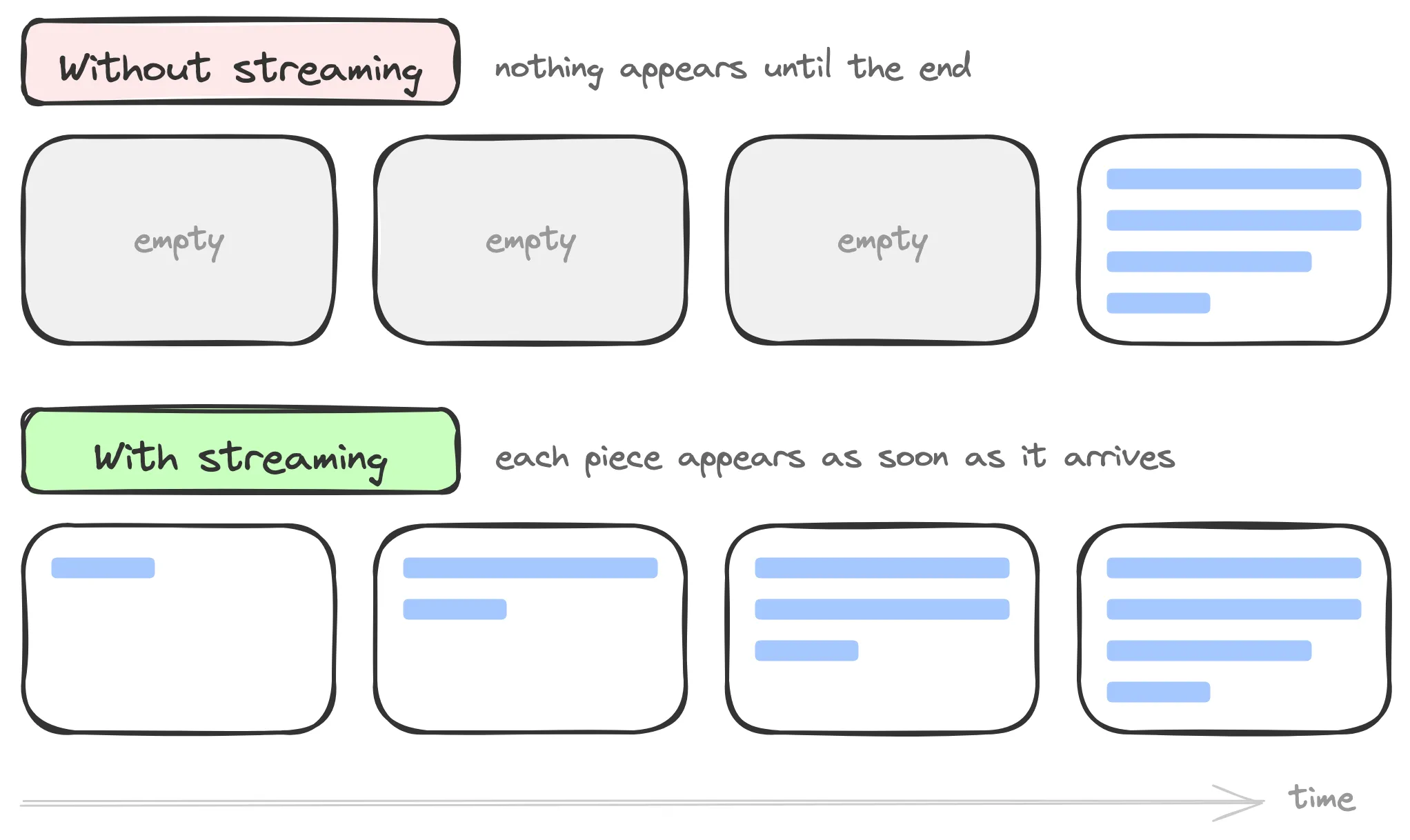
We need a way to measure the difference between those experiences. The gap between sending the prompt and receiving the model's first generated token is called time to first token, or TTFT. For the person using the app, the practical question is simpler. "How long do I wait before I see the response begin?" Streaming does not make the model generate text faster or reduce the model's own TTFT. It lets the application forward the first available output instead of buffering the full answer, which makes the app feel much smoother even when the complete response takes about the same amount of time to finish.
2. Why can the response arrive in pieces?
Before we talk about the network, it helps to understand why there are pieces in the first place. A language model does not write the entire response and then hand it over all at once. It generates one token at a time. A token is a small piece of text, roughly a word or part of a word.
The | model | gen | erates | text
Look at gen and erates. They are separate tokens that form one word together. If you want to experiment with this, the Tokenizer Playground lets you paste in text and see how different models split it.
The model predicts the next token, looks at everything generated so far, predicts another token, and keeps going. We call this autoregressive generation , which is a formal way of saying that every new piece depends on the pieces that came before it. If the model is already producing the response incrementally, why wait for the entire answer before showing anything? We do not have to. The application can start forwarding the generated text as soon as it becomes available.
One detail is worth keeping in mind. Models generate tokens, but the pieces your code receives are usually text chunks, and a chunk does not have to match exactly one token. A provider, SDK, or network layer may group several pieces together. The important part is that your app can process each chunk without waiting for the full response.
3. How generated text reaches your app
We know the model generates the response incrementally. Now the server needs to deliver those pieces without waiting for the rest. A typical API call works differently. You send a request, wait for a complete response, and the exchange is done.
With streaming, the connection between your app and the server stays open. As generated text becomes available, the server sends chunks through that connection. Your app reads each chunk when it arrives and adds it to the screen.
You will usually see this built with HTTP response streaming. Server-Sent Events, or SSE, is one format for doing that. SSE is a one-way server-to-client delivery mode . The client opens the connection with an HTTP request, but only the server sends events through that stream. The network chunks may contain one or more pieces of generated text, so they do not necessarily line up one-to-one with model tokens. If you want to dig further into the transport, MDN also explains chunked transfer encoding in HTTP/1.1 .

4. Let's build it
Everything that follows revolves around one question because the answer determines how we write the code. Who displays or forwards the pieces as they arrive? We are going to answer it three times, and each answer will become its own demo.
You will need Python 3.10 or newer and AWS credentials configured to follow along. Amazon Bedrock is the default model provider integration in Strands. Bedrock gives you managed access to a wide catalog of foundation models from Amazon and other leading providers . Strands can also connect to other model providers directly , so you are not limited to Bedrock.
For these demos, we explicitly select Amazon Nova Micro through Bedrock instead of relying on the default Claude model in Strands. Nova Micro is a fast, text-only Amazon model that works well for this example. Choosing an Amazon model also avoids the one-time use-case form that first-time Anthropic users may need to submit . Make sure your AWS configuration points to your project's selected Region and that
amazon.nova-micro-v1:0 is available there. You can confirm your Region in AWS Settings under View all projects > Overview > Additional Info > Region. If Nova Micro is not available, choose another Amazon text model available in that Region from the Bedrock model catalog and use its model ID in all three demos.1
2
python -m venv .venv && source .venv/bin/activate
pip install strands-agents fastapi uvicornCosts are also worth mentioning so there are no surprises. Strands is open source and has no license fee. You pay for model inference, and the price depends on the model and its token usage. For these demos, check the Amazon Bedrock pricing page . If you switch Strands to another model provider, check that provider's pricing separately.
Demo 1: Nobody displays them
Let's start with the simplest answer. Nobody displays the pieces while they arrive.
Strands streams output to the console by default without any setup. For this first demo, we are going to turn that behavior off on purpose so you can experience the longer wait before anything appears.
1
2
3
4
5
6
7
8
9
from strands import Agent

MODEL_ID = "amazon.nova-micro-v1:0"
PROMPT = "Explain in about 150 words how HTTP streaming works and why AI apps use it."

agent = Agent(model=MODEL_ID, callback_handler=None)  # 1

result = agent(PROMPT)  # 2
print(result) # 3model=MODEL_IDselects Amazon Nova Micro through Bedrock, andcallback_handler=Nonetells Strands not to display anything while the model is working. Without the second argument, Strands would print the text as it arrives.- This call blocks until the model finishes the entire response. This is where the waiting happens.
- Only then do we print the complete result all at once.
Run it and you will see something like this. Nothing happens for a moment, and then the whole answer appears at once. Does it work? Absolutely, and that experience is a good fit for many use cases. It just feels a little frustrating when you cannot see any progress.
Demo 2: Strands displays them
Here is our second answer. Strands displays the pieces for us.
1
2
3
4
5
6
7
8
from strands import Agent

MODEL_ID = "amazon.nova-micro-v1:0"
PROMPT = "Explain in about 150 words how HTTP streaming works and why AI apps use it."

agent = Agent(model=MODEL_ID)  # 1

agent(PROMPT) # 2- We keep the same Amazon Nova Micro model but remove
callback_handler=None. Strands now uses its default handler and prints generated text to the console as it arrives. - We no longer store the result in a variable or print it at the end.
That second point is easy to miss. You might think removing
callback_handler=None is the only change you need, but keeping print(result) would make the response appear twice. You would first see the streamed output from the default handler, followed by the complete response from print. The final print has to go too.Run this demo and the response will start appearing right away, much like the assistants you use every day. That small amount of code is enough to give you streaming in the terminal.
Demo 3: Our code forwards them
The third answer is the most useful one in practice. Our application code handles each piece as it arrives, so it can forward that piece wherever it needs to go.
The default console handler is great for local testing or a terminal app, but it does not help much when our users are in a browser. We turn off automatic printing again, and this time our own code listens to the stream.
This is where
stream_async comes in. As the agent works, it emits events, and stream_async lets us process them one by one as they happen.1
2
3
4
5
6
7
8
9
10
11
12
13
14
15
16
17
18
19
20
21
from fastapi import FastAPI
from fastapi.responses import StreamingResponse
from pydantic import BaseModel
from strands import Agent
MODEL_ID = "amazon.nova-micro-v1:0"
app = FastAPI()
class PromptRequest(BaseModel):
prompt: str
async def stream(request: PromptRequest) -> StreamingResponse:
async def generate(): # 1
agent = Agent(model=MODEL_ID, callback_handler=None) # 2
async for event in agent.stream_async(request.prompt): # 3
if "data" in event: # 4
yield event["data"] # 5
return StreamingResponse(generate(), media_type="text/plain") # 6- This is an asynchronous generator. Instead of returning everything at the end, it yields pieces as they become available.
model=MODEL_IDkeeps the same Amazon Nova Micro model, andcallback_handler=Noneprevents Strands from printing on the server. The text is headed to the browser, not our console.stream_asyncgives us the agent's events one by one as they happen.- Those events carry more than text. They can also tell us when the agent loop starts, when a tool is running, and when the final result is ready. We only need the generated text for the browser, and Strands exposes it through
event["data"]. The documentation has the complete list of stream events . yieldsends that chunk and gives control back to the generator so it is ready for the next one.- FastAPI's
StreamingResponseconsumes the generator and keeps sending each piece through the open response.
In the browser, we read the response body as it arrives instead of waiting for a complete value with
await res.json().1
2
3
4
5
6
7
8
9
10
11
12
13
14
const res = await fetch("/stream", {
method: "POST",
headers: { "Content-Type": "application/json" },
body: JSON.stringify({ prompt }),
});
const reader = res.body.getReader(); // 1
const decoder = new TextDecoder();
while (true) {
const { done, value } = await reader.read(); // 2
if (done) break;
output.textContent += decoder.decode(value, { stream: true }); // 3
}res.bodyis a stream.getReader()gives us a reader that can consume it piece by piece.- Each
read()returns the next available chunk or tells us that the stream has ended. - We decode the bytes into text and add them to the page. This is where the response starts to look like it is writing itself.
That closes the loop. Save the endpoint as
app.py, start it with uvicorn app:app --reload, and it will run locally. The model generates tokens, Strands exposes the available text as events, our endpoint forwards each chunk over an open HTTP response, and the browser displays it as it arrives.5. The tradeoffs
What we built feels great once you understand what is happening underneath. Like any systems design choice, however, it comes with a cost. There are two tradeoffs our demos did not show us.
Error handling gets more complicated. With a regular response, your server can return a
500 if something fails before sending the response. With streaming, the server may have already sent 200 OK and part of the output. HTTP headers go out before the streamed body, so an error in the middle arrives too late to change the status code. Your application needs a way to represent that failure inside the stream and decide what the frontend should do with a partial response.You cannot take back text the user has already seen. Once you send a chunk, the user may read it immediately. If your requirements say the entire answer must be reviewed before anything becomes visible, you need to buffer the full response and give up that live experience. Streaming moderation is still possible, and services such as Amazon Bedrock Guardrails can assess output as it is generated , but your filter works incrementally and your application must decide how to handle a blocked response midway through the stream.
6. When to use it and when not to
Use streaming when responses are long, when the model needs a moment before finishing, and especially when a person is sitting there watching the answer appear. Think chatbots, assistants, and other experiences that interact directly with people.
A regular complete response is perfectly fine when the output is small or when another process is calling your API instead of a person waiting. It is also simpler to build. A job processing a thousand documents gains little from displaying partial text because nobody is watching it type.
Streaming is a great tool. Like every tool in systems design, it is not the only option and it is not the answer to every problem.
Frequently asked questions
SSE or WebSockets?
SSE is one-way from server to client. It is usually enough when the server only needs to send generated text or status updates to the browser. The browser still makes the HTTP request that opens the connection, but it cannot send messages back through the SSE stream. WebSockets make more sense when both sides need to keep sending data over the same connection.
Our FastAPI demo uses a plain streamed HTTP response with
fetch, not the browser's EventSource API. That lets us send the prompt in a POST body, but it also means reconnection is something we would need to implement ourselves.Does streaming change the cost?
For on-demand text inference in Amazon Bedrock, billing is based on processed input and output tokens. Streaming changes when your application receives the generated output, not how many tokens the model processes. Check the Bedrock pricing page for the current rates of the model and Region you use.
Does this work with other model providers?
Yes. There are two layers of choice. Bedrock offers foundation models from multiple companies through one AWS service, and Strands can also connect directly to multiple model providers. You change the model configuration, while the agent's streaming pattern stays the same and
stream_async continues to expose the events your endpoint needs.Do I need streaming for my agent to use tools?
No. Tool use and streaming are separate capabilities. An agent can use tools with or without streaming. What streaming gives you is visibility into the events that happen while the agent works. For example, your interface can show "I'm looking that up" when the agent starts using a tool instead of leaving the user wondering what is happening.
Wrapping up
Let's recap what we covered.
- AI responses can arrive in pieces because the model already builds them token by token, and each token depends on the ones that came before it. That is autoregressive generation.
- TTFT means time to first token. Streaming does not reduce the model's own TTFT, but it lets the application show the first available output instead of waiting for the complete response.
- Generated text travels through an open HTTP response. SSE is a one-way server-to-client format for that flow. The chunks your app receives do not have to match individual model tokens.
- Strands streams output to the console by default. When your code needs to handle the pieces,
stream_asyncexposes events and generated text appears inevent["data"]. - Streaming improves the perceived experience, but it adds complexity to error handling and to controlling what the user sees before the response is complete.
If you enjoy this kind of content and prefer video, follow us on the AWS Developers LATAM YouTube channel . I will see you there.
Have you used streaming before? What did you build with it? I would love to hear about it.
Enjoyed reading this content? Let the author know!
Your likes, comments, shares, and saves help creators reach more builders.

Loading recommendations
Loading article