

What Is CORS? A Beginner's Guide with Amazon API Gateway
Learn what CORS is, why your API works in curl but fails in the browser, how preflight requests work, and how to fix CORS errors in Amazon API Gateway.
Series: New To AWS Beginners Guide (12 articles)
- …
- 11What Is CORS? A Beginner's Guide with Amazon API Gateway This article

Your API works in the terminal. It returns lovely JSON. You start drafting a new LinkedIn headline: Backend Engineer.
Then you call the same API from your website.
Blocked by CORS policy.
You wrote the website. You wrote the API. Nobody introduced them.
CORS, or cross-origin resource sharing, lets a server tell a browser which other origins may read its responses. The server supplies permission through HTTP headers; the browser enforces it. Some requests also need a permission check, called a preflight, before the browser sends them. How CORS works
We'll follow a concert-ticket website from a failed request to a readable booking confirmation, then turn it into a small AWS project. No real tickets. The band is called The Missing Headers, and their tour keeps getting stuck in preflight.
Why does the browser need CORS?
Imagine you're signed in to your email in one tab. In another, you visit a website promising to calculate your personality from your favorite potato.
That second website shouldn't be able to read your inbox.
The browser's same-origin policy is what stops it. It restricts how a page's scripts interact with resources from another origin. CORS gives servers a way to allow specific sharing across that boundary. Same-origin policy
Think of the browser as a receptionist handling replies for different tenants. A package arriving at the building doesn't mean every tenant gets to open it. The API needs to say which tenant may read the reply.
That's useful when our ticket page runs on a laptop and its API runs on AWS. They need to cooperate, but the browser can't infer permission from the fact that both were built by you, in the same hoodie.
What is an origin? Scheme, hostname, and port explained
For the web URLs we're using, an origin has three parts:
http://localhost:5173└─┬─┘ └───┬───┘ └┬┘ scheme hostname portThe scheme is
http or https . The hostname identifies the host. The port identifies the network endpoint on that host.
Compare these with
http://localhost:5173 :URL | Same origin? | Why? |
|---|---|---|
http://localhost:5173/events | Yes | Only the path changed |
http://localhost:5173/tickets?quantity=2 | Yes | Paths and query strings aren't part of the origin |
http://localhost:3000 | No | Different port |
https://localhost:5173 | No | Different scheme |
http://127.0.0.1:5173 | No | Different hostname, even on the same computer |
https://api.example.com | No | Different scheme, hostname, and effective port |
Ports can be implicit: HTTPS defaults to
443 , so https://api.example.com and https://api.example.com:443 have the same origin. Origin definition For our lab, the allowed origin is
http://localhost:5173 , character for character. No /tickets . No trailing slash. The browser is comparing an address, not accepting directions like "third door past the merch table."Why does an API work with curl but fail in the browser?
A terminal client such as
curl doesn't enforce the browser's CORS policy. A working terminal call tells you the API runs and returns data. It tells you nothing about whether a website can read that data.For a cross-origin
fetch() using its default CORS mode, the browser sends an Origin header. The API can permit that origin with a response header:Access-Control-Allow-Origin: http://localhost:5173A header is a small piece of metadata sent with an HTTP request or response. This one says: "The page running at that origin may read this response." Adding this header to your frontend request can't grant that permission. That would be like writing your own backstage pass in crayon. Access-Control-Allow-Origin

The request reaching the server and the page being allowed to read the reply are two different events.
For some requests, the API can run and return a response even when JavaScript can't read it. A CORS error doesn't prove that nothing happened on the server. If that request was a ticket order, you may now own a booking you've never seen. CORS response checks
What is a CORS preflight request?
A preflight is an automatic browser request asking whether a particular cross-origin request is allowed. Its HTTP method is
OPTIONS . You write the actual fetch() call; the browser handles this preliminary exchange. Preflight requests It's the browser calling the venue ahead of time: "Can this website bring a POST request and a JSON body?" The order waits outside while the browser asks.
api.example.com is a placeholder in this example; replace it with your deployed API's base URL when you build the lab. Run the code from the locally served ticket page.async function bookFakeTicket() { const response = await fetch("https://api.example.com/tickets", { method: "POST", headers: { "Content-Type": "application/json" }, body: JSON.stringify({ eventId: "missing-headers-live", quantity: 1, }), });
if (!response.ok) { throw new Error(`Booking failed: HTTP ${response.status}`); }
const booking = await response.json(); console.log(booking.confirmation);}
bookFakeTicket().catch(console.error);JSON.stringify() turns the order into text. Content-Type: application/json describes that text's format. For this cross-origin request, that content type triggers preflight. A plain GET without extra headers often skips it. Some POST requests skip it too: the trigger is the request's method and headers, not whether it changes data. Requests that require preflight Step 1: OPTIONS asks permission to send the order
The relevant request headers look like this:
OPTIONS /tickets HTTP/1.1Host: api.example.comOrigin: http://localhost:5173Access-Control-Request-Method: POSTAccess-Control-Request-Headers: content-typeThere's no ticket order in this request. It names the method and header the browser wants to use next.
A successful preflight response could be:
HTTP/1.1 204 No ContentAccess-Control-Allow-Origin: http://localhost:5173Access-Control-Allow-Methods: GET, POSTAccess-Control-Allow-Headers: content-typeThe browser checks the response against its request.
Access-Control-Request-Headers asks; Access-Control-Allow-Headers answers. Header names are case-insensitive. Preflight request headers Step 2: POST sends the order, and its response gets checked too
After preflight succeeds, the browser sends the JSON order. The actual response still needs to allow the page's origin:
HTTP/1.1 201 CreatedContent-Type: application/jsonAccess-Control-Allow-Origin: http://localhost:5173
{"confirmation":"FAKE-ENCORE-001"}
Now the page can read and display the confirmation.

If preflight fails, the browser doesn't send this POST. If preflight passes but the actual response fails CORS, the order may have run while its confirmation remains unreadable.
A successful preflight is permission to proceed, not a promise that the order will succeed. The backend can still reject an invalid quantity or return an error. Preflight and actual-response requirements
How to configure CORS in Amazon API Gateway
To fix a CORS error in an API Gateway HTTP API, add your website's exact origin, plus the methods and headers it sends, to the API's CORS configuration. API Gateway then answers preflight requests and adds the CORS headers for you.
We'll use an HTTP API in Amazon API Gateway. That's an API Gateway product type; its CORS setup differs from a REST API.
For the ticket lab, configure these values in the HTTP API's CORS settings:
Setting | Lab value | Purpose |
|---|---|---|
Allowed origins | http://localhost:5173 | Your local ticket page |
Allowed methods | GET , POST | Read events and submit a fake booking |
Allowed headers | content-type | Send the JSON order |
Allow credentials | Off | This first lab doesn't use cookies |
Max age | 0 while experimenting | Avoid reusing preflight permission during the exercise |
With CORS configured, API Gateway answers preflight requests and adds the configured CORS headers to integration responses. It ignores CORS headers supplied by the backend integration, so manage this HTTP API's policy in Gateway. HTTP API CORS configuration
If you later protect
POST /tickets with an authorizer and send an Authorization header, add authorization to allowed headers. Preflight names that header; it doesn't carry the bearer token.For later: an authorizer on a
$default route can catch preflights. AWS documents adding an unauthenticated OPTIONS /{proxy+} route with an integration for that configuration. Our first lab uses explicit routes. The $default route exception What if I created a REST API instead?
For a REST API with Lambda proxy integration, the backend must supply CORS headers on its actual responses, and preflight handling must also be configured. Setting up an
OPTIONS response alone won't make the booking response readable. Include appropriate CORS headers on error responses too. REST API CORS guidance Check the API type before following instructions. "It's an API" is about as specific as telling a mechanic you own "a vehicle."
Common CORS mistakes beginners make
Does CORS replace authentication?
No. An allowed origin says which website may read a response in the browser. It doesn't prove who's using the API or which records they may access. Other clients can call the API directly.
For real bookings, authentication establishes the user, and authorization decides what they may do. CORS doesn't check tickets at the door. It governs which browser page gets to read the venue's reply. AWS explanation of CORS
Our lab returns fake confirmations without sign-in on purpose. There's no payment, inventory, or personal data to protect in this exercise.
Can I fix CORS with mode: "no-cors"?
For an API whose JSON you need to read, no.
no-cors gives you an opaque response: JavaScript can't access its body or headers. It also restricts the request you can send. You've traded the CORS error for a sealed envelope. Congratulations on your envelope. Fetch request modes Should I allow every origin with an asterisk?
Access-Control-Allow-Origin: * can be appropriate for public data meant to be readable by any website. For this lab, use the exact origin so you can observe the matching rule.If you later use
credentials: "include" for cross-origin cookies, the server must return an explicit allowed origin and Access-Control-Allow-Credentials: true . The wildcard won't work for that credentials mode. Cookie policies still apply. Credentialed CORS requests Don't copy whatever
Origin a request sends straight into Access-Control-Allow-Origin . Check it against your allowed list. A guest list loses its purpose if the guests can rewrite it.How to debug a CORS error in the browser
Open your browser's developer tools, select Network, and click the booking button once. The console tells you there's a problem; Network helps you find the failed exchange.
What you observe | What to inspect next |
|---|---|
OPTIONS , but no POST | Preflight status and allowed origin, method, and headers |
POST ran, but the page can't read its response | CORS headers on the actual response, including errors |
Request originates from port 3000 , policy allows 5173 | The exact page origin; check window.location.origin |
401 , 403 , or 500 | Authentication, authorization, or backend failure, as well as CORS |
No OPTIONS this time | The request might skip preflight, or permission might be cached |
Preflight permission has its own cache. For this exercise, use max age
0 and a fresh browser session if an earlier successful check makes the behavior confusing. Preflight caching You can also inspect the server's preflight response with
curl . Replace the base URL; include the stage path if your API's invoke URL has one.API_BASE='https://YOUR_API_ID.execute-api.YOUR_REGION.amazonaws.com'curl -i -X OPTIONS "$API_BASE/tickets" \ -H 'Origin: http://localhost:5173' \ -H 'Access-Control-Request-Method: POST' \ -H 'Access-Control-Request-Headers: content-type'For HTTP API CORS handling, AWS requires
Origin and Access-Control-Request-Method on that OPTIONS request. Required preflight headers Read the headers, then verify in a real browser.
curl can show you the permission slip; it doesn't play the receptionist.Build a CORS ticket-booking lab with the new AWS experience
Build a one-page concert site with an event listing and a Book a fake ticket button. A successful click should display
FAKE-ENCORE-001 , which admits you to zero concerts.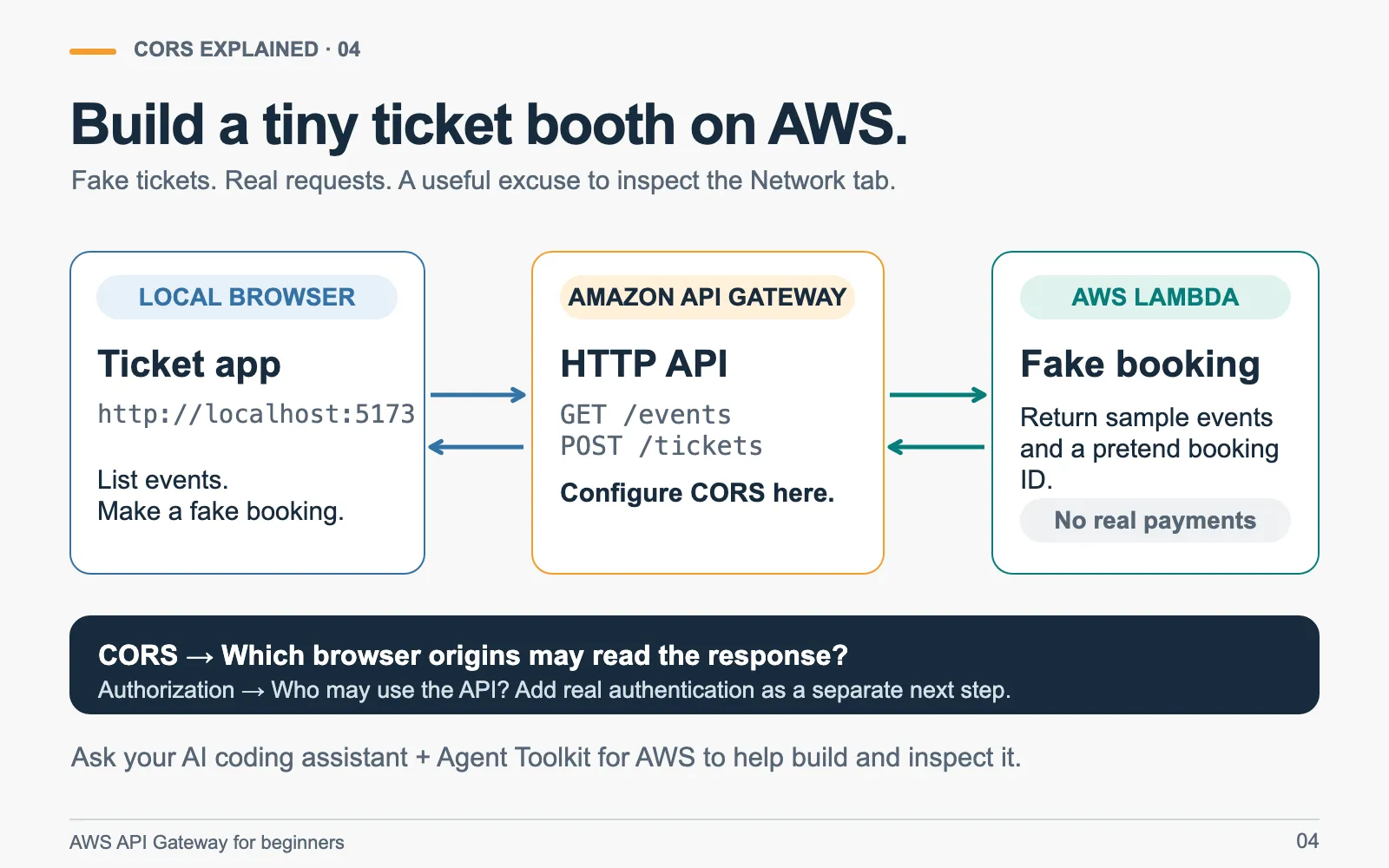
API Gateway receives and routes the HTTP requests. Lambda runs the code that returns the events and fake confirmation. Keep the frontend local so the two different origins are easy to see.
Start with the new AWS experience and create a learning project, or use an existing learning project. My new-to-AWS walkthrough covers getting started.
As of October 2026, AWS documents a limited rollout of the new experience to new customers. API Gateway and Lambda are supported; use your project's assigned Region and check its plan and permissions. Service availability doesn't make every resource free. New experience and supported services
Give your AI coding assistant these prompts
Connect Agent Toolkit for AWS to a compatible coding assistant using the official setup instructions . The toolkit supplies AWS documentation, skills, and tools for working with your AWS resources. It helps during development; it isn't another service your ticket requests pass through. Agent Toolkit overview
Start with the build:
Help me build a beginner CORS lab using Agent Toolkit for AWS andcurrent AWS documentation. Explain each step as we go.
Use my learning project in the new AWS experience. Confirm the project,assigned Region, supported services, and permissions. Explain theresources and expected costs before deployment.
Create a local concert-ticket page at http://localhost:5173 and anAmazon API Gateway HTTP API with explicit GET /events and POST /ticketsroutes backed by Lambda. Return made-up events and fake confirmations.Use JSON for POST. No real purchases, personal data, database, or sign-in.Label the button "Book a fake ticket".
Start with CORS unconfigured. Serve the frontend through a local webserver, and call the AWS API directly without a development proxy.Manage AWS resources as infrastructure as code and include cleanup.Keep AWS credentials out of browser code.
Then ask it to help you investigate:
Before fixing CORS, show me the JSON POST working from the terminal.Then help me try it from the page and inspect OPTIONS in browserNetwork tools. Verify that this failed preflight prevents POST.
Configure HTTP API CORS for exactly http://localhost:5173, GET and POST,content-type, no credentials, and max age 0 while testing.Repeat the browser request. Show me OPTIONS, POST, the response CORSheader, and the fake confirmation displayed by the page.
Serve the same page on port 5174 and call the same API. Explain whythat origin fails. Don't change the allowed list to make it pass.Report what we actually observed and what we haven't tested.
Finally, ask it to help you finish:
Give me a short explanation of why CORS doesn't authenticate a user.Then walk me through deleting this lab's resources, including leftoverlogs or deployment artifacts, and verify what's still present.Your finish line: port 5173 gets a readable fake confirmation; port 5174 fails preflight; you can point to the headers that explain both.
Build it, break it on purpose, and post what you learned on Builder Center. The Missing Headers have been stuck in preflight since the first section. You can get them on stage.
Series: New To AWS Beginners Guide (12 articles)
- …
- 11What Is CORS? A Beginner's Guide with Amazon API Gateway This article
Enjoyed reading this content? Let the author know!
Your likes, comments, shares, and saves help creators reach more builders.

Loading recommendations
Loading article