
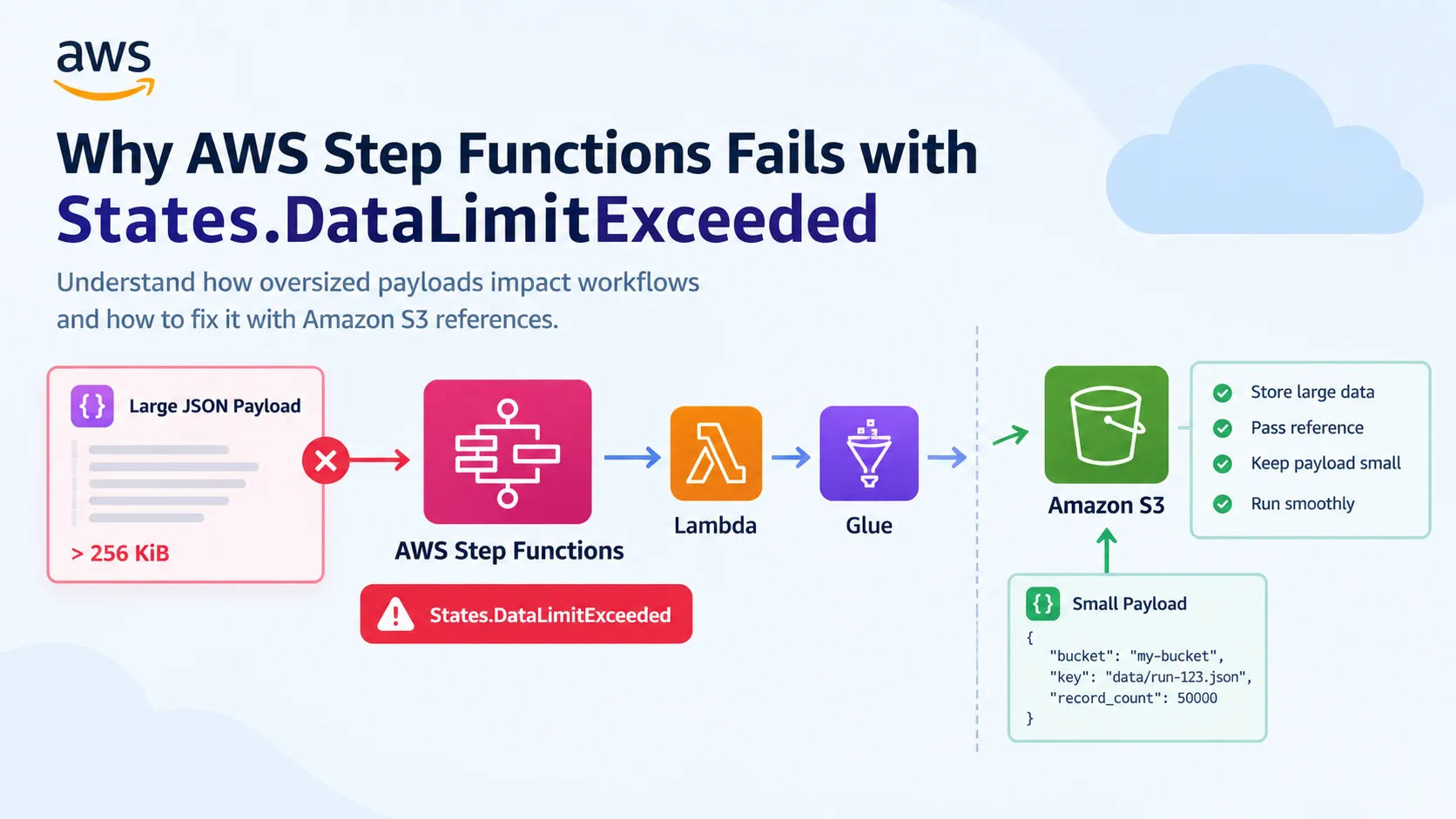
States.DataLimitExceeded: Why AWS Step Functions Fails with Large Payloads
Understand why AWS Step Functions fails with States.DataLimitExceeded and how oversized payloads impact workflows.

A workflow can fail even when every Lambda function is working correctly and the data itself is valid.
That sounds strange until you look at what is happening between the states.
Imagine an AWS pipeline that fetches records from an API, validates them with Lambda, processes them using AWS Glue, and finally reconciles the source and target counts. Everything works with a small test dataset. A few weeks later, the source starts returning more records, and the workflow begins failing with
States.DataLimitExceeded.The first instinct might be to retry the execution or increase Lambda memory. But neither necessarily addresses the actual problem.
The issue may be the amount of data Step Functions is trying to carry between states, not the amount of data your pipeline can process.
In this post, we will look at why this happens, how Lambda responses and Map states contribute to payload growth, and how using Amazon S3 as a data store can make the workflow more resilient.
1. Understanding the 256 KiB payload quota
AWS Step Functions has a payload quota of 256 KiB (262,144 bytes) for task, state, and execution input/output.
This limit applies to the JSON data handled by the workflow. It is not a limit on how much data AWS Glue can process or how many records Amazon S3 can store.
Consider a workflow that starts with a small input:
1
2
3
4
{
  "source": "customer_api",
  "run_id": "run-2026-101"
}
A Lambda function retrieves customer records and returns them directly:
1
2
3
4
5
6
7
8
9
10
11
12
13
14
15
{
  "statusCode": 200,
  "body": {
    "records": [
      {
        "customer_id": "C001",
        "name": "Customer One"
      },
      {
        "customer_id": "C002",
        "name": "Customer Two"
      }
    ]
  }
}
This works when the response is small. But imagine that the API returns thousands of records, each containing nested attributes, transaction details, or additional metadata.
The response can grow beyond the Step Functions quota even though the Lambda invocation itself succeeds.
This distinction is important: Lambda's own request and response limits are separate from Step Functions' payload quota. A response can be valid for one service and still be too large to pass through the workflow.
2. How oversized Lambda responses cause failures
One common pattern is to return the entire API response from a Lambda task.
For example:
1
2
3
4
5
6
7
8
9
import json

def lambda_handler(event, context):
    records = fetch_customer_records()

    return {
        "status": "SUCCESS",
        "records": records
    }
The function may be perfectly reasonable for a small dataset. The problem appears when the records become part of the Step Functions execution state.
A better design is to write the records to S3 and return only the location.
1
2
3
4
5
6
7
8
9
10
11
12
13
14
15
16
17
18
19
20
21
22
23
24
25
import json
import boto3

s3 = boto3.client("s3")

def lambda_handler(event, context):
    records = fetch_customer_records()

    bucket = "company-data-bucket"
    key = f"raw/customers/{event['run_id']}/records.json"

    s3.put_object(
        Bucket=bucket,
        Key=key,
        Body=json.dumps(records).encode("utf-8"),
        ContentType="application/json"
    )

    return {
        "status": "SUCCESS",
        "bucket": bucket,
        "key": key,
        "run_id": event["run_id"],
        "record_count": len(records)
    }
This is a simplified example. For very large API responses, avoid accumulating all records in a Python list. Stream or paginate the source data and write appropriately sized objects instead.
The important change is that the workflow receives a small response containing metadata rather than the complete dataset.
Also consider the permissions required by the Lambda execution role. It needs permission to write to the destination S3 prefix, and downstream tasks need permission to read the relevant objects.
3. Why Map state outputs can become a problem

Map states are useful when a workflow needs to process many independent items.
For example, a pipeline might process 1,000 files, validate each one, and collect the results.
Conceptually, the workflow looks like this:
1
2
3
4
5
6
7
8
9
10
11
12
13
14
                Step Functions
                      |
                  Map State
                      |
          +-----------+-----------+
          |           |           |
       File A      File B      File C
          |           |           |
          v           v           v
       Result A    Result B    Result C
          |           |           |
          +-----------+-----------+
                      |
                Combined Output
The trouble begins when every iteration returns a large result.
Suppose each iteration returns detailed validation errors, record-level information, and metadata. Collecting thousands of these responses can produce an oversized Map result.
Distributed Map can help process large datasets through separate child workflow executions, including inputs sourced from S3. However, it does not make every individual payload or collected result unlimited.
For example, this is a compact result:
1
2
3
4
5
{
  "file_id": "file-001",
  "status": "SUCCESS",
  "records_processed": 12000
}
This is a less suitable result when the workflow only needs a status:
1
2
3
4
5
6
{
  "file_id": "file-001",
  "status": "SUCCESS",
  "records": ["... thousands of detailed records ..."],
  "validation_errors": ["... detailed error entries ..."]
}
The second structure contains information that may be valuable, but it does not necessarily belong in the workflow state.
Write detailed results to S3, return compact summaries, and aggregate only what downstream states actually require.
4. The S3-reference pattern
This is the design I would consider first when the workflow needs to coordinate large datasets.
Instead of passing the actual records between states, store them in S3 and pass a reference.
1
2
3
4
5
6
7
8
9
10
11
12
13
14
15
16
17
18
19
20
21
22
Source API
    |
    v
Ingestion Lambda
    |
    +-------> Amazon S3
    |         Raw records
    |
    v
Step Functions
    |
    v
AWS Glue
    |
    +-------> Amazon S3
    |         Processed data
    |
    v
Reconciliation
    |
    v
Final status
The workflow carries control information, while S3 stores the data.
For example, the ingestion task can return:
1
2
3
4
5
6
{
  "run_id": "run-2026-101",
  "input_bucket": "company-data-bucket",
  "input_key": "raw/customers/run-2026-101/records.json",
  "record_count": 50000
}
The next task receives this reference and reads the data from S3.
A simplified Step Functions task that starts an AWS Glue job could look like this:
1
2
3
4
5
6
7
8
9
10
11
12
13
{
  "Type": "Task",
  "Resource": "arn:aws:states:::glue:startJobRun.sync",
  "Parameters": {
    "JobName": "customer-processing-job",
    "Arguments": {
      "--input_bucket.$": "$.input_bucket",
      "--input_key.$": "$.input_key",
      "--run_id.$": "$.run_id"
    }
  },
  "End": true
}
This example assumes the incoming state contains the referenced fields and that the Glue job accepts these arguments. The
.sync integration waits for the Glue job to finish, so it is appropriate when the workflow needs to coordinate subsequent steps based on the job's completion.The Glue job can read the object using the supplied bucket and key, process it, and write the transformed data back to S3.
The workflow does not need to receive the full processed dataset as the task result.
For larger datasets, consider storing a manifest containing the exact S3 object keys to process instead of passing a list of records or a huge collection of file names.
5. Can ResultPath solve the problem?
ResultPath is useful for controlling where a task result is placed in the state's JSON input.For example:
1
2
3
4
5
6
7
8
9
10
{
  "Type": "Task",
  "Resource": "arn:aws:states:::lambda:invoke",
  "Parameters": {
    "FunctionName": "validate-customer-data",
    "Payload.$": "$"
  },
  "ResultPath": "$.validation_result",
  "Next": "ContinueProcessing"
}
This places the Lambda integration result under
validation_result.However, there is a detail worth remembering:
ResultPath does not automatically reduce payload size. If the original input already contains a large dataset, adding another result can make the state even larger.If a task's output is no longer needed, consider discarding it with the appropriate supported output transformation. If the original input is no longer needed either, shape the workflow's input and output so that only required fields remain.
Do not use a payload transformation merely to hide the symptom. First identify which fields are needed by the next state.
6. How I would troubleshoot this in production

When I see
States.DataLimitExceeded, I would investigate the data moving through the workflow before changing concurrency or adding retries.My checklist would be:
- Identify the failing state. Inspect the execution history and determine which task or transition reports the error.
- Inspect input and output. Look for large arrays, nested JSON, full API responses, or detailed error lists.
- Measure serialized payload size. Estimate the actual JSON size in bytes, rather than relying on record counts alone.
- Review Map state behavior. Check whether every iteration returns detailed records and whether those results are collected into a large array.
- Review Lambda responses. Check whether the downstream task needs the returned records or only a status, count, and S3 reference.
- Check workflow transformations. Review
ResultPath,OutputPath,ResultSelector, and other applicable data-processing fields. - Check execution history and logs. Some oversized payloads may not be fully available for inspection, so application logs and CloudWatch metrics can help identify the source.
One warning: blindly adding retries is not a reliable fix for a deterministic payload-size failure. Repeating the same operation with the same oversized output will generally reproduce the problem.
7. Production details I would not ignore
Moving data to S3 addresses the payload design, but it introduces a few operational considerations.
- Idempotency: Use stable run IDs and define what happens when a workflow retries after writing an output object.
- Object completeness: Ensure downstream processing starts only after the intended input objects have been written successfully.
- Security: Pass object references, not credentials. Use least-privilege IAM roles for S3 access.
- Observability: Record the run ID, input location, record count, output location, and failure status.
- Cleanup: Define an appropriate retention policy for temporary data, manifests, and detailed error reports.
- Error reporting: Keep detailed rejected records and diagnostic information in durable storage, while returning a compact summary to Step Functions.
These safeguards matter because a workflow should not merely avoid the 256 KiB quota; it should also recover predictably when a task fails halfway through a run.
Final takeaway
States.DataLimitExceeded is not necessarily a sign that your Lambda function or Glue job cannot handle the workload. It can be a sign that the orchestration workflow is carrying more data than it needs to.Step Functions is designed to coordinate work, manage dependencies, and control execution flow. S3 is a better place for large datasets and detailed reports, while Lambda and Glue can process the data and return compact operational results.
The design principle I keep coming back to is simple:
Let S3 hold the data. Let Step Functions coordinate what happens next.
As the dataset grows, this separation makes the workflow easier to troubleshoot, easier to recover, and less dependent on the size of individual records or task responses.
References
Enjoyed reading this content? Let the author know!
Your likes, comments, shares, and saves help creators reach more builders.

Loading recommendations
Loading article