

Query SCADA and Your Lakehouse in One SQL Engine
Athena Federated Query plus the AWS Glue Data Catalog let one SQL statement join live SCADA telemetry, a streaming tier, and your Iceberg lakehouse.

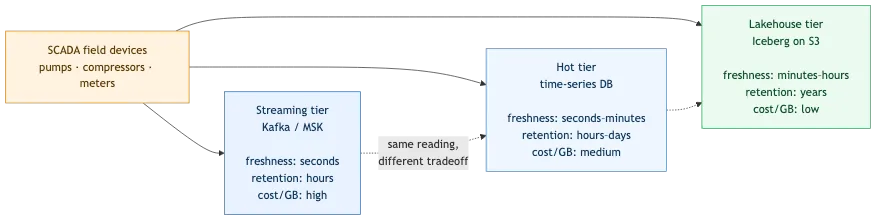
If you run industrial equipment — pumps, compressors, flow meters, wellheads — your SCADA system is already pouring telemetry somewhere. Usually somewheres, plural. The same pump-rate reading tends to land in three different stores on purpose: a streaming tier that holds the raw message for seconds, a hot operational database that keeps the last few hours at low latency, and a lakehouse that keeps years of history cheaply. Each tier answers a different question — "what did the field just send?", "what's happening right now?", "what did this asset do last quarter?" — and that spread is a feature, not a bug. It's how you trade freshness against cost.
The tax on that spread is that answering a question which crosses tiers normally means learning each store's own query dialect and opening a separate connection to each one. Want to compare a live pressure reading against the same sensor's archived baseline? That's one query against a Postgres-flavored time-series store, another against your Kafka topic, a third against the lakehouse, and then you stitch the results together by hand in a notebook.
Amazon Athena Federated Query collapses that. It runs ordinary SQL in Athena against data that lives outside S3 by invoking a per-source data source connector — an AWS Lambda function that translates between Athena and the store. One
SELECT can JOIN your Iceberg lakehouse table against live rows in a time-series database and raw messages still sitting on a Kafka topic. And the thing that makes it feel like one data estate rather than three bolted together is the AWS Glue Data Catalog sitting underneath as the shared metadata layer.
The Glue Data Catalog is the part that unifies
It's tempting to describe this as "Athena can query other things." That undersells the Glue Data Catalog, which is doing the actual unifying work. Athena is designed to integrate with the Glue Data Catalog as a single metadata repository across services — a central place that stores the table definition and physical location for every data asset , whatever store it physically lives in. That gives you three things that matter here:
- A single namespace. Your S3/Iceberg tables live natively in the Glue Data Catalog (
awsdatacatalog). Each federated connector registers as its own catalog. So every store — lakehouse, hot tier, stream — becomes acatalog.database.tablename you can reference in the same SQL, instead of three different client libraries. - Schema for things that don't have one. A Kafka topic is just bytes until something describes its shape. The AWS Glue Schema Registry is where you define the schema of each topic so Athena can treat it as a table — field names, types, and the JSON/Avro/Protobuf format. No Schema Registry entry, no queryable table.
- One place to govern access. Modern connectors are created with an AWS Glue connection, and you can register that connection as a federated Glue Data Catalog so the data is discoverable and governed with AWS Lake Formation fine-grained permissions — the same way you'd govern an S3 table.
So "federated query" is the engine, and "Glue Data Catalog" is the map it reads. You need both.
What gets federated
Here's a representative setup for an industrial telemetry estate — the same metric landing in three tiers, each reachable through one Athena catalog:
| Catalog (in Athena) | Store | Connector | Role |
|---|---|---|---|
awsdatacatalog → lakehouse table | Apache Iceberg on S3 | native (no connector) | years of history, cheap scans |
telemetry_hot | Time-series database (PostgreSQL-compatible) | Athena PostgreSQL connector | last few hours, low latency |
scada_stream | Amazon MSK topics (raw SCADA messages) | Athena Kafka/MSK connector | the raw message, pre-processing |
The same reading lands in each tier at a different point on the freshness-versus-cost curve — which is exactly why you'd ever want to query across them:
The connectors are prebuilt and open-sourced by the Athena team , including JDBC-compliant relational sources (PostgreSQL, MySQL, Redshift) and streaming. If a store you need has no prebuilt connector, you can write your own with the Athena Query Federation SDK — more on when that's worth it below.
How you query it
Everything runs through one Athena workgroup, so the console and SQL you already use for the lakehouse table work unchanged — you just prefix a table with its catalog.
1
2
3
4
5
6
7
8
-- Live rows from the hot time-series tier for one site. The PostgreSQL connector
-- exposes the database schema as the Athena database, so a table in `public`
-- is addressed as catalog.public.table.
SELECT sensor, value, unit, reading_time
FROM "telemetry_hot"."public"."sensor_readings"
WHERE site_id = 'site-07'
ORDER BY reading_time DESC
LIMIT 20;
1
2
3
4
5
-- Raw SCADA node telemetry still on the Kafka topic — no database hop.
SELECT asset_name, pressure_psi, flow_rate, ingest_ts
FROM "scada_stream"."default"."raw_telemetry"
WHERE site_id = 'site-07'
LIMIT 20;The payoff is the cross-store
JOIN — lakehouse history against the live stream, in a single engine, no manual stitching:1
2
3
4
5
6
7
8
9
10
-- Lakehouse history ⋈ live stream, one query
SELECT s.asset_name,
s.pressure_psi AS live_pressure,
ice.pressure_psi AS archived_pressure
FROM "scada_stream"."default"."raw_telemetry" s
JOIN "awsdatacatalog"."telemetry"."readings" ice
ON ice.asset_name = s.asset_name
WHERE s.site_id = 'site-07'
AND ice.site_id = 'site-07'
LIMIT 20;That one statement runs entirely in Athena's engine — the connectors never see the
JOIN. Athena fans out a read to each source in parallel, each connector returns Apache Arrow row batches, and the engine does the join, aggregation, and final filtering:(image 2 upload failed — insert manually)
Scope every query by site — but know where the filter runs
The SQL itself always executes in Athena's engine (Trino-based). The connectors are only readers; what they can push down to the source depends entirely on what that source can evaluate — and the two non-native tiers here differ sharply:
- PostgreSQL has its own SQL engine, so the connector translates the predicate into a real server-side
WHERE. AWHERE site_id = 'site-07'is evaluated by PostgreSQL (the connector pushes down boolean, equality, arithmetic,IN, andLIKEpredicates plusLIMIT N), so it genuinely reduces what the source scans and returns. - Kafka brokers evaluate nothing. The only thing pushable to Kafka is partition/offset selection, so a
WHEREfilter is applied inside the connector Lambda after it fetches the records — unless the filter column maps to how the topic is partitioned , in which case the connector can prune partitions. Either way it trims the bytes returned to Athena; it does not reduce what the brokers read.
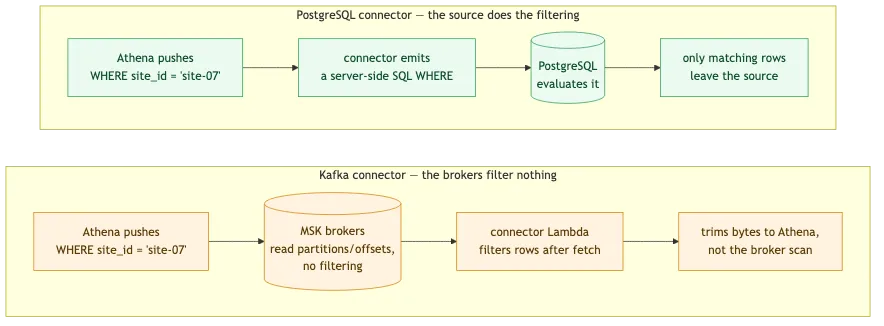
Scope every federated query by site or asset regardless — it always cuts the data Athena has to move and process, and on PostgreSQL it cuts the source scan too. Confirm what actually pushed down with
EXPLAIN ANALYZE , and keep filter expressions simple: a WHERE wrapped in an Athena-specific function won't push down at all.How it's wired
The connector is a Lambda, and that shapes everything
Each connector runs as a Lambda function in your account ; Athena fans out parallel invocations to read metadata and records. Two consequences fall out of that:
- Cold starts are real. The first federated query after an idle period pays a Lambda cold start (and, for the PostgreSQL connector, a fresh JDBC connect). Subsequent queries are warm. If an operator complains the "first query of the morning is slow," this is usually why.
- Oversized results spill to S3. When a result page exceeds Lambda limits, the connector spills to an S3 bucket you configure (default prefix
athena-federation-spill). Put an S3 lifecycle rule on that prefix to expire spills after a few days, and make sure the querying role can read it so Athena can return spilled rows.
Deploying the connectors needs the right IAM
The quickest path is the Athena console's "Create data source" flow , which uses a Glue connection. If you instead deploy from the AWS Serverless Application Repository (needed for custom or older connectors), the deploying principal needs
serverlessrepo:CreateCloudFormationChangeSet and GetApplication on the published connector apps, on top of the usual CloudFormation/Lambda/IAM permissions.Credentials come from Secrets Manager
Both connectors read their credentials from AWS Secrets Manager rather than from environment variables. The PostgreSQL connector reads a secret holding the database DSN; the MSK/Kafka connector, for a SCRAM cluster, reads the SASL/SCRAM secret associated with the cluster (
auth_type = SASL_SSL_SCRAM_SHA512). Rotate the secret, not the Lambda config.Networking: the part that bites
A connector Lambda has to actually reach the store, and in a VPC that is rarely automatic. You attach the connector Lambda to a VPC and security group so it can route to the data source. Two patterns show up constantly:
- MSK typically already admits traffic from the VPC CIDR, so the Kafka connector dials the bootstrap brokers directly over SASL/SCRAM.
- A time-series database on Kubernetes often sits on the pod network behind a
ClusterIP, which a VPC-attached Lambda can't route to. The fix is to expose the primary through an internal Network Load Balancer and point the connector at a stable private Route 53 name bound to it. Open the database's security group to the NLB on the right ports so both query traffic and NLB health checks land. (This is the networking seam between "the database runs fine" and "Athena can see it" — budget an afternoon for it the first time.)
When a store isn't a good federation target — yet
Federation is powerful, but not every store earns a connector. Two honest non-goals from a real estate:
- A streaming database with partial system-catalog support. The JDBC/PostgreSQL connector introspects
information_schemaandpg_catalogto discover tables. A Postgres-wire-compatible engine (for example, a streaming SQL database like RisingWave ) may not implement those system catalogs fully, so the connector's discovery is unproven against it. If the same data is already federated through another tier, skip it rather than fight the introspection. - A store with no prebuilt connector. Amazon Timestream for InfluxDB has no off-the-shelf Athena connector; federating it would mean a custom Query Federation SDK connector. Worth it if that store holds unique data — not worth it if it's a redundant copy of what you already query elsewhere.
The rule of thumb: federate the stores that hold data you can't get another way. Don't build a connector to a store whose data is already one
JOIN away through a tier you've already wired.Takeaways
- SCADA data is deliberately spread across tiers — stream, hot store, lakehouse — to trade freshness against cost. Federation lets you query that spread without collapsing it.
- Athena Federated Query is the engine; the Glue Data Catalog is the map. The catalog gives you one namespace, schema for schemaless streams (via the Schema Registry), and one governance surface (via Lake Formation).
- Each connector is a Lambda — so plan for cold starts, S3 spill, VPC routing, and Secrets Manager credentials.
- Always scope federated queries by site or asset so predicate pushdown keeps the connector from scanning the whole source.
- Don't federate redundant stores. Build or deploy a connector only for data you can't already reach through a tier you've wired.
Get those right and "unify the data estate" stops being a slide and becomes a
JOIN.Related reading
- Fresh Data to a Dashboard, and What It Costs — the freshness-vs-cost tiers this article federates over, measured per query.
- Give Your Agent a Data Lake and Interactive Charts — the Iceberg lakehouse tier, from the analytics side.
- Four Ways to Register a Device with AWS IoT Core — how the SCADA/edge telemetry gets into the cloud in the first place.
Enjoyed reading this content? Let the author know!
Your likes, comments, shares, and saves help creators reach more builders.

Loading recommendations
Loading article