
Containers vs. Virtual Machines: Choosing the Right Workload for the Cloud
An easy-to-understand breakdown of Containers and Virtual Machines (VMs), exploring their architectural differences, pros, cons, and how to choose the right one for your AWS deployments.

Whether you are deploying a personal side project or launching an enterprise-grade app on AWS, you’ve likely faced a critical infrastructure decision: Should I use a Virtual Machine (VM) or Containerize?
While they might seem to do the same thing—package and run your applications in isolated environments—they achieve this in completely different ways. Let's lift the hood on Containers vs. Virtual Machines, compare how they work, and see which is the best fit for your AWS projects.
Understanding the Architectures
Virtual Machines (VMs): The "Houses"
Think of a Virtual Machine like a standalone house. It is fully isolated, self-contained, and has everything it needs to survive, including its own foundation, plumbing, and utilities.
Think of a Virtual Machine like a standalone house. It is fully isolated, self-contained, and has everything it needs to survive, including its own foundation, plumbing, and utilities.
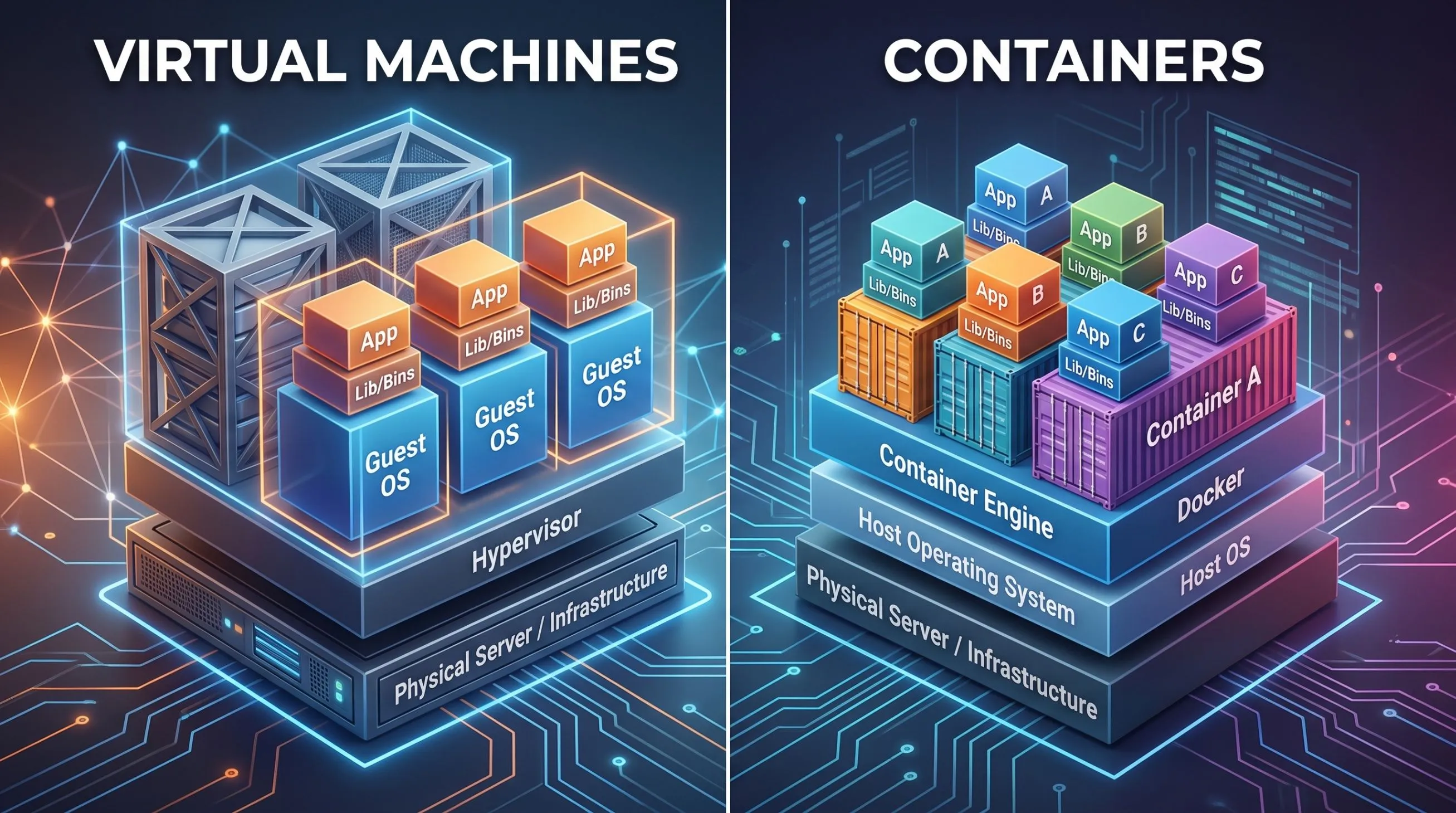
In tech terms, a VM sits on top of physical hardware via a Hypervisor (like AWS’s Nitro System). Inside every VM, you must install an entire Guest Operating System (OS) (like Windows or Linux), along with your applications, libraries, and dependencies.
- The AWS Equivalent: Amazon EC2.
Containers: The "Apartments"
In contrast, Containers are like apartments in a larger building. They are separate and private, but they share the same fundamental infrastructure—like the building's main foundation, water pipes, and security—to operate.
In contrast, Containers are like apartments in a larger building. They are separate and private, but they share the same fundamental infrastructure—like the building's main foundation, water pipes, and security—to operate.
Instead of running a bulky Guest OS for every single app, Containers share the host machine’s Operating System kernel and use a lightweight container engine (like Docker) to isolate apps. Your container only holds your application code and the tiny specific libraries needed to run it.
- The AWS Equivalent: Amazon ECS or EKS running on AWS Fargate.
The Big Comparison
| Feature | Virtual Machines (VMs) | Containers |
|---|---|---|
| Isolation | Strong (completely separate Kernel & OS) | Lightweight (shared OS Kernel) |
| Speed | Slow to boot (minutes) | Ultra-fast to boot (seconds) |
| Size | Large (gigabytes) | Tiny (megabytes) |
| Resources | High overhead (requires CPU/RAM for the entire OS) | Extremely efficient (low overhead) |
| Portability | Hard to move between environments | Highly portable (runs anywhere Docker is installed) |
Pros & Cons
Virtual Machines
- Pros: Outstanding security isolation. Since every VM has its own kernel, an exploit in one VM cannot easily access the underlying server or other VMs. They are also excellent for running legacy, monolithic workloads that require strict OS-level controls.
- Cons: They are slow, heavy, and consume considerable resources even when idle.
Containers
- Pros: Incredible speed, portability, and resource efficiency. You can pack hundreds of containers on the same server. They are also the gold standard for modern microservice architectures because they boot in seconds, making them perfect for auto-scaling.
- Cons: Because they share the host’s OS kernel, a major security vulnerability in the host OS kernel could theoretically affect all containerized applications on that host.
When to use which on AWS?
Choose Virtual Machines (Amazon EC2) when:
- You need to run legacy software that requires specific operating system kernels or custom system configurations.
- You need full, bare-metal control over the OS and hardware.
- Your workload runs 24/7 with a predictable, consistent state and does not require rapid auto-scaling.
Choose Containers (ECS, EKS, Fargate) when:
- You are building a microservices-based application or a web app that needs to scale up and down instantly to meet traffic spikes.
- You want to ensure your code works exactly the same on your local computer, testing environment, and AWS.
- You want to run serverless workloads (AWS Fargate) where you only pay for the exact seconds your app's code is running, without worrying about servers.
Conclusion
Both technologies are crucial in the modern cloud landscape. While Virtual Machines provide the robust, completely isolated, heavy-duty foundation the internet was built on, Containers offer the agile, resource-saving, lightning-fast environments required to scale modern applications. Underneath the hood, AWS even runs your containers inside optimized VMs (via Fargate/EC2) to give you the security of virtual machines with the speed of containerization!
Enjoyed reading this content? Let the author know!
Your likes, comments, shares, and saves help creators reach more builders.

Loading recommendations
Loading article