
Before you build a multi-agent system, try skills
Agent skills let one AI agent cover multiple specialties without a multi-agent system. See when that's enough, and how to build it on Amazon Bedrock AgentCore.


Before you build a multi-agent system, try skills
When an agent starts to struggle (too many tools, too many domains, answers that drift), a common reflex is to split it into a team of specialist agents. A better first move might be to add a skill: modular instructions the same agent loads only when a request needs them. This post dives into when to choose skills, implementation patterns on Amazon Bedrock AgentCore , and when a second agent earns its keep.
Splitting can have disadvantages, especially if you chain multiple agents in series. For example, if you chain five agents that each succeed 95% of the time, simple arithmetic puts end-to-end success at about 77% (0.95⁵). Other issues also can affect success. For example, UC Berkeley researchers who analyzed more than 1,600 traces from seven open-source multi-agent frameworks found failure rates between 41% and 86.7% , driven by system design issues, misalignment between agents, and weak task verification.
Costs are also higher: Anthropic reports multi-agent implementations typically use 3–10× more tokens than single-agent approaches for equivalent tasks. Anthropic recommends finding the simplest solution possible, and only increasing complexity when needed . OpenAI's guidance is to "maximize a single agent's capabilities first" . Recent research points the same way: when reasoning-token budgets are held equal, single agents match or outperform multi-agent systems on multi-hop reasoning, and a single agent with skills cuts token use and latency while staying competitive on accuracy .
So before you add an agent, ask: should I add a skill instead?
The default: one agent with modular skills
Agent skills are curated packages of instructions, code scripts, and reference materials that help agents complete specific tasks. They can help bridge the gap between what models know from training data and what they need to work effectively on a task. A skill is implemented as a folder containing a
SKILL.md file with a short YAML header (name and description) and markdown instructions, plus optional scripts and reference files. Ideally, skills should follow the open Agent Skills format, and they load through progressive disclosure:- Always loaded: each skill's name and description, about 100 tokens per skill .
- Loaded when triggered: the full instructions, typically under 5K tokens, read only when a request matches the skill.
- Loaded when needed: reference files and scripts, which the agent opens or runs from its filesystem.
An example is a published set of 38 skills for healthcare and life sciences (HCLS) use cases . An agent with all 38 skills carries about 3.8K tokens of metadata up front. Loading all 38 skills in full, by contrast, would take about 80K tokens. Progressive disclosure is what lets one agent hold many specializations without paying for all of them on every turn. For large skill libraries, sharding agent skills goes a step further by controlling not only when, but also how much of a skill loads.
One agent avoids hand-off failures and orchestration code, but it pays a single-agent tax. These are the signals that tell you when to add one or more agents:
- Context pollution. Each triggered skill adds instructions to the context. If many trigger at once, or if they overlap, the agent can get confused. Effective context engineering may be a remedy for this problem.
- Selection errors. Skill-selection accuracy drops sharply past a critical library size , so measure it as your library grows.
- No independent checker. An agent reviewing its own work tends to agree with itself.
An AWS-native example: one data analysis agent, multiple skills
A common goal for enterprise agents is democratizing data analysis: letting product managers and business users ask questions in plain language instead of waiting in a queue for the data team to provide answers. For example, a provider of fund administration software implemented this pattern with a single agent running in AgentCore, using one skill per product line over a curated set of analytics tables. With several product lines and hundreds of tables, this looks like it could be a job for a team of agents, yet one agent with a skill per product line handles it. In the design below, adding a product line means adding a skill folder and an AWS Agent Registry record, not a new agent with its own prompt, deployment, and failure modes.
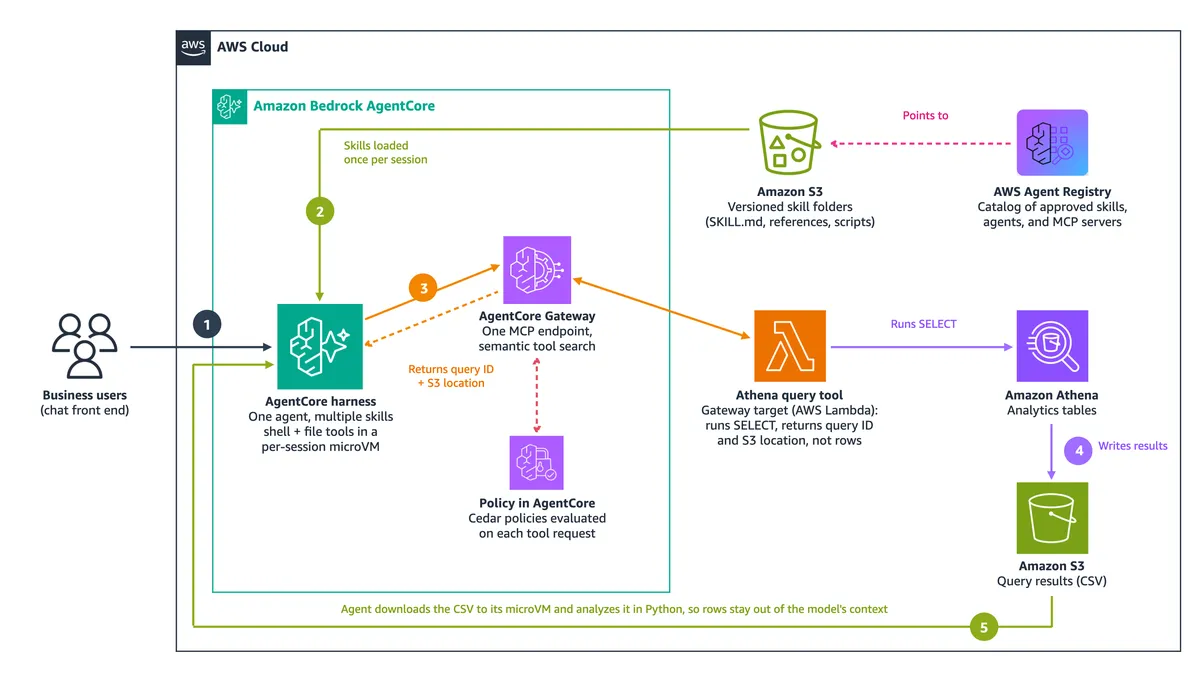
The following diagram shows the data analysis agent pattern as an AWS-native reference design.

Figure 1. One data analysis agent with multiple skills, built on Amazon Bedrock AgentCore (updated reference design).
- A business user asks a question through a chat front end.
- The AgentCore harness loads the skills it needs from Amazon S3, once per session. AWS Agent Registry catalogs approved skills and points to where they live.
- The agent calls the Athena query tool through AgentCore Gateway. Policy in AgentCore evaluates the request against Cedar policies, and if the request is allowed, the Lambda target runs the SELECT. Only the query ID and S3 location come back to the agent.
- Amazon Athena writes the query results to Amazon S3 as a CSV file.
- The agent downloads the CSV into its microVM and analyzes it in Python, so the full set of rows never enters the model's context and incur excess costs.
The agent: AgentCore harness . The harness is a managed agent loop, built on Strands Agents , that you define through configuration (model, prompt, tools, skills) rather than code. Each session gets an isolated microVM with built-in shell and file tools.
Skills storage: Amazon Simple Storage Service (Amazon S3) . Instead of baking skill folders into a container image, store them in Amazon S3 and reference them as a harness skill source . Skills are fetched once per session, so updating one means uploading a new version, not redeploying. A Git repo also would work as an alternative to S3. Note that AWS ships prebuilt analytics skills for Amazon Athena and AWS Glue .
Skills catalog: AWS Agent Registry . Skills are only reusable if other teams can find them. Agent Registry is a governed catalog for agents, MCP servers, and skills, with an approval lifecycle you can extend through Amazon EventBridge . A skill record stores the
SKILL.md content as discovery metadata , not the skill's scripts or reference files, so S3 or Git stays the source of truth and the Registry is how teams discover and govern it.Tool access: AgentCore Gateway . Business APIs, AWS Lambda functions, and existing Model Context Protocol (MCP) servers sit behind one gateway that the agent reaches as a single MCP endpoint, with semantic tool search so the agent isn't handed every tool definition up front. Policy in AgentCore evaluates each request through the gateway against Cedar policies before allowing tool access.
A note on efficiency: If a tool returns query rows, every row lands in the model's context. Instead, wrap the query as a Gateway tool (for example, a Lambda target) that runs the
SELECT in Athena and returns only a pointer: the query ID and the S3 location of the results. Policy in AgentCore governs who can call it, with which arguments. The agent downloads the result file to its own filesystem and analyzes it with code. The agent side of this pattern was tested on the harness: with a skill loaded from Amazon S3, the agent ran an Athena SELECT * (with the preinstalled AWS CLI rather than through Gateway), copied the comma-separated values (CSV) file from Amazon S3, and computed statistics in Python. The result rows never entered the model's context.When you actually need more than one agent
Two common failure modes for single agents, running out of context and juggling too many tools, have single-agent remedies. For example, Anthropic notes that context compaction is letting single agents work across much longer horizons , and recommends dynamic tool discovery (on AWS, semantic tool search in AgentCore Gateway) before going multi-agent, reporting up to 85% lower token usage.
However, sometimes these remedies may not work, or multiple agents may be preferable for one or more of the following additional reasons:
- Isolated context. The AWS DevOps Agent hands noisy work, such as filtering high-volume logs, to subagents that start with a clean context and return compressed results.
- Different trust levels. In a financial services reference architecture , each agent owns a narrow domain with its own tools and scoped permissions, so governance reviews happen per agent.
- Independent validation. A document classification system uses a validation agent to compare two specialists' outputs and resolve disagreements.
- More than one context can hold. An Amazon payments team found a single agent hit context limits on large documents; a structured workflow of specialists worked.
- Genuine parallelism. Anthropic's research system, where subagents explore independent threads at once, outperformed a single agent by 90.2% on breadth-first research, at about 15× the tokens of a chat interaction.
One caveat on that last result: Anthropic found token usage alone explained 80% of the performance variance in its evaluation, so part of the gain comes from spending more compute.
A decision framework
In the context of deciding whether to use subagents, the AWS Well-Architected Agentic AI Lens expresses the relevant guidance in one line: start with a tool, and promote a capability to a subagent only when it needs its own reasoning, its own context or memory, a different model or prompt, or independent failure isolation. More generally, the following decision framework is a useful way to think about the single vs. multi-agent decision, keeping in mind that there also is a "hybrid" option:
| Choose | When |
|---|---|
| One agent with skills | Tasks are sequential, specializations don't conflict, and the skills a typical request triggers fit comfortably in one context. |
| Multiple agents | Work genuinely parallelizes, you need an independent checker, roles need different permissions, or the required context outgrows one window. |
| Hybrid | One primary agent with skills handles most requests and calls specialist agents, as tools or in a fixed workflow, only for work that needs real independence. |
Many production systems end up hybrid, evolving by promoting capabilities to subagents only when justified by evaluation measurements. A walkthrough of single vs. multi-agent design for ERP agents reaches the same conclusion: start with one well-scoped agent, and treat an unmeasured benefit as a reason to wait.
Takeaways
- Default to a skill, not an agent. Split only for isolation, trust boundaries, independent validation, context limits, or true parallelism.
- Measure before you split. Track relevant metrics such as skill- and tool-selection accuracy (for example, with AgentCore Evaluations or Strands Evals ) and let the numbers decide.
- Count tokens the right way. Only skill metadata is loaded up front, which costs about 100 tokens per skill; the cost that matters is how many full skills a request triggers.
- Manage skills like code. Version them in S3 or Git, load them in the AgentCore harness, and list them in AWS Agent Registry for reuse.
- Govern tools in one place with AgentCore Gateway and Policy in AgentCore, and have tools return pointers, not bulk data.
To try the pattern, start with the AgentCore harness skills documentation : load a skill folder from S3 or Git into a test harness, and run an evaluation on a small set of test questions with known answers (a golden dataset) to measure the effectiveness of the single-agent, multiple-skill pattern.
Enjoyed reading this content? Let the author know!
Your likes, comments, shares, and saves help creators reach more builders.

Loading recommendations
Loading article