
Building a Serverless REST API with AWS Lambda, API Gateway, and DynamoDB
Learn how to build a serverless REST API using AWS Lambda, API Gateway, and DynamoDB, with practical implementation examples, security best practices, and production-readiness considerations.

Overview
Serverless architectures allow you to build and run applications without managing infrastructure. By combining AWS Lambda, Amazon API Gateway, and Amazon DynamoDB, you can construct a highly scalable, event-driven REST API that automatically scales with demand and operates on a pay-per-use pricing model.
In this guide, we will walk through building a production-ready serverless REST API for managing CRUD operations on items.
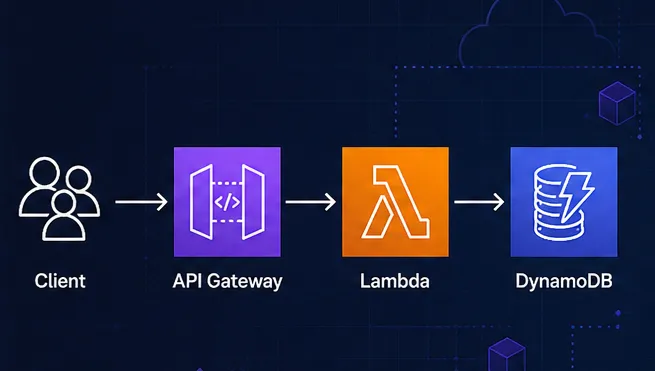
Architecture Overview
- Amazon API Gateway: Receives incoming HTTP requests from clients, handles routing, enables CORS, and forwards requests to AWS Lambda.
- AWS Lambda: Executes business logic in response to API triggers and interacts with DynamoDB.
- Amazon DynamoDB: Serves as a fully managed, low-latency NoSQL database for persistent data storage.
[ Client ] ──HTTP Request──> [ API Gateway ] ──Event Proxy──> [ AWS Lambda ] ──SDK──> [ DynamoDB ]

1
2
3
4
5
6
7
8
9
10
11
12
13
14
15
16
17
18
19
20
21
22
23
## Prerequisites
- An active **AWS Account**
- **AWS CLI** configured locally with appropriate IAM credentials
- **Node.js** (v18+ or v20+) runtime environment
- Basic understanding of REST API design principles and JSON formats
## Step 1: Create the Amazon DynamoDB Table
First, create a DynamoDB table named `ItemsTable` with a Partition Key named `id` (String).
### AWS CLI Command
```bash
aws dynamodb create-table \
--table-name ItemsTable \
--attribute-definitions AttributeName=id,AttributeType=S \
--key-schema AttributeName=id,KeyType=HASH \
--billing-mode PAY_PER_REQUEST
Step 2: Implement the AWS Lambda Handler
Below is a single, clean Node.js Lambda function using the AWS SDK v3 (
@aws-sdk/lib-dynamodb) to process standard CRUD routes (GET, POST, PUT, DELETE).1
2
3
4
5
6
7
8
9
10
11
12
13
14
15
16
17
18
19
20
21
22
23
24
25
26
27
28
29
30
31
32
33
34
35
36
37
38
39
40
41
42
43
44
45
46
47
48
49
50
51
52
53
54
55
56
57
58
59
60
61
62
63
64
65
66
67
68
69
70
71
72
73
74
75
76
77
78
79
80
81
82
83
84
85
86
87
88
import { DynamoDBClient } from "@aws-sdk/client-dynamodb";
import {
DynamoDBDocumentClient,
GetCommand,
PutCommand,
ScanCommand,
DeleteCommand
} from "@aws-sdk/lib-dynamodb";
const client = new DynamoDBClient({});
const docClient = DynamoDBDocumentClient.from(client);
const TABLE_NAME = process.env.TABLE_NAME || "ItemsTable";
export const handler = async (event) => {
const { httpMethod, pathParameters, body } = event;
let responseBody;
let statusCode = 200;
const headers = {
"Content-Type": "application/json",
"Access-Control-Allow-Origin": "*",
"Access-Control-Allow-Headers": "Content-Type,X-Amz-Date,Authorization,X-Api-Key",
"Access-Control-Allow-Methods": "OPTIONS,GET,POST,PUT,DELETE"
};
try {
switch (httpMethod) {
case "GET":
if (pathParameters && pathParameters.id) {
const res = await docClient.send(new GetCommand({
TableName: TABLE_NAME,
Key: { id: pathParameters.id }
}));
responseBody = res.Item || { message: "Item not found" };
if (!res.Item) statusCode = 404;
} else {
const res = await docClient.send(new ScanCommand({ TableName: TABLE_NAME }));
responseBody = res.Items;
}
break;
case "POST":
const newItem = JSON.parse(body);
await docClient.send(new PutCommand({
TableName: TABLE_NAME,
Item: newItem
}));
responseBody = { message: "Item created successfully", item: newItem };
statusCode = 201;
break;
case "PUT":
const updateData = JSON.parse(body);
await docClient.send(new PutCommand({
TableName: TABLE_NAME,
Item: updateData
}));
responseBody = { message: "Item updated successfully", item: updateData };
break;
case "DELETE":
if (pathParameters && pathParameters.id) {
await docClient.send(new DeleteCommand({
TableName: TABLE_NAME,
Key: { id: pathParameters.id }
}));
responseBody = { message: "Item deleted successfully" };
} else {
statusCode = 400;
responseBody = { message: "Missing item ID" };
}
break;
default:
statusCode = 405;
responseBody = { message: `Unsupported method "${httpMethod}"` };
}
} catch (err) {
statusCode = 500;
responseBody = { error: err.message };
}
return {
statusCode,
headers,
body: JSON.stringify(responseBody)
};
};
Step 3: Configure Amazon API Gateway
- Navigate to API Gateway in the AWS Management Console and create a new REST API.
- Configure resources and HTTP methods:
/items->GET(List items),POST(Create item)/items/{id}->GET(Get single item),PUT(Update item),DELETE(Delete item)
- Set integration type to Lambda Proxy Integration for all endpoints and link your Lambda function ARN.
- Enable CORS on all resources to handle cross-origin browser requests.
- Deploy your API to a stage (e.g.,
prodordev) to retrieve your invoke URL.
Security Best Practices
| Security Dimension | Best Practice |
|---|---|
| IAM Policies | Apply the Principle of Least Privilege. Restrict Lambda execution role permissions strictly to dynamodb:GetItem, dynamodb:PutItem, dynamodb:DeleteItem, and dynamodb:Scan on the specific table ARN. |
| Authentication | Attach an Amazon Cognito User Pool authorizer or custom Lambda Authorizer to validate JWT tokens on sensitive API routes. |
| Rate Limiting | Set up API Gateway Usage Plans and Throttling limits to protect your backend against spikes and unexpected billing costs. |
| Input Validation | Enable request body schema validation directly in API Gateway before requests reach your Lambda function execution runtime. |
Monitoring and Production Readiness
- AWS X-Ray: Turn on active tracing in API Gateway and Lambda to profile service latencies and pinpoint failure points.
- CloudWatch Alarms: Create metric alarms for key indicators like Lambda execution errors, duration spikes, and API Gateway
5xxerror rates. - Infrastructure as Code (IaC): Automate deployments using AWS SAM, AWS CDK, or Terraform to keep deployments declarative and repeatable across multiple stages.
Building APIs using AWS Lambda, API Gateway, and DynamoDB eliminates server maintenance and automatically scales from zero to peak traffic seamlessly. For high-volume read paths, consider implementing API Gateway Caching or Amazon DynamoDB Accelerator (DAX) to reduce latency and lower execution costs.
Enjoyed reading this content? Let the author know!
Your likes, comments, shares, and saves help creators reach more builders.

Loading recommendations
Loading article