
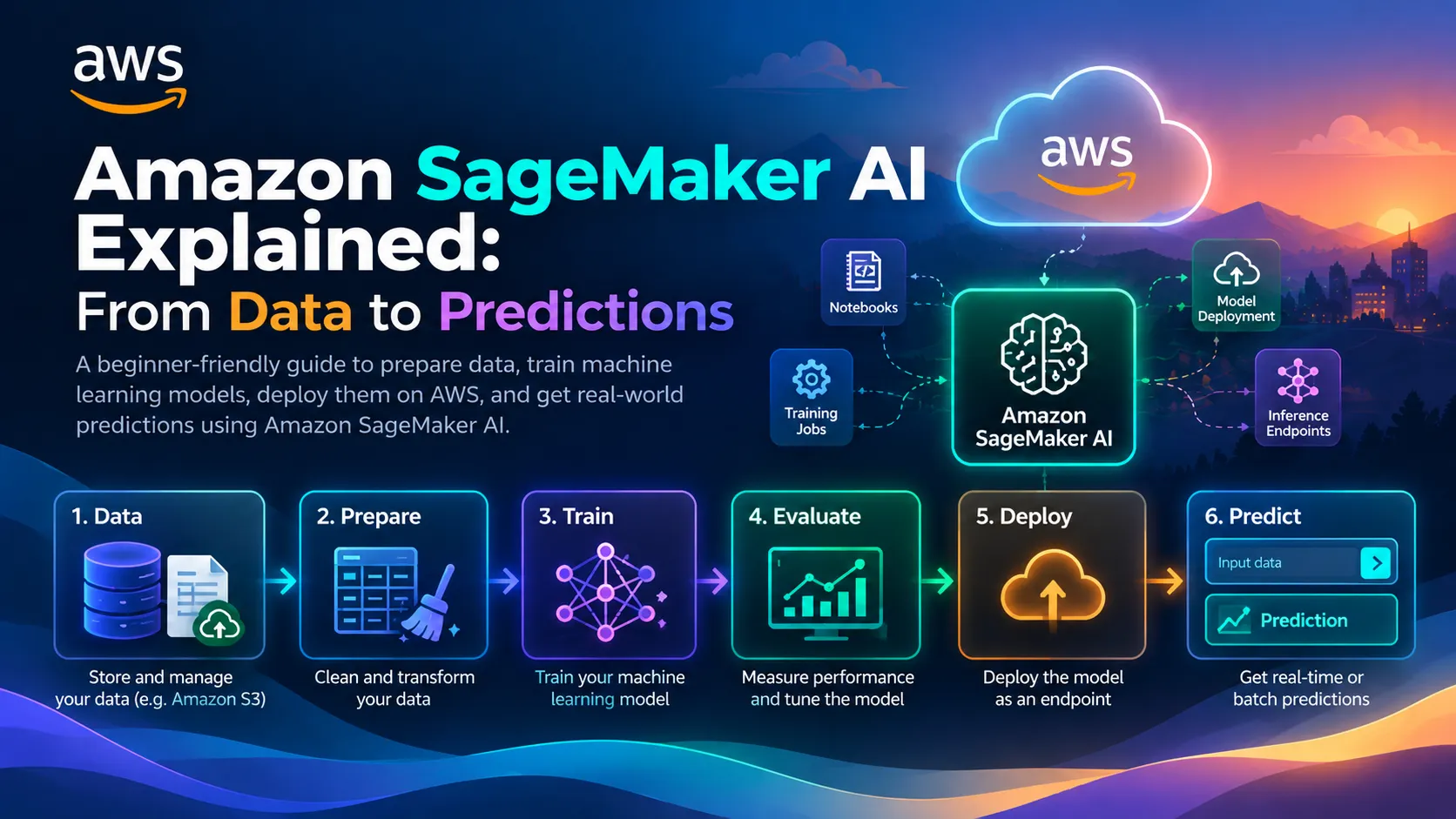
Amazon SageMaker AI Explained: From Data to Predictions
Explore how Amazon SageMaker AI helps you prepare data, train machine learning models, deploy predictions, and understand cloud costs in this beginner-friendly guide.
Series: AWS Decoded: A Beginner’s Guide to AWS Services (1 article)
- 1Amazon SageMaker AI Explained: From Data to Predictions This article

Amazon SageMaker AI Explained: From Data to Predictions
Imagine you have collected a dataset and want to build a machine learning model that can predict something useful.
You write some Python code, clean the data, experiment with an algorithm, and finally train a model. It works on your laptop, but what happens when you want to use it in a real application? How do you manage the computing resources, deploy the model, and generate predictions whenever someone makes a request?
This is where Amazon SageMaker AI becomes useful.
For students learning Python, machine learning, and cloud computing, understanding how a model moves from a dataset to a working application is an important step.
In this article, we'll explore Amazon SageMaker AI, understand its machine-learning workflow, and walk through an example of how a student could use it to build a prediction application.
1. What Is Amazon SageMaker AI?
Amazon SageMaker AI is a managed machine-learning service from AWS that helps developers and data scientists build, train, and deploy machine-learning models without having to manage all the underlying infrastructure themselves.
Instead of purchasing powerful computers or manually configuring servers for every experiment, developers can use managed cloud resources to run their machine-learning workloads.
SageMaker AI supports different workflows, from developing models with notebooks and training scripts to deploying trained models for predictions.
It also provides tools for working with existing models and foundation models, depending on the use case.
Think of it this way:
Python helps you write the logic. Machine learning helps the system learn patterns from data. SageMaker AI helps you develop, train, and deploy models using AWS infrastructure.
A quick note about the name
AWS expanded Amazon SageMaker into a broader platform for data, analytics, and AI in December 2024. The existing machine-learning service was renamed Amazon SageMaker AI and remains available as part of the broader platform or as a standalone service.
Understanding this distinction helps when searching for tutorials and choosing the right AWS service.
2. Why Is SageMaker AI Useful?
Building a machine-learning model involves more than writing an algorithm.
You need data, a suitable development environment, computing resources, training, evaluation, deployment, and ongoing management.
Without managed services, you may need to configure and maintain much of this infrastructure yourself.
SageMaker AI helps reduce that operational burden so you can focus more on the model and the problem you're trying to solve.
For example, you might use it to:
- Train a model that predicts product demand.
- Classify messages into different categories.
- Detect unusual patterns in a dataset.
- Estimate house prices from historical data.
- Experiment with machine-learning models for a college project.
It is particularly useful when your project needs a repeatable training workflow or a model that can be integrated into another application.
However, not every machine-learning project needs a cloud service. For small experiments, training locally with Python and scikit-learn can be a perfectly reasonable starting point.
3. Understanding the Machine-Learning Lifecycle
Before exploring AWS services, let's understand the basic machine-learning lifecycle.
A typical workflow looks like this:
Collect Data → Prepare Data → Train Model → Evaluate Model → Deploy Model → Generate Predictions
Each stage has a different purpose.
Collect data: Gather the historical information your model needs.
Prepare data: Clean the dataset, handle missing values, and select useful features.
Train the model: Use the training data to learn patterns.
Evaluate the model: Test how well it performs on data that was not used for training.
Deploy the model: Make the trained model available for an application or a prediction workflow.
Generate predictions: Supply new data to the deployed model and obtain its output.
SageMaker AI supports different parts of this lifecycle through managed development, training, and deployment capabilities.
The important lesson is that training a model is only one stage. A model also needs to be evaluated and made usable for its intended purpose.
4. A Practical Example: Predicting Bike Rentals
Let's imagine we want to build a model that estimates how many bicycles might be rented on a particular day.
We have a historical dataset containing information such as:
- Temperature
- Humidity
- Day of the week
- Weather conditions
- Previous rental counts
Our goal is to learn patterns from this data and estimate rental demand for new conditions.
For example, the model might receive information about a warm Saturday and predict the expected number of rentals.
This is a simplified educational example. Actual prediction quality depends on the dataset, the model, and how well the data represents future conditions.
Step 1: Store the dataset
Our dataset could be stored in Amazon S3, an AWS object-storage service.
Keeping the dataset in cloud storage gives our workflow a place to access the data without depending on a file that exists only on our laptop.
We would also make sure that the data format, permissions, and structure are appropriate for the training workflow.
Step 2: Prepare the data
Before training, we need to check our dataset.
Are any values missing? Are the columns correct? Are there duplicate records? Is the rental count represented in the right format?
We might use Python with pandas to clean the data and prepare the features.
This stage matters because a sophisticated model cannot automatically compensate for poor-quality data.
Step 3: Choose a model and train it
Next, we select an appropriate machine-learning approach.
For a beginner's regression project, we might compare a simple linear regression model with a more complex tree-based model.
SageMaker AI provides managed training capabilities that can run a supported algorithm or a custom training script using cloud compute resources.
During training, the model learns patterns from the training dataset.
The resulting model is not simply a set of rules manually written by us. Its learned parameters are derived from the training process.
Step 4: Evaluate the model
Now we need to determine whether our model is useful.
We can evaluate its predictions against a separate test dataset using suitable metrics.
For a rental-demand prediction problem, we might measure how far predicted rental counts differ from actual counts.
If the model performs poorly, we may need to improve the data, adjust the features, compare algorithms, or tune the model.
A completed training job does not automatically mean we have a good model.
Evaluation is essential.
Step 5: Deploy the model
Once we have a model that meets our requirements, we can deploy it using an appropriate SageMaker AI inference option.
The choice depends on how the application will use the model. Some applications need immediate responses, while others can process predictions in batches.
Deployment makes it possible to use the model beyond the original training environment.
Step 6: Connect it to an application
Finally, imagine a web application where a user selects a date and enters weather conditions.
The application sends the input to the deployed model, receives a prediction, and displays the estimated rental demand.
The architecture could look like this:
User → Web Application → Deployed Model → Prediction → User
The web interface and machine-learning model are separate components. This separation allows the model to support applications without putting the entire training workflow inside the web application.
5. What Happens During Training and Inference?
Two concepts are especially important when working with machine learning: training and inference.
Training is the process in which a model learns patterns from data.
Inference is the process of using a trained model to generate predictions for new inputs.
Imagine that our bike-rental model has already learned from historical data.
We don't need to retrain it every time someone asks for a prediction. We can use the trained model to estimate rental demand for new weather conditions.
That is inference.
Separating these stages makes it easier to understand how a machine-learning system is built and operated.
It also helps us think about costs: training jobs and a model that remains hosted for predictions can have different resource requirements.
6. Real-Time Predictions or Batch Predictions?
Not every application needs predictions in the same way.
Amazon SageMaker AI offers different deployment options for inference workloads. The appropriate option depends on factors such as response-time requirements, traffic patterns, payload size, and supported configurations.
Real-time inference: Useful when an application needs a response immediately, such as when a user submits a form and expects a prediction.
Batch transform: Useful for processing a large dataset offline instead of requesting predictions one at a time.
Asynchronous inference: Useful for certain requests involving large inputs or longer processing times where an immediate response is unnecessary.
Serverless inference: Can suit supported workloads with intermittent traffic and idle periods.
These options have different trade-offs. Before choosing one, understand the model's requirements and check the currently supported configurations.
For a small demonstration project, you don't always need a continuously running endpoint. An offline or batch workflow may be enough.
7. How Is SageMaker AI Different From Amazon Bedrock?
Since generative AI and language models are becoming increasingly important, it is useful to understand the difference between these two AWS offerings.
Amazon SageMaker AI is useful when you want to develop, train, customize, or deploy machine-learning models and manage more of their lifecycle.
Amazon Bedrock is designed to help developers build generative AI applications using supported foundation models through managed AWS capabilities.
Consider two examples.
If you want to train a model that predicts bike-rental demand from historical data, SageMaker AI is a natural option to explore.
If you want to build a chatbot that generates answers using a foundation model, Amazon Bedrock is often a convenient starting point.
There is some overlap between their capabilities, including working with foundation models. The best choice depends on whether you need to develop and operate a model or primarily want to build an application around an existing model.
The goal is not to memorize service names. It is to understand which tool fits the problem you are trying to solve.
8. Do Beginners Need to Write Everything From Scratch?
No.
SageMaker AI offers different ways to approach machine learning, depending on your experience and requirements.
You can work with notebooks and code, use supported algorithms, or explore pre-trained models and guided workflows.
For someone who already knows Python, starting with a small dataset and a simple model can be a useful way to learn the lifecycle.
For someone who is not yet comfortable writing machine-learning code, guided or lower-code options may help them understand the process first.
However, using a pre-trained model does not eliminate the need to evaluate its suitability, understand its limitations, or configure access correctly.
The objective is to learn how the components fit together, not merely to click through a workflow.
9. What About Security and Cloud Costs?
Cloud machine learning can be powerful, but two responsibilities should never be overlooked.
Security
Make sure that only authorized users and services can access your data and models.
Use IAM permissions appropriate to your workflow, protect credentials, and avoid exposing sensitive datasets publicly.
If your project uses personal or confidential information, understand the applicable privacy and data-handling requirements before uploading it to the cloud.
Costs
Training and deploying models can consume cloud resources.
Depending on the configuration, you may incur charges for compute, storage, processing, and hosted inference resources.
Before experimenting, review the current pricing for the services and resources you plan to use.
After completing an experiment, stop or delete resources that you no longer need, following the appropriate cleanup procedure. Also check whether any storage or other supporting resources remain.
For a student project, start small and understand the cost implications before scaling up.
10. A Beginner's Roadmap
If you're interested in exploring SageMaker AI, you can approach it step by step.
First: Learn the Python basics and work with datasets using pandas.
Second: Understand fundamental machine-learning concepts such as features, labels, training, testing, and evaluation.
Third: Build a small model locally using a library such as scikit-learn.
Fourth: Explore SageMaker AI and understand how cloud training differs from local training.
Fifth: Train a model with a suitable dataset and evaluate its performance.
Sixth: Explore deployment and learn how another application can request predictions.
Finally: Learn how to manage permissions, monitor performance, and control cloud usage.
You do not need to master the entire platform at once. Each step gives you a foundation for the next.
Final Thoughts
For students learning machine learning, it is easy to focus only on the algorithm or the accuracy score.
But building a useful machine-learning application involves much more: preparing data, selecting an appropriate model, evaluating results, deploying the model, and making it accessible to other software.
Amazon SageMaker AI helps developers manage important parts of that journey using AWS infrastructure and tools.
The most valuable lesson is not simply knowing that SageMaker AI exists. It is understanding how data becomes a trained model and how that model becomes a usable prediction service.
Start with a small dataset, understand each stage, and build something you can explain from beginning to end.
Because learning machine learning is not just about training a model. It is about learning how to turn data into something useful.
# amazon-sagemaker# amazon-sagemaker-ai# aws-student-builders-groups# machine-learning# artificial-intelligence
Series: AWS Decoded: A Beginner’s Guide to AWS Services (1 article)
- 1Amazon SageMaker AI Explained: From Data to Predictions This article
Enjoyed reading this content? Let the author know!
Your likes, comments, shares, and saves help creators reach more builders.

Loading recommendations
Loading article