
CSV vs. Parquet on AWS: Why Your Data Lake Could Be Slower and More Expensive
While CSV is simple and universal, growing datasets demand better efficiency. Explore how Apache Parquet reduces query costs and speeds up Amazon Athena queries on AWS, and learn how to convert your existing data lake datasets.

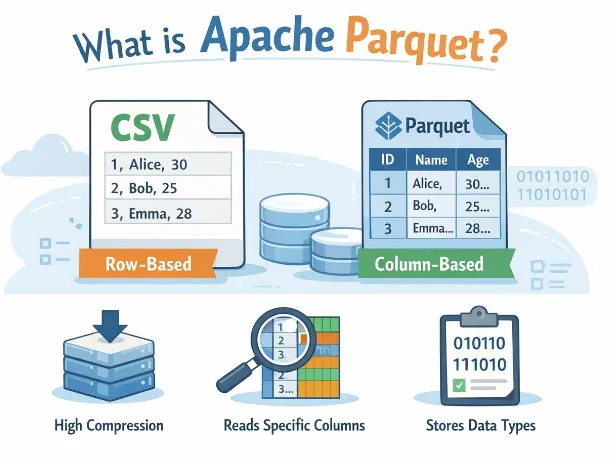
Understanding CSV vs. Parquet
The main difference is how these formats organize data.
CSV: Row-based storage
CSV stores data as plain text, with each line representing a record.
For example:
1
2
3
4
order_id,product,quantity,price
1,Laptop,2,850
2,Mouse,5,20
3,Keyboard,3,45
CSV is easy to inspect, share, and generate. However, analytical engines often need to parse the text and read much more data than a query actually needs.
Parquet: Columnar storage
Apache Parquet organizes data by column and supports efficient encoding and compression.
Instead of storing every record as a complete text line, it organizes column values into a structure designed for analytical processing.
This allowsquery engines such as Amazon Athena to read only the necessary columns and, when metadata permits, skip irrelevant data blocks.
The result can be less data scanned and better query performance.
Why File Format Matters in Amazon Athena
Imagine that your company stores millions of sales records in Amazon S3.
An analyst wants to calculate total revenue by product:
1
2
3
4
5
SELECT
    product,
    SUM(quantity * price) AS revenue
FROM sales
GROUP BY product;
The query only needs three columns:
product, quantity, and price.With CSV, Athena generally needs to scan and parse the text records containing the dataset's fields.
With Parquet, Athena can read the required columns without reading every other column in the same way.
This distinction becomes especially important when your tables contain dozens of columns and your queries use only a few of them.
According to AWS documentation, columnar formats such as Parquet support column-level reading, compression, and metadata-based data skipping. These capabilities can improve analytical performance and reduce the amount of data scanned.
How Does This Affect Cost?
With Amazon Athena's standard per-query pricing model, query costs depend on the amount of data scanned, subject to the service's pricing rules.
That means reducing scanned data can reduce query costs.
For example, imagine a query scans 100 GB of CSV data, while the equivalent query against Parquet scans only 20 GB.
That would represent an 80% reduction in scanned data for that query.
Important: These numbers are illustrative, not measured results. Actual savings depend on the dataset, selected columns, compression, partitioning, and query patterns.
The general principle is straightforward: if Athena reads less data, you may pay less for the query.
There is also an important distinction between storage costs and query costs. Parquet compression may reduce the amount of data stored in S3, but actual storage savings depend on the original data and compression settings.
Converting CSV to Parquet with Amazon Athena
Let's look at a practical example.
Assume you already have a table called
raw_sales in Athena, backed by CSV files stored in Amazon S3.You can create a Parquet version of that dataset using CTAS (CREATE TABLE AS SELECT).
1
2
3
4
5
6
7
8
9
10
11
12
CREATE TABLE sales_parquet
WITH (
    format = 'PARQUET',
    external_location = 's3://YOUR-BUCKET/curated/sales-parquet/',
    write_compression = 'SNAPPY'
) AS
SELECT
    order_id,
    product,
    quantity,
    price
FROM raw_sales;
Before running this query:
- Replace
YOUR-BUCKETwith your actual S3 bucket. - Make sure the destination prefix is empty and does not already contain data.
- Confirm that your Athena workgroup and IAM permissions allow the operation.
This query creates a new dataset in Parquet format, using Snappy compression, without modifying the original CSV files.
Keeping the raw dataset separate from the transformed dataset makes it easier to validate the conversion and recover the original data if needed.
Compare the Results
Now run the same analytical query against both tables.
Query the original CSV data:
1
2
3
4
5
SELECT
    product,
    SUM(quantity * price) AS revenue
FROM raw_sales
GROUP BY product;
Query the Parquet data:
1
2
3
4
5
SELECT
    product,
    SUM(quantity * price) AS revenue
FROM sales_parquet
GROUP BY product;
Both queries should return equivalent results if the conversion preserves the data and types correctly.
To compare performance, examine the execution time and the amount of data scanned in Athena's query details.
For a meaningful comparison:
- Use equivalent datasets and query logic.
- Run several trials rather than relying on a single execution.
- Record the amount of data scanned for each query.
- Compare execution times while accounting for other sources of variation.
- Verify that the output is correct.
This gives you evidence based on your actual workload instead of relying on theoretical performance claims.
When Should You Choose Each Format?
CSV is still useful in many situations:
- Sharing data between applications.
- Exporting reports for spreadsheets.
- Exchanging small datasets.
- Working with systems that require plain-text files.
Parquet is often a better choice for analytical workloads:
- Large datasets stored in Amazon S3.
- Repeated queries through Amazon Athena.
- Data processing with Apache Spark or AWS Glue.
- Workloads that select a subset of columns.
- Data lakes where compression and scan efficiency matter.
Parquet is not automatically the best answer for every scenario. Small files, poorly designed partitions, or queries that read most of the dataset can reduce its advantages.
Your file format should support the way your data is actually queried.
Beyond Parquet: Other Optimization Opportunities
Changing the file format is only one step toward building an efficient data lake.
Consider these additional practices:
Partition your data. Organize data by useful attributes, such as date, when your queries frequently filter on them.
Avoid excessive small files. Large numbers of tiny files can increase metadata and processing overhead.
Use compression. Choose a suitable codec and test the trade-off between storage size and processing time.
Monitor query metrics. Track scanned bytes, execution duration, and failures to identify opportunities for optimization.
Validate data quality. Confirm that data types, null handling, and record counts remain correct after conversion.
A well designed data lake combines an appropriate file format with effective storage organization and query patterns.
Enjoyed reading this content? Let the author know!
Your likes, comments, shares, and saves help creators reach more builders.

Loading recommendations
Loading article