
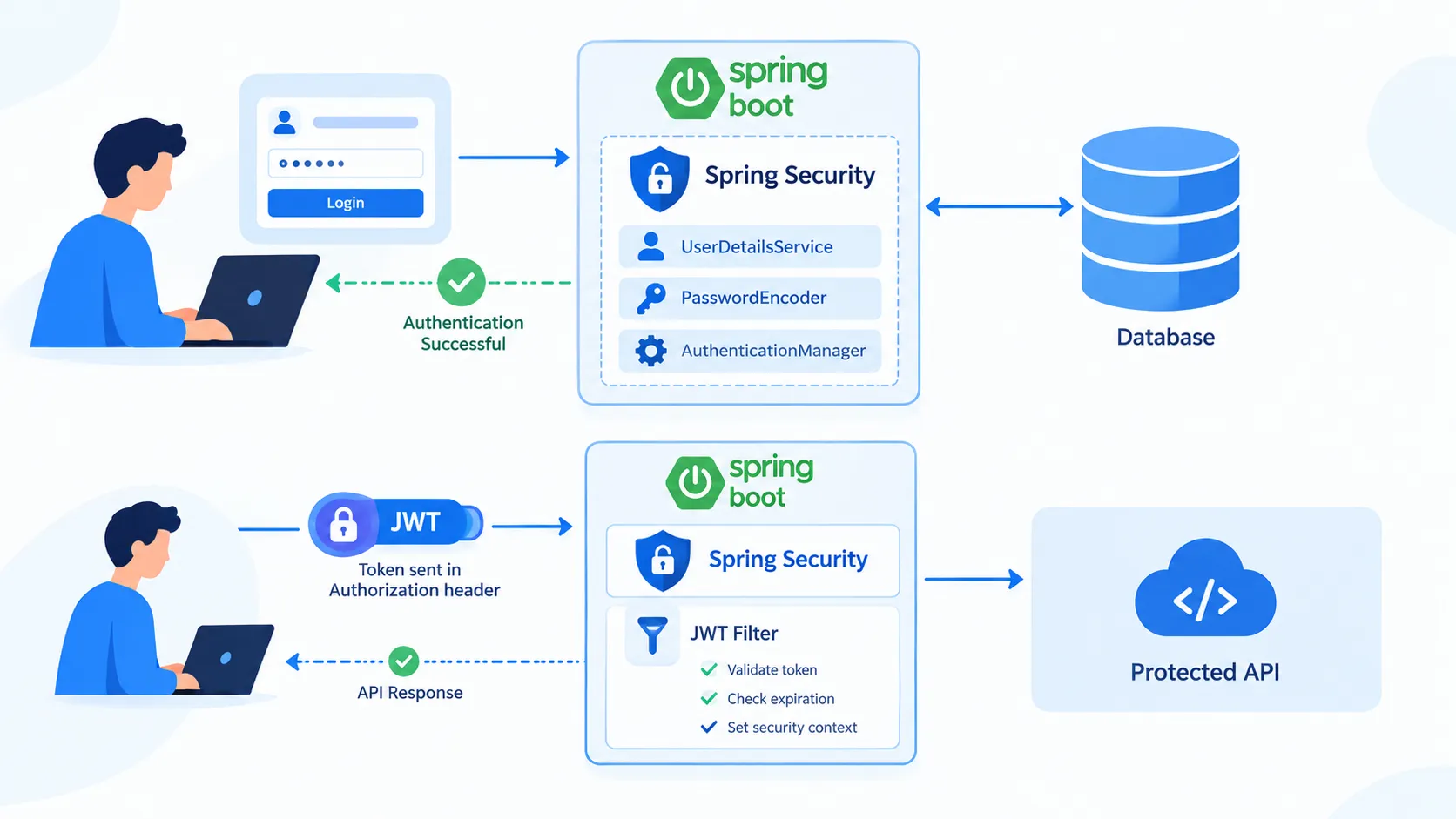
Authentication in Spring Boot: A Beginner’s Guide to Securing REST APIs
Learn how authentication works in Spring Boot, how Spring Security verifies users, how password encoding works, and how JWT-based authentication secures REST APIs.

Authentication in Spring Boot: A Beginner’s Guide to Securing REST APIs
Introduction
Security is an essential part of modern backend development. Applications often contain user accounts, personal information, and other sensitive data that must be protected from unauthorized access.
Spring Boot makes it easier to implement authentication using Spring Security, a powerful framework for securing Java applications.
In this article, we will understand authentication, explore how Spring Security works, learn about password encoding, and introduce JSON Web Tokens (JWT).
1. What Is Authentication?
Authentication is the process of verifying the identity of a user.
For example, when a user logs into an application, they provide a username and password. The application checks whether the supplied credentials are valid.
Authentication answers the question:
“Who are you?”
Authorization is different. It determines what an authenticated user is allowed to access.
For example:
- Authentication: Is this user really registered with the application?
- Authorization: Is this user allowed to access the admin dashboard?
2. What Is Spring Security?
Spring Security is a framework that provides authentication, authorization, and protection against common security threats.
When integrated with Spring Boot, it helps developers secure web applications and REST APIs without implementing every security mechanism from scratch.
Some important features include:
- User authentication and authorization.
- Password encoding.
- Role-based access control.
- Session management.
- JWT-based authentication when configured.
- Protection against common attacks such as cross-site request forgery (CSRF).
Adding Spring Security to a Spring Boot web application typically secures its endpoints by default until you configure the required access rules.
3. How Does Authentication Work?
Consider a login system built using Spring Boot and Spring Security.
The typical authentication flow is:
- The user enters their username and password.
- The login request reaches the backend.
- Spring Security processes the authentication request.
- The application loads the user's details from a configured source, such as a database.
- A password encoder verifies the submitted password against the stored password hash.
- If the credentials are valid, authentication succeeds.
- The application establishes a session or issues a token, depending on its configuration.
If the credentials are invalid, authentication fails.
4. Important Components in Spring Security
UserDetails
UserDetails represents the user's information required by Spring Security, including the username, password hash, authorities, and account status.Developers can use Spring Security's built-in implementation or create a custom class that implements
UserDetails.UserDetailsService
UserDetailsService loads a user's information using their username.For example, a custom implementation can retrieve a user from a database through a repository.
1
2
3
4
5
6
7
8
9
10
11
12
13
14
15
16
17
18
public class MyUserDetailsService implements UserDetailsService {
private final UserRepository userRepository;
public MyUserDetailsService(UserRepository userRepository) {
this.userRepository = userRepository;
}
public UserDetails loadUserByUsername(String username)
throws UsernameNotFoundException {
return userRepository.findByUsername(username)
.orElseThrow(() ->
new UsernameNotFoundException("User not found"));
}
}This example assumes that
UserRepository returns a compatible UserDetails implementation. If your entity does not implement UserDetails, map its fields to a Spring Security User object instead.PasswordEncoder
Passwords should not be stored as plain text. Spring Security provides the
PasswordEncoder interface to encode passwords and verify login attempts.For example, BCrypt is a commonly used password-hashing algorithm.
1
2
3
4
public PasswordEncoder passwordEncoder() {
return new BCryptPasswordEncoder();
}When a user registers, the application encodes the password before storing it. During login, Spring Security uses the encoder to verify the submitted password against the stored hash.
Important: Password encoding is not the same as encryption. BCrypt is designed for password hashing, and the original password is not recovered during verification.
AuthenticationManager
AuthenticationManager is responsible for processing an authentication request. In a typical username-and-password setup, it delegates authentication to an appropriate provider, which loads user details and verifies the password.5. Configuring Spring Security
Spring Security can be configured using a
SecurityFilterChain bean.The following example demonstrates a basic configuration:
1
2
3
4
5
6
7
8
9
10
11
12
13
14
15
16
17
18
19
20
21
22
23
public class SecurityConfig {
public SecurityFilterChain securityFilterChain(
HttpSecurity http) throws Exception {
http
.authorizeHttpRequests(auth -> auth
.requestMatchers("/login", "/register").permitAll()
.anyRequest().authenticated()
)
.formLogin(Customizer.withDefaults());
return http.build();
}
public PasswordEncoder passwordEncoder() {
return new BCryptPasswordEncoder();
}
}This configuration allows access to
/login and /register without prior authentication and requires authentication for other requests. It enables Spring Security's default form-login mechanism.For a real REST API, the login and registration endpoints must also be implemented appropriately. The configuration above is an introductory example, not a complete production-ready authentication system.
6. What Is JWT Authentication?
JSON Web Token (JWT) is a compact token format commonly used to carry claims between parties. It can be used to implement token-based authentication for REST APIs.
A typical JWT authentication flow is:
- The user sends login credentials.
- The backend authenticates the user.
- The backend generates and returns a signed JWT.
- The client stores the token securely.
- The client sends the token in subsequent requests, usually through the
Authorizationheader. - A JWT authentication filter validates the token and establishes the authenticated security context.
An example request header is:
1
Authorization: Bearer <your-jwt-token>
A signed JWT is not necessarily encrypted. Avoid placing passwords or other sensitive information in its payload.
JWT authentication also requires correct signature verification, expiration checks, and secure key management. Merely generating a token is not enough to secure an API.
7. Session-Based vs. JWT-Based Authentication
| Feature | Session-based | JWT-based |
|---|---|---|
| Authentication state | Usually stored on the server | Usually represented by a signed token |
| Client sends | Session cookie | Bearer token |
| Server-side state | Session state is maintained | Can be stateless, depending on the design |
| Common use | Traditional web applications | REST APIs and distributed applications |
Neither approach is universally better. The right choice depends on the application's architecture, client type, security requirements, and token or session management strategy.
8. Common Mistakes to Avoid
- Storing plain-text passwords: Always use a suitable password encoder.
- Disabling security without understanding the consequences: Avoid exposing protected endpoints accidentally.
- Trusting a JWT without validating it: Verify its signature, expiration, and relevant claims.
- Hardcoding secrets: Store sensitive configuration outside source code and manage it securely.
- Confusing authentication with authorization: Verifying identity does not automatically grant every permission.
- Ignoring CSRF and CORS: Configure them according to the application's architecture rather than disabling them blindly.
Conclusion
Spring Security provides the foundation for implementing secure authentication in Spring Boot applications. Understanding
UserDetails, UserDetailsService, PasswordEncoder, and AuthenticationManager helps developers understand how username-and-password authentication works.JWT adds another approach for securing API requests, especially in applications that use token-based authentication.
For backend developers, learning authentication alongside authorization, password hashing, secure configuration, and API security is an important step toward building production-ready Spring Boot applications.
Enjoyed reading this content? Let the author know!
Your likes, comments, shares, and saves help creators reach more builders.

Loading recommendations
Loading article