
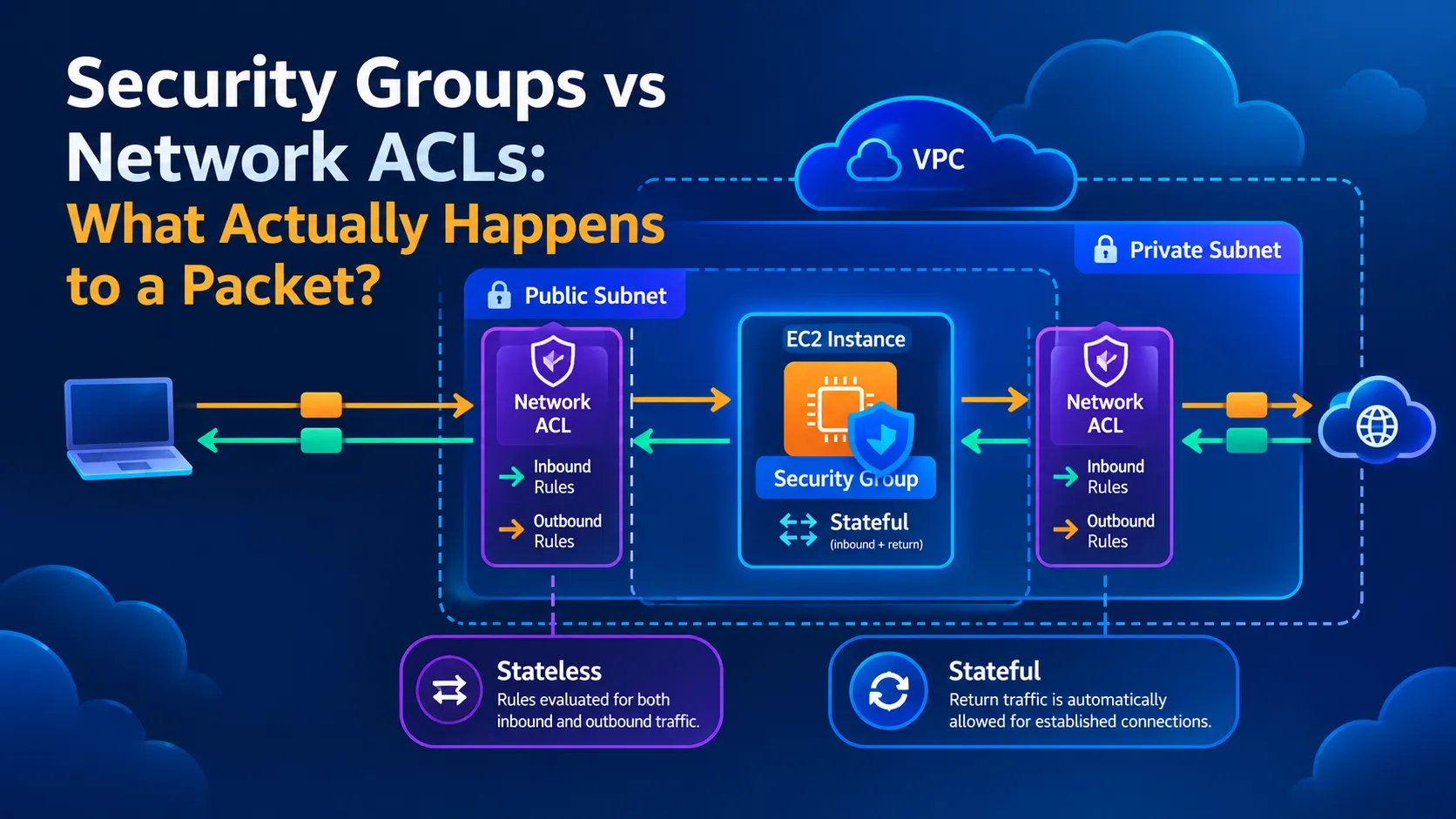
Security Groups vs Network ACLs: What Actually Happens to a Packet?
Security Groups and Network ACLs both help protect AWS networks, but they work differently. In this article, I explain their differences through a practical packet-flow example, covering stateful and stateless filtering, inbound and outbound rules, and common troubleshooting mistakes. As I continue learning AWS networking, I explore how these controls work together to protect resources inside a VPC.

Security Groups vs Network ACLs: What Actually Happens to a Packet?
When learning AWS networking, one question comes up quickly: if Security Groups and Network ACLs both filter traffic, why do we need both?
At first, they can seem like two versions of the same security feature. However, they operate at different levels and handle network traffic differently.
Understanding this distinction is useful when designing a secure VPC and troubleshooting connectivity problems.
In this article, I explain the difference through a simple example: a user accessing a website hosted on an Amazon EC2 instance.
1. Security Groups: Protecting Network Interfaces
A Security Group acts as a virtual firewall associated with supported AWS resources, such as EC2 instances through their network interfaces.
It controls traffic using rules that specify protocols, ports, and permitted sources or destinations.
For example, a web server might have these inbound rules:
- Allow HTTPS traffic on TCP port 443 from authorized clients.
- Allow SSH traffic on TCP port 22 only from a trusted administrative IP address.
Security Groups support allow rules, not explicit deny rules. Traffic that does not match an applicable allow rule is not permitted.
The most important property to remember is that Security Groups are stateful.
If an incoming connection is allowed, its response traffic is automatically allowed, provided it belongs to that tracked connection. You do not need to create a separate outbound rule just to permit the response.
This simplifies many common application configurations.
2. Network ACLs: Filtering Traffic at the Subnet Level
A Network Access Control List, or Network ACL, operates at the subnet boundary.
Unlike Security Groups, Network ACLs support both allow and deny rules.
They are also stateless. This means inbound and outbound traffic are evaluated independently.
For example, if a Network ACL allows an incoming HTTPS request to reach an EC2 instance, you must also ensure that its outbound rules permit the corresponding response traffic.
Depending on the connection, that response may use an ephemeral destination port on the client side.
If the outbound rule does not permit the response, the connection may fail even though the incoming request was allowed.
Network ACL rules are evaluated in ascending numerical order. The first matching rule determines the result, so rule ordering matters.
3. Follow a Packet: A Website Connection Example
Imagine that a user opens:
https://example.comThe website is hosted on an EC2 instance inside a subnet in an Amazon VPC.
For the connection to succeed, several things must work together.
Step 1: The traffic reaches the VPC
The client sends an HTTPS request to the server's reachable IP address.
The appropriate network path must exist. Depending on the architecture, this may involve an Internet Gateway, route tables, public IP addressing, or another network component.
A correct Security Group rule cannot compensate for a missing route.
Step 2: The Network ACL evaluates the traffic
As traffic enters the destination subnet, the subnet's Network ACL evaluates the packet against its inbound rules.
If the first matching rule allows the traffic, it can continue. If a matching deny rule blocks it, the packet is dropped.
Step 3: The Security Group evaluates the connection
The Security Group associated with the EC2 network interface must permit the incoming HTTPS connection.
For example, an inbound rule could allow TCP port 443 from the intended client address range.
If the Security Group does not allow the connection, the request cannot reach the application through that path.
Step 4: The application processes the request
Even when the network controls permit traffic, the web server must be running and listening on the expected port.
An application configuration problem can therefore cause a website to remain unavailable even when the Security Group and Network ACL are correct.
Step 5: The response travels back
The response must be able to return to the client.
The Security Group automatically permits response traffic belonging to the tracked, allowed connection.
The Network ACL, however, independently evaluates the outbound response. Its outbound rules must permit the traffic, including the relevant destination port.
This is one reason Network ACL configurations can cause confusing connectivity problems.
4. The Key Differences
Here is a quick comparison:
| Feature | Security Group | Network ACL |
|---|---|---|
| Applies to | Network interfaces and supported resources | Subnets |
| Traffic filtering | Allow rules | Allow and deny rules |
| Connection tracking | Stateful | Stateless |
| Response traffic | Automatically permitted for tracked connections | Must satisfy outbound rules independently |
| Rule evaluation | Applicable allow rules | Rules evaluated by ascending number |
| Common purpose | Control traffic to and from individual resources | Add subnet-level traffic filtering |
Neither feature replaces the other. They provide different layers of network control.
5. A Common Troubleshooting Mistake
Suppose an EC2 web server has an inbound Security Group rule allowing HTTPS on port 443, but users still cannot access the website.
It is tempting to keep changing the Security Group. However, the problem could be elsewhere.
I would investigate the following in order:
- Routing: Is there a valid route between the client and the destination?
- Addressing: Does the instance have the required reachable IP address or an appropriate alternative access path?
- Network ACLs: Are both inbound requests and outbound responses permitted?
- Security Groups: Does the correct network interface have the required rules?
- Operating system: Is the host firewall blocking the connection?
- Application: Is the web server running and listening on port 443?
This approach helps isolate the failure instead of changing several rules at once.
It also reduces the risk of accidentally opening unnecessary ports.
6. Security Groups and Network ACLs Work Together
A secure AWS network does not depend on a single firewall rule.
Security Groups help control which connections can reach individual resources, while Network ACLs provide an additional filtering layer at subnet boundaries.
For example, a web server may accept HTTPS traffic, while a database Security Group allows database connections only from the application server's Security Group.
A Network ACL can provide additional subnet-level restrictions, but its rules must be designed carefully to avoid blocking legitimate traffic.
The objective is not to allow everything through both controls. It is to permit the communication that the architecture requires and block what it does not.
7. What I Am Learning
As I continue learning AWS and networking, I am discovering that understanding a service's definition is only the beginning.
The real challenge is understanding how traffic moves through the infrastructure and how different components influence that journey.
Security Groups and Network ACLs illustrate this well: they both filter traffic, but their scope, rule behavior, and connection tracking are different.
For troubleshooting, I want to develop the habit of following the packet step by step rather than randomly modifying configurations.
Conclusion
Security Groups and Network ACLs serve complementary purposes in AWS networking.
Remember these three points:
- Security Groups are stateful and protect supported resources at the network-interface level.
- Network ACLs are stateless and filter traffic at the subnet level.
- Routing, network security rules, host configuration, and the application itself must all work together for a connection to succeed.
Understanding these differences makes it easier to design secure VPCs and investigate connectivity issues.
Question for the AWS community: When troubleshooting an EC2 connectivity issue, what do you usually check first: route tables, Security Groups, Network ACLs, or application logs? Why?
Enjoyed reading this content? Let the author know!
Your likes, comments, shares, and saves help creators reach more builders.

Loading recommendations
Loading article