
Deploying Nginx on an AWS EC2 Instance: My First Hands-On Cloud Project
A hands-on walkthrough of deploying Nginx on an Ubuntu EC2 instance and accessing the web server through its public IP address. I share the AWS concepts I learned, including compute, networking, security groups, and HTTP access, as I continue building my Cloud Engineering skills.

I'm building my Cloud Engineering skills through practical AWS projects, and one of my first exercises was deploying Nginx on an Ubuntu EC2 instance.
The goal was simple: run a web server on a cloud virtual machine and access its webpage from my browser.
Step 1: Launch an EC2 instance
I used Amazon EC2 to launch an Ubuntu instance. EC2 provides on-demand compute capacity without requiring us to manage physical servers.
Step 2: Install and start Nginx
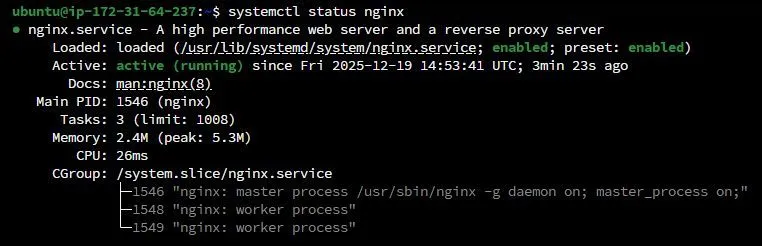
After connecting to the instance, I installed Nginx and verified that the web server was running.
Nginx is a web server that can also be used as a reverse proxy and load balancer.
Step 3: Configure network access
To access the webpage externally, the instance needed appropriate network connectivity and security group rules permitting HTTP traffic on port 80.
This helped me understand that running a service and making it reachable over the internet are two different things.
Step 4: Verify the deployment
I opened the EC2 instance's public IP address in my browser and confirmed that the Nginx default webpage was accessible.
That was the key result: a working web server running on AWS.
Key takeaways
- EC2 provides the compute infrastructure.
- Nginx serves HTTP requests.
- Security groups control permitted network traffic.
- A public IP alone does not guarantee accessibility; routing and firewall rules must also be correct.
What's next?
I want to build on this foundation by exploring custom web pages, domain configuration, HTTPS, and deployment automation.
I'm learning cloud concepts one practical project at a time.
Question for the community: If you were improving this deployment, would you start with HTTPS, a custom domain, or automated installation using a script?
#AWS #AmazonEC2 #Nginx #CloudEngineering
Enjoyed reading this content? Let the author know!
Your likes, comments, shares, and saves help creators reach more builders.

Loading recommendations
Loading article