
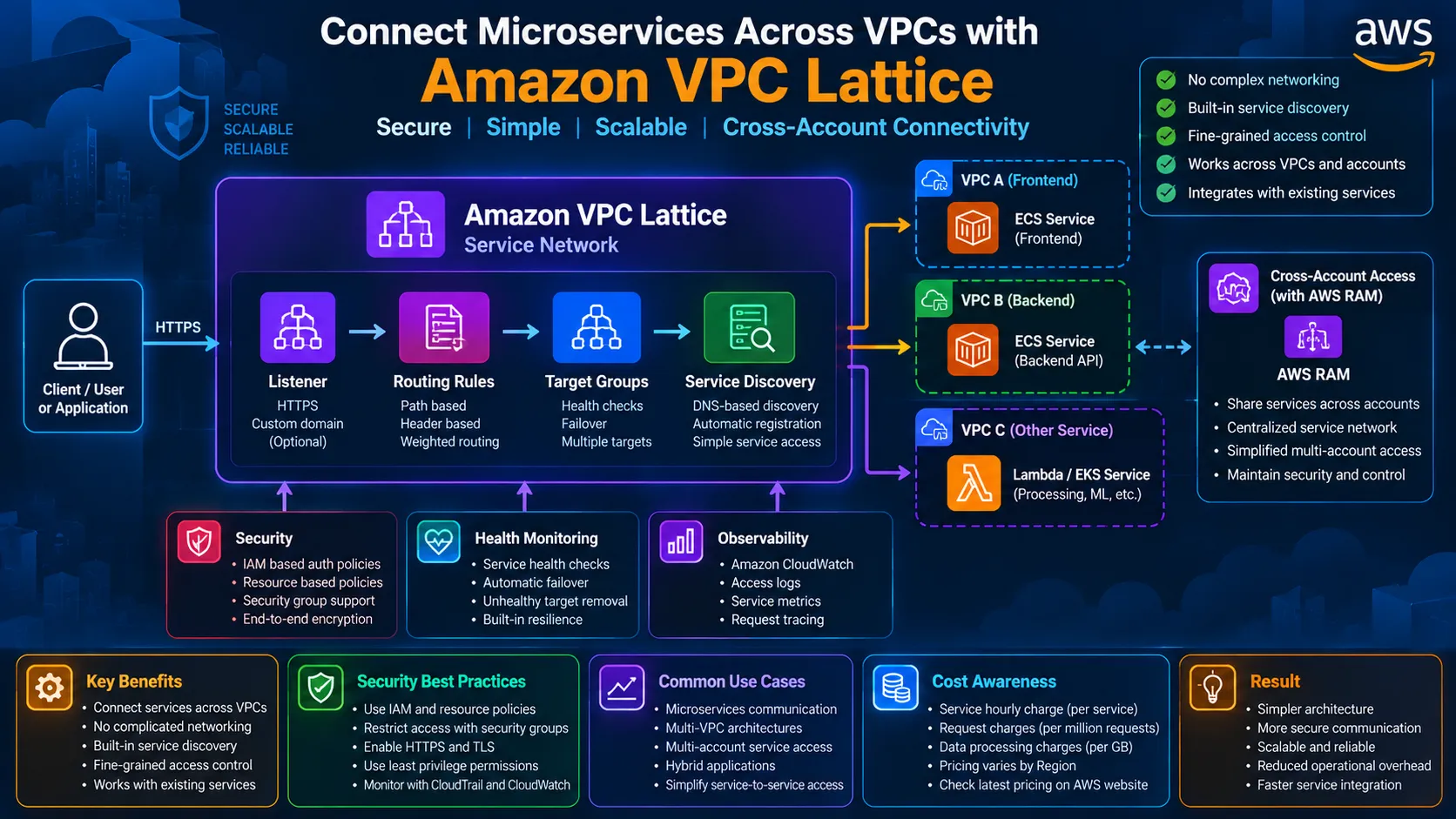
Connect Microservices Across VPCs with Amazon VPC Lattice
Learn how Amazon VPC Lattice can simplify service-to-service communication across VPCs and AWS accounts. This practical DevOps guide covers service networks, ECS/EKS/Lambda integration, routing, health checks, IAM-based authorization, observability, cross-account connectivity, cost considerations, and production best practices.

Connect Microservices Across VPCs with Amazon VPC Lattice
Modern applications are increasingly built as distributed microservices.
A typical application may have:
- Frontend service
- Authentication service
- User service
- Payment service
- Order service
- Notification service
- Database service
- AI or ML service
As the number of services grows, networking becomes complicated.
Different services may run in:
- Different VPCs
- Different Availability Zones
- Different AWS accounts
- Amazon ECS
- Amazon EKS
- Amazon EC2
- AWS Lambda
Traditional approaches can require a combination of VPC peering, Transit Gateway, load balancers, DNS configuration, security groups, and custom service discovery.
Amazon VPC Lattice provides another approach.
It creates a service-network layer that allows applications to communicate through a consistent service-to-service connectivity model.
The main idea is:
Connect services instead of building complicated network connections between every VPC.
1. What Is Amazon VPC Lattice?
Amazon VPC Lattice is an application networking service designed to connect and secure services across VPCs and AWS accounts.
A service can represent an independently deployable application component.
For example:
Frontend Service
|
↓
Order Service
|
↓
Payment Service
|
↓
Notification Service
|
↓
Order Service
|
↓
Payment Service
|
↓
Notification Service
These services may not necessarily run in the same VPC.
With VPC Lattice, they can be connected through a service network.
A simplified architecture is:
1
2
3
4
5
6
7
8
9
10
            VPC Lattice

          Service Network

                 |

    +------------+------------+

    |            |            |

    ↓            ↓            ↓

 ECS Service  Lambda       EKS Service

    |            |            |

    ↓            ↓            ↓

   VPC A        VPC B        VPC C
The application can communicate through the service-network model without creating a separate networking design for every service pair.
2. Why VPC Lattice?
Imagine an organization with:
1
2
3
5 VPCs

10 AWS accounts

50 microservices
A traditional architecture can quickly become difficult to manage.
You may need:
1
2
3
4
5
6
7
8
9
10
11
VPC Peering

    |

    +---- Route Tables

    |

    +---- Security Groups

    |

    +---- DNS

    |

    +---- Load Balancers

    |

    +---- Service Discovery
As the environment grows, the number of networking relationships also increases.
VPC Lattice provides a logical service-network layer:
Application
|
↓
VPC Lattice Service Network
|
+---- Service A
+---- Service B
+---- Service C
+---- Service D
|
↓
VPC Lattice Service Network
|
+---- Service A
+---- Service B
+---- Service C
+---- Service D
This makes service connectivity more application-oriented.
3. Core VPC Lattice Components
A production implementation usually involves several components.
Service
A service represents an independently deployable application component.
Examples:
1
2
3
4
payment-service

order-service

user-service

inventory-service
A service can use targets such as:
- EC2 instances
- IP addresses
- ECS tasks
- Kubernetes Pods
- Lambda functions
- Application Load Balancers
Target Group
A target group contains the resources that actually run the service.
Example:
1
2
3
4
5
6
7
Payment Service

      |

      ↓

Target Group

   /   |   \

  /    |    \

ECS   ECS   ECS
Task Task Task
VPC Lattice health checks can determine which targets are healthy.
Listener
A listener receives requests for a service.
Example:
1
2
3
4
5
6
7
8
9
10
HTTPS :443

    |

    ↓

VPC Lattice Listener

    |

    ↓

Listener Rule

    |

    ↓

Target Group
Listener rules can determine where traffic should go.
Service Network
The service network is the logical boundary connecting services and clients.
Example:
1
2
3
4
5
Service Network

      |

+-----+-----+

|     |     |

↓     ↓     ↓
API Payment Order
VPC VPC VPC
VPC VPC VPC
Clients and services associated with the same service network can communicate when authorization and network access requirements allow it.
4. VPC Lattice Architecture for Microservices
Consider an e-commerce platform.
Frontend:
1
2
3
4
VPC A

  |

  ↓

ECS Frontend
Backend:
1
2
3
4
VPC B

  |

  ↓

ECS Order Service
Payments:
1
2
3
4
VPC C

  |

  ↓

Lambda Payment Service
All three can participate in the same service network.
Architecture:
1
2
3
4
5
6
7
8
9
10
11
12
13
                Users

                  |

                  ↓

           Frontend Service

                  |

                  ↓

         VPC Lattice Network

          /        |        \

         /         |         \

        ↓          ↓          ↓

   Order API   Payment API   Inventory

      |            |             |

     ECS         Lambda         EKS
This creates a clean service-to-service architecture.
5. VPC Lattice with Amazon ECS
Amazon ECS is a natural use case for VPC Lattice.
Example:
1
2
3
4
5
6
7
8
9
10
11
Client

  |

  ↓

VPC Lattice

  |

  ↓

ECS Service

  |

+---+---+

|   |   |

↓   ↓   ↓
Task Task Task
For ECS services using the appropriate networking configuration, ECS tasks can be registered with VPC Lattice target groups.
A typical production architecture could be:
1
2
3
4
5
6
7
8
9
10
Service Network

      |

      ↓

Order Service

      |

      ↓

ECS Target Group

   /    |    \

  ↓     ↓     ↓

Task  Task  Task
Health checks continuously determine target availability.
6. VPC Lattice with Amazon EKS
VPC Lattice can also connect Kubernetes workloads.
Example:
1
2
3
4
5
6
7
8
9
10
EKS Cluster

    |

    +---- User Service

    |

    +---- Order Service

    |

    +---- Payment Service

            |

            ↓

      VPC Lattice
This is useful when different application teams run workloads across separate clusters or VPCs.
A platform team can create common networking policies while application teams manage their own services.
7. VPC Lattice with AWS Lambda
Serverless applications can also participate.
Example:
1
2
3
4
5
6
7
ECS Application

      |

      ↓

VPC Lattice

      |

      ↓

Lambda Payment Service
This is useful when an organization combines:
- Containers
- Kubernetes
- Serverless
- EC2 workloads
Instead of designing a completely different communication model for each compute platform, VPC Lattice provides a common service-network approach.
8. VPC Lattice with Application Load Balancer
An Application Load Balancer can also be used as a target.
Architecture:
1
2
3
4
5
6
7
8
9
10
11
12
VPC Lattice

     |

     ↓

  Target

     |

     ↓

   ALB

     |

 +---+---+

 |       |

 ↓       ↓

ECS     ECS
This can be useful when an existing application already uses an ALB and you want to expose that application through a VPC Lattice service.
9. Service Discovery
Microservices need to find each other.
Without service discovery:
1
2
3
4
5
6
7
Order Service

     |

     ↓

Hard-coded IP

     |

     ↓

Payment Service
This is fragile.
With a service-oriented architecture:
1
2
3
4
5
6
7
8
9
10
Order Service

     |

     ↓

Payment Service

     |

     ↓

VPC Lattice

     |

     ↓

Healthy Payment Targets
The application can communicate with the logical service rather than depending on individual server addresses.
This is especially useful when targets scale dynamically.
10. Routing with Listener Rules
VPC Lattice supports routing rules.
For example:
1
2
3
4
5
6
7
8
9
10
11
12
13
14
/payments

     |

     ↓

Payment Service


/orders

     |

     ↓

Order Service


/users

     |

     ↓

User Service
You can also use conditions such as headers and other supported listener-rule conditions.
A simplified design is:
1
2
3
4
5
HTTPS Listener

      |

  +---+---+

  |       |

  ↓       ↓
/orders /payments
| |
↓ ↓
Order Payment
Target Target
Group Group
| |
↓ ↓
Order Payment
Target Target
Group Group
This keeps routing logic close to the service-network layer.
11. Weighted Routing
Weighted target groups can be useful for controlled releases.
For example:
1
2
3
4
5
6
7
8
9
10
11
New Version

    10%

      |

      ↓

Target Group A


Old Version

    90%

      |

      ↓

Target Group B
Architecture:
1
2
3
4
5
6
7
8
9
10
         VPC Lattice

              |

              ↓

         Listener Rule

              |

      +-------+-------+

      |               |

      ↓               ↓

   Version A       Version B

      10%             90%
This can help implement gradual traffic shifting.
Always combine traffic shifting with application health monitoring before increasing the weight.
12. Health Checks
Reliable service communication requires healthy targets.
Example:
1
2
3
4
5
6
VPC Lattice

     |

     ↓

Target Group

  /   |   \

 ↓    ↓    ↓
Healthy Healthy Unhealthy
Traffic should be directed toward healthy targets.
A practical health endpoint might be:
1
GET /health
Expected response:
1
HTTP 200
The endpoint should verify the application is capable of serving requests without performing unnecessarily expensive operations.
13. Security Model
VPC Lattice security can be thought of as multiple layers.
1
2
3
4
5
6
7
8
9
10
11
12
13
14
15
16
Client

  |

  ↓

Network Association

  |

  ↓

Security Groups / Network Controls

  |

  ↓

VPC Lattice Auth Policy

  |

  ↓

Service

  |

  ↓

Target
Do not rely on only one security mechanism.
Use layered controls.
14. IAM-Based Authorization
VPC Lattice supports authorization policies using IAM-style policy documents.
For example:
1
2
3
4
5
6
7
8
9
10
Service Network

      |

      ↓

Authentication

      |

      ↓

Authorization Policy

      |

      ↓

Payment Service
A policy can restrict which principals are allowed to access a service.
The principle should be:
1
Allow only what is required.
Avoid creating policies that effectively allow every principal to call every internal service.
15. Example Authorization Policy
A simplified conceptual policy could look like:
{
"Version": "2012-10-17",
"Statement": [
{
"Effect": "Allow",
"Principal": "",
"Action": "vpc-lattice-svcs:Invoke",
"Resource": ""
}
]
}
"Version": "2012-10-17",
"Statement": [
{
"Effect": "Allow",
"Principal": "",
"Action": "vpc-lattice-svcs:Invoke",
"Resource": ""
}
]
}
This is intentionally simplified.
In production, do not use an unrestricted policy like this without carefully evaluating the security requirements.
Instead, restrict:
- Principals
- Services
- Actions
- Conditions
- Organization/account boundaries
Use the most restrictive policy that satisfies the application requirement.
16. Creating a Service Network
The AWS CLI can be used to create a service network.
Example:
1
2
aws vpc-lattice create-service-network \

  --name ecommerce-network
For IAM authorization:
1
2
3
aws vpc-lattice create-service-network \

  --name ecommerce-network \

  --auth-type AWS_IAM
When IAM authorization is enabled, configure the corresponding authorization policy.
This allows the service-network layer to participate in a controlled access model.
17. Creating a VPC Lattice Service
Example:
1
2
aws vpc-lattice create-service \

  --name payment-service
After creating the service, configure:
- Target groups
- Listeners
- Routing rules
- Service-network associations
- Access policies
- Monitoring
A service without the required routing and network associations will not automatically provide application connectivity.
18. Creating a Target Group
A target group can be created with the AWS CLI.
Example:
1
2
3
4
aws vpc-lattice create-target-group \

  --name payment-targets \

  --type IP \

  --config file://tg-config.json
Example configuration:
{
"ipAddressType": "IPV4",
"port": 443,
"protocol": "HTTPS",
"protocolVersion": "HTTP1",
"vpcIdentifier": "vpc-xxxxxxxx"
}
"ipAddressType": "IPV4",
"port": 443,
"protocol": "HTTPS",
"protocolVersion": "HTTP1",
"vpcIdentifier": "vpc-xxxxxxxx"
}
The exact configuration depends on the workload.
For ECS tasks using IP targets, make sure the networking configuration and security groups are correct.
19. Creating an HTTPS Listener
A simplified listener configuration can use HTTPS.
Example:
1
2
3
4
5
6
aws vpc-lattice create-listener \

  --name payment-listener \

  --protocol HTTPS \

  --port 443 \

  --service-identifier svc-xxxxxxxx \

  --default-action file://listener-config.json
A listener then forwards traffic to the appropriate target group.
For production systems, HTTPS should be preferred when protecting application traffic.
20. Security Group Considerations
Security groups still matter.
For workloads behind VPC Lattice, configure security groups so that the expected VPC Lattice traffic can reach the target.
For example:
1
2
3
4
5
6
7
8
9
10
VPC Lattice

     |

     ↓

Managed Prefix List

     |

     ↓

Security Group

     |

     ↓

ECS Task
Do not simply open the application port to:
1
0.0.0.0/0
unless there is a specific and justified requirement.
Restrict inbound access as much as possible.
21. Cross-Account Architecture
Large organizations commonly separate environments by account.
Example:
1
2
3
4
5
AWS Organization

      |

 +----+----+

 |         |

 ↓         ↓
Account A Account B
Frontend Backend
Frontend Backend
VPC Lattice can be combined with AWS Resource Access Manager for sharing services across accounts.
Architecture:
1
2
3
4
5
6
7
8
9
10
11
12
13
14
   Account A

      |

   Frontend

      |

      ↓

 VPC Lattice

      |

      ↓

   AWS RAM

      |

      ↓

   Account B

      |

   Backend
This can be useful for centralized platform teams.
For example:
Platform Account
|
↓
Service Network
|
+----+----+----+
| | | |
↓ ↓ ↓ ↓
App App App App
Acct Acct Acct Acct
|
↓
Service Network
|
+----+----+----+
| | | |
↓ ↓ ↓ ↓
App App App App
Acct Acct Acct Acct
22. Observability
Networking without observability makes troubleshooting difficult.
VPC Lattice provides metrics and access logging capabilities.
A useful monitoring architecture is:
1
2
3
4
5
6
7
8
9
10
11
12
13
14
15
16
17
18
19
20
Application

    |

    ↓

VPC Lattice

    |

    +---- Metrics

    |

    +---- Access Logs

    |

    ↓

CloudWatch

    |

    +---- Dashboard

    |

    +---- Alarms

    |

    +---- Logs

    |

    ↓

DevOps Team
Access logs can be delivered to supported destinations such as:
- CloudWatch Logs
- Amazon S3
- Amazon Kinesis Data Firehose
23. Example Monitoring Strategy
Track important signals such as:
1
2
3
4
5
Request Count

Error Rate

Target Health

Latency

HTTP Status Codes
A simple operational model is:
1
2
3
4
5
6
7
8
9
10
11
12
13
14
15
Normal

  |

  ↓

Monitor


Error Rate ↑

  |

  ↓

CloudWatch Alarm

  |

  ↓

Incident Investigation

  |

  ↓

Remediation
Avoid creating alarms for every small fluctuation.
Alerts should be actionable.
24. Cost Considerations
VPC Lattice is a managed service, but it is not automatically free.
Pricing can include service hourly charges, request/connection charges, and data-processing charges depending on the configuration and Region.
AWS currently lists pricing examples using US East (N. Virginia), but actual pricing varies by Region.
Therefore:
1
2
3
4
5
6
7
8
9
Traffic Volume

     +

Number of Services

     +

Request Rate

     +

Data Processed

     =

VPC Lattice Cost
Before deploying VPC Lattice at large scale:
- Estimate traffic.
- Count services.
- Estimate requests.
- Estimate data processing.
- Check the current regional pricing.
- Monitor actual usage after deployment.
Do not assume that replacing one networking architecture with another will always reduce cost.
Evaluate both operational complexity and total cost.
25. Cost Optimization
Practical cost controls include:
- Remove unused services.
- Avoid unnecessary high-volume traffic through the service network.
- Monitor request volume.
- Monitor data processing.
- Review service count regularly.
- Use AWS Cost Explorer and billing reports.
- Tag services consistently.
- Review architecture before large-scale rollout.
A good architecture should balance:
1
2
3
4
5
6
7
Cost

  +

Security

  +

Reliability

  +

Operational Simplicity
26. Reliability Design
For production systems:
- Deploy targets across multiple Availability Zones.
- Configure health checks.
- Monitor target health.
- Use multiple healthy targets.
- Avoid single points of failure.
- Define timeout behavior carefully.
- Monitor error rates and latency.
- Test failure scenarios.
A simple resilient design:
1
2
3
4
5
6
7
8
9
10
11
12
13
      VPC Lattice

           |

    +------+------+

    |             |

    ↓             ↓

   AZ-A          AZ-B

    |             |

  ECS           ECS

  Task          Task

    |             |

    +------+------+

           |

        Backend
If one target fails, healthy targets can continue serving requests.
27. Timeout Design
Timeouts are important in distributed systems.
If Service A waits too long for Service B:
1
2
3
4
5
6
7
8
9
10
11
12
13
Service A

    |

    ↓

Service B

    |

    ↓

  Slow

    |

    ↓

Timeout

    |

    ↓

Service A also becomes slow
This can create cascading failures.
Define reasonable application and connection timeouts.
Do not allow one slow dependency to consume all available application resources.
28. Microservice Failure Example
Consider:
1
2
3
4
5
6
7
8
9
10
Frontend

   |

   ↓

Order API

   |

   ↓

Payment API

   |

   ↓

Payment Database
Suppose the database becomes slow.
Then:
1
2
3
4
5
6
7
8
9
10
11
12
13
Database Latency ↑

       |

       ↓

Payment API Latency ↑

       |

       ↓

Order API Latency ↑

       |

       ↓

Checkout Latency ↑

       |

       ↓

User Experience ↓
Observability and timeout controls should help identify the dependency causing the problem.
This is why networking, monitoring, and application reliability should be designed together.
29. VPC Lattice and DevOps
VPC Lattice fits well into a DevOps workflow.
Example:
Developer
|
↓
GitHub
|
↓
CI/CD
|
↓
ECS / EKS / Lambda
|
↓
VPC Lattice
|
↓
CloudWatch
|
↓
Alerts
|
↓
DevOps Team
|
↓
GitHub
|
↓
CI/CD
|
↓
ECS / EKS / Lambda
|
↓
VPC Lattice
|
↓
CloudWatch
|
↓
Alerts
|
↓
DevOps Team
Infrastructure as Code can define:
- VPC Lattice service networks
- Services
- Target groups
- Listeners
- Authorization policies
- VPC associations
- Monitoring
- Security configuration
This makes the network layer version-controlled and reproducible.
30. Terraform Example
A simplified Terraform structure could look like:
1
2
3
4
5
6
7
8
terraform/

|

+---- main.tf

+---- variables.tf

+---- outputs.tf

+---- iam.tf

+---- lattice.tf

+---- monitoring.tf
Conceptually:
1
2
3
4
5
6
7
8
9
10
11
12
VPC

  |

  ↓

Service Network

  |

  +---- Service

  |

  +---- Target Group

  |

  +---- Listener

  |

  +---- Auth Policy
The exact Terraform resource names and arguments should be checked against the provider version being used.
Always pin and test provider versions in production.
31. When Should You Use VPC Lattice?
VPC Lattice can be a strong choice when:
- You operate many microservices.
- Services are distributed across VPCs.
- Multiple AWS accounts are involved.
- You use ECS, EKS, Lambda, or EC2 together.
- You need centralized service networking.
- You need application-level authorization.
- You want managed service discovery and routing.
- You want to reduce custom networking complexity.
32. When It May Not Be Necessary
Do not introduce VPC Lattice simply because it is an AWS service.
A small application such as:
1
2
3
4
5
6
7
One VPC

  |

  +---- ALB

  |

  +---- ECS

  |

  +---- RDS
may not require VPC Lattice.
Additional networking services introduce:
- Cost
- Configuration
- IAM policies
- Operational knowledge
- Monitoring requirements
Choose the simplest architecture that satisfies the requirements.
33. VPC Lattice vs Traditional Networking
Traditional approach:
1
2
3
4
5
6
7
8
9
10
11
12
13
14
15
VPC A

  |

  +---- Peering / Transit Gateway

  |

  ↓

VPC B

  |

  +---- DNS

  |

  +---- Routes

  |

  +---- Security Groups

  |

  ↓

Service
VPC Lattice approach:
1
2
3
4
5
6
7
8
9
10
Client

  |

  ↓

Service Network

  |

  +---- Service A

  |

  +---- Service B

  |

  +---- Service C
The important difference is that VPC Lattice focuses on application services and service-to-service connectivity rather than requiring every application team to manage the entire underlying network path.
34. Production Security Checklist
Before production use, verify:
[ ] HTTPS is configured where appropriate.
[ ] IAM permissions follow least privilege.
[ ] VPC Lattice auth policies are restrictive.
[ ] Security groups allow only required traffic.
[ ] Network ACLs are reviewed.
[ ] Cross-account sharing is intentional.
[ ] AWS RAM permissions are controlled.
[ ] Access logs are enabled where required.
[ ] CloudWatch monitoring is configured.
[ ] Sensitive information is not exposed in logs.
[ ] Health checks are configured correctly.
[ ] Timeouts are appropriate.
[ ] Cost monitoring is enabled.
[ ] Failure scenarios have been tested.
35. Practical Portfolio Project
A strong DevOps portfolio project could be:
"Multi-VPC Microservices Platform with Amazon VPC Lattice"
Architecture:
1
2
3
4
5
6
7
8
9
10
             Users

               |

               ↓

          Frontend

               |

               ↓

      VPC Lattice Network

      /        |        \

     /         |         \

    ↓          ↓          ↓
Order API Payment API User API
| | |
ECS Lambda EKS
| | |
+------------+------------+
|
CloudWatch
|
↓
Alerts
| | |
ECS Lambda EKS
| | |
+------------+------------+
|
CloudWatch
|
↓
Alerts
Add:
- Terraform
- ECS
- EKS
- Lambda
- VPC Lattice
- IAM
- AWS RAM
- CloudWatch
- CloudTrail
- Security Groups
- HTTPS
- Cost monitoring
Then document:
- Architecture
- Security model
- Routing
- Authorization
- Observability
- Failure testing
- Cost considerations
- Infrastructure as Code
This demonstrates practical cloud networking skills rather than only basic AWS deployment knowledge.
36. Final Architecture
A mature architecture can look like:
1
2
3
4
5
6
7
8
9
10
11
12
13
14
15
16
17
18
19
20
                     Users

                       |

                       ↓

                Frontend Service

                       |

                       ↓

            +---------------------+

            |  VPC Lattice        |

            |  Service Network    |

            +---------------------+

              /        |        \

             /         |         \

            ↓          ↓          ↓

         ECS API    EKS API   Lambda API

          VPC A       VPC B      VPC C

            |          |          |

            +----------+----------+

                       |

                       ↓

                   Databases
Security:
1
2
3
4
5
6
7
8
9
IAM

 +

Auth Policies

 +

Security Groups

 +

HTTPS

 +

AWS RAM Controls
Observability:
1
2
3
4
5
6
7
8
9
10
VPC Lattice

     |

     +---- Metrics

     +---- Access Logs

     |

     ↓

CloudWatch

     |

     ↓

Alerts / Dashboards
Operations:
1
2
3
4
5
6
7
8
9
10
Terraform

     |

     ↓

Infrastructure

     |

     ↓

CI/CD

     |

     ↓

Application Services
Conclusion
Amazon VPC Lattice provides a service-oriented approach to connecting microservices across VPCs and AWS accounts.
Instead of building a large collection of application-specific networking connections, teams can use a service network to create a consistent communication layer.
The most important concepts are:
1
2
3
4
5
6
7
8
9
10
11
Service

   ↓

Target Group

   ↓

Listener

   ↓

Service Network

   ↓

Authorization

   ↓

Observability
When combined with ECS, EKS, Lambda, IAM, AWS RAM, CloudWatch, and Infrastructure as Code, VPC Lattice can simplify complex microservice networking while providing strong controls for routing, authorization, monitoring, and reliability.
The key DevOps principle is:
1
2
3
4
5
Connect services intentionally.

Secure them with least privilege.

Monitor the traffic.

Control the cost.

Test failure scenarios.
A good service-network architecture should make microservices easier to operate without hiding the security, reliability, and cost decisions behind the abstraction.
Enjoyed reading this content? Let the author know!
Your likes, comments, shares, and saves help creators reach more builders.

Loading recommendations
Loading article