
Automating File Uploads with Amazon S3 and AWS Lambda
Learn how Amazon S3 and AWS Lambda work together to automate file-processing tasks in AWS. This beginner-friendly guide explains the architecture, workflow, benefits, and practical use cases of event-driven automation.

Automating File Uploads with Amazon S3 and AWS Lambda
Introduction
Cloud computing makes it easier to store files and automate tasks without managing physical servers. Amazon Web Services (AWS) provides several services that help developers build scalable and efficient applications.
In this article, we will explore how Amazon Simple Storage Service (Amazon S3) and AWS Lambda can work together to automate tasks whenever a file is uploaded.
What is Amazon S3?
Amazon S3 is an object storage service that allows users to store and retrieve files such as images, documents, videos, and application data.
Some important features of Amazon S3 include:
- Scalability to store large amounts of data.
- High durability of stored objects.
- Access control using AWS security features.
- Integration with other AWS services.
For example, a website can use Amazon S3 to store profile pictures, documents, and uploaded images.
What is AWS Lambda?
AWS Lambda is a serverless computing service that runs code in response to events without requiring users to manage servers.
With Lambda, developers can focus on writing code instead of maintaining server infrastructure.
Some common use cases include:
- Processing uploaded files.
- Generating thumbnails for images.
- Validating data.
- Automating backend tasks.
- Responding to application events.
How Do S3 and Lambda Work Together?
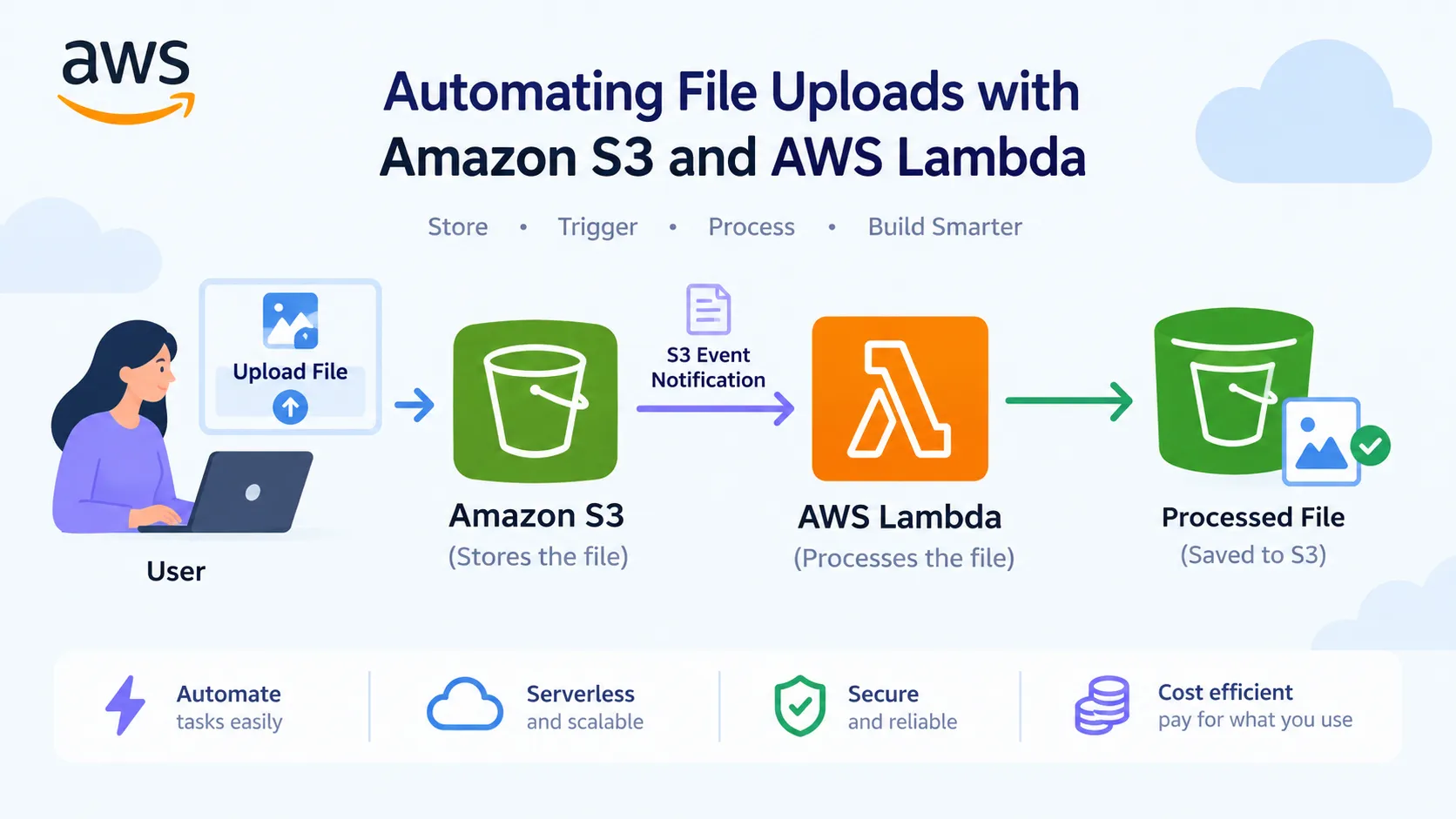
Imagine building a website where users upload images. Instead of manually processing each image, we can configure AWS Lambda to run automatically when a new image is uploaded to an S3 bucket.
The workflow is simple:
- A user uploads an image to an Amazon S3 bucket.
- Amazon S3 generates an object-created event.
- The event triggers an AWS Lambda function.
- The Lambda function processes the uploaded image.
- The processed result can be saved to another S3 bucket or used by another application.
Architecture:
User → Amazon S3 → S3 Event Notification → AWS Lambda → Processed Output
A Practical Example
Consider an online photo-sharing application.
Whenever a user uploads a high-resolution image, a Lambda function can automatically generate a smaller thumbnail for faster website loading.
This helps reduce manual work and makes the application more efficient.
The same approach can be adapted for document validation, log processing, and automated data workflows.
Benefits of Using S3 with Lambda
1. Automation: Tasks can start automatically when an event occurs.
2. Serverless execution: There is no need to manage servers for the Lambda function.
3. Scalability: These services can support workloads that grow with application demand.
4. Cost efficiency: Lambda charges are based on requests and execution duration, subject to the applicable pricing model. S3 storage and requests are billed separately.
5. AWS integration: Both services can be integrated with other AWS services to build more advanced applications.
Important Security Considerations
When implementing this architecture, security should be considered from the beginning.
- Use an appropriate IAM execution role for the Lambda function.
- Grant only the S3 permissions required for the task.
- Avoid making buckets public unless there is a justified requirement.
- Configure event filters when necessary to avoid unintended repeated processing.
- Monitor execution logs and errors using Amazon CloudWatch.
These practices help build a more secure and reliable cloud solution.
Conclusion
Amazon S3 and AWS Lambda demonstrate how cloud services can work together to automate real-world tasks. By combining object storage with event-driven serverless computing, developers can build applications that are easier to maintain and scale.
As I continue learning AWS, exploring how individual services integrate is helping me understand practical cloud architecture and automation.
My next step is to build a small hands-on project using an S3 bucket, an event notification, and a Lambda function.
Thank you for reading!
#AWS #AmazonS3 #AWSLambda #CloudComputing #Serverless #AWSTutorial
Enjoyed reading this content? Let the author know!
Your likes, comments, shares, and saves help creators reach more builders.

Loading recommendations
Loading article