
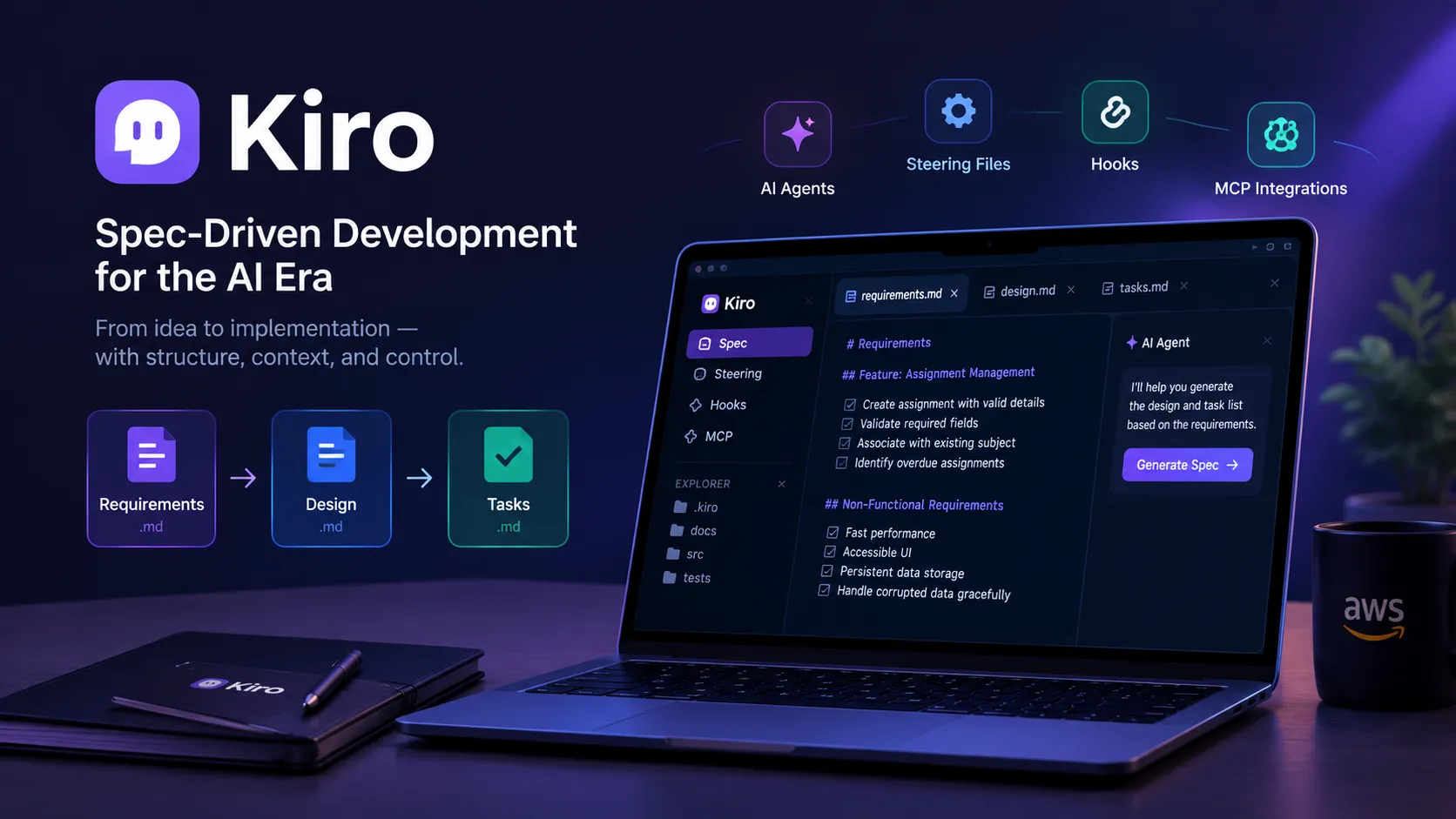
Beyond Vibe Coding: Building Reliable Applications with Spec-Driven Development in Kiro
Discover how Kiro's spec-driven development workflow transforms natural-language ideas into structured requirements, technical designs, and actionable implementation tasks. This practical guide explores AI-assisted software engineering, project context with steering files, automation with agent hooks, MCP integrations, and testing strategies to build more reliable, maintainable applications.

Beyond Vibe Coding: Building Reliable Applications with Spec-Driven Development in Kiro
A practical guide to turning natural-language ideas into structured, testable, and maintainable software with AI-assisted development.
Introduction: The Real Challenge Is Not Writing Code
Software development is evolving rapidly with the emergence of AI-powered development environments. Developers can now describe an idea in natural language and use AI assistance to generate components, implement features, troubleshoot errors, and explore unfamiliar technologies.
However, generating code quickly does not automatically produce reliable software.
A feature may work in its expected scenario but fail when users provide invalid input. A generated component may look correct while violating the application's architecture. An apparently complete application may lack meaningful tests, consistent error handling, or adequate documentation.
This reveals an important distinction: the ability to generate code is not the same as the ability to engineer a dependable software system.
This is where specification-driven development becomes valuable.
Instead of moving directly from an idea to implementation, developers first establish what the system must do, how it should be designed, and how the implementation can be divided into manageable tasks.
AWS Kiro brings this structured approach into an AI-assisted development environment, helping developers connect requirements, design decisions, and implementation activities through an organized workflow.
In this article, we will explore how specification-driven development works, how Kiro supports the process, and how developers can apply these principles to build applications with greater clarity, consistency, and control.
1. Understanding the Limitations of Vibe Coding
Vibe coding is commonly associated with describing an application in natural language, generating code, and refining the result through conversational iterations.
This approach can be useful for experimenting with ideas, creating prototypes, and exploring unfamiliar technologies. Problems can arise, however, when an informal process becomes the primary development strategy for a complex application.
Consider a student study planner that allows users to create subjects, manage assignments, schedule study sessions, and track academic progress.
An initial prompt might be:
"Build a student dashboard with assignments, a weekly calendar, and progress charts."
An AI coding assistant might generate a visually appealing interface with working navigation and sample data. Yet several important questions remain unanswered:
- Can users create assignments without selecting a subject?
- What happens when an assignment's due date has passed?
- Can two study sessions overlap?
- How is progress calculated when no sessions have been completed?
- Does the application preserve information after a browser refresh?
- What happens when locally stored data becomes corrupted?
- How can developers verify that a change has not broken an existing feature?
These are not minor implementation details. They are part of the application's expected behavior.
When such decisions remain implicit, developers may discover missing requirements only after implementation. This can lead to repeated rework, inconsistent behavior, and code that becomes increasingly difficult to maintain.
The solution is not to eliminate experimentation. It is to introduce structure where ambiguity can create expensive mistakes.
2. What Is Specification-Driven Development?
Specification-driven development places a structured description of the intended system at the center of the development process.
Rather than treating a prompt as a complete implementation plan, developers use it as the starting point for explicit engineering artifacts.
A typical workflow follows this sequence:
Requirements → Design → Tasks → Implementation → Validation
Each stage answers a different question.
Requirements: What must the system do?
This stage defines user needs, expected behavior, constraints, acceptance criteria, and exceptional scenarios.
Design: How should the system satisfy those requirements?
This stage establishes the architecture, component responsibilities, data models, interfaces, error-handling strategies, and testing approach.
Tasks: What specific work needs to happen?
This stage decomposes the design into implementation steps that can be executed and reviewed incrementally.
The benefit is traceability. Developers can connect a user need to a design decision, an implementation task, and a corresponding test.
Specifications should also evolve when new information emerges. The objective is to make decisions explicit and changes deliberate rather than relying entirely on conversational context.
3. Introducing Kiro: An AI Development Environment Built Around Structure
Kiro is an AI-powered development environment from AWS designed to support developers throughout the software development process.
One of its distinguishing capabilities is specification-driven development, which helps transform a high-level feature description into structured requirements, a technical design, and an implementation task list.
Instead of asking an AI agent to immediately implement an entire application, developers can collaborate with it to establish expected behavior and a suitable technical approach.
Kiro also provides capabilities such as steering files, agent hooks, and Model Context Protocol (MCP) integrations. These capabilities can help developers provide project-specific context, automate selected workflows, and connect the development environment to compatible external tools.
The capabilities serve different purposes:
- Specs organize feature planning and implementation.
- Steering provides persistent project conventions and guidance.
- Hooks automate configured actions in response to supported events.
- MCP integrations connect the development environment to compatible tools and context sources.
The important principle is that AI assistance becomes more useful when it operates within a clearly defined engineering context.
Explore the official Kiro documentation .
4. The Three Core Artifacts in a Kiro Specification Workflow
Let's explore how the specification workflow can be applied to the student study planner.
4.1 Requirements: Define the Expected Behavior
The first artifact,
requirements.md, describes the intended behavior of a feature.A vague requirement might state:
"The application should support assignment management."
A more useful specification defines observable conditions and outcomes.
Requirement: Assignment Creation
- WHEN a user submits an assignment with valid details, THE SYSTEM SHALL save the assignment and associate it with the selected subject.
- WHEN a user submits an assignment without a title, THE SYSTEM SHALL display a validation message and prevent submission.
- WHEN a user selects a subject that does not exist, THE SYSTEM SHALL reject the invalid association.
- WHEN a user views an assignment whose due date has passed and which is not completed, THE SYSTEM SHALL identify it as overdue.
This style follows the principles of EARS (Easy Approach to Requirements Syntax), which Kiro supports for expressing clear, testable system behavior.
Each statement describes a condition and an observable outcome. Developers can therefore evaluate whether the feature satisfies its requirements rather than relying on subjective judgments.
Requirements should also cover relevant non-functional concerns, including performance, accessibility, security, maintainability, and data handling.
Before moving to design, developers should check for ambiguous wording, conflicting constraints, missing edge cases, and assumptions that have not been validated.
A useful specification describes both the expected success path and how the application should respond when something goes wrong.
4.2 Design: Translate Requirements into an Engineering Approach
Once the requirements are sufficiently clear,
design.md describes how the application will satisfy them.For the study planner, a suitable frontend-focused design could include:
- React components for subjects, assignments, study sessions, and dashboard summaries.
- React Context and
useReducerfor coordinated application state. - A storage abstraction backed by browser LocalStorage.
- Service abstractions for authentication and data access.
- Validation logic for assignment details and study-session scheduling.
- Automated tests for important business rules and user interactions.
The design should explain how these elements interact rather than merely listing technologies.
For example, an assignment form should not independently implement persistence, validation, and dashboard updates. Instead, it can submit data through a defined application-state or service interface. The relevant state update can then trigger the appropriate interface changes.
This separation reduces duplicated logic and makes individual parts easier to test.
The design should also document important decisions and limitations.
If the initial application uses LocalStorage, the design should acknowledge that it provides browser-local persistence rather than a secure, centralized database. Similarly, mock authentication should not be presented as production-grade identity management.
Such distinctions help prevent an early prototype from being mistaken for a production-ready system.
4.3 Tasks: Convert the Design into Executable Work
The third artifact,
tasks.md, translates the approved approach into discrete implementation tasks.A simplified task breakdown might include:
- Establish the React application structure and routing.
- Implement the application-state model and persistence abstraction.
- Create subject management with validation.
- Implement assignment creation, editing, completion, and deletion.
- Build the weekly study planner.
- Add progress calculations and dashboard summaries.
- Implement error states and data-recovery behavior.
- Write automated tests for critical business rules.
- Verify the complete application against its acceptance criteria.
Tasks should have clear outcomes and appropriate dependencies.
For example, dashboard calculations should be based on an agreed data model rather than implemented independently before the application state has been defined.
This structure improves reviewability. Developers can inspect a focused implementation, validate it, and address problems before proceeding to dependent work.
Kiro's standard specification workflow supports reviewing requirements, design, and tasks before proceeding through implementation.
For smaller, well-understood features, Kiro also offers Quick Spec, which generates the three artifacts in a single pass after clarifying questions. The standard workflow is preferable when requirements or design decisions need more careful iteration and review.
Explore the Feature Specs documentation and Quick Spec guide .
5. A Practical Walkthrough: Building an Assignment Management Feature
Let's turn the theory into a repeatable development process.
Step 1: Describe the Problem, Not Just the Interface
Begin with the user need:
"Students need to organize assignments by subject, track deadlines, prioritize upcoming work, and mark completed assignments."
Then establish the feature boundaries.
An assignment might require a title, a subject, a due date, and a priority. Completion status must persist between sessions. Assignments associated with deleted subjects must be handled consistently.
This gives the AI agent meaningful context before implementation begins.
Step 2: Ask for Explicit Requirements
A useful starting prompt is:
"Create a specification for assignment management in a student study planner. Define user stories, testable acceptance criteria, input validation, assignment-subject relationships, overdue behavior, persistence expectations, and relevant edge cases. Use the existing project architecture and identify assumptions that require clarification. Do not begin implementation until the requirements have been reviewed."
The purpose is not to dictate every line of code. It is to establish expected behavior and invite the agent to identify missing decisions.
Review the resulting requirements carefully.
If the system must support editing assignments, ensure the requirements cover updates. If assignment completion must affect dashboard statistics, make that relationship explicit.
Step 3: Review the Technical Design
Next, ask the agent to develop a design that satisfies the approved requirements while respecting the existing architecture.
Consider the following questions:
- Is state management consistent with the rest of the application?
- Is validation implemented in a reusable location?
- Are data relationships clearly defined?
- What happens when persistence fails?
- Can the logic be tested independently of the user interface?
- Are security assumptions appropriate for the intended environment?
Do not accept an architecture simply because it looks sophisticated. The best design is one that satisfies the requirements with appropriate complexity.
Step 4: Implement Incrementally
Once the tasks are ready, implement them in a sensible order.
Begin with the data model and core behavior. Continue with the user interface, integration, and supporting tests.
After each meaningful change, inspect the modified files and check whether the implementation still matches the specification.
If the agent proposes a dependency, changes a shared interface, or modifies unrelated functionality, review the impact before accepting the change.
Step 5: Validate the Result
Consider these test scenarios:
| Scenario | Expected behavior |
|---|---|
| Valid assignment | Assignment is created and displayed |
| Missing title | Validation prevents submission |
| Invalid subject association | Invalid assignment is rejected |
| Overdue incomplete assignment | Assignment is identified as overdue |
| Completed assignment | Status and relevant summaries update |
| Browser refresh | Persisted assignment data is restored |
| Corrupted stored data | Application handles the failure safely |
These are proposed test cases, not proof that an application has passed them. They must be implemented and executed against the actual application.
A task being marked complete is not equivalent to independent verification that its requirement has been satisfied.
6. Going Beyond Specifications: Steering, Hooks, and MCP
Specifications establish the intended behavior of a feature. Other Kiro capabilities can help maintain consistency and support repeatable development workflows.
Steering: Give the Agent Persistent Project Context
Steering files provide project-specific instructions and conventions to guide the AI agent.
For a React application, useful guidance might specify:
- Use functional React components and the existing JSX conventions.
- Keep business logic separate from presentation where practical.
- Reuse established design tokens and shared components.
- Validate user input and handle failures explicitly.
- Write tests for critical business logic.
- Avoid introducing dependencies without a clear justification.
These instructions help the agent align its suggestions with the existing codebase.
Steering should describe meaningful architectural and engineering constraints rather than prescribe every implementation detail. Overly restrictive instructions can make legitimate changes harder to implement.
Hooks: Automate Repetitive Development Activities
Kiro's agent hooks can automate configured actions when supported events occur.
Depending on the workflow and configuration, hooks can help with activities such as reviewing changed code, running selected checks, or maintaining supporting documentation.
For example, a team could configure a workflow to run relevant validation after selected file changes.
Automation should be introduced carefully. A hook that runs at the wrong time or triggers an expensive operation unnecessarily can slow development rather than improve it.
Start with a small, predictable workflow, verify its behavior, and expand it only when the benefits are clear.
MCP: Connect Development to External Context
The Model Context Protocol provides a standardized way for compatible AI applications to interact with external tools and data sources.
Where suitable MCP servers are available and configured, Kiro can use these integrations to access relevant project information or work with supported tools.
This can reduce the need to repeatedly copy context into a conversation.
However, integrations should follow least-privilege principles. Grant only the access needed for the task, review what data is exposed, and understand whether a connected tool can modify external resources.
These capabilities are most valuable when they reinforce an intentional development process rather than adding complexity for its own sake.
7. Testing and Reliability: The Developer Remains Accountable
One important misconception about AI-assisted development is that a well-written specification guarantees a correct implementation.
It does not.
A specification can contain incorrect assumptions. A design can overlook operational constraints. Generated code can contain defects. Tests can be incomplete or pass without exercising important scenarios.
The specification workflow provides a structure for identifying and reducing these risks, but validation remains essential.
A practical verification strategy should include several layers.
Unit testing
Test isolated functions such as progress calculations, date comparisons, validation rules, and state transformations.
Integration testing
Verify that related components work together correctly, including persistence, state updates, and subject-assignment relationships.
User-interface testing
Test important user journeys, including creating an assignment, editing it, completing it, and handling validation failures.
Regression testing
After a change, rerun relevant tests to confirm that existing behavior has not been unintentionally broken.
Security and operational review
For applications that handle real users or sensitive data, review authentication, authorization, secret management, dependency security, data exposure, logging, and deployment configuration.
The level of verification should match the application's risk.
A student prototype and a financial application should not be held to identical operational requirements. Both, however, benefit from clear expectations and evidence that the implemented behavior has been checked.
8. Important Lessons for Developers Adopting AI-Assisted Engineering
The most effective use of an AI development environment is not necessarily the one that generates the most code in the shortest time.
It is the one that reduces uncertainty while preserving engineering judgment.
Several practices make a meaningful difference.
Provide specific context. Describe the user, the problem, the expected behavior, the technical constraints, and the acceptance criteria.
Review before implementation. Requirements and architecture decisions are cheaper to correct before they are embedded throughout the codebase.
Work in manageable increments. Smaller changes are easier to understand, test, review, and reverse.
Treat generated artifacts as proposals. The agent can help draft requirements and designs, but developers must confirm that they are accurate and appropriate.
Maintain a single source of truth. When requirements change, update the relevant specifications and verify that implementation tasks and tests remain aligned.
Measure outcomes rather than activity. Evaluate whether the application satisfies its requirements, whether tests cover important behavior, and whether the code remains understandable and maintainable.
These practices are useful beyond any single tool. They reflect fundamental software engineering principles applied to a development environment in which AI can participate in more of the workflow.
9. What This Means for the Future of Software Development
AI-assisted development is expanding the range of tasks that developers can delegate to intelligent tools.
As implementation becomes easier to initiate, the ability to define the correct problem, make sound architectural decisions, evaluate trade-offs, and verify results becomes even more important.
Specification-driven development offers one approach to this challenge.
It provides a shared structure for expressing intent, evaluating technical decisions, and tracking implementation progress. In Kiro, these practices are integrated into an AI-assisted development environment rather than being left entirely to informal conversations and manually maintained notes.
This does not eliminate the need for software engineering expertise. Instead, it changes where that expertise can have the greatest impact.
Developers can devote more attention to requirements quality, system boundaries, reliability, and user outcomes while using AI to assist with implementation and repetitive work.
The future is not simply about asking AI to write more code. It is about creating a disciplined collaboration between human judgment and AI capabilities.
Conclusion
Building reliable software requires more than turning ideas into working interfaces. It requires a clear understanding of user needs, deliberate architecture, manageable implementation steps, and meaningful validation.
Kiro's specification-driven workflow offers a practical way to connect these activities through requirements, design, and tasks. Combined with appropriate project guidance, automation, and testing, it can help developers approach AI-assisted development with greater structure and transparency.
For developers beginning their AI-assisted engineering journey, a useful principle is simple:
Define what success means before asking AI to implement it. Review the design before scaling the code. Verify the result before calling the feature complete.
AI can accelerate development, but engineering judgment determines whether the result is worth shipping.
Further Reading
Note: The application walkthrough is an illustrative example of how the workflow can be applied. It is not a claim of measured productivity improvement or a report of independently verified application results.
Enjoyed reading this content? Let the author know!
Your likes, comments, shares, and saves help creators reach more builders.

Loading recommendations
Loading article