
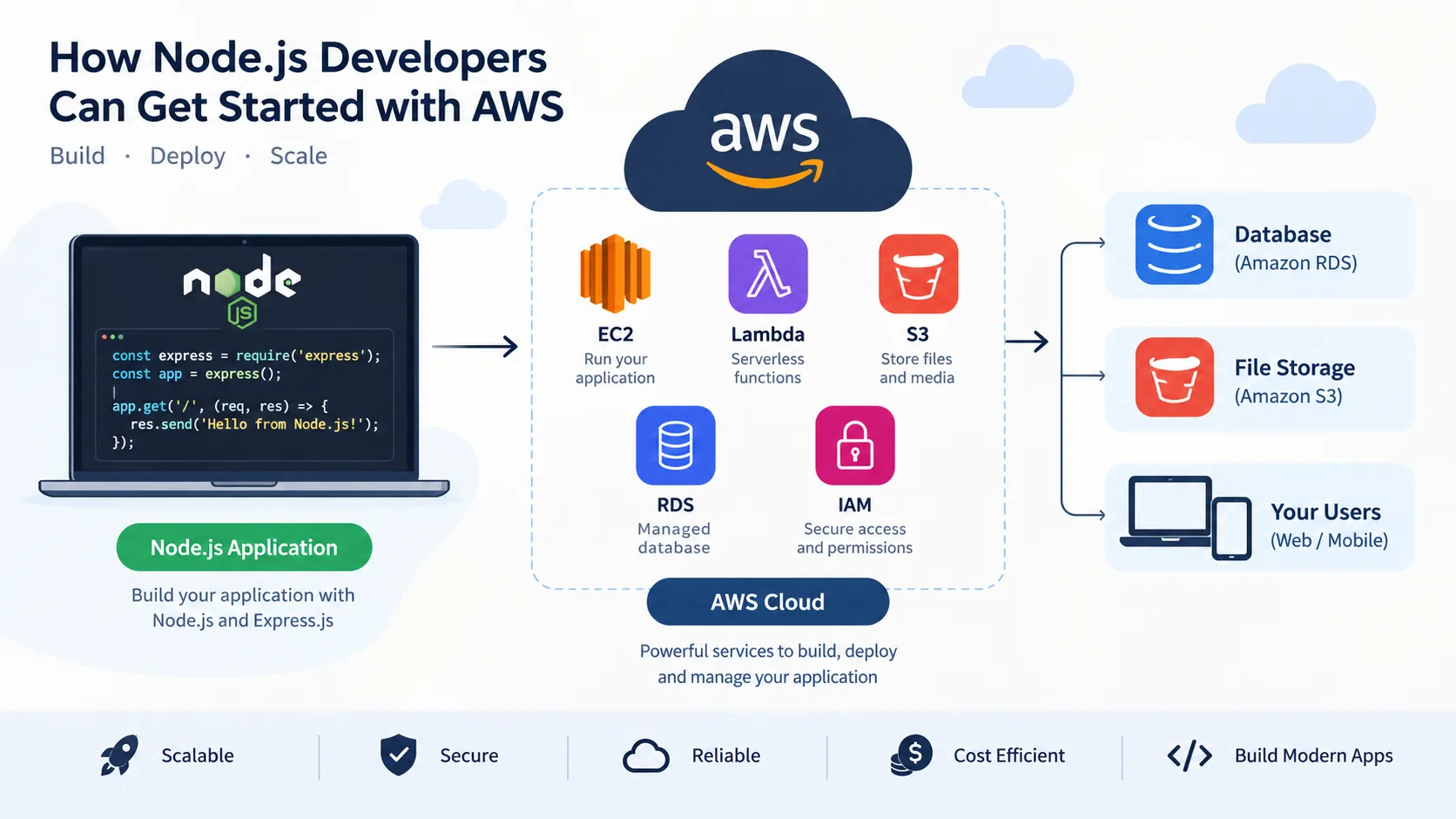
How Node.js Developers Can Get Started with AWS
Learn how Node.js developers can use AWS services to deploy applications, build APIs, store files, connect databases, and follow essential cloud security practices.

How Node.js Developers Can Get Started with AWS
Introduction
Node.js makes it possible to build fast and scalable web applications using JavaScript. But writing an application is only one part of development. We also need to understand how to deploy, host, and maintain it.
This is where cloud computing becomes useful.
Amazon Web Services (AWS) provides cloud services that developers can use to deploy applications, store data, manage infrastructure, and build scalable systems.
In this article, we'll explore how Node.js developers can get started with AWS.
1. What Is AWS?
Amazon Web Services (AWS) is a cloud computing platform that provides services for computing, storage, databases, networking, security, and application deployment.
Instead of purchasing physical servers, developers can use AWS resources over the internet.
For Node.js developers, AWS offers several ways to run applications without having to manage every part of the underlying infrastructure.
2. Important AWS Services for Node.js Developers
Here are five AWS services worth exploring.
Amazon EC2
Amazon Elastic Compute Cloud (EC2) provides virtual servers in the cloud.
You can install Node.js, configure your application, and run an Express.js server on an EC2 instance.
For example, an Express application that runs locally on your computer could be deployed to a properly configured EC2 instance.
AWS Lambda
AWS Lambda lets you run code without managing servers directly.
You can use Node.js to create Lambda functions that respond to events or HTTP requests through services such as Amazon API Gateway.
This approach can be useful for APIs, background tasks, and event-driven applications.
Amazon S3
Amazon Simple Storage Service (S3) provides object storage.
A Node.js application can use S3 to store and retrieve files such as images, documents, and uploaded media.
For example, a college project could allow students to upload documents that are stored in an S3 bucket.
Amazon RDS
Amazon Relational Database Service (RDS) simplifies the setup and management of relational databases.
A Node.js application can connect to a supported relational database, such as MySQL, to store application data.
This is useful when building applications that need structured data, including student management systems and e-commerce platforms.
AWS IAM
AWS Identity and Access Management (IAM) helps control who can access AWS resources and what actions they can perform.
Developers should understand IAM permissions and follow the principle of least privilege, granting only the access required for a particular task.
3. How Can You Deploy a Node.js Application?
Let's consider a simple Express.js application.
First, create a project and install Express:
1
2
3
4
mkdir my-node-app
cd my-node-app
npm init -y
npm install express
Next, create an
index.js file:1
2
3
4
5
6
7
8
9
10
11
12
const express = require("express");
const app = express();
const PORT = process.env.PORT || 3000;
app.get("/", (req, res) => {
res.send("Hello from my Node.js application!");
});
app.listen(PORT, "0.0.0.0", () => {
console.log(`Server running on port ${PORT}`);
});Run the application:
1
node index.js
Open
http://localhost:3000 in your browser to test it locally.You should see:
1
Hello from my Node.js application!
This confirms that the basic application is running on your computer. It has not yet been deployed to AWS.
4. Choosing an AWS Deployment Approach
There are several ways to deploy a Node.js application.
- Amazon EC2: Suitable when you want control over the server and its configuration.
- AWS Lambda with Amazon API Gateway: Useful for serverless APIs and event-driven applications.
- AWS Elastic Beanstalk: Helps deploy and manage web applications while AWS handles much of the underlying infrastructure configuration.
- Amazon ECS: Runs containerized applications and supports different deployment configurations.
The right choice depends on your application's requirements, architecture, expected traffic, and budget.
5. Important Security Practices
When deploying a Node.js application to AWS, keep these practices in mind:
- Never hardcode passwords, API keys, or other secrets in your source code.
- Use appropriate IAM permissions.
- Protect application endpoints with suitable authentication and authorization.
- Use HTTPS to protect data in transit.
- Monitor application activity and errors.
- Review AWS pricing before creating resources.
Some AWS resources can incur charges even when you are experimenting, so check current pricing and any applicable free-tier eligibility before deployment.
6. A Beginner Project Idea
A good first project is a cloud-based student management application.
You could build it using:
- Node.js and Express.js for the backend.
- Amazon EC2 or another suitable hosting service to run the application.
- Amazon RDS for relational data.
- Amazon S3 for file uploads, if needed.
- IAM to manage access to AWS resources.
Start with a simple application, test it locally, and then learn how to deploy it securely.
You do not need to use every AWS service in your first project. Begin with the services your application actually requires.
Conclusion
Node.js and AWS can work together to build and deploy modern web applications.
By learning services such as EC2, Lambda, S3, RDS, and IAM, developers can expand their knowledge beyond application development and begin exploring cloud infrastructure.
My recommendation for beginners is to start with the fundamentals, deploy a small project, and gradually explore more advanced services.
What would you deploy first on AWS: a Node.js REST API, a file-upload application, or a complete full-stack project?
Enjoyed reading this content? Let the author know!
Your likes, comments, shares, and saves help creators reach more builders.

Loading recommendations
Loading article