
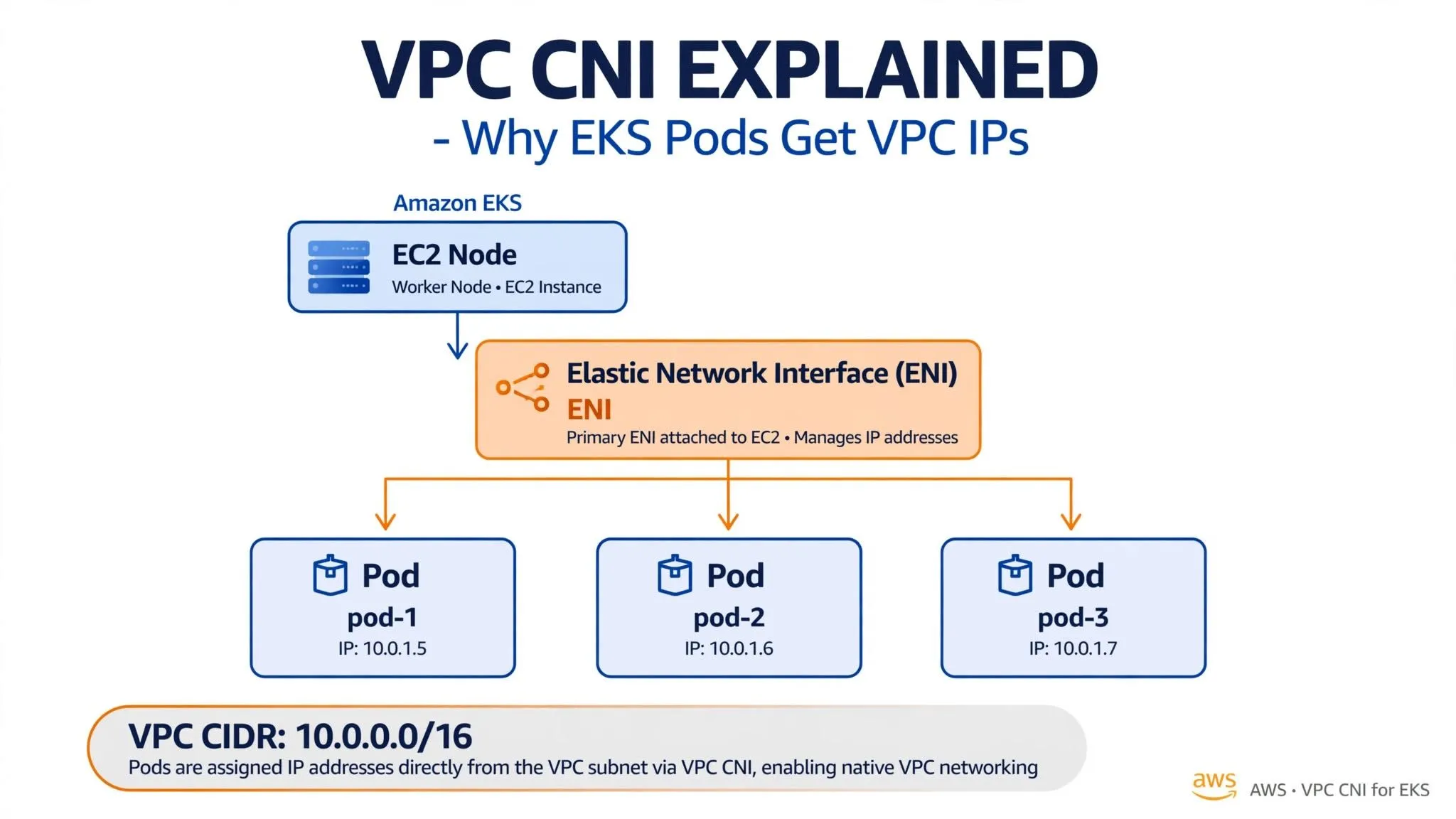
VPC CNI Explained: Why Your EKS Pods Get Real VPC IPs (10.0.x.x)
Why do EKS pods get real VPC IPs like 10.0.1.11? Deep dive into AWS VPC CNI, ENI secondary IPs, WARM pools, IP exhaustion, and how Prefix Delegation fixes scaling for 110+ pods per node

TL;DR: Amazon VPC CNI uses native VPC networking without an overlay. In IPv4 secondary-IP mode, its IPAM component assigns VPC-routable IP addresses from node ENIs to pods and maintains a warm pool for faster startup. However, subnet IP exhaustion and per-node ENI/IP limits can constrain scaling. Use Prefix Delegation to increase pod density and accelerate IP allocation, tune warm-pool settings to reduce unused IP reservations, and plan sufficient subnet capacity. Use Security Groups for Pods separately for pod-level traffic controls.
The Question Every EKS Engineer Asks
You run
kubectl get pods -o wide and see:NAME READY STATUS IP NODEpod-a 1/1 Running 10.0.1.11 ip-10-0-1-10.ec2.internalpod-b 1/1 Running 10.0.1.12 ip-10-0-1-10.ec2.internalpod-c 1/1 Running 10.0.1.13 ip-10-0-1-10.ec2.internalThose pod IPs
10.0.1.11, .12, .13 are from your VPC CIDR 10.0.1.0/24 . Not 192.168.x.x overlay IPs. Why?It's the AWS VPC CNI plugin.
Traditional CNI vs VPC CNI
Most Kubernetes CNIs (Flannel, Calico default) create an overlay network. Pod to pod traffic is encapsulated (VXLAN) and NAT'd at the node. This adds latency and hides pod IPs from VPC tools like Security Groups and Flow Logs.
VPC CNI takes a native approach: Every pod gets a real secondary IP from the node's Elastic Network Interface (ENI). No encapsulation, fully routable inside VPC, visible to all AWS networking features.
How It Works - Step by Step

1. EC2 Node with ENI:
Your EKS worker node is an EC2 instance, e.g.,
10.0.1.10 in subnet 10.0.1.0/24 . Each node has a primary ENI.2. The aws-node DaemonSet (IPAM):
On every node,
aws-node DaemonSet runs two containers:-
aws-node: CNI plugin
-
aws-eks-nodeagent: IPAMD - IP Address Management Daemon
IPAMD talks to EC2 API and pre-allocates secondary IPs.
**3. The WARM Pool:
**

IPAMD doesn't wait for a pod to be scheduled. It keeps a WARM pool - a set of free secondary IPs already attached to ENIs, ready for fast pod launch.
You can tune it:
kubectl set env daemonset aws-node -n kube-system WARM_ENI_TARGET=1kubectl set env daemonset aws-node -n kube-system WARM_IP_TARGET=54. Pod IP Assignment:
When scheduler places Pod A on this node, CNI calls IPAMD -> IPAMD hands over
10.0.1.11 from WARM pool -> Pod gets it. Same for .12 and .13.Verify:
kubectl get pods -o wide# Check ENIs on nodeaws ec2 describe-network-interfaces --filters Name=attachment.instance-id,Values=i-0abcd1234All pod IPs are routable without NAT. Security Groups, NACLs, VPC Flow Logs see pod traffic directly.
The 2 Big Limitations (And How We Fix Them in Production)
1. IP Exhaustion - ENI Limit
Each EC2 instance type has max ENIs and IPs per ENI.
Example:
t3.medium = 3 ENIs * 6 IPs per ENI = 17 usable IPs for pods (1 IP per ENI reserved for node). Your /24 (254 IPs) dies fast with 100 nodes.Check limits:
aws ec2 describe-instance-types --instance-types t3.medium --query "InstanceTypes[].NetworkInfo"2. Slow Scale and Wasted IPs
WARM pool keeps IPs even when no pods use them. Scale up 50 pods quickly? Need new ENIs attached, which takes time.
Production Fixes
Fix 1: Enable Prefix Delegation (MUST for EKS > 1.9)
Instead of allocating single /32 IPs, allocate /28 prefixes (16 IPs). One ENI call = 16 pods.
kubectl set env daemonset aws-node -n kube-system ENABLE_PREFIX_DELEGATION=truekubectl set env daemonset aws-node -n kube-system WARM_PREFIX_TARGET=1Result:
t3.medium goes from 17 pods to 110 pods per node. This is now AWS best practice.Fix 2: Security Groups for Pods (Branch ENI)
By default, all pods share node SG. Not secure for multi-tenant.
Enable SG for Pods:
# Enable on clusteraws eks update-cluster-config --cluster-name my-cluster --vpc-config securityGroupIds=...# In pod specapiVersion: v1kind: Podmetadata: name: my-pod annotations: vpc.amazonaws.com/pod-eni: | [{"privateIpAddress": "10.0.1.50", "securityGroupIds": ["sg-0abc"]}]Now each pod gets its own Branch ENI with its own SG.
Fix 3: When to Move to Cilium
If you need:
- 250+ pods per node
- True NetworkPolicy enforcement with eBPF
- No VPC IP exhaustion
Consider Cilium CNI. It uses eBPF, not ENI IPs, but you lose native VPC routability. Trade-off: Performance vs simplicity.
Best Practices Checklist
- Subnet sizing: Never use /24 for EKS data plane. Start with /20 per AZ.
- Enable Prefix Delegation from Day 1:
eksctl create cluster --vpc-cidr 10.0.0.0/16 --enable-prefix-delegation
- Private EKS: Combine with VPC Endpoints for ECR, S3, CloudWatch to avoid NAT costs.
- Monitoring:
kubectl logs -n kube-system -l k8s-app=aws-node -c aws-node -- | grep -i warmWatchAvailable IPsandMaximum Pods.
Conclusion
VPC CNI is simple and powerful:
EC2 Node -> ENI -> Secondary IP -> Pod . No overlay, native AWS integration.But it forces you to think like a network architect, not just a Kubernetes admin. Your VPC CIDR design IS your pod scalability design.
If you're building EKS at scale, enable Prefix Delegation today. Your future self will thank you when you don't run out of IPs at 2 AM.
Note: Prefix delegation allocates a contiguous /28 (16 IPs). If your subnet is heavily fragmented from months of pod churn, you may see
InsufficientFreeAddresses even when free IPs show as available. Check for free /28 blocks before enabling, or use fresh subnets for EKS.Enjoyed reading this content? Let the author know!
Your likes, comments, shares, and saves help creators reach more builders.

Loading recommendations
Loading article