
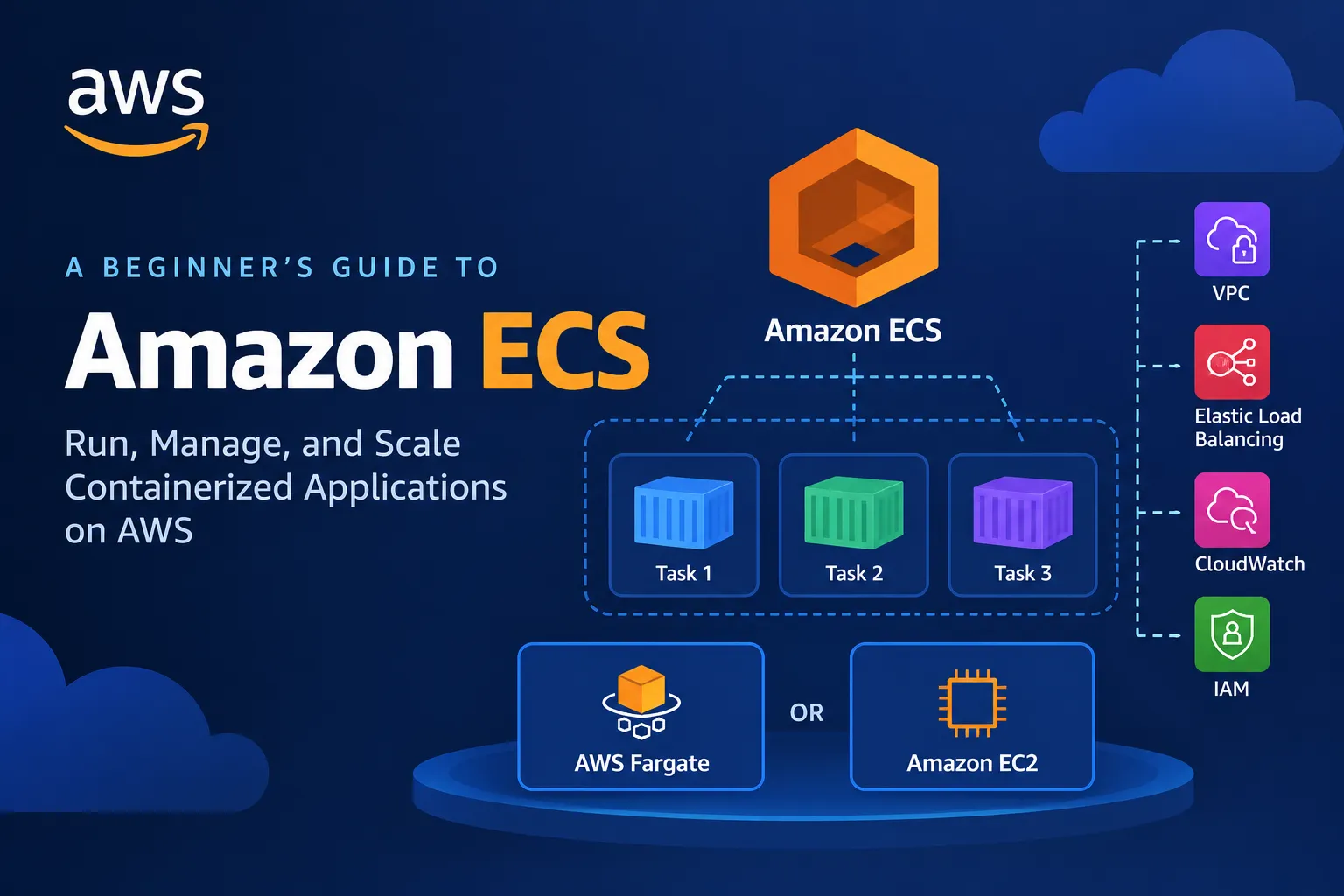
Amazon ECS Explained: Deploy and Scale Containerized Applications on AWS
Learn how Amazon Elastic Container Service (Amazon ECS) simplifies deploying, managing, and scaling containerized applications on AWS. This beginner-friendly guide explains containers, tasks, task definitions, services, clusters, AWS Fargate, and Amazon EC2 launch options, with a practical deployment example and key concepts for AWS certification preparation.

Introduction: Why Are Containers So Popular?
Imagine you have built an application on your laptop. It works perfectly, but when you deploy it to another environment, you discover missing dependencies, different software versions, or configuration problems.
Containers help address this challenge by packaging an application and its dependencies into a consistent, portable unit.
But running containers in production introduces new questions:
- Where should containers run?
- How do you restart failed containers?
- How can you scale when traffic increases?
- How do you connect containers to networking and security services?
- How do you deploy updates without managing every container manually?
AWS provides Amazon Elastic Container Service (Amazon ECS) to help solve these problems.
Amazon ECS is a fully managed container orchestration service that helps you deploy, manage, and scale containerized applications on AWS.
Let's explore how it works and why it matters for cloud engineers.
1. What Is Amazon ECS?
Amazon ECS is a service for running and managing containers.
It helps you define how applications should run, specify their resource requirements, and maintain the desired number of running tasks.
For example, imagine you're building an online shopping application packaged as a Docker container.
You could use ECS to run the application, manage its deployment, integrate it with networking, and increase the number of running tasks as demand grows.
Key benefits
- Container orchestration: Manage containerized workloads without manually coordinating every container.
- Scalability: Adjust the number of running tasks to meet application requirements.
- AWS integration: Connect workloads with services such as IAM, Amazon VPC, Elastic Load Balancing, and Amazon CloudWatch.
- Flexible compute options: Run supported workloads on AWS Fargate or Amazon EC2.
- Deployment management: Configure services to maintain desired task counts and roll out application updates.
- Operational visibility: Monitor application and infrastructure behavior using AWS observability tools.
ECS is particularly useful when you want to run containers without adopting a full Kubernetes-based platform.
2. Understanding Containers and Docker Images
Before exploring ECS, let's understand two important concepts.
A container image is a packaged application artifact that contains the filesystem, application code, and dependencies needed to run the container.
A container is a running instance of an image.
For example, a team might create a Docker image containing a Python web application and its required libraries.
The image can be stored in a container registry such as Amazon Elastic Container Registry (Amazon ECR), then used by ECS to launch containers.
A simplified workflow looks like this:
- Write the application code.
- Create a Docker image.
- Push the image to a container registry such as Amazon ECR.
- Configure ECS to run the image.
- Monitor the application and update the image when needed.
Important: ECS orchestrates container workloads. It doesn't automatically create a container image from your source code unless you build and configure that process separately.
3. Understanding ECS Clusters, Tasks, and Services
Amazon ECS uses several core concepts. Understanding their relationships makes the service much easier to learn.
ECS cluster
A cluster is a logical grouping for ECS tasks and services.
It provides an organizational boundary for running containerized workloads using the supported compute capacity and configuration.
Task definition
A task definition is a blueprint describing how an ECS task should run.
It can specify:
- Container images.
- CPU and memory requirements.
- Port mappings.
- Environment variables.
- Logging configuration.
- IAM roles.
- Storage and other container settings.
Task definitions are versioned, which helps you deploy new configurations while retaining earlier revisions.
Task
A task is a running instance of a task definition.
A task may contain one or more containers that are intended to run together.
For example, a task might run a web application container alongside a supporting container, depending on the application's architecture.
Service
An ECS service helps maintain a desired number of tasks and manages deployments for a long-running application.
If a running task stops unexpectedly, the service can attempt to replace it to maintain the desired task count.
For example, you might configure an ECS service to maintain three application tasks.
Easy way to remember:
- Cluster: Where workloads are organized.
- Task definition: How a task should run.
- Task: A running workload.
- Service: Maintains the desired running task count and manages deployments.
4. Amazon ECS on AWS Fargate vs. Amazon EC2
One of the most important ECS decisions is choosing where your containers will run.
ECS supports AWS Fargate and Amazon EC2 launch options.
Option A: AWS Fargate
AWS Fargate is a serverless compute engine for containers that works with Amazon ECS and Amazon EKS.
With Fargate, you don't manage the underlying EC2 instances used to provide compute capacity for your tasks.
You still configure your application, networking, IAM permissions, CPU, memory, and other task settings.
Advantages:
- No need to manage the underlying container-host instances.
- Less infrastructure maintenance.
- Useful for teams that want to focus on application workloads.
- Integrates with supported ECS networking and security features.
Example: A startup wants to run a containerized API without managing EC2 instances.
Fargate can be a suitable option.
Option B: Amazon EC2
With the EC2 launch option, you manage the EC2 instances that provide compute capacity for ECS tasks.
This gives you more control over the underlying compute environment, but it also introduces infrastructure-management responsibilities.
Advantages:
- Greater control over instance types and host configuration.
- Ability to plan and optimize compute capacity.
- Useful for workloads with specific host-level requirements.
Example: An organization runs several containerized workloads and wants to manage instance capacity and placement according to its operational requirements.
ECS on EC2 may be appropriate.
Which option should you choose?
Choose Fargate when you want to reduce host-management responsibilities.
Choose EC2 when you need more control over the underlying compute environment and are prepared to manage it.
The right choice depends on workload requirements, cost, scaling behavior, operational expertise, and any specialized compute needs.
5. How Amazon ECS Works with Amazon ECR
Amazon Elastic Container Registry (Amazon ECR) is a managed container image registry.
It allows you to store and retrieve container images for your applications.
A typical deployment workflow is:
- Build a container image.
- Tag the image appropriately.
- Push it to an ECR repository.
- Create or update an ECS task definition that references the image.
- Run a task or update an ECS service to deploy the new version.
This separates image storage from container orchestration.
For production applications, use controlled image-tagging practices and consider immutable image references, image scanning, and a deployment process that allows you to identify exactly which image version is running.
6. A Practical Example: Deploying a Web Application
Imagine you're building a containerized web application for an online store.
Your architecture could include:
- Amazon ECR for storing the container image.
- Amazon ECS for orchestrating the application.
- AWS Fargate for running the tasks.
- An Application Load Balancer for receiving web traffic.
- Amazon VPC for network isolation.
- AWS IAM for permissions.
- Amazon CloudWatch for logs and monitoring.
Deployment workflow
Step 1: Build the application image.
Package your web application and its dependencies into a container image.
Step 2: Push the image to Amazon ECR.
Create an ECR repository and upload the image.
Step 3: Create an ECS cluster.
Set up the logical environment for your containerized workload.
Step 4: Create a task definition.
Specify the image, CPU, memory, container ports, logging, and required IAM roles.
Step 5: Configure networking.
Choose the VPC, subnets, security groups, and other settings needed by the application.
Step 6: Create an ECS service.
Configure the service to maintain the desired number of running tasks.
Step 7: Configure the load balancer if required.
For a web application, integrate an Application Load Balancer with the ECS service using the supported configuration.
Step 8: Monitor the deployment.
Review task status, application logs, resource utilization, and load-balancer health.
This architecture separates application packaging, image storage, orchestration, compute, networking, and monitoring.
7. How Does ECS Scale Applications?
Applications often experience changing traffic levels.
A shopping application may receive modest traffic during normal hours but experience a significant increase during a promotional event.
ECS services can be configured to scale the desired number of tasks.
For example, you might configure a service to run a small number of tasks under normal demand and increase that number as traffic or resource utilization grows.
ECS service auto scaling can work with supported scaling policies and Amazon CloudWatch metrics.
Common scaling approaches include:
- Target tracking: Adjust task count to maintain a selected metric near a target.
- Step scaling: Increase or decrease capacity based on configured alarm thresholds and step adjustments.
- Scheduled scaling: Adjust desired capacity according to a known schedule.
Remember that scaling the number of ECS tasks is not the same as scaling every other component of the application. Your database, network capacity, downstream services, and load balancer must also support the workload.
8. Security Best Practices for ECS
Container security requires attention to both the application and the AWS environment.
Use IAM roles correctly
ECS supports different roles for different responsibilities.
The task execution role allows ECS-related operations such as retrieving container images from ECR and sending logs to supported destinations, when those permissions are required.
The task role provides AWS permissions to the application code running inside the task.
Keep these responsibilities separate and grant only the permissions each role needs.
Protect network access
Use security groups and VPC configuration to restrict unnecessary inbound and outbound traffic.
Avoid exposing internal application components directly to the public internet unless the architecture requires it.
Protect secrets
Avoid embedding passwords, access keys, or other sensitive credentials directly in container images or source code.
Use an appropriate secret-management service, such as AWS Secrets Manager or Systems Manager Parameter Store, and configure access permissions carefully.
Monitor application behavior
Configure CloudWatch logging and monitoring so you can investigate errors, unexpected restarts, and performance problems.
Keep images updated
Use trusted base images, scan images where appropriate, and rebuild them when important security updates become available.
Security should be part of the container lifecycle, not something added only after deployment.
9. Amazon ECS vs. Amazon EKS
AWS offers more than one service for orchestrating containers.
Amazon ECS is AWS's managed container orchestration service with its own AWS-native orchestration model.
Amazon EKS is AWS's managed Kubernetes service for running Kubernetes workloads.
Feature | Amazon ECS | Amazon EKS |
|---|---|---|
Orchestration model | ECS-native | Kubernetes |
Common use case | AWS-integrated container applications | Kubernetes-based applications and ecosystems |
Learning requirements | ECS concepts and configuration | Kubernetes concepts plus AWS integration |
Compute choices | Supported ECS compute options, including Fargate and EC2 | Supported EKS compute options, including Fargate and EC2 managed or self-managed capacity where applicable |
Best fit | Teams seeking AWS-native container orchestration | Teams that need Kubernetes APIs, tooling, or ecosystem compatibility |
Neither service is universally better.
ECS can be a strong choice when you want AWS-native orchestration without operating a Kubernetes control plane.
EKS can be appropriate when Kubernetes compatibility and its ecosystem are important requirements.
10. Common ECS Mistakes to Avoid
1. Confusing tasks with services. A task is a running workload; a service helps maintain the desired number of tasks for an application.
2. Forgetting container image permissions. Ensure the execution role has the required permissions to retrieve images and perform configured startup operations.
3. Misconfiguring security groups. The application may fail to receive traffic if the required network access is blocked.
4. Setting unsuitable CPU and memory values. Insufficient resources can affect application stability and performance.
5. Ignoring health checks. Configure appropriate health checks so unhealthy application tasks or targets can be identified.
6. Putting secrets in images. Credentials embedded in an image can persist even after the application configuration changes.
7. Assuming Fargate removes every operational responsibility. You still manage application code, IAM, networking, observability, deployment settings, and data dependencies.
8. Forgetting cost management. Review compute usage, logging volume, load-balancer costs, data transfer, and other related charges.
11. Why Amazon ECS Matters for AWS Certification
Amazon ECS is useful for understanding containers, serverless compute options, deployment patterns, and application scalability.
For AWS certification preparation, focus on:
- ECS clusters, tasks, task definitions, and services.
- The differences between Fargate and EC2 launch options.
- Amazon ECR and container-image workflows.
- Task execution roles versus task roles.
- ECS service deployments and desired task counts.
- Load-balancer integration and networking.
- CloudWatch monitoring and service auto scaling.
- The differences between ECS and EKS.
A typical scenario might ask how to run a containerized application while minimizing the need to manage servers.
Understanding ECS with AWS Fargate will help you evaluate that requirement.
Always check the official exam guide for your target certification because the depth of service coverage varies by exam.
Conclusion
Amazon ECS makes it easier to deploy and manage containerized applications on AWS.
By understanding task definitions, tasks, services, clusters, image registries, and compute options, you can design container architectures that are easier to operate and scale.
The most important takeaway is this:
Package your application into a container, define how it should run, and let ECS orchestrate the workload.
For hands-on practice, create a small container image, store it in Amazon ECR, and deploy it to ECS in a learning environment. Review the required IAM permissions, networking configuration, logs, and costs before and after deployment.
Your turn: For a new containerized web application, would you choose ECS with Fargate or ECS with EC2? What factors would influence your decision?
Share your thoughts in the comments, and let's keep learning AWS together!
Official AWS Resources
- Amazon ECS Developer Guide: https://docs.aws.amazon.com/AmazonECS/latest/developerguide/Welcome.html
- Amazon ECR User Guide: https://docs.aws.amazon.com/AmazonECR/latest/userguide/what-is-ecr.html
- ECS task definitions: https://docs.aws.amazon.com/AmazonECS/latest/developerguide/task_definitions.html
- ECS service auto scaling: https://docs.aws.amazon.com/AmazonECS/latest/developerguide/service-auto-scaling.html
Enjoyed reading this content? Let the author know!
Your likes, comments, shares, and saves help creators reach more builders.

Loading recommendations
Loading article