
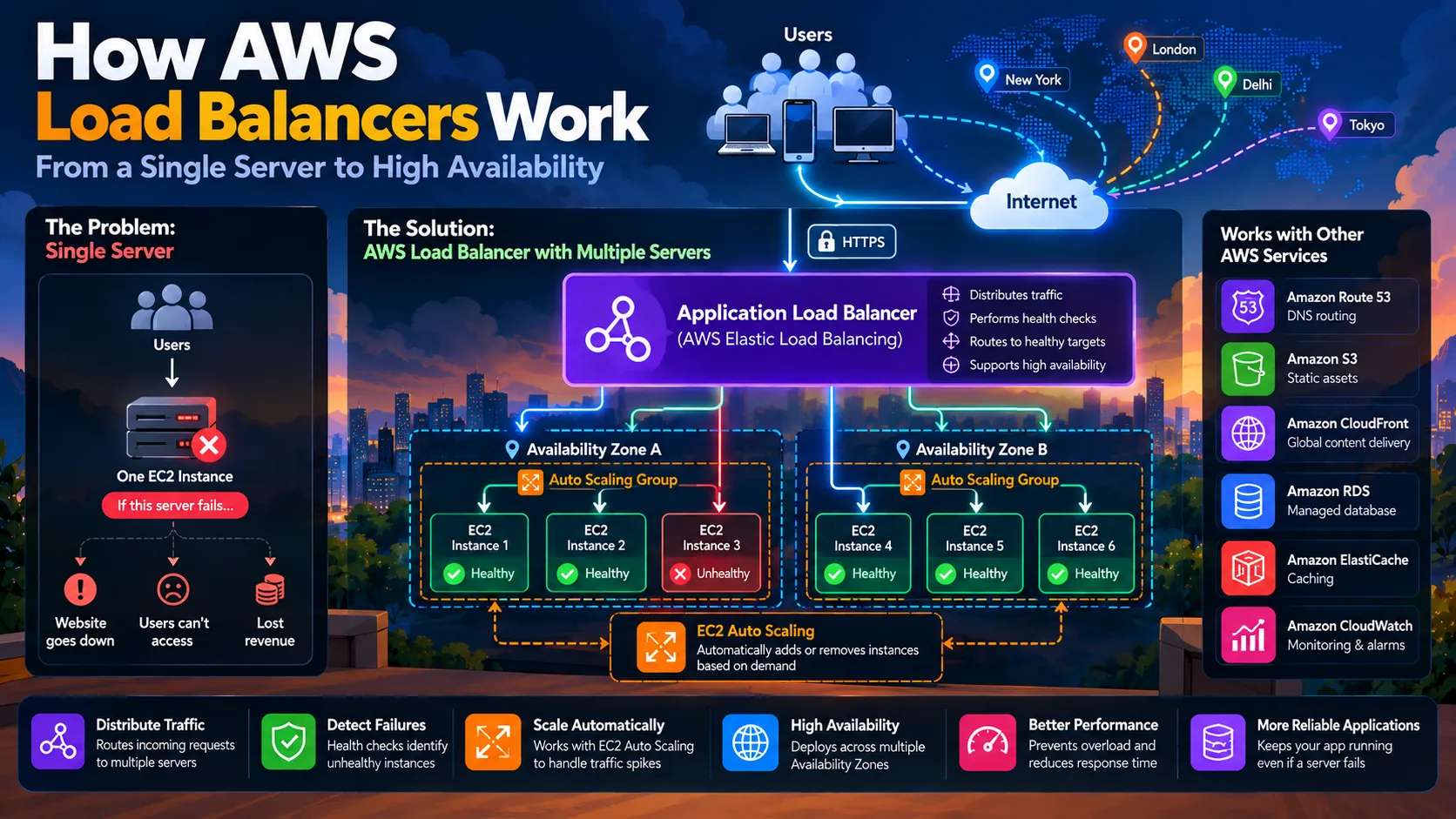
How AWS Load Balancers Work: From a Single Server to High Availability
What happens when your application server fails while thousands of users are online? Learn how AWS Elastic Load Balancing distributes traffic, uses health checks to identify unhealthy targets, and works with EC2 Auto Scaling to handle changing demand. Explore Application Load Balancers, multi-AZ architectures, and practical strategies for building more reliable web applications.

What happens when your application server crashes while thousands of users are online? Discover how load balancing, health checks, and Auto Scaling help developers build more reliable applications on AWS.
Introduction
Imagine you've built a web application that works perfectly on your laptop. You deploy it to a cloud server, share it with a few friends, and everything runs smoothly.
Then your application starts growing.
More users sign up. More requests hit your API. Your server begins struggling to keep up.
You add more computing power, but one problem remains: what happens if that server suddenly fails?
If every request depends on a single server, your entire application could become unavailable.
This is where load balancing becomes important.
Instead of relying on one server to handle every request, you can distribute traffic across multiple servers and route requests away from unhealthy instances.
Amazon Web Services (AWS) provides Elastic Load Balancing (ELB), a service that helps developers distribute incoming traffic across multiple targets, including Amazon EC2 instances, containers, and IP addresses.
In this article, we'll explore how load balancing works, what happens when a server fails, and how to combine an AWS load balancer with health checks, Auto Scaling, and multiple Availability Zones to build a more resilient application.
1. The Single-Server Problem
Let's start with a simple application architecture.
Imagine you're building an online shopping website using React, Node.js, Express, and a database.
Your application runs on one Amazon EC2 instance.
Every user request reaches that server, and the server communicates with the database whenever necessary.
The architecture looks like this:
1
2
3
4
5
6
7
8
9
10
11
12
             Users
                |
                v
       +----------------+
       |  EC2 Instance  |
       |  Node.js App   |
       +----------------+
                |
                v
          +-----------+
          |  Database |
          +-----------+
For a small application, this might be sufficient.
However, this architecture has two major weaknesses.
Problem 1: Limited capacity
Your server has finite CPU, memory, network capacity, and connection-handling capability. As traffic increases, response times may rise and requests may begin to fail.
Problem 2: A single point of failure
If the server crashes, becomes unreachable, or encounters a critical application error, users may lose access to the application.
You could purchase a more powerful server, but that only addresses some capacity constraints. It doesn't eliminate the single point of failure.
So, what if we used multiple servers instead?
2. Introducing Load Balancing
A load balancer sits between incoming traffic and your application servers.
Rather than sending every request directly to one server, clients connect through the load balancer, which routes requests to registered targets according to its configuration and routing rules.
The architecture becomes:
1
2
3
4
5
6
7
8
9
                 Users
                   |
                   v
          +------------------+
          |   Load Balancer  |
          +------------------+
             /      |      \
            v       v       v
         Server A Server B Server C
Now, your application can distribute work across multiple servers.
If one server becomes overloaded, the other servers can continue handling requests, provided they have sufficient capacity.
If a server becomes unhealthy, the load balancer can stop routing requests to it once its health checks identify the problem.
AWS provides this functionality through Elastic Load Balancing.
According to the official AWS documentation , ELB distributes incoming traffic across registered targets and monitors their health.
But load balancing is more than simply dividing traffic into equal portions.
To understand why, we need to look at the different types of load balancers.
3. Understanding AWS Load Balancer Types
AWS offers several types of load balancers, each designed for different traffic patterns and use cases.
Application Load Balancer (ALB)
An Application Load Balancer operates at the application layer and supports HTTP and HTTPS traffic.
It can make routing decisions based on information such as URL paths, hostnames, and HTTP headers.
For example, imagine your application has two backend services:
/productshandles product requests./ordershandles order-related requests.
An ALB can route requests to different target groups based on configured rules.
1
2
3
4
5
6
7
8
9
10
                 Incoming Requests
                         |
                         v
                  Application ALB
                    /         \
                   v           v
             /products       /orders
                  |             |
                  v             v
             Product API     Order API
This is useful for web applications, REST APIs, and applications with multiple backend services.
Network Load Balancer (NLB)
A Network Load Balancer operates at the transport layer and is designed to handle TCP, UDP, and TLS traffic.
It is useful when you need high-performance network-level load balancing, static IP addresses, or support for protocols and workloads that require Layer 4 routing.
For example, an application handling large volumes of TCP connections might benefit from an NLB, depending on its requirements.
Gateway Load Balancer (GWLB)
A Gateway Load Balancer helps deploy, scale, and manage virtual network appliances, such as certain firewall and traffic-inspection systems.
It is primarily used in network security and traffic-inspection architectures rather than ordinary web application routing.
What about Classic Load Balancers?
Classic Load Balancers are an older generation of AWS load balancers. For new architectures, AWS generally recommends choosing a modern load balancer type that matches the workload.
Which one should you choose?
| Requirement | Typical choice |
|---|---|
| Web application using HTTP/HTTPS | Application Load Balancer |
| REST APIs with path-based routing | Application Load Balancer |
| TCP/UDP workloads requiring Layer 4 routing | Network Load Balancer |
| Virtual network security appliances | Gateway Load Balancer |
The right choice depends on the protocol, routing requirements, performance characteristics, and architecture.
For the rest of this article, we'll focus on an Application Load Balancer because it is a natural fit for a typical web application.
4. How Does a Load Balancer Know Where to Send Requests?
A load balancer doesn't simply forward every request to a random machine.
It uses configured listeners, routing rules, target groups, and health information to determine where traffic should go.
Let's break those components down.
Listener: A listener checks for connection requests on a configured protocol and port, such as HTTPS on port 443.
Listener rules: These determine how requests should be routed based on configured conditions.
Target group: A target group contains the registered destinations that can receive traffic, such as EC2 instances.
Health checks: These periodically test whether registered targets are healthy enough to receive traffic.
For example:
1
2
3
4
5
6
7
8
9
10
11
12
13
14
                 User Request
                      |
                      v
              HTTPS Listener
                      |
                      v
                Routing Rules
                      |
                      v
                Target Group
                 /        \
                v          v
           EC2 Instance  EC2 Instance
             Healthy       Healthy
Suppose both instances are healthy. The load balancer can route requests to the available targets according to its configured routing behavior.
If one instance becomes unhealthy, the load balancer can stop sending new requests to that target and route traffic to healthy targets instead.
This brings us to one of the most important features of load balancing.
5. Health Checks: Detecting Unhealthy Servers
Imagine your application has three EC2 instances:
- Server A
- Server B
- Server C
Everything works perfectly until Server B stops responding correctly.
Perhaps the application process has crashed, the server is overloaded, or a dependency required by the application is unavailable.
How does the load balancer know that Server B should no longer receive traffic?
It uses health checks.
A health check periodically tests a registered target using the configured protocol, port, and endpoint.
For an HTTP application, you might configure a health-check endpoint such as:
1
GET /health
A healthy application might respond with:
1
HTTP 200 OK
If the configured health checks repeatedly fail, the load balancer can mark the target as unhealthy.
The flow becomes:
1
2
3
4
5
6
7
8
9
10
11
Server B stops responding
          |
          v
Health checks fail
          |
          v
Target marked unhealthy
          |
          v
New traffic routed to
healthy targets instead
AWS lets you configure health checks for target groups. The exact behavior depends on the load balancer type and health-check configuration.
An important distinction
A server being reachable does not necessarily mean the application is healthy.
For example, the operating system might still be running while the Node.js application has crashed.
Similarly, an application might return a successful response from
/health while its database connection pool is exhausted.That is why health-check endpoints should be designed carefully.
For some applications, a lightweight liveness check is sufficient. Others need readiness checks that verify whether the application is prepared to handle requests.
Avoid making every health check depend on every downstream service without considering the consequences. A temporary database issue, for example, could cause every application instance to be marked unhealthy, even if those instances could still serve some requests.
The goal is to detect whether a target can handle the work it is supposed to perform—not simply whether a machine is switched on.
For details, see the AWS Application Load Balancer health-check documentation .
6. What Happens When a Server Fails?
Let's walk through a realistic example.
Suppose your e-commerce application has three healthy EC2 instances behind an Application Load Balancer.
Then one instance fails.
Before the failure:
1
2
3
4
5
6
7
8
                 Users
                   |
                   v
              Application ALB
               /     |     \
              v      v      v
           Server A Server B Server C
            Healthy Healthy Healthy
After Server B fails:
1
2
3
4
5
6
7
8
9
10
                 Users
                   |
                   v
              Application ALB
               /            \
              v              v
           Server A        Server C
            Healthy         Healthy

           Server B: Unhealthy
Once the load balancer detects that Server B is unhealthy, it stops routing new requests to that target while healthy targets remain available.
This helps prevent a single application-instance failure from becoming a complete outage.
However, there is an important limitation.
If the remaining servers cannot handle the additional traffic, users may still experience slow responses or errors.
Load balancing improves traffic distribution and helps isolate individual target failures. It does not automatically guarantee that your application will remain available under every failure or traffic spike.
You still need sufficient capacity, appropriate health checks, and a resilient application architecture.
7. Load Balancing and Auto Scaling: A Powerful Combination
So far, we've learned how a load balancer distributes requests and avoids unhealthy targets.
But what happens when traffic increases?
Suppose your application normally handles 1,000 requests per minute.
A popular post mentions your product, and traffic increases to 20,000 requests per minute.
Your existing instances might not have enough capacity.
You could manually launch more EC2 instances, but that takes operational effort and may be too slow for changing workloads.
This is where Amazon EC2 Auto Scaling becomes useful.
Auto Scaling can adjust the number of EC2 instances in an Auto Scaling group according to configured capacity limits and scaling policies.
When an Auto Scaling group is attached to a load balancer, new instances can be registered with the target group, and instances removed from the group can be deregistered.
The architecture becomes:
1
2
3
4
5
6
7
8
9
10
11
12
13
14
15
                   Users
                     |
                     v
              Application ALB
                     |
           +---------+---------+
           |         |         |
           v         v         v
         EC2 A     EC2 B     EC2 C
           \         |         /
            \        |        /
             +-------+-------+
                     ^
                     |
                Auto Scaling
When demand rises, Auto Scaling can launch additional instances.
When demand falls, it can reduce capacity within the configured limits.
The result is a more elastic architecture.
Load balancing vs. Auto Scaling
These services solve different problems.
| Service | Primary responsibility |
|---|---|
| Elastic Load Balancing | Distributes traffic across registered targets |
| EC2 Auto Scaling | Adjusts the number of EC2 instances |
| Amazon CloudWatch | Collects metrics, logs, and monitoring information |
A load balancer does not automatically launch more EC2 instances just because traffic increases. Auto Scaling needs to be configured to adjust capacity.
Likewise, Auto Scaling alone does not provide the same traffic-distribution functionality as a load balancer.
Together, they help support scalable web applications.
Learn more in the AWS guide to load balancing an Auto Scaling group .
8. High Availability: Why One Availability Zone Isn't Enough
Let's assume your application has three healthy EC2 instances.
However, all three are running in the same Availability Zone.
What happens if that Availability Zone experiences a major disruption?
You might lose access to all three instances at once.
Even though you have multiple servers, you still have a shared point of failure.
This is why production architectures often distribute application instances across multiple Availability Zones within an AWS Region.
A simplified architecture looks like this:
1
2
3
4
5
6
7
8
9
10
11
12
13
14
15
                      Users
                        |
                        v
                Application ALB
                        |
             +----------+----------+
             |                     |
             v                     v
        Availability Zone A   Availability Zone B
             |                     |
          +------+              +------+
          | EC2  |              | EC2  |
          +------+              +------+
          | EC2  |              | EC2  |
          +------+              +------+
If one Availability Zone becomes unavailable, instances in another zone may continue serving requests, provided the remaining infrastructure has sufficient capacity and the application does not depend on an unavailable component.
For this design to work, the load balancer must be configured for the intended Availability Zones, and application instances must be deployed across them.
For an internet-facing Application Load Balancer, AWS requires at least two Availability Zones.
You also need to consider dependencies such as databases, caches, storage, and external services. A highly available application tier cannot compensate for a single database or another critical component that remains a point of failure.
High availability is an architectural property of the whole system, not just the load balancer.
9. Putting It All Together: A Practical AWS Architecture
Let's design a conceptual architecture for a Node.js e-commerce application.
The application has a React frontend, a Node.js backend, and a database.
A possible architecture is:
1
2
3
4
5
6
7
8
9
10
11
12
13
14
15
16
17
18
19
20
21
                         Users
                           |
                           v
                    Amazon Route 53
                      (DNS routing)
                           |
                           v
                    Application ALB
                           |
                  +--------+--------+
                  |                 |
                  v                 v
             Availability Zone A  Availability Zone B
                  |                 |
                  v                 v
                EC2 A             EC2 B
                  |                 |
                  +--------+--------+
                           |
                           v
                        Database
EC2 instances are registered in the ALB's target group, and an Auto Scaling group manages the application instances.
In a real deployment, you would also configure networking, security groups, HTTPS certificates, monitoring, and database availability according to your requirements.
Here's how the components work together:
- Amazon Route 53 resolves your domain name to the appropriate endpoint.
- Application Load Balancer receives HTTP/HTTPS requests and routes them to the configured target group.
- Amazon EC2 instances run your Node.js application.
- Health checks help identify targets that should not receive traffic.
- EC2 Auto Scaling adjusts application capacity and can replace instances that it identifies as unhealthy when the appropriate health checks are enabled.
- Multiple Availability Zones reduce dependence on a single zone.
- Amazon CloudWatch helps you monitor metrics, logs, and alarms.
For a static React frontend, you might separately use Amazon S3 and Amazon CloudFront. The exact design depends on how the frontend is hosted and how requests should reach the backend.
The key idea is that each component has a specific responsibility.
You are not adding AWS services just to make the architecture look sophisticated. You are adding them to solve specific reliability, routing, scaling, or operational problems.
10. Common Load-Balancing Mistakes
Even when a load balancer is configured correctly, application design and infrastructure mistakes can undermine its benefits.
Mistake 1: Keeping sessions only in local memory
Imagine a user logs in through Server A. Their session is stored only in that server's memory.
The next request reaches Server B, which has no knowledge of the session.
The user may appear logged out.
A common solution is to design the application around shared session storage or stateless authentication where appropriate.
Sticky sessions can help with certain workloads, but they should not be treated as a universal solution to application-state problems.
Mistake 2: Incorrect health checks
A health check that only confirms the server is reachable may not detect an application that cannot process requests.
On the other hand, an overly strict health check may mark instances unhealthy during temporary dependency problems.
Choose health checks that reflect the application's readiness to serve its intended traffic.
Mistake 3: Insufficient capacity
Suppose an application has only two instances and one fails during a traffic spike.
The remaining instance might become overloaded.
Use monitoring, capacity planning, and appropriately configured scaling policies to help the application handle expected demand and failures.
Mistake 4: Ignoring the database
Adding more application servers does not necessarily increase database capacity.
If every request generates expensive database queries, the database may become the next bottleneck.
You may need query optimization, caching, connection management, or database scaling strategies.
Mistake 5: Forgetting security
A load balancer does not automatically make an application secure.
You still need appropriate network access rules, secure application configuration, authentication, authorization, and protection of sensitive data.
For example, EC2 security groups can be configured to allow application traffic from the load balancer rather than permitting unrestricted inbound access to the application instances.
Mistake 6: Assuming high availability means zero downtime
Health checks and multiple Availability Zones improve resilience, but they do not guarantee that users will never experience errors.
Failover can take time, and shared dependencies or application bugs can still cause outages.
Design for realistic failure scenarios and test the behavior of the complete system.
11. How to Start Practicing
You don't need to build a massive distributed system to learn load balancing.
Start with a small, controlled experiment.
Step 1: Create a simple web application.
Build a basic Node.js application with an endpoint that returns a response.
Step 2: Deploy it to an EC2 instance.
Verify that the application works and can be reached through the intended network path.
Step 3: Create a second instance.
Deploy the same application to another EC2 instance.
Step 4: Create a target group.
Register both instances and configure an appropriate health-check endpoint.
Step 5: Create an Application Load Balancer.
Configure a listener and route incoming requests to the target group.
Step 6: Test traffic distribution.
Send requests through the load balancer and inspect application logs to observe which instances handle them.
Step 7: Test a controlled failure.
In a non-production environment, stop the application on one instance and observe the health-check behavior.
Step 8: Add Auto Scaling.
Attach an Auto Scaling group to the target group and explore how instances are registered and deregistered as capacity changes.
Step 9: Explore multiple Availability Zones.
Deploy instances across multiple zones and review how your configuration supports resilience.
Be mindful of AWS charges. Load balancers, EC2 instances, data transfer, and other services may incur costs. Review current pricing, set billing alerts, and remove resources when you have finished testing.
Conclusion
A load balancer is more than a traffic distributor. It is an important component in building applications that can handle multiple servers, detect unhealthy targets, and continue operating when individual instances fail.
AWS Elastic Load Balancing provides the routing and health-check capabilities needed to distribute traffic across registered targets.
When combined with EC2 Auto Scaling, appropriately configured health checks, and deployment across multiple Availability Zones, it can help developers build applications that are more scalable and resilient.
But no single service guarantees reliability.
A load balancer cannot fix inefficient database queries, an application-wide bug, or a critical dependency that has become unavailable.
Reliable systems come from understanding how components interact and designing for the failures that can occur.
The next time you deploy a web application, don't ask only how many servers you need.
Ask yourself:
How will traffic reach those servers? What happens if one becomes unhealthy? And can the remaining system continue serving users?
Those questions are the beginning of designing for high availability on AWS.
Key Takeaways
- Load balancing distributes incoming traffic across registered targets.
- AWS Elastic Load Balancing supports multiple load balancer types for different workloads.
- Application Load Balancers are commonly used for HTTP/HTTPS web applications and APIs.
- Health checks help load balancers identify targets that should not receive traffic.
- EC2 Auto Scaling adjusts application capacity when configured scaling conditions are met.
- Multiple Availability Zones reduce dependence on a single zone.
- Shared application state and database bottlenecks must be addressed separately.
- High availability requires designing and testing the entire system, not just adding a load balancer.
Further Reading
- What is Elastic Load Balancing?
- Create an Application Load Balancer
- Health Checks for Application Load Balancer Target Groups
- Use Elastic Load Balancing with an Auto Scaling Group
- Resilience in Amazon EC2 Auto Scaling
This article is for educational purposes. AWS service capabilities, configuration options, and pricing may change over time.
Enjoyed reading this content? Let the author know!
Your likes, comments, shares, and saves help creators reach more builders.

Loading recommendations
Loading article