
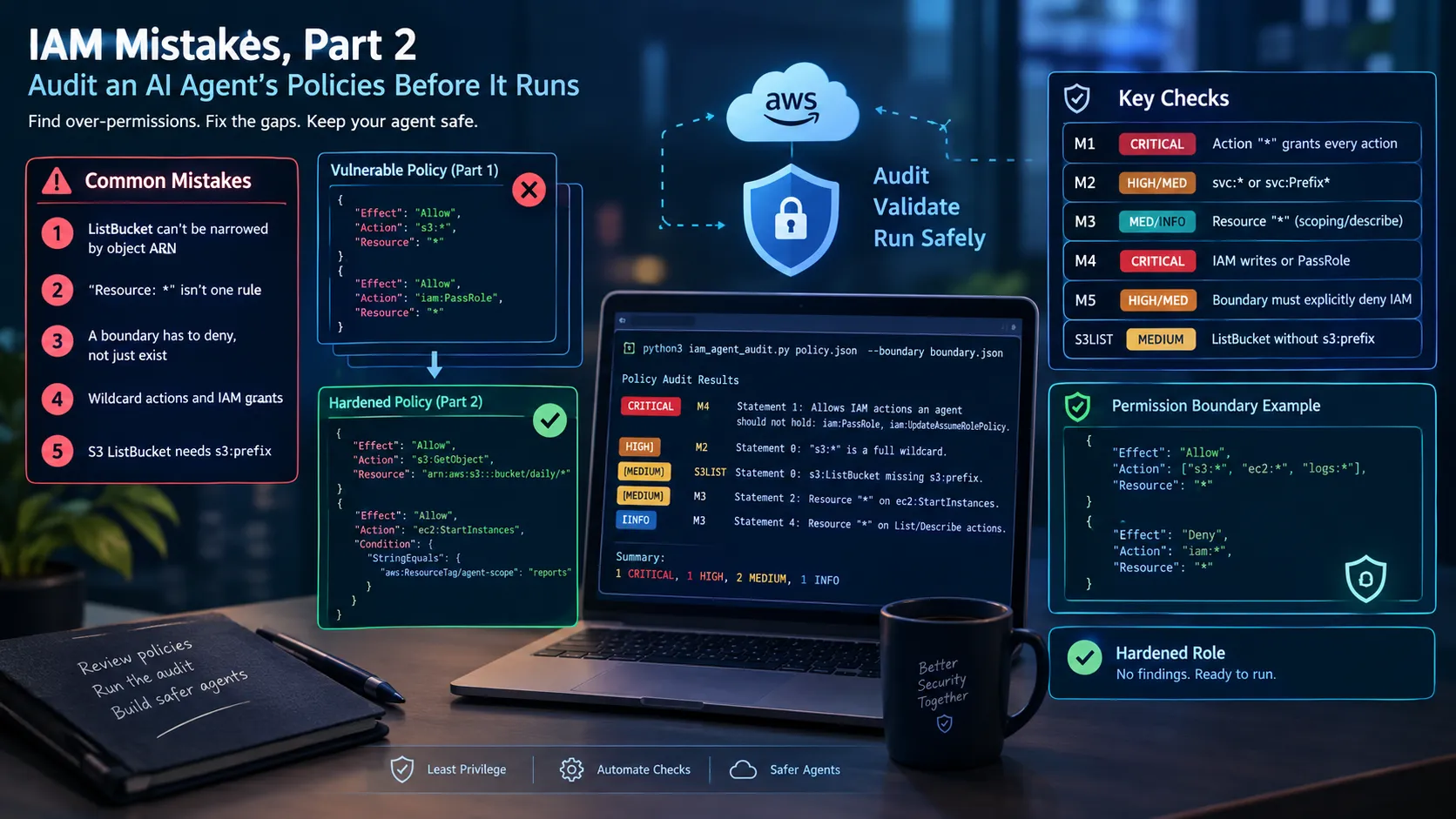
5 IAM Mistakes, Part 2: Auditing an AI Agent's Policies Before It Runs
Part 2 of my series on giving AI agents AWS access. It fixes three gaps from Part 1: why s3:ListBucket needs an s3:prefix condition, when Resource "*" is actually a risk, and why a permission boundary must explicitly deny IAM. It adds a stdlib Python script that audits agent role policies for these mistakes locally, with no AWS calls or credentials, and fails builds on critical findings. Useful for anyone giving an AI agent access to an AWS account. Sample policies and tested output are included.

5 IAM Mistakes, Part 2: Auditing an AI Agent's Policies Before It Runs
In Part 1 I described five IAM mistakes I made while giving an AI agent access to my AWS account. Rereading that post, I found three places where I was vague or wrong, and a reader who copied my "after" policy could still end up with a gap. This part fixes those three points, then adds a small audit script that checks policy JSON for the mistakes, so you don't have to catch them by eye.
Three gaps in Part 1
Gap 1: ListBucket can't be narrowed by object ARN
The "after" S3 policy in Part 1 scoped
s3:GetObject to daily/*, but scoped s3:ListBucket to the whole bucket. That means the agent could list every key in the bucket, including keys outside daily/. ListBucket is a bucket-level action. Its resource is the bucket ARN, and the object path isn't part of that resource. To restrict which keys it returns, use the s3:prefix condition key.The corrected statements look like this:
1
2
3
4
5
6
7
8
{
  "Effect": "Allow",
  "Action": "s3:ListBucket",
  "Resource": "arn:aws:s3:::example-reports-bucket",
  "Condition": {
    "StringLike": { "s3:prefix": ["daily/*"] }
  }
}
In practice, a list request without a prefix that matches
daily/* is denied. That means the agent code must always pass a prefix. That's the behavior I want, but it's a code change, so test it.Gap 2: "Resource: *" isn't one rule
Part 1 said some List and Describe actions don't support resource-level scoping. That's true, but it leaves out the other cases:
- No resource-level support.
ec2:DescribeInstancesis an example. Its resource must be*, so it belongs in a read-only group. - Resource accepted, but narrowed by conditions.
s3:ListBuckettakes a bucket ARN, ands3:prefixnarrows what it returns. - State-changing actions. Actions like
ec2:StartInstancesors3:PutObjectaccept specific ARNs. Scope them with ARNs or tag conditions.
When you review a policy, check each action against these three cases instead of treating every List or Describe action the same way.
Gap 3: A boundary has to deny, not just exist
Part 1 said to attach a permission boundary to every agent role. That's correct, but I didn't explain what the boundary does or why an explicit Deny matters.
A role's effective permissions are the intersection of its identity policies and its permission boundary. Session policies and SCPs also apply. A boundary doesn't remove grants from the role's own policy. It limits what those grants can do. So in Part 1's setup, a boundary alone would not have fixed the problem, because the role's
iam:UpdateAssumeRolePolicy grant would still exist.The boundary still matters, because it limits the damage if someone later widens the role. An allow-list boundary already blocks IAM implicitly, since IAM isn't in its Allow list. An explicit Deny goes further: IAM stays blocked even if someone adds IAM to the Allow list later. This is the boundary I'd use:
1
2
3
4
5
6
7
8
9
10
11
12
13
14
15
{
  "Version": "2012-10-17",
  "Statement": [
    {
      "Effect": "Allow",
      "Action": ["s3:*", "ec2:*", "logs:*", "cloudwatch:*"],
      "Resource": "*"
    },
    {
      "Effect": "Deny",
      "Action": "iam:*",
      "Resource": "*"
    }
  ]
}
The fix has two parts. Remove IAM grants from the role's policy, and add a boundary that explicitly denies IAM. Neither one is enough on its own.
The hardened role
Putting the fixes together, the agent role needs three statements: read objects under
daily/, list only the daily/ prefix, and start only tagged instances.1
2
3
4
5
6
7
8
9
10
11
12
13
14
15
16
17
18
19
20
21
22
23
24
25
26
{
"Version": "2012-10-17",
"Statement": [
{
"Effect": "Allow",
"Action": "s3:GetObject",
"Resource": "arn:aws:s3:::example-reports-bucket/daily/*"
},
{
"Effect": "Allow",
"Action": "s3:ListBucket",
"Resource": "arn:aws:s3:::example-reports-bucket",
"Condition": {
"StringLike": { "s3:prefix": ["daily/*"] }
}
},
{
"Effect": "Allow",
"Action": "ec2:StartInstances",
"Resource": "arn:aws:ec2:us-east-1:111122223333:instance/*",
"Condition": {
"StringEquals": { "aws:ResourceTag/agent-scope": "reports" }
}
}
]
}
An audit script for agent roles
iam_agent_audit.py reads local policy JSON and reports the problems above. It uses only the Python standard library, makes no AWS calls, and needs no credentials, so you can run it locally or in CI before a policy is applied.| Check | Severity | What it flags | Part 1 mistake |
|---|---|---|---|
| M1 | CRITICAL | Action: "*" | 1 |
| M2 | HIGH / MEDIUM | service:* (HIGH) or service:Prefix* (MEDIUM) | 2 |
| M3 | MEDIUM / INFO | Resource: "*" on actions that support scoping (MEDIUM), or on List/Describe actions only (INFO) | 3 |
| M4 | CRITICAL | IAM writes or iam:PassRole granted to the role | 1 and 4 |
| M5 | HIGH / MEDIUM | Boundary doesn't explicitly deny high-risk IAM actions (HIGH), or no boundary was supplied (MEDIUM) | 5 |
| S3LIST | MEDIUM | s3:ListBucket without an s3:prefix condition | Part 2, gap 1 |
The full script:
1
2
3
4
5
6
7
8
9
10
11
12
13
14
15
16
17
18
19
20
21
22
23
24
25
26
27
28
29
30
31
32
33
34
35
36
37
38
39
40
41
42
43
44
45
46
47
48
49
50
51
52
53
54
55
56
57
58
59
60
61
62
63
64
65
66
67
68
69
70
71
72
73
74
75
76
77
78
79
80
81
82
83
84
85
86
87
88
89
90
91
92
93
94
95
96
97
98
99
100
101
102
103
104
105
106
107
108
109
110
111
112
113
114
115
116
117
118
119
120
121
122
123
124
125
126
127
128
129
130
131
132
133
134
135
136
137
138
139
140
141
142
143
144
145
146
147
148
149
150
151
152
153
154
155
156
157
158
159
160
161
162
163
164
165
166
167
168
169
170
171
172
173
174
175
176
177
178
179
180
181
182
183
184
185
186
187
188
189
190
191
192
193
194
195
196
197
#!/usr/bin/env python3
"""
iam_agent_audit.py - static audit of IAM policy JSON for AI agent roles.

Companion script to "5 IAM Mistakes I Made Giving an AI Agent Access to My
AWS Account" (Part 1) and its continuation (Part 2).

Stdlib only. Reads local JSON files and never calls AWS.

Check IDs
  M1      Action "*" grants every action                          (Part 1, mistakes 1 and 2)
  M2      Wildcard action: "svc:*" (HIGH) or "svc:Prefix*" (MEDIUM) (Part 1, mistake 2)
  M3      Resource "*" on actions that support resource scoping   (Part 1, mistake 3)
  M4      Allows IAM writes or PassRole an agent should not hold  (Part 1, mistakes 1 and 4)
  M5      Boundary does not explicitly deny high-risk IAM actions,
          or no boundary was supplied                             (Part 1, mistake 5)
  S3LIST  s3:ListBucket not limited by an s3:prefix condition     (Part 2, gap 1)

Usage
  python3 iam_agent_audit.py POLICY.json [POLICY.json ...] [--boundary BOUNDARY.json]

Exit codes
  0  no CRITICAL or HIGH findings
  1  at least one CRITICAL or HIGH finding
  2  bad input

Simplifications
  - Boundary Deny statements are matched on Action only. Resource and Condition
    are ignored, so a conditional Deny counts as a full Deny. Review boundaries
    by hand as well.
  - M5 requires an explicit Deny even when a boundary's Allow list already
    excludes IAM. That is deliberate: an explicit Deny keeps blocking IAM if
    someone later widens the Allow list.
  - Does not evaluate SCPs, resource policies, or session policies.
  - Access key age and CloudTrail review need live account data and are out of scope.
"""

import argparse
import fnmatch
import json
import sys

SEVERITY_ORDER = {"CRITICAL": 0, "HIGH": 1, "MEDIUM": 2, "LOW": 3, "INFO": 4}

# IAM actions an AI agent role should not hold. Extend as needed.
HIGH_RISK_IAM = [
    "iam:CreateUser",
    "iam:CreateRole",
    "iam:CreateAccessKey",
    "iam:CreateLoginProfile",
    "iam:UpdateLoginProfile",
    "iam:AttachRolePolicy",
    "iam:AttachUserPolicy",
    "iam:PutRolePolicy",
    "iam:PutUserPolicy",
    "iam:UpdateAssumeRolePolicy",
    "iam:PassRole",
]

def die(message):
    print(f"error: {message}", file=sys.stderr)
    sys.exit(2)

def as_list(value):
    if value is None:
        return []
    return value if isinstance(value, list) else [value]

def action_matches(pattern, action):
    """True if the concrete action name is covered by pattern (supports *)."""
    return fnmatch.fnmatchcase(action.lower(), pattern.lower())

def load_policy(path):
    try:
        with open(path, encoding="utf-8") as fh:
            doc = json.load(fh)
    except (OSError, json.JSONDecodeError) as exc:
        die(f"cannot read {path}: {exc}")
    if not isinstance(doc, dict) or "Statement" not in doc:
        die(f"{path} has no Statement key; not an IAM policy document")
    return doc

def statements(doc):
    return [s for s in as_list(doc.get("Statement")) if isinstance(s, dict)]

def is_read_only(action):
    verb = action.partition(":")[2].lower()
    return verb.startswith(("list", "describe"))

def has_prefix_condition(stmt):
    conditions = stmt.get("Condition") or {}
    for operators in conditions.values():
        if isinstance(operators, dict) and any(k.lower() == "s3:prefix" for k in operators):
            return True
    return False

def denied_actions(boundary):
    denied = []
    for stmt in statements(boundary):
        if stmt.get("Effect") == "Deny":
            denied.extend(a for a in as_list(stmt.get("Action")) if isinstance(a, str))
    return denied

def audit_policy(doc, boundary=None):
    """Return a list of (severity, check_id, statement_index_or_None, message)."""
    findings = []

    def add(severity, check, index, message):
        findings.append((severity, check, index, message))

    for idx, stmt in enumerate(statements(doc)):
        if stmt.get("Effect") != "Allow":
            continue

        actions = [a for a in as_list(stmt.get("Action")) if isinstance(a, str)]
        resources = as_list(stmt.get("Resource"))

        # M1 and M2: admin and wildcard actions
        for action in actions:
            if action == "*":
                add("CRITICAL", "M1", idx, 'Action "*" grants every action on every service.')
            elif "*" in action:
                service, _, name = action.partition(":")
                if name == "*" or "*" in service:
                    add("HIGH", "M2", idx,
                        f'"{action}" is a full wildcard; list the exact actions needed.')
                else:
                    add("MEDIUM", "M2", idx,
                        f'"{action}" is a prefix wildcard; list the exact actions needed.')

        # M4: IAM writes and PassRole granted to this statement
        covered = sorted({r for a in actions for r in HIGH_RISK_IAM if action_matches(a, r)})
        if covered:
            add("CRITICAL", "M4", idx,
                "Allows IAM actions an agent should not hold: " + ", ".join(covered) + ".")

        # M3: Resource "*"
        if "*" in resources:
            scoped = [a for a in actions if not is_read_only(a)]
            if scoped:
                add("MEDIUM", "M3", idx,
                    'Resource "*" on actions that support resource scoping: ' + ", ".join(scoped) + ".")
            elif actions:
                add("INFO", "M3", idx,
                    'Resource "*" on List/Describe actions only; keep these in a read-only group.')

        # S3LIST: ListBucket without a prefix condition
        if any(action_matches(a, "s3:ListBucket") for a in actions) and not has_prefix_condition(stmt):
            add("MEDIUM", "S3LIST", idx,
                "s3:ListBucket is not limited by an s3:prefix condition, "
                "so any key in the bucket can be listed.")

    # M5: permission boundary
    if boundary is None:
        add("MEDIUM", "M5", None,
            "No permission boundary supplied; boundary coverage was not checked.")
    else:
        denied = denied_actions(boundary)
        missing = [r for r in HIGH_RISK_IAM if not any(action_matches(d, r) for d in denied)]
        if missing:
            add("HIGH", "M5", None,
                "Permission boundary does not explicitly deny: " + ", ".join(missing) + ".")

    return findings

def main(argv=None):
    parser = argparse.ArgumentParser(
        description="Audit IAM policy JSON for over-permissive AI agent roles.")
    parser.add_argument("policies", nargs="+", help="IAM policy JSON files to audit")
    parser.add_argument("--boundary", help="permission boundary JSON to check each policy against")
    args = parser.parse_args(argv)

    boundary = load_policy(args.boundary) if args.boundary else None

    failed = False
    counts = {}
    for path in args.policies:
        findings = audit_policy(load_policy(path), boundary)
        findings.sort(key=lambda f: SEVERITY_ORDER[f[0]])

        print(f"== {path} ==")
        if not findings:
            print("  no findings")
        for severity, check, index, message in findings:
            where = f"Statement {index}: " if index is not None else ""
            print(f"  [{severity:<8}] {check:<6} {where}{message}")
            counts[severity] = counts.get(severity, 0) + 1
            if severity in ("CRITICAL", "HIGH"):
                failed = True
        print()

    summary = ", ".join(f"{counts[s]} {s}" for s in SEVERITY_ORDER if s in counts) or "no findings"
    print(f"Summary: {summary}")
    return 1 if failed else 0

if __name__ == "__main__":
    sys.exit(main())
Running it
To audit the vulnerable sample from Part 1 against the hardened sample and the boundary above:
1
python3 iam_agent_audit.py samples/vulnerable_agent_role.json samples/hardened_agent_role.json --boundary samples/boundary_deny_iam.json
Output from the test run:
1
2
3
4
5
6
7
8
9
10
11
12
13
14
15
== samples/vulnerable_agent_role.json ==
[] M4 Statement 1: Allows IAM actions an agent should not hold: iam:PassRole, iam:UpdateAssumeRolePolicy.
[] M2 Statement 0: "s3:*" is a full wildcard; list the exact actions needed.
[] M3 Statement 0: Resource "*" on actions that support resource scoping: s3:*.
[] S3LIST Statement 0: s3:ListBucket is not limited by an s3:prefix condition, so any key in the bucket can be listed.
[] M3 Statement 1: Resource "*" on actions that support resource scoping: iam:UpdateAssumeRolePolicy, iam:PassRole.
[] M2 Statement 2: "ec2:Start*" is a prefix wildcard; list the exact actions needed.
[] M3 Statement 2: Resource "*" on actions that support resource scoping: ec2:Start*.
[] M3 Statement 3: Resource "*" on actions that support resource scoping: logs:GetLogEvents.
[] M3 Statement 4: Resource "*" on List/Describe actions only; keep these in a read-only group.
== samples/hardened_agent_role.json ==
no findings
Summary: 1 CRITICAL, 1 HIGH, 6 MEDIUM, 1 INFO
Two results stand out. The hardened role has no findings. The vulnerable role still gets a CRITICAL M4 finding even though the boundary denies
iam:*. That's Gap 3 in practice: the boundary limits the grant, but the grant is still there, and the audit should report it.Now run the same vulnerable role with
boundary_partial.json, which denies only two IAM actions. The M5 finding lists nine high-risk actions that boundary leaves open, including iam:PassRole and iam:UpdateAssumeRolePolicy.The script exits with code 1 when it finds any CRITICAL or HIGH issue, so it can fail a build.
Using it on a real role
For an inline policy:
1
aws iam get-role-policy --role-name my-agent-role --policy-name my-policy --query PolicyDocument > my-policy.json
For a customer-managed policy, fetch the document with
aws iam get-policy-version. To find the boundary, run aws iam get-role --role-name my-agent-role --query Role.PermissionsBoundary, then fetch that policy's document the same way.What the script doesn't check
- SCPs, resource-based policies, and session policies.
- Conditions on boundary Deny statements. A conditional Deny counts as a full Deny, so review boundaries by hand.
- Access key age, unused permissions, and CloudTrail activity. These need live account data. IAM Access Analyzer covers unused access.
- Whether the agent's code passes the required S3 prefix. The script checks the policy, not the code.
A clean report doesn't mean the agent is safe. It means the specific mistakes listed here aren't in the policy. Permissions still need to be reviewed as the agent's tools change.
Enjoyed reading this content? Let the author know!
Your likes, comments, shares, and saves help creators reach more builders.

Loading recommendations
Loading article