
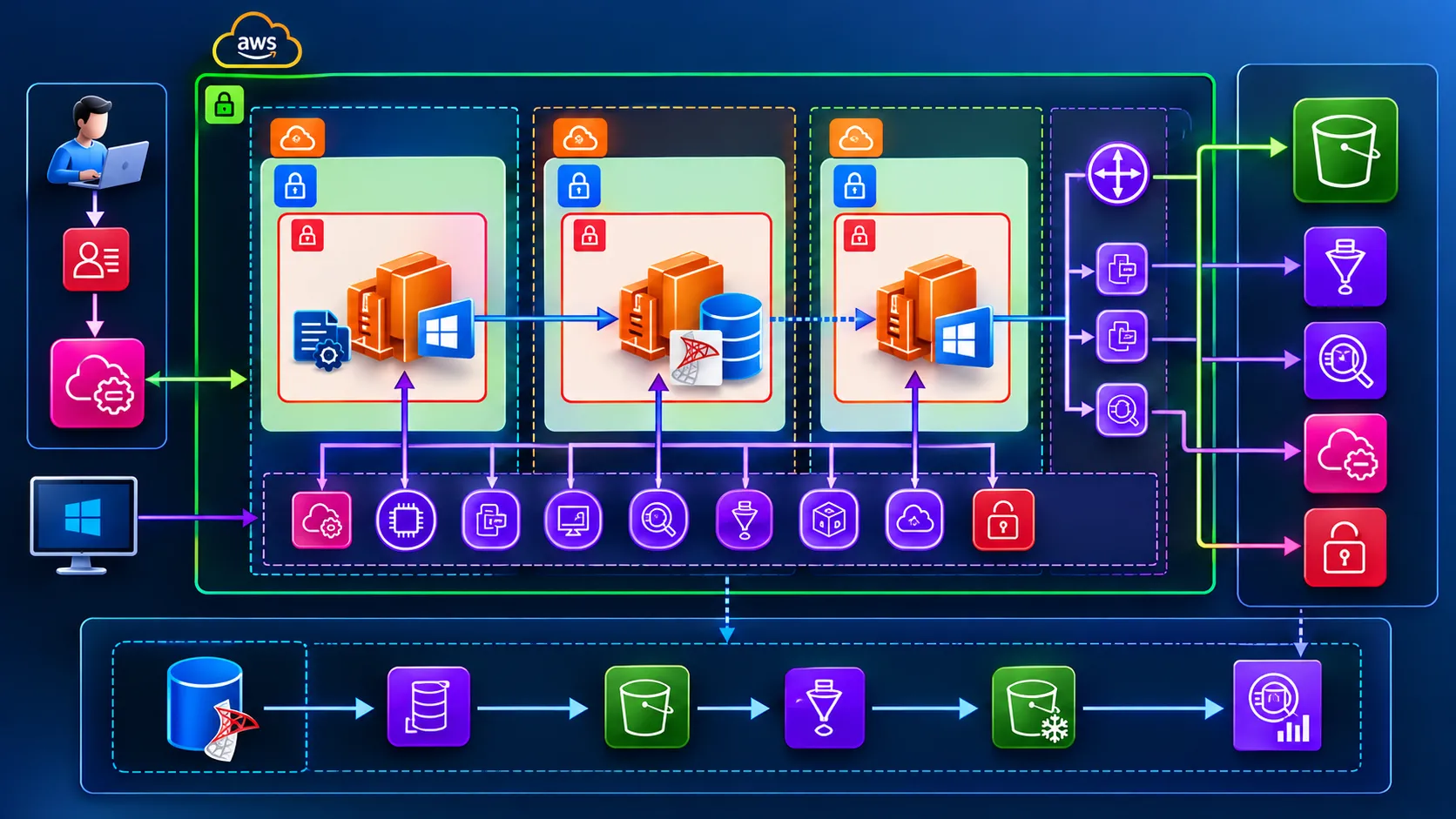
Private AWS Architecture: Windows EC2 Application, SQL Server Archival to S3, Athena Search, Windows Bastion and SSM
Learn how to design a secure, private AWS infrastructure using Windows EC2, Microsoft SQL Server, Amazon S3, AWS Glue, and Amazon Athena. Explore SQL Server data archival, private VPC endpoints, secure administration with AWS Systems Manager, network security, and cost-effective historical data querying without exposing EC2 instances to the public internet.

AWS Community Builder Article | AWS Networking | Windows EC2 | SQL Server | S3 | Athena | Systems Manager

Introduction
This architecture hosts application files on a private Windows EC2 server and Microsoft SQL Server on another private Windows EC2 server. Historical SQL Server data is exported to Amazon S3 for long-term archival and queried later with Amazon Athena from the application server.
A third Windows EC2 instance can serve as a private bastion for RDP or SSH (if Windows OpenSSH is enabled), while AWS Systems Manager (SSM) offers a more direct administration path.
Every EC2 instance remains in a private subnet with no public IP. An Amazon S3 gateway VPC endpoint connects private route tables to S3. Separate interface endpoints are required for private access to SSM, Athena, Glue, and other AWS APIs.
1. What the VPC Screenshot Shows
The screenshot shows a VPC in eu-west-1 (Ireland) with CIDR 10.47.124.0/22, six subnets spanning eu-west-1a, eu-west-1b, and eu-west-1c, four route tables, and network connections including an AWS-S3-Endpoint.
The subnet labels include application, data, and stack private subnets. This supports the intended private-network design.
Important: The screenshot alone does not prove that every instance has no public IP, that every private subnet's effective route table is associated with the S3 endpoint, or that SSM/Athena interface endpoints exist. Verify these separately.
2. End-to-End Reference Architecture
1
2
3
4
5
6
7
8
9
10
11
12
13
14
15
16
17
18
19
20
21
22
23
24
25
26
27
28
29
30
31
32
33
34
35
36
37
38
39
40
                         ADMINISTRATOR
                              |
                   IAM Identity Center / IAM
                              |
                    Systems Manager (SSM)
                              |
 +-------------------- AWS VPC: 10.47.124.0/22 -------------------+
 |                   Ireland (eu-west-1)                          |
 |                                                                |
 |   PRIVATE APP SUBNET         PRIVATE DATA SUBNET                |
 |   +--------------------+     +-------------------------+        |
 |   | Windows EC2        |     | Windows EC2             |        |
 |   | Application files  |---->| Microsoft SQL Server    |        |
 |   | Search UI / API    |1433 | Live operational DB     |        |
 |   +----------+---------+     +------------+------------+        |
 |              |                            |                     |
 |              |                  DMS / export / Glue ETL         |
 |              |                            |                     |
 |   PRIVATE STACK SUBNET                     |                     |
 |   +--------------------+                   |                     |
 |   | Windows Bastion    |                   |                     |
 |   | Optional RDP / SSH |                   |                     |
 |   +--------------------+                   |                     |
 |              |                            |                     |
 |       SSM interface endpoints             |                     |
 |       Athena/Glue interface endpoints     |                     |
 |              |                            |                     |
 |       Private route tables -> S3 gateway VPC endpoint          |
 +------------------------------+---------------------------------+
                                |
                  +-------------+-------------+
                  |                           |
                  v                           v
           S3 Archive Bucket          S3 Query Results
                  |                           ^
                  v                           |
           AWS Glue Catalog ----------------> Athena
                                               |
                                               v
                                        Windows App UI
S3 gateway endpoints use VPC route tables. Athena is a managed regional service, not an EC2 instance inside the subnet.
3. Windows Application on EC2
Store application binaries on encrypted EBS volumes.
1
2
3
4
5
C:\Apps\BusinessApp\
    current\
    releases\
    config\
    logs\
Deploy releases through CI/CD or SSM Run Command. Store passwords and connection strings in Secrets Manager or another approved secure configuration store.
4. Microsoft SQL Server on Private EC2
Host SQL Server on a private Windows EC2 instance with encrypted EBS.
Allow SQL traffic only from the application server security group on the configured SQL Server port, commonly TCP 1433.
Define SQL-aware backup and recovery procedures and validate restores.
Moving records to S3 is not the same as taking a database backup.
5. Historical SQL Server Archival to S3
1
2
3
4
5
6
7
8
9
10
11
12
13
14
15
16
17
18
19
20
21
22
23
24
25
SQL Server historical rows
        |
        v
Retention policy / cutoff date
        |
        v
AWS DMS or scheduled export
        |
        v
S3 landing area
        |
        v
Glue ETL / validation
        |
        v
Partitioned compressed Parquet
        |
        v
S3 curated archive
        |
        v
Glue Data Catalog
        |
        v
Amazon Athena
AWS DMS supports S3 targets, subject to the selected SQL Server version and configuration. Alternatively, use controlled batch exports.
Before deleting records, reconcile row counts, date ranges, schemas, and representative aggregates. Verify Athena queries and obtain approval.
6. S3 Bucket and File Design
1
2
3
4
5
6
7
s3://example-sql-archive/
    landing/orders/
    curated/orders/year=2025/month=01/part-0001.parquet
    curated/orders/year=2025/month=02/part-0001.parquet

s3://example-athena-results/
    queries/
Use separate archive and Athena result locations, encrypt both, and apply lifecycle policies appropriate to retention and retrieval requirements.
7. Glue Catalog and Athena SQL
1
2
3
4
5
6
7
8
9
CREATE EXTERNAL TABLE IF NOT EXISTS archive_db.orders (
    order_id BIGINT,
    customer_id BIGINT,
    order_total DECIMAL(18,2),
    order_date TIMESTAMP
)
PARTITIONED BY (year STRING, month STRING)
STORED AS PARQUET
LOCATION 's3://example-sql-archive/curated/orders/';
Register partitions through Glue crawlers or explicit catalog operations.
Example search:
1
2
3
4
5
6
7
SELECT order_id, customer_id, order_total, order_date
FROM archive_db.orders
WHERE year = '2025'
  AND month = '01'
  AND customer_id = 12345
ORDER BY order_date DESC
LIMIT 100;
Athena is designed for analytical and historical queries, not low-latency SQL Server transactional updates.
8. Search Archives from Windows EC2
The Windows application can call Athena through an AWS SDK, driver, or internal API.
1
2
3
4
5
6
7
8
9
10
11
12
13
14
15
16
17
18
19
import boto3

athena = boto3.client("athena", region_name="eu-west-1")

response = athena.start_query_execution(
    QueryString="""
        SELECT order_id, order_total
        FROM archive_db.orders
        WHERE year = '2025' AND month = '01'
        LIMIT 10
    """,
    QueryExecutionContext={"Database": "archive_db"},
    ResultConfiguration={
        "OutputLocation": "s3://example-athena-results/queries/"
    },
    WorkGroup="archive-readonly"
)

print(response["QueryExecutionId"])
The call is asynchronous. Poll
GetQueryExecution and retrieve results after successful completion.Use an EC2 instance role with minimal Athena, Glue, S3, and KMS permissions.
9. S3 Gateway Endpoint Configuration
- Open VPC → Endpoints.
- Verify the S3 endpoint is of type Gateway.
- Confirm the endpoint service is
com.amazonaws.eu-west-1.s3. - Associate the private subnet route tables that need S3 access.
- Verify S3 prefix-list routes.
- Review endpoint and bucket policies.
- Test S3 access from a private instance through SSM.
An S3 gateway endpoint does not provide connectivity to SSM, Athena, or all other AWS APIs.
10. Windows Bastion: RDP and SSH
1
2
3
4
5
6
7
8
9
10
11
Administrator
    |
    v
SSM Session Manager
    |
    v
Private Windows Bastion
    |
    +--> RDP TCP 3389 --> Windows App
    +--> RDP TCP 3389 --> Windows SQL Server
    +--> SSH TCP 22 ----> Windows target with OpenSSH enabled
Windows normally uses RDP for graphical administration.
SSH requires Windows OpenSSH Server and appropriate firewall and authentication configuration.
Prefer direct SSM access to the target when possible. For GUI access, an approved RDP-over-SSM port-forwarding workflow may be used.
11. SSM in a VPC Without Internet Access
Each Windows instance needs a working SSM Agent, suitable EC2 IAM role, and connectivity to the necessary SSM endpoints.
Typically configure:
1
2
3
com.amazonaws.eu-west-1.ssm
com.amazonaws.eu-west-1.ssmmessages
com.amazonaws.eu-west-1.ec2messages
The
ec2messages endpoint requirement depends on Region and agent behavior.Also consider interface endpoints for CloudWatch Logs, KMS, Secrets Manager, STS, Athena, and Glue where those services are used.
Enable private DNS and allow TCP 443 from the instances to the interface endpoint security groups.
12. Security Groups
| Source | Destination | Port |
|---|---|---|
| Application SG | SQL Server SG | SQL TCP port |
| Bastion SG | App/DB SG | 3389 |
| Bastion SG | App/DB SG | 22, if enabled |
| EC2 SGs | Interface endpoint SG | 443 |
| Internal clients | Application SG | Application port |
The S3 gateway endpoint is controlled using route tables, IAM, bucket policies, endpoint policies, and relevant network rules rather than an interface endpoint security group.
13. Terraform Deployment
1
2
3
4
5
6
7
8
9
10
11
12
13
terraform/
  modules/
    vpc/
    endpoints/
    security-groups/
    windows-app/
    sqlserver-ec2/
    bastion/
    s3-archive/
    iam/
    monitoring/
  environments/
    production/
Use CI/CD for validation and Terraform plan review. Restrict deployment permissions and require approval for production changes.
14. Observability, Backups, and Cost
Monitor SQL Server health, EBS capacity, application errors, SSM managed-node status, archival failures, S3 storage, Athena scanned bytes, and query errors.
Test SQL Server backups and restoration independently of the S3 archive.
Cost drivers include Windows/SQL licensing, EC2, EBS, interface endpoints, archival storage, DMS/ETL processing, Athena scans, and monitoring.
Use Parquet, partition pruning, and Athena workgroup limits to manage query costs.
15. Implementation Roadmap
- Verify the six private subnets, four route tables, and S3 endpoint.
- Map each subnet to its effective route table.
- Verify S3 endpoint associations.
- Create required interface endpoints.
- Deploy private Windows application and SQL Server instances.
- Configure IAM, security groups, and SSM.
- Add the optional Windows bastion.
- Create S3 archive and Athena result buckets.
- Implement SQL Server archival.
- Convert data to Parquet and catalog with Glue.
- Build Athena-backed archive search.
- Test network isolation, recovery, and monitoring.
16. Production Checklist
- All EC2 instances have no public IP addresses.
- S3 gateway endpoint is associated with the required private route tables.
- SSM, Athena, and Glue endpoints are configured as needed.
- Endpoint security groups and private DNS are correct.
- SQL Server permits only approved application connections.
- RDP/SSH access is restricted.
- SSM access works.
- Archive exports are validated before deletion.
- S3 archive and Athena results are encrypted.
- Glue partitions and Athena queries are verified.
- SQL Server backup restoration is tested.
- Logs, alerts, and cost controls are configured.
Key Takeaway
A private Windows EC2 application and SQL Server database can use Amazon S3 for historical archival and Amazon Athena for historical searches without assigning public IP addresses to the EC2 instances.
The data flow is:
SQL Server → Validated Export → S3 Parquet → Glue Catalog → Athena → Windows Application Search
The administration flow is:
IAM/SSO → Systems Manager → Private Windows EC2
The networking principle is to use an S3 gateway endpoint for S3 and separate interface endpoints for AWS APIs such as SSM and Athena.
Official AWS References
Enjoyed reading this content? Let the author know!
Your likes, comments, shares, and saves help creators reach more builders.

Loading recommendations
Loading article