
Building a Metabase Business Intelligence Platform on AWS with Kubernetes
Metabase is a business intelligence (BI) platform that lets users connect to databases, create dashboards, build SQL queries, and share business reports without requiring every user to know SQL

Organizations generate enormous amounts of data across transactional databases, applications, and cloud-native services. Turning that data into actionable insights requires a Business Intelligence (BI) platform that enables teams to explore information, build dashboards, and make data-driven decisions.
Metabase is an open-source Business Intelligence platform that makes analytics accessible to technical and non-technical users. It supports interactive dashboards, SQL queries, data exploration, and visualization without requiring organizations to develop a custom analytics application.
When deployed on Amazon Web Services (AWS), Metabase can become part of a scalable, secure, and highly available analytics platform.
In this article, we'll explore how to deploy Metabase on Amazon Elastic Kubernetes Service (Amazon EKS) using Terraform and Helm, integrate it with Amazon RDS for PostgreSQL, and apply production-ready security and operational practices.
1. Architecture Overview
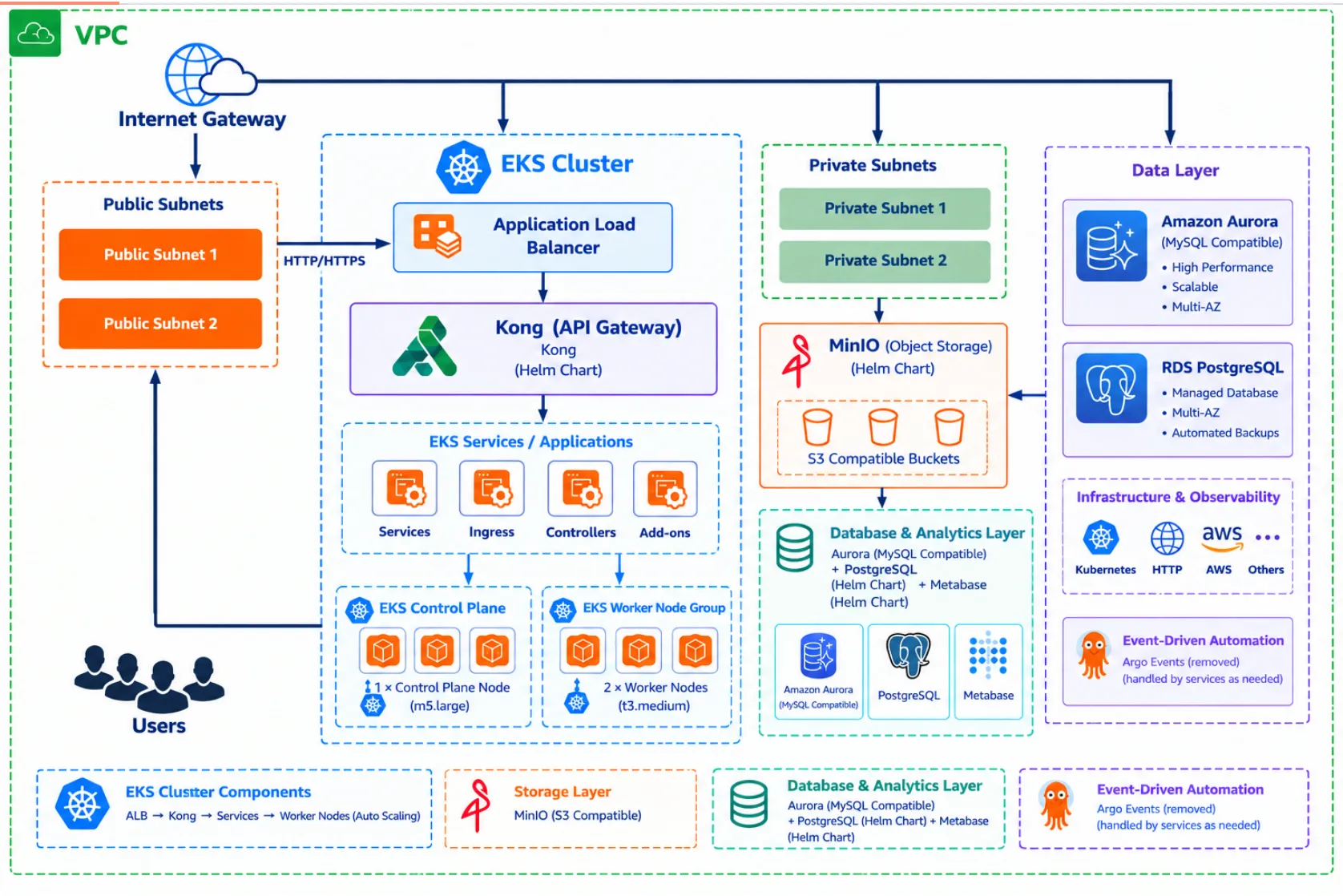
The proposed architecture separates the analytics application, its persistent application metadata, and the databases being analyzed.
Core components
- Amazon EKS: Runs Metabase in Kubernetes.
- Amazon Application Load Balancer (ALB): Provides external HTTPS access to the application.
- AWS Load Balancer Controller: Manages ALB resources through Kubernetes ingress configuration.
- Amazon RDS for PostgreSQL: Stores Metabase application metadata, including saved questions, dashboards, users, and configuration.
- AWS Secrets Manager: Stores database credentials and other sensitive configuration.
- Amazon CloudWatch: Collects application logs and infrastructure metrics.
- Helm: Packages and deploys Metabase and its Kubernetes resources.
- Terraform: Provisions AWS infrastructure and manages deployment configuration.
Metabase connects to two distinct categories of databases:
- Application database: Stores Metabase's own internal state.
- Analytics data sources: The databases that users query to generate reports and dashboards.
These roles should be configured separately. For example, Metabase can use PostgreSQL on Amazon RDS for its application database while connecting to another PostgreSQL database, Amazon Redshift, or a MySQL database for analytics.
2. Why Deploy Metabase on Amazon EKS?
Running Metabase on Kubernetes provides operational flexibility and integrates BI into an existing cloud-native platform.
Scalability
Kubernetes Deployments allow operators to manage application replicas, resource requests, resource limits, and rolling updates.
For workloads with high query concurrency, resource allocation should be based on observed CPU, memory, connection usage, and dashboard response times.
However, adding replicas does not automatically improve every workload. Database capacity, connection pools, query complexity, and caching can become bottlenecks.
Infrastructure as Code
Terraform provides a repeatable approach to provisioning infrastructure, including:
- VPCs and private subnets.
- Amazon EKS clusters and node groups.
- Amazon RDS for PostgreSQL.
- Security groups and IAM roles.
- Application load balancing.
- Secrets Manager resources.
Helm manages the Kubernetes application deployment independently of the underlying AWS infrastructure.
This separation makes it easier to review changes, reproduce environments, and implement infrastructure promotion across development, staging, and production.
Operational consistency
Teams already using GitOps and Kubernetes can manage Metabase through established deployment workflows, including version control, automated validation, and controlled releases.
3. Provision the Infrastructure with Terraform
A production-oriented deployment should start with a properly configured AWS environment.
A typical Terraform repository could use the following structure:
1
2
3
4
5
6
7
8
9
10
11
12
13
14
15
16
17
18
metabase-platform/
├── terraform/
│   ├── main.tf
│   ├── variables.tf
│   ├── outputs.tf
│   ├── providers.tf
│   ├── vpc.tf
│   ├── eks.tf
│   ├── rds.tf
│   ├── security-groups.tf
│   └── iam.tf
├── helm/
│   └── metabase-values.yaml
├── kubernetes/
│   ├── namespace.yaml
│   ├── ingress.yaml
│   └── network-policy.yaml
└── README.md
The Terraform layer provisions the AWS resources, while Helm configures Metabase inside the EKS cluster.
Infrastructure design considerations
Networking
Deploy worker nodes and RDS in private subnets. Public access should be limited to the application entry point, where appropriate.
Use multiple Availability Zones to improve resilience against individual Availability Zone failures.
Database
Configure Amazon RDS for PostgreSQL with:
- Encryption at rest.
- TLS connections.
- Automated backups and an appropriate retention period.
- Multi-AZ deployment where required.
- Private network access.
- Restricted security-group rules.
The RDS security group should allow PostgreSQL traffic only from the approved Metabase workload or its dedicated security group, depending on the networking design.
Avoid exposing PostgreSQL directly to the public internet.
IAM
Use IAM roles for service accounts or EKS Pod Identity to grant workloads access to AWS services when required.
Apply least-privilege permissions instead of distributing long-lived AWS access keys to application containers.
For more information, see the official Amazon EKS documentation .
4. Deploy Metabase with Helm
Helm simplifies the deployment and configuration of Metabase on Kubernetes.
Before deploying, create a dedicated namespace:
1
kubectl create namespace metabase
Add the official Metabase Helm chart repository:
1
2
helm repo add metabase https://pmint93.github.io/helm-charts
helm repo update
The chart's availability, maintenance status, and compatibility should be verified before adopting it for production. Pin the selected chart version and review its rendered Kubernetes manifests.
Create a production-specific values file rather than relying on chart defaults.
For example, a conceptual configuration might include:
1
2
3
4
5
6
7
8
9
10
11
12
13
14
15
16
17
replicaCount: 2

image:
  repository: metabase/metabase
  tag: "YOUR_APPROVED_METABASE_VERSION"

service:
  type: ClusterIP
  port: 3000

resources:
  requests:
    cpu: "500m"
    memory: "1Gi"
  limits:
    cpu: "2"
    memory: "4Gi"
Important: This is an illustrative configuration, not a universally valid values file for every Metabase chart version. Verify the selected chart's schema and rendered manifests before deploying.
Replace the placeholder image version with an approved, tested release. Avoid relying on an unpinned
latest tag.Deploy using the verified chart and configuration:
1
2
3
helm upgrade --install metabase metabase/metabase \
  --namespace metabase \
  --values helm/metabase-values.yaml
Validate the deployment:
1
2
3
kubectl get deployments -n metabase
kubectl get pods -n metabase
kubectl get services -n metabase
Review the logs if the application fails to start:
1
kubectl logs -n metabase deployment/metabase
For production deployments, the Helm chart should also be reviewed for readiness and liveness probes, security contexts, service-account configuration, and support for the desired environment variables.
5. Configure Amazon RDS for PostgreSQL
Metabase requires a persistent application database for its internal metadata.
Although Metabase can use an embedded H2 database for simple deployments, an external PostgreSQL database is generally a better choice for production environments.
An illustrative environment configuration is:
1
2
3
4
5
6
7
8
9
10
11
12
env:
  - name: MB_DB_TYPE
    value: postgres

  - name: MB_DB_HOST
    value: YOUR_RDS_ENDPOINT

  - name: MB_DB_PORT
    value: "5432"

  - name: MB_DB_DBNAME
    value: metabase
The database username and password should be supplied through a supported Kubernetes Secret integration rather than hardcoded into the Helm values file.
The exact Secret references and environment-variable syntax depend on the selected chart.
Security considerations
- Require encrypted connections between Metabase and RDS.
- Validate the RDS server certificate when configuring TLS.
- Store credentials in AWS Secrets Manager.
- Restrict database permissions to the application database.
- Rotate credentials using a tested procedure.
- Monitor database connections and connection exhaustion.
The application database must be treated as critical state. Backups should be tested through actual restoration exercises, not just configured.
See the Amazon RDS for PostgreSQL documentation for database deployment and operational guidance.
6. Expose Metabase Securely with an Application Load Balancer
For external access, an AWS Application Load Balancer can route HTTPS traffic to the Metabase Kubernetes Service.
A typical request flow is:
1
2
3
4
5
6
7
8
9
10
11
12
13
14
15
16
17
18
19
20
Users
  |
  v
DNS
  |
  v
AWS Application Load Balancer
  |
  | HTTPS
  v
Kubernetes Ingress
  |
  v
Metabase Service
  |
  v
Metabase Pods
  |
  v
Amazon RDS PostgreSQL
The AWS Load Balancer Controller provisions and manages the relevant AWS load-balancing resources.
A production configuration should include:
- HTTPS using an AWS Certificate Manager certificate.
- HTTP-to-HTTPS redirection where appropriate.
- Restricted administrative access.
- Appropriate ingress and security-group rules.
- DNS configuration.
- Application health checks.
- A deliberate choice between internet-facing and internal load balancing.
For organizations with private BI requirements, an internal ALB combined with corporate network connectivity or a VPN can reduce exposure.
For additional protection, AWS WAF can help filter unwanted web traffic. It should complement, rather than replace, application authentication and authorization.
Consult the AWS Load Balancer Controller documentation for supported ingress and load-balancing configuration.
7. Manage Secrets and Application Configuration
Credentials are a common source of security risk in Kubernetes environments.
A secure design separates configuration from secrets.
Non-sensitive configuration can be stored in Helm values or Kubernetes ConfigMaps. Database passwords, API tokens, and other sensitive values should be managed through an appropriate secret-management mechanism.
One option is to integrate AWS Secrets Manager with Kubernetes using the AWS Secrets and Configuration Provider for the Secrets Store CSI Driver or another supported integration.
The deployment should define:
- Which identity can retrieve each secret.
- How secrets are delivered to the workload.
- How credential rotation triggers application updates or restarts.
- How access is audited.
- How sensitive values are excluded from Terraform state and CI/CD logs where possible.
Terraform state may contain sensitive values even when variables are marked
sensitive. Use a protected remote backend, encryption, strict access controls, and appropriate state-management practices.8. Scale Metabase and Optimize Performance
Scaling Metabase requires attention to both application capacity and database performance.
Kubernetes scaling
Start with resource requests and limits based on realistic workload testing.
Horizontal Pod Autoscaling may be useful when supported metrics correlate with application demand, but CPU utilization alone may not reflect slow SQL queries or database contention.
Database optimization
For the Metabase application database:
- Monitor CPU, memory, storage, and active connections.
- Review connection-pool settings.
- Establish backup and recovery objectives.
- Test the impact of upgrades and migrations.
For analytical data sources:
- Optimize SQL queries and database indexes.
- Use read replicas or dedicated analytical systems where appropriate.
- Restrict expensive queries when necessary.
- Monitor the effect of dashboards and scheduled refreshes on production systems.
Metabase caching can reduce repeated query execution, but its effectiveness depends on the workload and configuration.
Multiple replicas
Running multiple Metabase replicas can improve availability and distribute application requests. However, replicas must use the same external application database and compatible configuration.
Do not assume that increasing replicas will provide linear query-performance improvements. Validate the design under realistic concurrent usage.
9. Observability and Operational Readiness
A production deployment needs visibility into the application, Kubernetes, and database layers.
Amazon CloudWatch can provide infrastructure metrics, logs, and alarms. Kubernetes monitoring tools can provide additional workload-level visibility.
Useful signals include:
| Layer | Signals to monitor |
|---|---|
| Metabase | Application errors, response latency, JVM memory, restarts |
| Kubernetes | Pod availability, CPU, memory, failed probes |
| Amazon RDS | Database connections, CPU, storage, query latency |
| Load balancer | HTTP 4xx/5xx responses, target health, request latency |
| Security | Authentication failures, administrative changes, secret access |
Alerting thresholds should reflect the service's availability and performance objectives.
Operational procedures should also cover application upgrades, database migrations, rollback limitations, credential rotation, and disaster recovery.
10. CI/CD and GitOps
A reliable delivery pipeline can automate the validation and deployment process.
A typical workflow is:
- Validate Terraform formatting and configuration.
- Run Terraform plan and review infrastructure changes.
- Validate Helm values and render the Kubernetes manifests.
- Scan container images and configuration for security issues.
- Deploy to a development environment.
- Run health checks and integration tests.
- Promote the approved release to production.
- Verify application availability and monitor errors.
Teams using Argo CD can manage the Helm-based deployment through GitOps, making application configuration changes auditable and repeatable.
Pin Terraform providers, Helm chart versions, and application image versions to support reproducibility.
Enjoyed reading this content? Let the author know!
Your likes, comments, shares, and saves help creators reach more builders.

Loading recommendations
Loading article