

Free AWS cron jobs: EventBridge Scheduler and Step Functions
A $0 nightly job on EventBridge Scheduler and Step Functions Standard, with every state transition counted and daylight saving time handled.

You can run an AWS cron job for free if you know where the limits sit. Amazon EventBridge Scheduler gives you 14 million invocations a month at no charge. AWS Step Functions Standard gives you 4,000 state transitions a month. That second number runs out first.
We built a report job that would run every night and spend 93 of them in a 31-day month. We also built a counter that tells you what your own design will spend before you deploy it.
This is for developers who want scheduled jobs with retries and a visible history, without paying for a server that sits idle all day. You get the schedule settings that matter, the transition math, and a tested AWS Cloud Development Kit (CDK) repo.
Key takeaways
- Scheduler's free tier is 14 million invocations a month. A job that runs once a night uses 31.
- Step Functions counts a transition for every state a run enters and for every retry. 4,000 a month go fast if you loop over data with a Map state.
- Scheduler skips a cron time that falls in the daylight saving gap. In New York, a 02:30 job misses one night a year.
- Put per-item work inside one Lambda function. Keep states for retries, branching and a readable history.
| At a glance | |
|---|---|
| Level | Intermediate |
| Time to read | 9 minutes |
| Cost | $0 a month for the job on its own |
| Code | InfraTales/free-scheduled-workflows |
| Tested with | Node.js 24, AWS CDK 2, DynamoDB Local, Step Functions Local, 90 automated tests, cdk-nag |
| Deployed | Not yet. The smoke test hasn't run against AWS |
EventBridge Scheduler free tier and what it buys
EventBridge Scheduler starts things on a schedule. Its pricing page says you "can make 14,000,000 invocations per month for free", counted across all Regions. After that it's $1.00 per million. A job that runs every minute uses about 44,640 invocations a month, so the scheduler won't be the expensive part.
A schedule can call 12 common operations as templated targets, such as Lambda Invoke, SQS SendMessage and Step Functions StartExecution. Universal targets reach "over 6,000 API operations", but not read-only ones like Get, List or Query. Each Region allows 10,000,000 schedules.
You may know the older way: an EventBridge rule with a schedule expression. AWS now calls those "a legacy feature" and recommends Scheduler. Rules run in UTC only, and an event bus holds 300 rules in most Regions. Scheduler has time zones, retries and a dead-letter queue on each schedule.
Pick cron, rate or one-time
Scheduler has three schedule types.
cron() takes six fields: minutes, hours, day-of-month, month, day-of-week and year. rate() takes a number and a unit in minutes, hours or days. at() runs once at a date and time, and you can tell Scheduler to delete the schedule after it fires.Two details catch people. In AWS cron, day-of-week 1 is Sunday, not Monday. And one of day-of-month or day-of-week must be
?, so cron(0 9 ? * MON *) is valid and cron(0 9 * * MON *) isn't.Pick
cron() for anything tied to a wall clock. rate(1 days) means 24 hours after the last run, so it drifts against local time when daylight saving changes.Time zones and the night that doesn't exist
Scheduler evaluates cron and one-time schedules in the time zone you set, using names from the Internet Assigned Numbers Authority (IANA) database such as
America/New_York. The docs cover both change days. In spring, Scheduler skips a cron time that doesn't exist that day. In autumn, a time that happens twice "runs only once."So a 02:30 job in
America/New_York doesn't run on 8 March 2026, because clocks jump from 02:00 to 03:00. Nothing fails and no alarm fires, so you find the missing report later. Our stack checks the chosen time against the next three years. If any day loses or repeats that time, synth stops:1
2
3
$ npm run synth -- -c hour=2
Error: 02:30 in America/New_York is hit by daylight saving time
(skipped: 2026-03-08 02:30; repeated: none). Pick a time outside the change.The default is 03:30, which exists once every day in New York. If you schedule in UTC, there's no change to dodge at all.
Retries, the flexible window and the dead-letter queue
Each schedule has a retry policy and an optional Amazon Simple Queue Service (SQS) dead-letter queue (DLQ). Retries go up to 185 attempts and the event age up to 24 hours. Once both run out, Scheduler sends the event to the DLQ with attributes such as
ERROR_CODE and SCHEDULED_TIME. The queue must be a standard queue, not a first-in, first-out (FIFO) queue.The docs give the maximums but not the defaults, so we set both. The schedule in CDK looks like this:
1
2
3
4
5
6
7
8
9
10
11
12
13
14
new scheduler.Schedule(this, 'Nightly', {
  schedule: scheduler.ScheduleExpression.cron({
    minute: '30', hour: '3', timeZone: cdk.TimeZone.of('America/New_York'),
  }),
  timeWindow: scheduler.TimeWindow.flexible(cdk.Duration.minutes(15)),
  target: new targets.StepFunctionsStartExecution(stateMachine, {
    input: scheduler.ScheduleTargetInput.fromObject({
      scheduledTime: scheduler.ContextAttribute.scheduledTime,
    }),
    retryAttempts: 3,
    maxEventAge: cdk.Duration.hours(2),
    deadLetterQueue: dlq,
  }),
});
Notice the input placeholder,
<aws.scheduler.scheduled-time>. The docs describe it as "the time you specified for the schedule to invoke its target". The flexible window lets Scheduler start up to 15 minutes late, and retries can make it later still. Our job reports on the day before the scheduled time, not the day before "now". A late run still picks the right day.How Step Functions counts transitions
Step Functions Standard is where the free tier gets tight. Its pricing page has two rules. Step Functions "counts a state transition each time a step of your workflow is executed". And "each retry will be charged as an additional state transition." The 4,000 free transitions a month don't expire after 12 months. After that, it's $0.025 per 1,000.
Map states need care. For an inline Map, "there is no state transition for starting each iteration", but every state inside each iteration counts. A Distributed Map costs one transition per iteration, plus whatever its child workflows cost.
Express workflows have no free tier. They bill $1.00 per million requests plus duration, and they run for five minutes at most. For a job that runs once a night, Standard's free transitions are the better deal.
Budget an AWS cron job before building it
Transitions a month equal states per run times runs a month. Our counter walks a state machine definition and follows a small profile for Choice branches, retries and Map items. Then it multiplies by the runs your cron produces in a given month.
Four designs, side by side:
| Design | Per run | Runs a month | Transitions | Above the free tier |
|---|---|---|---|---|
| Our workflow, nightly | 3 | 31 | 93 | $0 |
| Six Lambda steps, nightly | 6 | 31 | 186 | $0 |
| Six Lambda steps, hourly | 6 | 744 | 4,464 | $0.01 |
| Map over 200 orders, nightly | 603 | 31 | 18,693 | $0.37 |
The money stays small until a Map runs over your data. At 100,000 orders a night, that last design costs $232.40 a month. The cost follows your item count, not your schedule.
That's the point to move logic into one Lambda function. AWS Lambda gives you 1 million requests and 400,000 GB-seconds a month. A loop over 200 orders inside one invocation costs one request and no transitions. Keep a state only when Step Functions does something your code would do worse: retry with backoff, wait, branch, or show you which step failed.
Keep the workflow at three states
Our job adds up yesterday's orders from Amazon DynamoDB and saves a report. It has three states on a normal night:
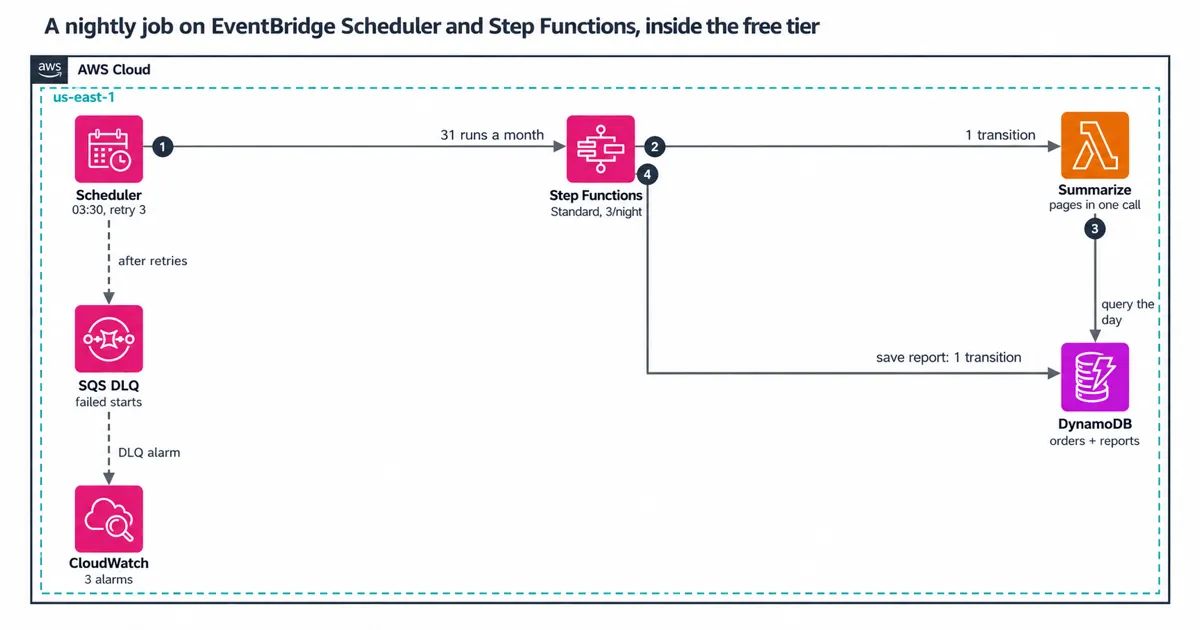
The diagram shows the path and the budget:
- Scheduler starts the workflow at 03:30 New York time, with retries and a DLQ.
- Step Functions runs
Summarize, our one Lambda function. Summarizequeries the day's orders page by page inside one invocation. A Choice state,MorePages?, sends the run back only if the function ran short of time, capped at 5 rounds.SaveReportwrites the report from Step Functions to DynamoDB with no Lambda in between.
The report write uses a condition so a second run for the same day can't overwrite the first:
1
2
3
4
5
6
7
8
9
const saveReport = new tasks.DynamoPutItem(scope, 'SaveReport', {
  table,
  item: { pk: tasks.DynamoAttributeValue.fromString(
    sfn.JsonPath.format('REPORT#{}', sfn.JsonPath.stringAt('$.day'))), /* ... */ },
  conditionExpression: 'attribute_not_exists(pk)',
});
saveReport.addCatch(new sfn.Succeed(scope, 'AlreadyReported'), {
  errors: CONDITIONAL_CHECK_FAILED,
});
A repeat run ends in
AlreadyReported, which makes four transitions. The worst night we allow has 5 full rounds with 2 retries each, then a sixth try that fails. That's 24 transitions. Thirty-one nights like that would still use only 744.The CDK
LambdaInvoke task adds its own retry by default, with up to 6 retries. We turned that off and wrote one that retries Lambda's service errors twice. Our own errors, like TooManyRounds, fail at once and cost nothing extra.What we got wrong first
We first caught only
DynamoDB.ConditionalCheckFailedException. The Step Functions docs say optimized integrations like dynamodb:putItem use that DynamoDB prefix, while SDK integrations use DynamoDb. Our test ran the state machine on Step Functions Local, which sent the real PutItem to DynamoDB Local. The second run for the same day came back FAILED, not AlreadyReported.Step Functions Local had reported
Dynamodb.ConditionalCheckFailedException, a third spelling. A Catch only matches an exact name. We now list all three spellings, and the smoke test checks the real service once you deploy. AWS calls Step Functions Local "unsupported", so treat it as a useful check, not proof.We also caught a weak test. Our first worst-case budget test failed the run on its first visit to
Summarize, so it checked 4 transitions instead of the full worst case. It passed and proved nothing. We now break each safeguard on purpose once and confirm a test fails. We ran 17 of those checks on this repo.What it costs
One 31-day month in us-east-1, priced from the AWS Price List API:
| Service | Used | Free each month | Cost |
|---|---|---|---|
| EventBridge Scheduler | 31 invocations | 14,000,000 | $0 |
| Step Functions Standard | 93 transitions | 4,000 | $0 |
| Lambda (arm64, 256 MB) | 31 requests | 1,000,000 requests, 400,000 GB-s | $0 |
| DynamoDB (5 read and 5 write capacity units) | Under 1 GB | 25 read, 25 write units, 25 GB | $0 |
| SQS DLQ, CloudWatch (3 alarms) | Near zero | 1M requests; 10 alarms | $0 |
These allowances belong to your whole account. If other projects already use them, count those too.
A new account on the Free plan closes on its own after 6 months, or sooner if its credits run out, unless you upgrade. The always-free allowances, such as Lambda's and Step Functions', still apply on the Paid plan. A third alarm watches for more than 3 runs a day, because a schedule edited to
rate(1 minute) would spend 4,320 transitions a day.When this isn't the right fit
- Jobs that run every few seconds. Scheduler works at 60-second precision. Use a queue or a stream instead.
- High-volume, short workflows. Past the free tier, our 3-state Standard run costs $0.000075. A 1-second Express run at 64 MB costs about $0.000002.
- Work longer than a year. That's the Standard limit for one run.
- A single step with no retries. Point Scheduler at the Lambda function and skip Step Functions.
Try it yourself
The repo runs without an AWS account first.
npm run check type-checks, lints, runs the unit and CDK tests, and synthesizes with cdk-nag. npm run local:up starts DynamoDB Local and Step Functions Local in Docker, and npm run test:local runs the real workflow against them.To count your own design, export or write the definition, then run
npm run count -- --definition <file> --schedule "cron(...)" --tz <zone> --month 2026-11. To deploy, run npm run deploy in a CDK-bootstrapped account, then npm run smoke. The smoke test uses about 7 transitions.Clean up
Run
npm run destroy. The stack deletes the table and its demo data with it, so export any reports you want to keep first.Tell me about the busiest schedule you run on Step Functions, and the number of transitions one run takes. I'd like to know where your free tier goes.
Enjoyed reading this content? Let the author know!
Your likes, comments, shares, and saves help creators reach more builders.

Loading recommendations
Loading article