

Sign-in for 10,000 users at $0 with Amazon Cognito
A tested CDK stack for Cognito's Essentials plan: 10,000 free monthly users, passkeys and MFA, and token checks in Lambda without a paid authorizer.

The Amazon Cognito free tier covers 10,000 monthly active users, and on the Essentials plan that includes passkeys, managed login pages and refresh token rotation. That makes Cognito a strong choice for free auth on a side project, if you avoid the few settings that start a bill. We built a small notes app to find those settings and to check Cognito tokens in our own Lambda code.
This article is for developers who want real sign-in without paying for it yet. You get the plan choice explained with prices and a secure user pool that costs nothing. You also get token checks that catch the common mistakes, and a tested AWS Cloud Development Kit (CDK) repo.
Key takeaways
- Lite and Essentials both include 10,000 free monthly active users (MAU) per account or organization, with no end date. Plus has no free tier.
- Every plan charges extra for text messages (SMS). Turn them off and use authenticator apps or passkeys for multi-factor authentication (MFA).
- The default Cognito email sender stops at 50 messages a day. Fine for testing, too low for a launch.
- Accept only access tokens in your API, and check the issuer, the app client and the expiry on every request.
- A token your function verifies on its own stays valid until it expires, even after sign-out. Keep access tokens short.
| At a glance | |
|---|---|
| Level | Intermediate |
| Time to read | 9 minutes |
| Cost | $0 up to 10,000 MAU on Essentials, then $0.015 per MAU |
| Code | InfraTales/cognito-free-auth |
| Tested with | Node.js 24, AWS CDK 2, aws-jwt-verify 5, DynamoDB Local, 86 automated tests, cdk-nag |
What the Cognito free tier covers
AWS replaced the old pricing with three feature plans in November 2024: Lite, Essentials and Plus. New user pools start on Essentials. The free tier is 10,000 MAU a month for pools on Lite or Essentials, counted per account or per AWS organization, not per pool. AWS's pricing page says it "does not automatically expire" and applies to new and existing customers.
The tracking docs list Cognito MAU as an always-free offer, so it counts on both the Free and Paid plans. A new account on the Free plan closes on its own after 6 months, or sooner if its credits run out, unless you upgrade. On the Paid plan, the 10,000 free MAU carry on.
A user counts as active in a calendar month when something identity-related happens to them. Sign-up, sign-in, a password reset and an attribute change all count. A user who signs in 40 times that month still counts once. Sign-ins through Security Assertion Markup Language (SAML) or OpenID Connect providers have a smaller free tier of 50 MAU, while social sign-ins count toward the 10,000.
Past the free tier, the plans split apart. These are us-east-1 prices from the AWS Price List API:
| Plan | Free MAU | Price above the free tier | Bill at 20,000 MAU |
|---|---|---|---|
| Lite | 10,000 | $0.0055 per MAU | $55 |
| Essentials | 10,000 | $0.015 per MAU | $150 |
| Plus | None | $0.020 per MAU | $400 |
We chose Essentials. Passkeys, managed login, password-reuse checks and refresh token rotation aren't in Lite, and they cost nothing below 10,000 users. If you grow past that and don't use those features, Lite costs about a third as much.
The settings that start a bill
Beyond MAU, four settings can add a Cognito bill:
| Setting | What it costs | Our choice |
|---|---|---|
| SMS for MFA, sign-up or recovery | Billed by Amazon Simple Notification Service (SNS) or AWS End User Messaging SMS | Off everywhere |
| Plus plan, needed for threat protection | $0.020 per MAU from the first user | Essentials |
| Machine-to-machine tokens | $0.00225 per token request, no free tier | Not used |
| Your own email through Amazon Simple Email Service (SES) | SES email prices | Later, before launch |
SMS deserves extra care. The first time you set up SMS in a Region, your account starts in the SMS sandbox with a $1 monthly spending quota. Texts to US numbers also need an origination identity first. We turned off SMS MFA, SMS sign-in and phone recovery, so the pool has no SMS role at all.
The default Cognito sender caps email at 50 messages a day per account, and AWS won't raise it. That's enough for development. Before real users sign up, switch the pool to Amazon SES.
A custom domain needs an AWS Certificate Manager (ACM) certificate in us-east-1, and ACM issues public certificates for integrated services at no cost. We used Cognito's prefix domain instead, which needs no certificate.
Build a user pool that costs nothing
Our CDK stack sets the plan, MFA and passkeys in one place. This is a shortened excerpt of
infra/lib/auth-stack.ts:1
2
3
4
5
6
7
8
9
10
11
12
13
14
const userPool = new cognito.UserPool(this, 'UserPool', {
featurePlan: cognito.FeaturePlan.ESSENTIALS,
signInAliases: { email: true },
email: cognito.UserPoolEmail.withCognito(), // 50 emails a day
accountRecovery: cognito.AccountRecovery.EMAIL_ONLY,
mfa: cognito.Mfa.REQUIRED,
mfaSecondFactor: { otp: true, sms: false, email: false },
signInPolicy: { allowedFirstAuthFactors: { password: true, passkey: true } },
passkeyUserVerification: cognito.PasskeyUserVerification.REQUIRED,
passwordPolicy: { minLength: 12, passwordHistorySize: 5 /* plus all 4 character types */ },
deletionProtection: true,
});
(userPool.node.defaultChild as cognito.CfnUserPool)
.webAuthnFactorConfiguration = 'MULTI_FACTOR_WITH_USER_VERIFICATION';Notice the last line. With MFA required, users with a password add an authenticator app at first sign-in. A passkey sign-in counts as MFA on its own, but only with that setting and user verification required. Email MFA isn't an option here. The pool is on Essentials already, but email MFA also needs the pool to send through your own Amazon SES, and ours uses the default Cognito sender.
The app client matters as much as the pool. A browser app can't keep a secret, so ours has none. Managed login uses the authorization code grant with Proof Key for Code Exchange (PKCE), and SDK sign-in uses the
USER_AUTH or Secure Remote Password (SRP) flows. Access and ID tokens last 15 minutes instead of the default hour, and refresh tokens last 30 days with rotation on.We also set "prevent user existence errors" on. The Cognito console turns it on for you, but the API leaves it off for new app clients, and CDK follows the API default. Deletion protection has the same split, so the stack sets both.
Verify Cognito tokens in your function
The API is a Lambda function URL. Function URLs cost nothing beyond normal Lambda pricing, and the function checks every token itself, so there's no authorizer to pay for. AWS recommends the
aws-jwt-verify library for Node.js. We create one verifier per Lambda environment. This is a simplified excerpt of src/auth.ts:1
2
3
4
5
6
7
8
9
10
11
export function createAccessTokenVerifier(opts: VerifierOptions) {
return CognitoJwtVerifier.create(
{
userPoolId: opts.userPoolId, // checks iss, and finds the public keys
tokenUse: 'access', // refuses ID tokens
clientId: opts.clientId, // refuses tokens issued to other app clients
graceSeconds: 5, // clock tolerance on exp and nbf
},
opts.jwksCache ? { jwksCache: opts.jwksCache } : undefined,
);
}Each option closes a real hole. A token from your dev user pool is a valid Cognito token, but the
iss check refuses it. An ID token carries aud instead of client_id and belongs to the app that signed the user in, so the API refuses it too. The handler then keys every DynamoDB read and write by the token's sub, not by an ID from the request.The library downloads the pool's public keys, the JSON Web Key Set (JWKS), on the first request and keeps them in memory. It fetches again only when a token names a key ID it hasn't seen, which is how a Cognito key rotation reaches you. A made-up key ID costs one download, then the library refuses to fetch again for 10 seconds.
Test token checks without Cognito
We wanted the tests to run the real library, not a mock of it. The tests make signing keys, sign JSON Web Tokens (JWTs) with the claims Cognito uses, and serve the public keys from a local HTTPS server. Only the JWKS host changes; the library's own fetcher, cache and back-off do the rest.
The suite covers these cases, all against the real verifier:
- a valid access token, and five verifications that cause one key download.
- a wrong issuer, a wrong app client, and an ID token sent as an access token.
- an expired token, a changed payload, and a token signed by an attacker's key that reuses our key ID.
- unsigned tokens and HMAC-signed tokens (algorithm confusion).
- a rotated key, an unknown key ID, and clock skew at 4 seconds (accepted) and 6 seconds (refused).
We then broke each safeguard on purpose, 14 times in total, and confirmed a test failed every time. Dropping
tokenUse, dropping clientId, raising the clock tolerance and turning on SMS MFA all turned tests red.What we got wrong first: silent logs
Our first handler logged
err.name when it refused a token. The first test run showed the problem: the library's error classes don't set name, so every refusal read Error. An expired token and a forged one would have looked the same in the logs. We switched to the class name, so a log now reads JwtExpiredError or CognitoJwtInvalidTokenUseError, and a test pins that format.The same test run corrected one of our assumptions. We expected a wrong issuer to throw
JwtInvalidIssuerError. It throws ParameterValidationError with "issuer not configured". Since version 5.2, the library accepts two issuer formats per pool and looks the token's issuer up in a list. If you alert on error classes, alert on both.What local checks can't catch
Revocation is the gap. Cognito's guide says offline signature and expiry checks can't detect a revoked token. If a user signs out everywhere, their access token still works against your API until it expires. Short tokens limit that window, which is why ours last 15 minutes.
Refresh token rotation shrinks the risk on the other side. Each refresh returns a new refresh token, and the old one keeps working only for a grace period. You can set it to anything up to 60 seconds; ours is 10.
Your app must save the new token every time. It can refresh with the
GetTokensFromRefreshToken operation or with the token endpoint's refresh_token grant. Only the older REFRESH_TOKEN_AUTH flow doesn't work with rotation.The pieces fit together like this:
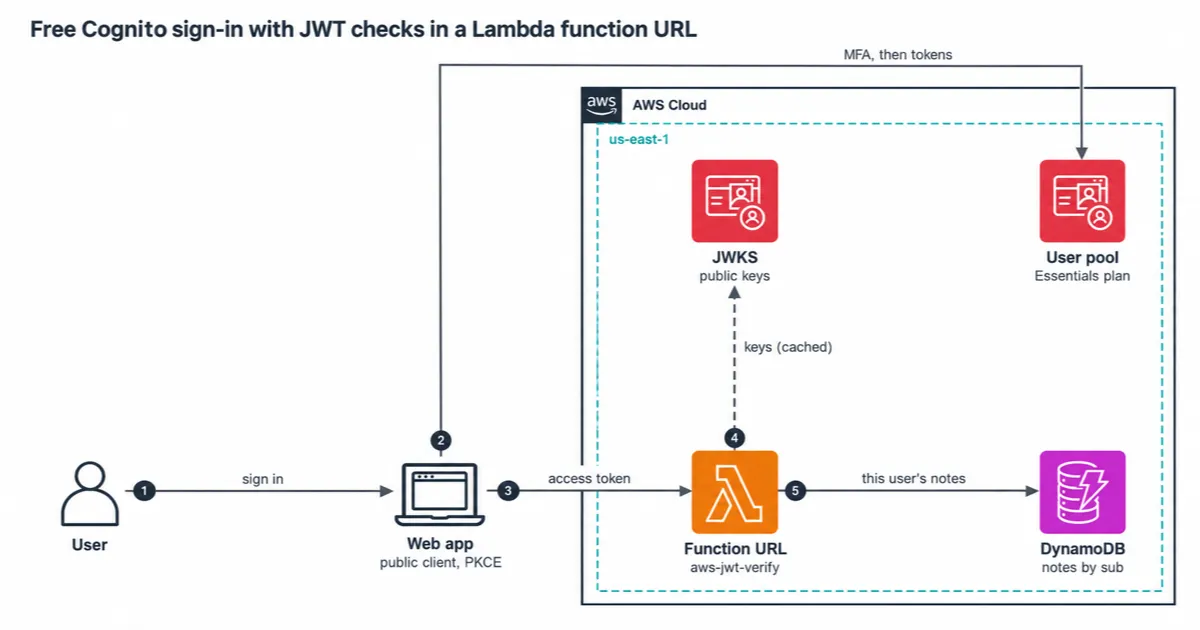
Users sign in through managed login or the SDK. The app then sends the access token to the function URL. The function checks it against cached keys and reads only that user's rows in DynamoDB.
What it costs
At 10,000 MAU or fewer, the Cognito, Lambda and DynamoDB lines below are free. These figures use us-east-1 prices:
| Item | Free allowance | This stack |
|---|---|---|
| Cognito Essentials | 10,000 MAU | $0, then $0.015 per MAU |
| Lambda | 1 million requests, 400,000 GB-seconds | 256 MB, so 1.6 million seconds of run time |
| DynamoDB | 25 read and 25 write units, 25 GB | 5 and 5 provisioned |
| 50 a day from Cognito | Not stated. AWS says SES charges for email | |
| SMS | Not used | $0 |
Point-in-time recovery for the table has no free tier, so the stack leaves it off. Turn it on once the notes matter to someone.
The function URL is public, so anyone can send it junk tokens, and each one is a billed Lambda request. The stack reserves 2 concurrent copies of the function to cap that. Past 2 copies, callers get HTTP 429, and the URL accepts at most 20 requests a second, 10 times the reserved concurrency.
Watch self sign-up. Every sign-up counts as an MAU, confirmed or not, so a bot can push you past 10,000. A pre sign-up Lambda trigger that checks email domains narrows that gap, and invite-only sign-up closes it.
When this isn't the right fit
- You need adaptive authentication. That's threat protection, with compromised-password checks too. It needs the Plus plan from the first user.
- Your users expect text codes. That works on every plan, but you pay per message and must handle the SMS sandbox.
- You expect far more than 10,000 users. If you don't need passkeys or managed login, Lite costs about a third of Essentials per user.
- Sign-out must end access at once. Local checks can't do that. Set access tokens to the 5-minute minimum and accept that window, or choose a design with server-side sessions.
Try it yourself
The repo runs without an AWS account.
npm run check type-checks, lints, runs the token tests against the local JWKS server, runs the CDK template tests, and synthesizes with cdk-nag. With DynamoDB Local in Docker, npm run test:int runs the handler against a real engine.To deploy, run
npm run bundle, then npx cdk deploy -c domainPrefix=your-unique-prefix. Then run npm run smoke. The smoke test creates a throwaway user and sets up a time-based one-time password (TOTP) for it. It calls the API with the user's access token, checks that the API refuses the ID token, and deletes the user.Clean up
Run
npm run destroy. The user pool and the notes table have deletion protection, so they stay. Turn protection off in each console, then delete them.I'd like to hear which part of auth you still pay a third-party service for on your side projects. Do passkeys on the free tier change that for you?
Enjoyed reading this content? Let the author know!
Your likes, comments, shares, and saves help creators reach more builders.

Loading recommendations
Loading article