

Run a real API for $0 a month on Lambda's always-free tier
A bookmarks API on a Lambda function URL and DynamoDB: which free limit runs out first, what a traffic flood can cost, and settings that break $0.

The AWS Lambda free tier limits are 1 million requests and 400,000 GB-seconds of compute a month, and they don't expire after 12 months the way some offers do. That's enough to run a real backend for $0, if you know which limit you'll hit first and what happens when traffic goes wrong. We built a small bookmarks API to find out, and turned the answers into a tested repo.
This article is for developers who want a free backend on AWS for a side project or a personal tool. You get the free-tier math, a front door that costs nothing, and a hard ceiling on the worst month. There are also alarms that cost nothing, plus an AWS Cloud Development Kit (CDK) stack.
Key takeaways
- For a fast API, the 1 million free requests run out long before the 400,000 GB-seconds. Extra memory costs nothing until requests get slow.
- A Lambda function URL costs nothing extra. With auth type
NONE, your free requests belong to anyone who finds the URL. - Reserved concurrency plus the function URL's request limit puts a hard cap on the bill. With 2 reserved copies at 256 MB, the worst possible month is $23.04.
- A CloudWatch alarm that uses metric math doesn't count toward the 10 free alarm metrics. Give each alarm one plain metric.
| At a glance | |
|---|---|
| Level | Beginner |
| Time to read | 11 minutes |
| Cost | $0 within the always-free tier. Worst case with the default cap: $23.04 for a month |
| Code | InfraTales/lambda-always-free-api |
| Tested with | Node.js 24, AWS CDK 2, DynamoDB Local, 84 automated tests, cdk-nag |
Lambda free tier limits: the math that matters
Lambda bills two things. Each request costs $0.20 per million after the first million. Lambda bills compute in GB-seconds: how long each request runs, rounded up to the next millisecond, times the memory you gave the function. The free tier covers 1 million requests and 400,000 GB-seconds every month, on the Free and Paid plans alike.
Arm and x86 functions draw from one shared allowance, not one each. AWS's Graviton launch post says Arm functions are "included in the AWS Free Tier up to the existing limits". A 2024 post on the AWS Architecture Blog says the 400,000 GB-seconds are "usable for functions across both x86 and AWS Graviton processors". Past the free tier, Arm compute costs $0.0000133334 per GB-second against $0.0000166667 for x86, so we use Arm.
Compute and requests run out at the same time only when requests are slow. You can work out that point for each memory size:
| Memory | Both limits run out together at a mean billed duration of |
|---|---|
| 128 MB | 3,200 ms |
| 256 MB | 1,600 ms |
| 512 MB | 800 ms |
| 1,024 MB | 400 ms |
An API that answers in 20 ms is nowhere near any of these. Your limit is the request count, and extra memory costs you nothing inside the free tier, so we gave the function 256 MB for headroom.
Two more billing details matter. Rounding happens per request, so average the billed durations instead of rounding an average. And since August 1, 2025, Lambda bills the initialization phase of a cold start too.
What we measured on a laptop
The repo has a
measure script that runs the bundled handler the way one Lambda environment does: load it once, then serve one request at a time. We ran 1,000 rounds of create, get, list and update, plus a delete in every second round, against DynamoDB Local on an Apple silicon laptop with Node.js 24.The mean billed duration came out between 1.3 and 4.5 ms across four runs. The laptop was busy with other work, which explains the spread. Real Lambda adds a network trip to DynamoDB, so expect more, but still far below 1,600 ms. A successful request wrote 0 bytes of logs, and an average response was about 1.4 KB.
The
free-tier-model script turns those numbers into a monthly picture:1
2
3
4
Lambda, per month
free by request count 1,000,000
free by compute 352,422,907 (400,000 GB-s / GB-s per request)
=> 1,000,000 requests a month cost $0. The 1M request allowance runs out first.Notice the gap. Compute alone would cover over 350 million requests a month, 350 times the request allowance. After you deploy, pass your real billed duration to the script with
--duration-ms.Choose a front door that costs nothing
Amazon API Gateway's free tier lasts 12 months and is for new customers only. Free plan accounts get none of it, since the Free plan comes with only the always-free offers. Without the free tier, an HTTP API costs $1.00 per million requests. A Lambda function URL is an HTTPS endpoint on the function itself, and the Lambda docs say there are "no additional charges for the URL endpoint itself".
The whole design fits in one picture:
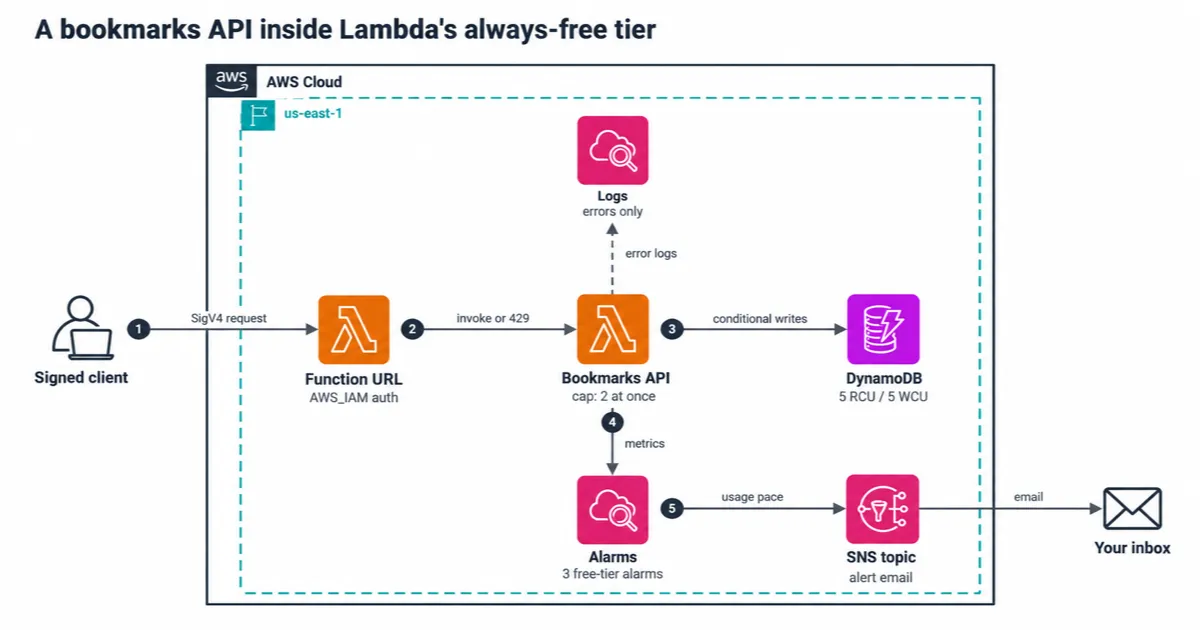
The client signs each request. The function URL checks the signature, and the function reads and writes one DynamoDB table. CloudWatch watches the function's metrics and emails you through SNS when usage gets close to the free limits.
A function URL has two auth types. With
NONE, Lambda runs your function for anyone on the internet, and each of those calls spends your free requests. With AWS_IAM, Lambda checks a Signature Version 4 (SigV4) signature before your code runs, and unsigned requests get 403.We use
AWS_IAM, and the handler uses the caller's identity to keep each caller's data apart:1
2
3
4
5
6
// Stack: Lambda checks the signature before the function runs.
fn.addFunctionUrl({ authType: lambda.FunctionUrlAuthType.AWS_IAM, invokeMode: lambda.InvokeMode.BUFFERED });
// Handler: Lambda passes the signed caller's IAM ARN.
const owner = event.requestContext?.authorizer?.iam?.userArn;
if (!owner) return problem(403, 'this API needs AWS_IAM auth on the function URL');The owner check matters if someone flips the URL to
NONE later. Lambda then sends no identity at all, so the handler refuses the request rather than guess whose bookmarks to show. One more detail: since October 2025, new function URLs need both lambda:InvokeFunctionUrl and lambda:InvokeFunction permissions. CDK's grantInvokeUrl adds both, and a template test checks it.Put a hard ceiling on the bill
The free tier is a monthly allowance, not a limit. Nothing stops a buggy client from sending 50 million requests. Reserved concurrency is the setting that bounds how much the function can run. It sets the most copies of the function that may run at once, and it costs nothing to configure.
Function URLs add a second limit. The docs say the maximum request rate "is equivalent to 10 times the configured reserved concurrency". Callers above either limit get HTTP 429. The Lambda metrics docs say throttled requests aren't recorded as invocations, and that invocations equal billed requests.
Those two limits give you a worst case you can compute. Below 100 ms per request, the rate limit caps the request count. Above 100 ms, concurrency caps compute. So the worst month is the one where every request takes 100 ms:
| Reserved concurrency | Memory | Most requests in 31 days | Most GB-seconds | Worst Lambda bill (Arm) |
|---|---|---|---|---|
| 1 | 128 MB | 26,784,000 | 334,800 | $5.16 |
| 2 | 256 MB | 53,568,000 | 1,339,200 | $23.04 |
| 5 | 256 MB | 133,920,000 | 3,348,000 | $65.89 |
The repo uses 2 reserved copies, so a client can send at most 20 requests a second. With 1 copy at 128 MB, compute can't leave the free tier at all, and only requests can cost money. The repo's smoke test fires 60 parallel calls after a deploy and expects some of them to get 429.
One trap catches new accounts. Lambda keeps 100 units of account concurrency unreserved, and new accounts start with a lower concurrency quota. If your quota is too small to reserve 2 more units, the deploy fails. Check the quota in Service Quotas before you deploy, and ask for an increase rather than removing the cap.
Alarm before the free tier runs out
A monthly total is hard to alarm on, because a CloudWatch alarm can look back at most 7 days. Instead, we alarm on pace. If one day uses more than 1/31 of the monthly allowance, a 31-day month at that rate would run out. The alarm fires at 80% of that daily share: 25,806 invocations, or 10,322 GB-seconds.
The stack sets up the request alarm like this. This is a simplified excerpt; the real code builds the threshold and description from the stack's props:
1
2
3
4
5
6
7
new cloudwatch.Alarm(this, 'RequestsPace', {
  metric: fn.metricInvocations({ statistic: 'Sum', period: cdk.Duration.days(1) }),
  threshold: Math.floor((1_000_000 * 0.8) / 31), // 25,806
  comparisonOperator: cloudwatch.ComparisonOperator.GREATER_THAN_THRESHOLD,
  evaluationPeriods: 1,
  treatMissingData: cloudwatch.TreatMissingData.NOT_BREACHING,
});
A third alarm fires when Lambda throttles anything, so you know callers are getting 429. All three notify an Amazon Simple Notification Service (SNS) topic, which gives 1,000 email notifications free each month. If other functions share your account, set
monthlyRequestBudget to this API's share, since they all draw from the same 1 million.What we got wrong first: a paid alarm
Our first compute alarm used CloudWatch metric math. It took the daily
Duration sum and multiplied it into GB-seconds, which made a tidy graph in the console. Our tests didn't check how the alarm was built, so nothing flagged it.Then the fact check of the CloudWatch pricing page turned up the condition on the free alarms. The 10 free alarm metrics are "only applicable to Standard resolution alarms that list metrics directly". A metric math alarm lists an expression instead, so our free-tier alarm would have cost $0.10 a month. The fix moves the math into the threshold. The alarm watches the raw
Duration sum, and the threshold becomes 41,288,000 ms a day at 256 MB.A test now checks that every alarm names one metric and no math expression. We broke it on purpose by putting the metric math back, and the test failed. The same habit caught a bug in our model too: its first version rounded an average of billed durations up a second time, which overstated compute by 57%.
Keep storage at $0 too
DynamoDB's always-free tier gives 25 read and 25 write capacity units and 25 GB of storage per Region. It applies to provisioned tables, not on-demand ones. We provision 5 of each with no auto scaling, which leaves room for other tables in the account. Article 3 in this series goes deeper on DynamoDB design.
Every write is conditional. A create uses
attribute_not_exists, so it can't overwrite. An update needs the version from the If-Match header, so two clients editing the same version can't both win, and a deleted bookmark can't come back. The integration tests run these conditions on DynamoDB Local, including 20 updates racing for one version.What breaks the $0
Some settings add a charge without warning you. The ones that matter for this design:
| Setting | What it costs |
|---|---|
| Logging every request | Lambda logs count as vended logs, at $0.50 per GB, and we couldn't confirm the 5 GB of free logs covers them |
| Provisioned concurrency | The pricing page says the free tier doesn't apply to functions that use it |
| On-demand DynamoDB | No always-free capacity |
| An eleventh alarm metric | $0.10 a month each |
| Point-in-time recovery on the table | $0.20 per GB-month from the first GB |
Because of the logging line, the stack sets the system log level to
WARN. That drops the START and REPORT lines of successful requests, so a good request writes nothing. To see your real billed duration and memory, deploy for a day with -c reportLines=true and query those lines with CloudWatch Logs Insights.What it costs
These are us-east-1 prices from the AWS Price List API. They assume this API has the free tier to itself:
| Monthly traffic | Lambda | DynamoDB, alarms, SNS | Total |
|---|---|---|---|
| 1 million requests | $0 | $0 | $0 |
| 2 million requests | $0.20 | $0 | $0.20 |
| Worst case, callers keep both copies busy for 31 days | $23.04 | $0 | $23.04 |
Responses leave AWS over the internet, and AWS gives 100 GB of data transfer out free each month across services. At about 1.4 KB per response, a million requests send 1.4 GB, so even if all of it counts you stay far inside that.
When this isn't the right fit
- A public API for browsers:
AWS_IAMneeds signed requests. Put real auth in front, such as Amazon Cognito, which a later article in this series covers. - Traffic above the cap: if you need more than 20 requests a second, raise reserved concurrency and recompute the ceiling.
- Custom domains, AWS WAF (web application firewall) or request validation: we didn't need them here. API Gateway or Amazon CloudFront in front of the function adds them, at a price.
- Slow requests: a handler that takes seconds runs out of free compute first. Use the table above.
Try it yourself
The repo works without an AWS account first.
npm run check type-checks, lints, runs the unit and CDK tests, and synthesizes with cdk-nag. Start DynamoDB Local in Docker, then run npm run test:int, npm run measure and npm run free-tier-model.To deploy, you need a CDK-bootstrapped account. Run
npm run deploy -- -c alertEmail=you@example.com, confirm the email, then run npm run smoke with the same credentials.Clean up
Run
npm run destroy. The stack keeps the bookmarks table on purpose, so delete it in the DynamoDB console when you're sure.Has your own free-tier backend hit the request limit or the compute limit first? I'd like to hear where your real billed duration landed.
Enjoyed reading this content? Let the author know!
Your likes, comments, shares, and saves help creators reach more builders.

Loading recommendations
Loading article