

The $0 AWS account in 2026: Free plan, credits, guardrails
The 2025 Free Tier rules in plain terms, plus a tested CDK stack that emails you at the first cent and blocks new paid resources at your limit.

The AWS Free Tier in 2026 gives a new account up to $200 in credits and more than 30 services with free monthly allowances. It still won't stop a forgotten network address translation (NAT) gateway from billing you. This article is for developers opening their first AWS account, or their first one since the July 2025 change. You get the rules in plain terms and the places where AWS's own pages disagree. You also get a tested AWS Cloud Development Kit (CDK) stack that emails you at the first cent and blocks new paid resources at your limit.
Key takeaways
- Accounts opened since July 15, 2025 choose a Free plan or a Paid plan. Both get $100 in credits, plus up to $100 more for activities.
- The Free plan closes your account after 6 months or when credits run out. Joining AWS Organizations upgrades it to Paid, and you can't go back.
- AWS Budgets counts credits as negative cost by default, so a zero-spend budget stays quiet while your credits drain. Turn that off.
- A budget action can attach a deny policy to your IAM role at your limit, with no Organizations needed. It blocks new resources and leaves running ones alone.
- Budgets, one action-enabled budget and Cost Anomaly Detection cost $0 to run.
At a glance | |
|---|---|
Level | Beginner |
Time to read | 9 minutes |
Cost | $0 a month |
Code | InfraTales/aws-zero-spend-guardrails |
Tested with | AWS CDK 2.273, Node.js 24, 55 automated tests, cdk-nag, aws-sdk-client-mock |
How the AWS Free Tier works in 2026
Every account created on or after July 15, 2025 picks one of two plans at sign-up. Both get $100 in credits. You can earn up to $100 more by doing activities in the first 6 months. The activities are an Amazon EC2 launch, a prompt in the Amazon Bedrock playground and a cost budget in AWS Budgets. An AWS Lambda web app and an Amazon Relational Database Service (RDS) database count too.
The two plans differ in what happens when money runs out:
| Free plan | Paid plan |
|---|---|---|
Charges | None while credits last | Pay-as-you-go after credits |
Services | A subset; no Savings Plans, Reserved Instances or some Marketplace offers | All |
Offers active | Always free only | Always free and short-term trials |
End | 6 months or no credits left, whichever comes first | Doesn't close |
Notice the last row. At the end of the Free plan, AWS closes the account and you lose access to your resources. You have 90 days to upgrade and recover them, and then AWS deletes the account and its content.
Rules that catch new accounts
Three rules catch people. First, you can't extend the Free plan past 6 months, and you can't downgrade from Paid back to Free. Second, some account changes upgrade a Free plan to Paid on the spot. Joining AWS Organizations does it, and so does an AWS Control Tower landing zone or marking the account as subject to the Health Insurance Portability and Accountability Act (HIPAA).
Third, not every free allowance lasts. API Gateway's free calls run for 12 months, for new customers only, and Free plan accounts get only the always-free offers. Accounts opened before July 15, 2025 are on the legacy free tier, whose 12-month offers ran from the sign-up date. All of those accounts are past that now. Their 12-month offers have ended. The always-free allowances and the short-term trials are still there.
AWS's pages disagree on when credits expire. The Free Tier FAQ says 6 months in one answer and 12 months in another, and the Terms say twelve months. Check the Credits page in the Billing and Cost Management console for your own date, and plan as if it's the earlier one.
AWS announced a new sign-up experience on September 16, 2026, but its docs say it's still reaching customers in stages, so you might not have it yet. Those accounts live in projects and can set a monthly spend limit on the Paid plan. The minimum is $20 or AWS's estimate of your likely spend, whichever is higher. If you have that option, use it. This stack targets the standard sign-up, which has no spend limit.
What AWS already watches for you
Two alerts arrive without setup. Free Tier usage alerts email you when a service passes 85% of its free limit. They go to the root user's email address, which might be an old inbox you don't check, so change it under Billing preferences. A management account in AWS Organizations gets none of these until it opts in.
AWS also creates a Cost Anomaly Detection monitor for many new Cost Explorer users, with a daily email. AWS's 2023 launch post describes that default as alerting only on anomalies above $100 that also exceed 40% of expected spend. For an account meant to cost $0, that's too late.
The guardrails we built
We built one CDK stack that sends every guardrail to one inbox:
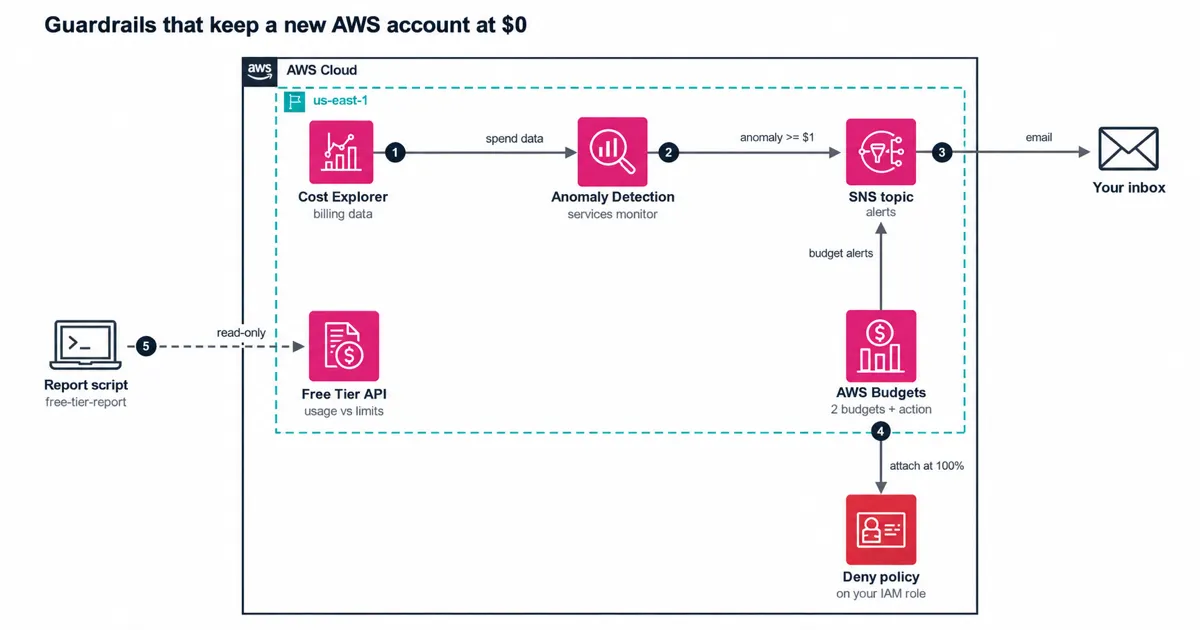
The diagram shows three paths:
- Two budgets (zero spend and a monthly limit) and an anomaly subscription publish to one Amazon Simple Notification Service (SNS) topic, which emails you.
- At your limit, a budget action attaches a deny policy to the IAM role you work in.
- A read-only script reads the Free Tier API and prints usage against each limit.
The SNS topic needs one policy statement per publishing service. Budgets publishes as
budgets.amazonaws.com and Cost Anomaly Detection as costalerts.amazonaws.com . Budgets checks that permission when you create the budget and answers "Invalid SNS topic" if it's missing. So in CDK, each budget, the action and the anomaly subscription depend on the topic policy, and CloudFormation creates the policy first.Count credits as spend
Our first draft of the stack used the default budget settings. Then we read the
CostTypes reference: IncludeCredit defaults to true . Credits count as negative cost, so on an account with $200 of credits, a zero-spend budget reports $0 while EC2 hours burn through them.
Both budgets in the stack leave credits out:
TypeScript
// Credits are counted as negative cost by default, which hides spend that is burning// your Free Tier credits. Both budgets leave credits out so you see the gross amount.const costTypes: budgets.CfnBudget.CostTypesProperty = { includeCredit: false };
Now the zero-spend budget emails you the first time anything beyond the free allowances bills, even when credits pay for it. That's the moment to look, because those credits are your safety margin for the rest of the year.
What we got wrong first
The first zero-spend budget had a $1 limit and alerted at an absolute value of $0.01. The Budgets API reference allows a threshold of 0, so nothing looked wrong. Then the first synth printed a warning from CDK's CloudFormation schema check: "0.01 is less than the minimum of 0.1". That schema is the one CloudFormation publishes for the resource, so we treated it as a failed deploy waiting to happen.
The fix keeps the same one-cent trigger. The alert now fires at 1% of a $1 budget, which passes the schema. We made the schema check a synth error and added a test that every threshold is at least 0.1. Then we put the old value back once to confirm the tests fail.
The anomaly monitor had a similar trap. An account can hold one AWS services monitor, and AWS may have created yours already. The stack takes an
anomalyMonitorArn so you can attach the new subscription to the monitor you have.Freeze new spending with a budget action
Budget actions can apply an IAM policy, apply a service control policy (SCP), or stop EC2 and RDS instances. SCPs need a management account. An IAM policy works in a single account with no Organizations, so this stack uses that. At 100% of your monthly limit, AWS Budgets attaches a policy with only
Deny statements to the roles or groups you name.
The policy blocks the calls that start hourly or per-call charges:
TypeScript
DenyHourlyNetworkCharges: ['ec2:AllocateAddress','ec2:CreateNatGateway','ec2:CreateVpcEndpoint','elasticloadbalancing:CreateLoadBalancer',],DenyModelInvocation: ['bedrock:InvokeModel', 'bedrock:InvokeModelWithResponseStream'],
A third statement covers EC2 launches, RDS, Amazon Elastic Container Service (ECS), Amazon Elastic Kubernetes Service (EKS) and Amazon SageMaker. Two more stop the frozen role from assuming the CDK bootstrap roles or passing a role, which shuts the
cdk deploy route around the freeze. The last two stop it from detaching or editing the policy. To lift the freeze, you reverse the action in AWS Budgets, and the action history records it.
The role AWS Budgets assumes is tight too. Only
budgets.amazonaws.com , for budgets in this account, can assume it. It can call iam:AttachRolePolicy and iam:DetachRolePolicy only on the roles you named, and only when iam:PolicyARN is the freeze policy. The AWS example policy allows those calls on every resource.
Know the limits before you rely on it. Budgets data updates up to three times a day, 8 to 12 hours apart, so spend can pass the line before the action runs.
The policy stops new resources and leaves running ones billing. It blocks only the calls on its list, so creating a DynamoDB table, for example, still works. It covers only the roles and groups you name, so if your role can assume another role, name that one too. IAM policies don't apply to the root user, so work in a role.
Check usage against every limit
Budgets tell you about dollars. The Free Tier API tells you how close each service is to its free limit, including AWS's forecast for the month. The repo's
npm run free-tier-report calls GetAccountPlanState and GetFreeTierUsage , follows every page, and flags lines at 80% of the limit or forecast over it.
This is its output for sample data, last column cut:
text
Account plan: FREE (ACTIVE), credits left 163.40 USD, plan expires 2027-03-01STATUS SERVICE USAGE TYPE USED LIMIT USED % FORECAST %FORECAST_OVER Amazon CloudWatch CW:MetricMonitorUsage 6 Metrics 10 Metrics 60.0% 140.0%AT_80 Amazon DynamoDB TimedStorage-ByteHrs 21 GB-Mo 25 GB-Mo 84.0% 96.0%OK AWS Lambda Request 212000 Requests 1000000 Requests 21.2% 59.0%
The CloudWatch line sits at 60% today, and the forecast says it will pass the limit by month end. The 85% email wouldn't have fired yet. With
--strict , the script exits with code 2 when it flags a line, so a scheduled job fails and alerts you.
The tests mock the SDK with aws-sdk-client-mock for pagination, empty results, throttling and access errors. A flow test also runs the real script as its own process against a local HTTP stand-in for the Free Tier API. That catches mistakes in request routing and exit codes that the mocks hide.
Traps that cost money on day one
These charges surprise people on a new account:
Trap | Price | 30 days |
|---|---|---|
Public IPv4 address, in use or idle | $0.005 per hour | $3.60 |
NAT gateway (AWS's Ohio example) | $0.045 per hour plus $0.045 per GB | $32.40 before data |
Joining AWS Organizations on a Free plan | Upgrades the account to Paid | Can't undo |
Say a tutorial builds a virtual private cloud (VPC) with a NAT gateway. Deleting the tutorial's EC2 instance leaves the NAT gateway and its Elastic IP running. The freeze blocks a second NAT gateway, and the first one stays until you delete it.
What it costs
Every guardrail in the stack fits inside free allowances:
Part | Price | Monthly |
|---|---|---|
AWS Budgets, 2 budgets | Monitoring is free | $0 |
Budget action | First 2 action-enabled budgets free | $0 |
Cost Anomaly Detection | No charge | $0 |
SNS email | First 1,000 emails a month free | $0 |
Free Tier API | No charge | $0 |
Total | | $0 |
One choice would add cost. Encrypting the SNS topic needs a customer managed AWS Key Management Service (KMS) key that names both services, at $1 a month. The alerts carry spend figures, not customer data, so the stack leaves the topic unencrypted and requires TLS.
When this isn't the right fit
- You can set a spend limit. Accounts in AWS's new sign-up experience can cap a project's monthly spend and pause it at the cap. Optional early controls act sooner: one applies an AWS-managed SCP about 7 days before you'd reach the limit, so new resources stop launching. Use that.
- You need a hard stop on running resources. This freeze blocks new ones. For running EC2 or RDS instances, add a budget action that stops them.
- You run an organization. Put the guardrail in an SCP from the management account, so member account admins can't route around it.
Try it yourself
You need Node.js 24 and an AWS account bootstrapped for CDK in us-east-1. Run
npm ci and npm run check first; neither needs AWS credentials. Then deploy with your email, a monthly limit and the role you work in:Bash
npx cdk deploy -c alertEmail=you@example.com -c monthlyLimitUsd=5 -c restrictRoles=Developer
Confirm the SNS subscription email, or no alert will reach you. Then run
npm run free-tier-report to see where you stand.Clean up
Run
npx cdk destroy . If the freeze sits on a role at the time, reverse the action in AWS Budgets first, because IAM won't delete a policy that's still attached.
Tell us the first charge that surprised you on your AWS account, and how long it ran before you noticed.
Enjoyed reading this content? Let the author know!
Your likes, comments, shares, and saves help creators reach more builders.

Loading recommendations
Loading article