
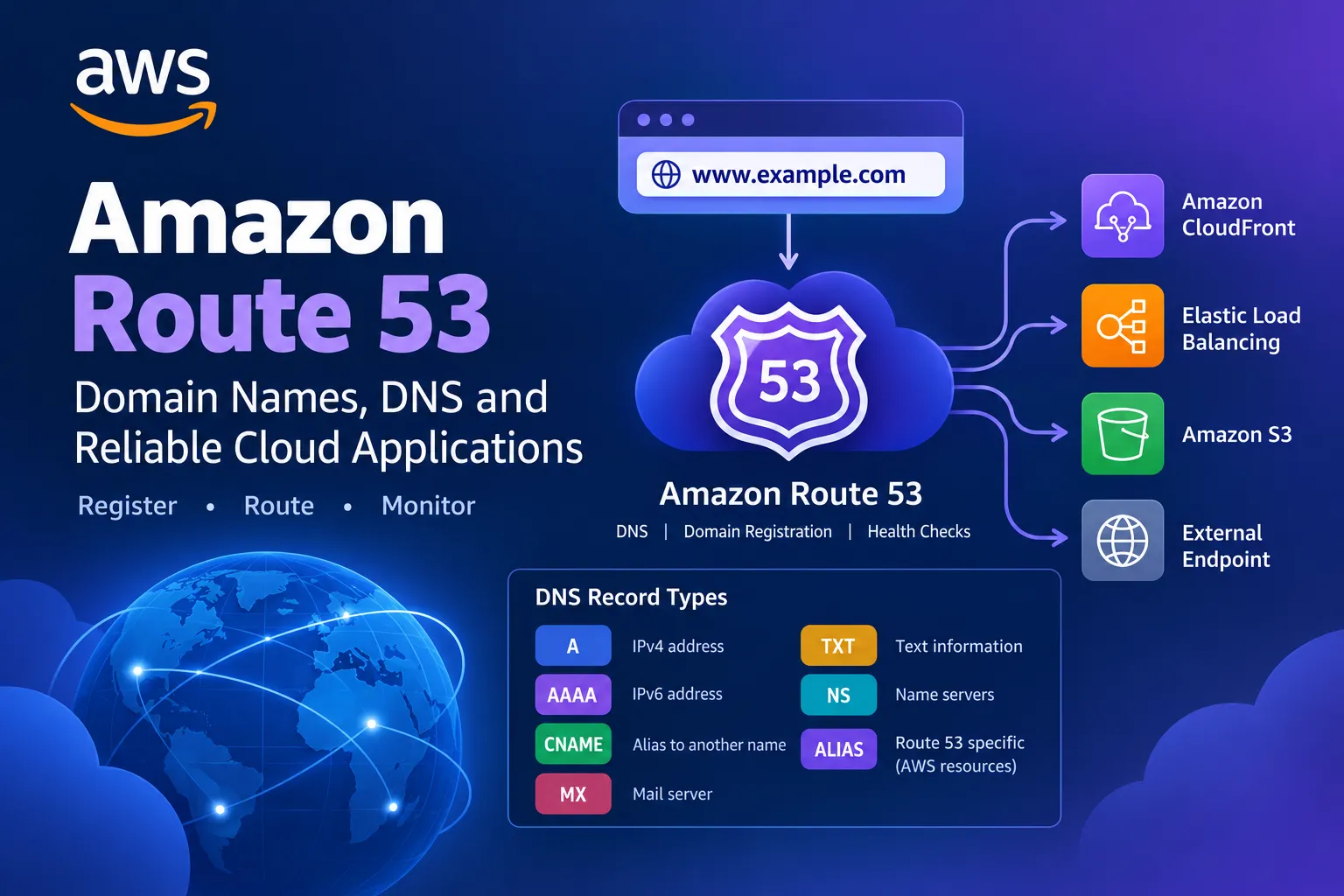
Amazon Route 53 Explained: Connect Domains to AWS and Build Highly Available Applications
Learn how Amazon Route 53 translates domain names into IP addresses and routes users to applications hosted on AWS or elsewhere. This beginner-friendly guide covers DNS records, hosted zones, routing policies, health checks, failover, and domain registration—with practical examples for AWS certification preparation.


Introduction: What Happens When You Visit a Website?
When you enter a website address such as
example.com into your browser, how does your computer find the server hosting that website?The answer involves the Domain Name System (DNS).
DNS translates human-readable domain names into information that computers use to locate services, such as IP addresses.
AWS provides a managed DNS service called Amazon Route 53 that helps developers connect domain names to applications, register domains, and route traffic according to defined policies.
For example, you could use Route 53 to direct visitors to a website hosted on Amazon CloudFront, an application running on an Elastic Load Balancing load balancer, or an endpoint hosted outside AWS.
In this article, we'll explore how Route 53 works and how to use its features to build reliable cloud applications.
1. What Is Amazon Route 53?
Amazon Route 53 is a highly available and scalable cloud Domain Name System (DNS) web service.
It provides three major capabilities:
- Domain registration: Register and manage supported domain names.
- DNS routing: Configure records that direct DNS queries to appropriate destinations.
- Health checking: Monitor supported endpoints and use health information in routing decisions.
Imagine that you own an online store with the domain
myshop.example.Instead of asking customers to remember an IP address, you configure DNS records so visitors can use a familiar domain name to reach your application.
Route 53 can help direct that domain to the appropriate AWS resource or other supported destination.
Key takeaway: Route 53 helps connect domain names with application endpoints. It does not automatically host your website or replace your application servers.
2. Understanding How DNS Works
Let's walk through a simplified DNS lookup.
Suppose a user enters
www.example.com in a browser.- The browser or operating system checks its available DNS cache.
- If necessary, a DNS resolver looks up the requested name.
- The DNS hierarchy leads the resolver to the authoritative DNS service for the domain.
- The authoritative service returns the relevant DNS record.
- The browser uses the returned information to connect to the destination.
When Route 53 hosts the authoritative DNS records for a domain, it responds to queries according to those records and their configurations.
For example, an A record can map a hostname to an IPv4 address, while an AAAA record can map a hostname to an IPv6 address.
DNS caching means changes may not appear everywhere immediately. The record's time to live (TTL), resolver behavior, and other caching factors influence how quickly updates are observed.
3. What Is a Hosted Zone?
A hosted zone is a container for DNS records associated with a domain or subdomain.
Amazon Route 53 supports two main hosted-zone types.
Public hosted zones
A public hosted zone contains DNS records that can be used to answer queries from the public internet.
For example, you could configure records for:
www.example.comapi.example.comshop.example.com
These records could direct traffic to your website, API, or online store.
Private hosted zones
A private hosted zone contains DNS records intended for use within one or more associated Amazon VPCs.
For example, an organization might use internal names such as
database.internal.example for resources that should be discoverable only through its configured private DNS environment.Private hosted zones are useful for internal applications, service discovery, and private network architectures.
Remember: Public hosted zones serve public DNS needs, while private hosted zones support DNS resolution within associated private environments.
4. Common DNS Record Types
Route 53 supports several DNS record types. Understanding the common ones is useful for both practical cloud work and AWS certification.
| Record type | Purpose | Example |
|---|---|---|
| A | Maps a name to an IPv4 address | www.example.com → IPv4 address |
| AAAA | Maps a name to an IPv6 address | www.example.com → IPv6 address |
| CNAME | Aliases one DNS name to another DNS name | blog.example.com → another hostname |
| MX | Specifies mail servers for a domain | Email delivery configuration |
| TXT | Stores text information used for verification and other purposes | Domain ownership verification |
| NS | Identifies authoritative name servers | Delegation of DNS authority |
| Alias | Route 53-specific functionality that points supported DNS names to selected AWS resources or records | Root domain pointing to a supported AWS endpoint |
An important distinction is that a CNAME is a standard DNS record type, while an Alias record is an Amazon Route 53 feature, not a separate standard DNS record type.
Route 53 Alias records can support destinations such as Amazon CloudFront distributions and certain Elastic Load Balancing resources. They can also be used at the zone apex in supported configurations, where a conventional CNAME cannot be used.
Choose the record type based on the destination and the requirements of the application.
5. What Are Route 53 Routing Policies?
One of Route 53's most useful capabilities is its ability to select DNS responses based on routing policies.
These policies help direct users to appropriate endpoints according to the application's needs.
A. Simple routing
Simple routing is suitable when you want a straightforward DNS response for a domain.
For example, a basic website might use a record that points its hostname to a single destination.
B. Weighted routing
Weighted routing distributes DNS responses across multiple records according to assigned weights.
For example, you might direct a portion of DNS traffic toward a new application version while sending the rest to the existing version.
This can help with gradual releases and traffic distribution.
However, weighted DNS routing is not the same as precise per-request load balancing. DNS caching can affect how traffic is distributed in practice.
C. Latency-based routing
Latency-based routing directs DNS queries toward a configured resource associated with a Region that offers lower measured latency for the user.
This is useful when an application operates across multiple AWS Regions and you want to improve the responsiveness of user requests.
D. Failover routing
Failover routing can direct DNS responses toward a primary or secondary resource based on the configured health-check and failover behavior.
For example, an application could use a primary endpoint and a standby endpoint in another Region.
Failover behavior depends on the records, health checks, and supported configuration. DNS caching can also delay the effect of a routing change.
E. Geolocation routing
Geolocation routing selects DNS responses based on the geographic location associated with the DNS query.
For example, you might direct users in one country to a particular endpoint and users in another country to a different endpoint.
Geolocation routing is useful when applications have geographic requirements, but it does not guarantee the lowest latency.
F. Geoproximity routing
Geoproximity routing can direct traffic based on the geographic location of users and resources. With supported configurations, you can use bias values to expand or shrink the geographic area served by a resource.
This can be useful when you need more control over how geographic traffic distribution works.
G. Multivalue answer routing
Multivalue answer routing can return multiple healthy record values in response to a DNS query, helping clients select from available endpoints.
It can improve the availability of DNS responses, but it is not a replacement for a dedicated load balancer in every architecture.
Certification tip: Be able to identify the routing policy that matches a scenario. For example, weighted routing supports gradual traffic distribution, while failover routing supports primary-and-secondary DNS response behavior.
6. How Route 53 Health Checks Work
A DNS record alone does not tell you whether an application is working correctly.
Route 53 health checks can monitor supported endpoints or evaluate the health of other health checks.
Depending on the configuration, a health check can evaluate factors such as endpoint responsiveness or specified health criteria.
For example, suppose your application has:
- A primary endpoint in one AWS Region.
- A secondary endpoint in another Region.
- A failover routing configuration.
- Health checks associated with the relevant endpoints.
If the primary endpoint becomes unhealthy according to the configured health-check behavior, Route 53 can return DNS responses that direct eligible queries to the secondary endpoint.
This can help support disaster-recovery architectures.
Keep in mind that health checks have configuration requirements and limitations. They do not automatically repair a failed application, and DNS caching can affect how quickly clients begin using a different endpoint.
7. Real-World Example: Routing a Website to AWS
Imagine you have purchased a domain called
mycloudapp.example and want to make your website accessible.Your website is distributed through Amazon CloudFront, which serves content to users.
A possible setup is:
- Register the domain through a supported registrar or use a domain you already own.
- Create a public hosted zone in Route 53 for the domain.
- Configure the domain's authoritative name servers at the registrar if Route 53 is to host the authoritative DNS records.
- Create an appropriate Route 53 record for the website hostname.
- Use a supported Alias record to direct the hostname to the CloudFront distribution.
- Configure HTTPS and the appropriate certificate for the domain.
- Test DNS resolution and confirm that the website loads correctly.
This setup separates responsibilities:
- Route 53 provides DNS routing.
- CloudFront distributes website content.
- The origin, such as an S3 bucket or application endpoint, provides the content.
- The certificate and HTTPS configuration secure the connection.
The exact setup depends on your domain, certificate, origin, and hosting architecture.
8. Route 53 and High Availability
High availability means designing an application to remain accessible despite certain failures.
Route 53 can support high-availability architectures by directing DNS queries toward suitable endpoints.
For example, a multi-Region application might use:
- A primary application endpoint.
- A secondary application endpoint.
- Health checks where appropriate.
- Failover routing.
- Suitable DNS TTL values.
- A tested application recovery process.
If the primary endpoint becomes unhealthy, the DNS configuration can direct subsequent eligible queries toward the secondary endpoint.
However, Route 53 alone does not guarantee disaster recovery. The secondary environment must be operational, application data must be available, and dependencies must be designed for recovery.
Always test failover behavior before relying on it during an actual incident.
9. Route 53 vs. a Load Balancer
Beginners sometimes confuse DNS routing with load balancing.
These technologies can complement each other, but they operate at different layers.
Amazon Route 53 answers DNS queries and helps determine which destination a client should use.
Elastic Load Balancing (ELB) distributes application traffic among configured targets, such as EC2 instances or supported application endpoints.
For example, Route 53 could direct a domain to an Application Load Balancer. The load balancer then distributes incoming application requests among healthy targets.
A simplified architecture looks like this:
User → Route 53 DNS lookup → Application Load Balancer → Application targets
The user normally doesn't send application traffic to Route 53 itself. Route 53 helps resolve the domain to the relevant destination.
10. Common Mistakes to Avoid
When configuring Route 53, watch out for these mistakes:
1. Confusing DNS with hosting. Route 53 can direct traffic to a website, but it does not itself run your web application.
2. Forgetting domain delegation. If you use Route 53 as the authoritative DNS service, ensure the domain's name-server delegation is configured correctly.
3. Choosing the wrong record type. A, AAAA, CNAME, and Alias configurations have different purposes and restrictions.
4. Ignoring DNS caching. Record updates and failover changes may not be visible immediately to every client.
5. Assuming health checks fix failures. Health checks can inform routing decisions, but they do not repair application code or restore a failed database.
6. Treating weighted routing as exact traffic splitting. DNS caching and client behavior mean observed traffic may not match configured weights precisely.
7. Forgetting private DNS requirements. Private hosted zones must be associated with the appropriate VPCs and supported DNS-resolution settings.
8. Skipping failover tests. Verify that the secondary environment and its dependencies can actually serve traffic.
11. Why Amazon Route 53 Matters for AWS Certification
Amazon Route 53 is useful to understand when studying networking, DNS, high availability, and disaster recovery.
For AWS certification preparation, focus on:
- The role of DNS and hosted zones.
- Public versus private hosted zones.
- Common DNS record types.
- Route 53 Alias records and their differences from CNAME records.
- Simple, weighted, latency-based, failover, geolocation, geoproximity, and multivalue answer routing.
- Health checks and DNS failover.
- The difference between DNS routing and load balancing.
- DNS caching and TTL behavior.
A typical exam-style scenario might ask how to direct users to a secondary endpoint when the primary application endpoint becomes unhealthy.
Understanding Route 53 failover routing and health checks will help you evaluate that architecture.
Check the official exam guide for your target AWS certification to confirm which services and concepts are in scope.
Conclusion
Amazon Route 53 is more than a way to connect a domain name to an application. It provides DNS management, supported domain-registration capabilities, health checks, and flexible routing policies that can help organizations build reliable cloud architectures.
By combining Route 53 with services such as CloudFront, Elastic Load Balancing, and applications deployed across multiple Regions, you can create architectures that are easier to access and better prepared for certain failures.
The most important lesson is this:
Route 53 helps users find the right destination; your application architecture must ensure that destination can serve them.
For hands-on practice, create a test hosted zone, examine the available DNS record types, and learn how routing policies differ. Use a domain you control and understand any charges before creating billable resources.
Your turn: Which Route 53 routing policy would you choose for a website with primary and secondary endpoints, and why?
Share your thoughts in the comments, and let's keep learning AWS together!
Official AWS Resources
- Amazon Route 53 Developer Guide: https://docs.aws.amazon.com/Route53/latest/DeveloperGuide/Welcome.html
- How Amazon Route 53 works: https://docs.aws.amazon.com/Route53/latest/DeveloperGuide/Welcome.html
- Route 53 routing policies: https://docs.aws.amazon.com/Route53/latest/DeveloperGuide/routing-policy.html
- Route 53 health checks: https://docs.aws.amazon.com/Route53/latest/DeveloperGuide/dns-failover.html
- Route 53 record types: https://docs.aws.amazon.com/Route53/latest/DeveloperGuide/ResourceRecordTypes.html
Enjoyed reading this content? Let the author know!
Your likes, comments, shares, and saves help creators reach more builders.

Loading recommendations
Loading article