
I Built a Haunted House on AWS and It Found the Real Ghosts in My Account (and a Haunted House Around It)
By Rajpreet Gill · AWS Community Builders · Halloween 2026

Happy Halloween, builders!
At 3 a.m. every night, something walks through my AWS account.
It checks every region. It counts the instances nobody turned off, the disks attached to nothing, the secrets nobody has opened in months. And when it finds a new one, it emails me a ghost story about it.
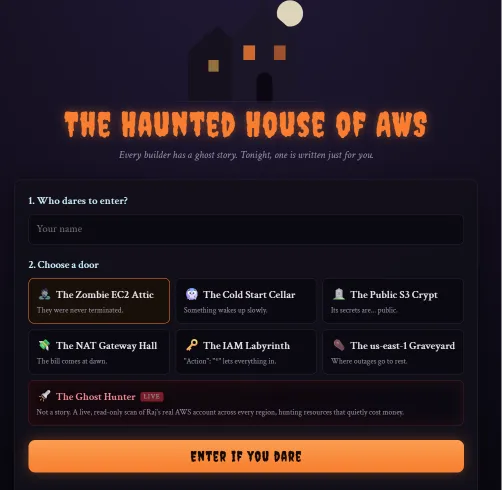
That "something" is a Lambda function. It lives inside a serverless haunted house I built for Halloween, where AI writes you a personal horror story, Amazon Polly whispers it in the dark, and a skeleton drops from the ceiling to greet you by name.
Enter if you dare: main.d1qn6brb4r7z20.amplifyapp.com (turn your sound on)
TL;DR
- 7 doors: 6 tell AI-written horror stories about classic AWS nightmares, and 1 scans my real account for resources wasting money.
- Built with Lambda, API Gateway, Polly, DynamoDB, Secrets Manager, EventBridge, SNS and Amplify, plus gpt-oss-120b on Groq.
- The Ghost Hunter found a secret I created 109 days ago and never opened once.
- Total cost for Halloween: under $1.
- I hit 12 problems building it. The troubleshooting log and lessons are at the end.
By the numbers
| What | Count |
|---|---|
| Doors | 7 (6 fiction, 1 terrifyingly real) |
| AWS regions scanned per hunt | 18, in parallel, in about 5 seconds |
| Time to write and voice a story | about 3 seconds |
| Lambda functions | 3 |
| Cost | under $1 for the whole of Halloween |
| Problems hit along the way | 12 |
The rooms
You type your name and open a door. A skeleton drops in to greet you, a personal horror story is read aloud, and you can pin it to the Wall of Screams for others to vote on.
| Door | What haunts it |
|---|---|
| The Zombie EC2 Attic | Instances that were never terminated |
| The Cold Start Cellar | A Lambda that wakes too slowly |
| The Public S3 Crypt | Secrets whispered to strangers |
| The NAT Gateway Hall | The bill that arrives at dawn |
| The IAM Labyrinth | "Action": "*" lets everything in |
| The us-east-1 Graveyard | The day every dashboard turned red |
| The Ghost Hunter (LIVE) | The real idle resources in my own account |
Six doors are fiction. The seventh is not.
The blueprint of the house

Every door shares one API, one key, one voice and one table. Only the Ghost Hunter may look at the account, and it can only look. Everything is serverless, so nothing runs when nobody is visiting. Fitting, for a house that only wakes at night.
Step 1: Teaching an AI to write for the ear
A Lambda sends your name and room to OpenAI's open-weight gpt-oss-120b on Groq, which returns a 150-word story in about 2 seconds. Groq's API is OpenAI-compatible, so Node's built-in
fetch is enough and the bundle needs no AI SDK.The API key never appears in code or the template. It lives in AWS Secrets Manager, and the Lambda reads it once per cold start:
1
2
3
4
5
6
7
8
9
10
11
12
13
14
15
16
17
18
19
20
21
22
23
24
25
let apiKey;

async function getApiKey() {

  if (!apiKey) {

    const { SecretString } = await secrets.send(

      new GetSecretValueCommand({ SecretId: process.env.API_KEY_SECRET }),

    );

    apiKey = SecretString.trim();

  }

  return apiKey;

}


const res = await fetch("https://api.groq.com/openai/v1/chat/completions", {

  method: "POST",

  headers: { authorization: `Bearer ${await getApiKey()}`, "content-type": "application/json" },

  body: JSON.stringify({

    model: "openai/gpt-oss-120b",

    max_tokens: 2000,        // reasoning tokens count toward this

    reasoning_effort: "low",

    temperature: 0.9,

    messages: [

      { role: "system", content: SYSTEM_PROMPT },

      { role: "user", content: `Visitor's name: ${name}\nRoom: ${room.label}` },

    ],

  }),

});
Four tricks that made the stories good:
- Write the prompt for the ear. The story is spoken, so the prompt asks for short sentences, sounds, a slow build and one chilling final line on its own.
- Leave room for reasoning. gpt-oss thinks for about 800 tokens before writing, even on low effort. With a small
max_tokens, you get an empty story. - Sanitize the name. It goes into a prompt, so I keep only letters, spaces, apostrophes and hyphens, capped at 30 characters.
- Parse defensively. I ask for
TITLE:on the first line, strip stray markdown, and fall back to the room name.
The Lambda's role can read exactly one secret and nothing else:
1
2
3
- Effect: Allow

  Action: secretsmanager:GetSecretValue

  Resource: !Sub "arn:${AWS::Partition}:secretsmanager:${AWS::Region}:${AWS::AccountId}:secret:${ApiKeySecretName}-??????"
Step 2: Making Polly whisper
Amazon Polly reads the story in a slow, deep voice and whispers the last line. The trick is the standard engine: neural voices sound more natural, but only standard supports pitch changes and the whisper effect.
<prosody rate="80%" pitch="-15%">for slow, deep narration<break time="600ms"/>between sentences, because silence is scary<amazon:effect name="whispered">for the final line
1
2
3
4
5
6
7
function toCreepySsml(story) {

  const lines = story.split("\n").filter(Boolean);

  const finalLine = lines.pop();

  const body = lines.map((l) => `${escapeSsml(l)}<break time="600ms"/>`).join(" ");

  return `<speak><prosody rate="80%" pitch="-15%">${body}<break time="1200ms"/></prosody>`

       + `<amazon:effect name="whispered"><prosody rate="70%">${escapeSsml(finalLine)}</prosody></amazon:effect></speak>`;

}
The Lambda returns the MP3 as base64 and the browser plays it from a
data: URL, so there is no S3 bucket to manage, and no public crypt of my own.Step 3: Scares that cost $0
The frontend is one HTML file on AWS Amplify Hosting: a flickering house, bats, lightning and seven doors. Three scares run entirely in the browser, so they never call the API and never cost a cent:
- The skeleton at the door. When you open a door, the screen goes black and a skeleton drops from the ceiling on a rope, swings, chatters its jaw and greets you by name: "Welcome, Raj... the door is open." It plays while the story is being written, so the 2 to 5 second wait becomes part of the show. The bone rattle is a thud plus 16 short noise bursts through a band-pass filter, made with the Web Audio API.
- Eyes in the dark. Five pairs of glowing eyes fade in around the page, follow your cursor (or finger) and blink at random.
- "Don't look behind you." A button that throws a ghost face at the screen with a shriek: a falling sawtooth scream plus a burst of static, with no audio file.
All three respect
prefers-reduced-motion: the skeleton appears still, and nothing flashes or swings.Design lesson: a loading spinner is a wasted moment. A skeleton that greets you by name is the loading screen.

Step 4: The Ghost Hunter finds the real ghosts
This is the door that made the project useful.
A second Lambda scans my real account across all 18 regions in parallel in about 5 seconds, finds resources that quietly cost money, and the model tells the story of those ghosts with one strict rule: every ghost must be a real finding.
| Ghost | What it really is | Priced as |
|---|---|---|
| A zombie instance | EC2 stopped 7+ days; its disks still bill | attached EBS GB × price |
| A lost soul | An EBS volume attached to nothing | GB × price by type |
| A wandering spirit | An Elastic IP attached to nothing | $0.005 per hour |
| Bones in the crypt | A snapshot older than 90 days | GB × $0.05 |
| Logs that never die | A log group set to Never expire | stored GB × $0.03 |
| A forgotten secret | A secret nobody opened in 90+ days | $0.40 per month |
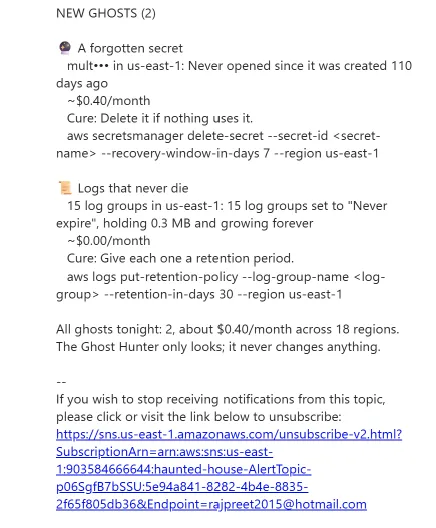
My account was fairly clean, but the hunter still found a secret I created 109 days ago and never opened once, plus 14 log groups keeping everything forever. Its story began:
"In the east wing, a forgotten secret creaks open after 109 days of darkness..."
Every ghost on the page comes with its cure: the exact CLI command to fix it.
It can look, but never touch
The scanner's IAM role has only
Describe and List permissions. It cannot stop, change or delete anything:1
2
3
4
5
6
7
8
Action:
- ec2:DescribeRegions
- ec2:DescribeInstances
- ec2:DescribeVolumes
- ec2:DescribeAddresses
- ec2:DescribeSnapshots
- logs:DescribeLogGroups
- secretsmanager:ListSecretsThe scariest bug was almost a security one
My first version also showed security findings on the public page: root MFA, buckets with Block Public Access off, old access keys. Then it hit me: a public page saying "this account's buckets are unlocked" is a map for attackers. So I split it:
- The public page shows only money ghosts, with names shortened (
mult•••). - Security ghosts live in a read-only CloudShell script you run on your own account, so only you see the results.
One scan for everyone
Everyone sees the same account, so the Lambda caches the result for 15 minutes. The first visitor waits about 5 seconds; everyone after gets it in 0.7 seconds, and the model is called at most once per 15 minutes, however many people press the button.
Step 5: The 3 a.m. patrol
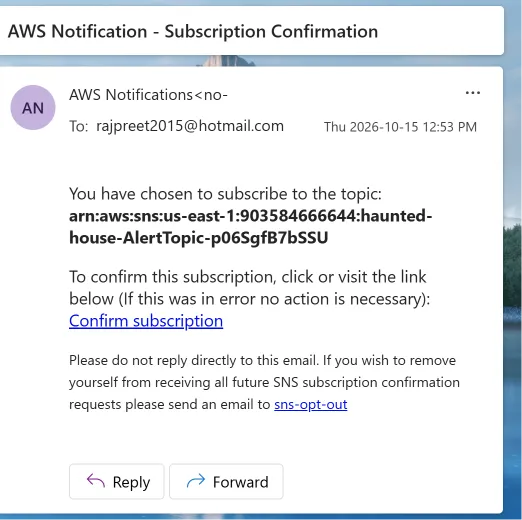
An EventBridge schedule runs the Ghost Hunter at 03:00 UTC every night, and it emails me only when a ghost appears that it has not seen before. A quiet night sends nothing.
To know what is new, each ghost gets a stable key: a SHA-256 hash of its kind, region and resource id, cut to 16 characters. The hunter keeps last night's keys in DynamoDB and compares:
1
2
3
4
5
const ghostKey = (...parts) => createHash("sha256").update(parts.join(":")).digest("hex").slice(0, 16);


const { Item: last } = await db.send(new GetCommand({ TableName: TABLE, Key: { pk: "HUNT#last-seen" } }));

const seen = new Set(last?.keys ?? []);

const fresh = found.ghosts.filter((g) => !seen.has(g.key));
New ghosts go out through Amazon SNS as an email: a short ghost story, then each ghost with its monthly cost and its cure. The hash means real resource ids never leave the account. One Lambda serves both jobs: an EventBridge event takes the nightly path, and an HTTP request takes the live one.
Tested: the first run found 2 new ghosts and sent the email; the second run found nothing new and stayed silent.


Step 6: The Wall of Screams
Visitors pin their story to a public wall, and anyone can vote for it with a drop of blood. The top 10 stories are shown under the house.
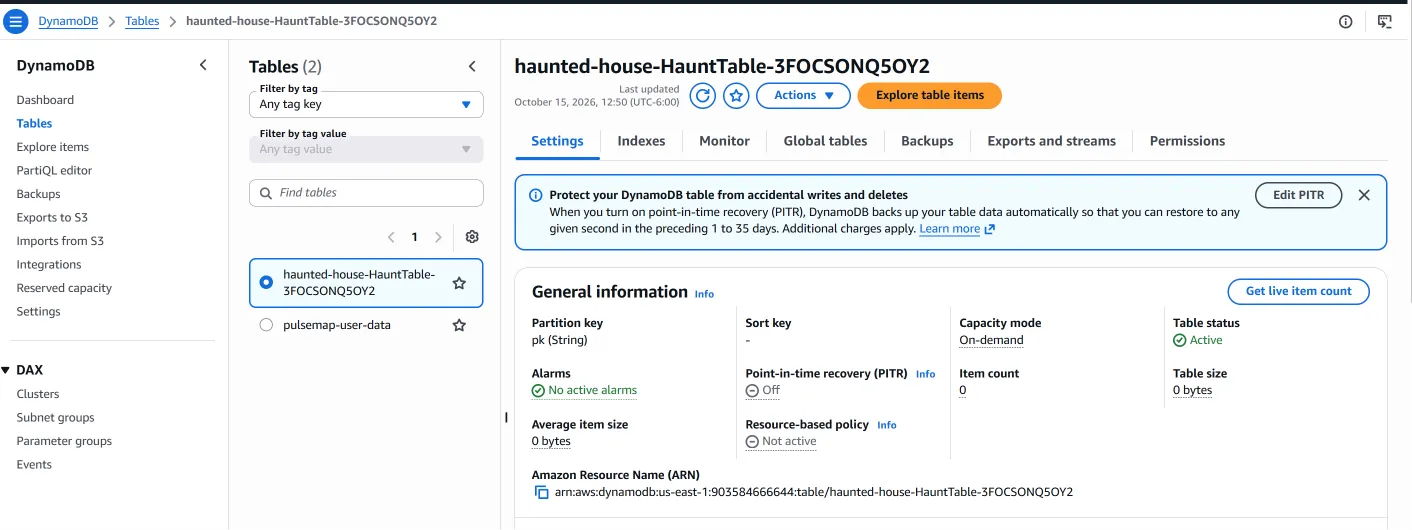
It is one DynamoDB table with a sparse index:
- Every story is saved with a 7-day TTL, so unpinned stories delete themselves.
- Pinning sets
wallPk = "WALL"and removes the TTL. Only pinned stories havewallPk, so only they appear in thewallindex. - The index's sort key is
votes, so the top 10 is one query withScanIndexForward: false. A vote isADD votes :one, and the order updates itself.
1
2
3
4
5
6
7
8
const pin = (id) => db.send(new UpdateCommand({

  TableName: TABLE,

  Key: { pk: `STORY#${id}` },

  UpdateExpression: "SET wallPk = :wall, votes = :zero, pinnedAt = :now REMOVE #ttl",

  ConditionExpression: "attribute_exists(pk) AND attribute_not_exists(wallPk)",

  ExpressionAttributeNames: { "#ttl": "ttl" },

  ExpressionAttributeValues: { ":wall": "WALL", ":zero": 0, ":now": new Date().toISOString() },

}));
The guardrails live in the data model, not in extra code:
- You can only pin a story this site wrote: the request carries just its id, so nobody can post their own text to the wall.
- Conditional writes refuse a second pin, an unknown id, or a vote for an unpinned story.
- The page builds the wall with
textContentonly, so a name can never become HTML, and the vote button locks after one vote.
The ghost counter
The top of the wall counts the house's visitors live: ghosts who entered, stories pinned, drops of blood, and the most haunted door. All of it is one DynamoDB item, and every visit, pin and vote ticks it with an atomic
ADD, so two visitors at the same moment never overwrite each other:1
2
3
4
5
6
7
8
9
10
11
12
13
14
15
16
export async function countVisit(fields) {
const names = Object.keys(fields);
try {
await db.send(new UpdateCommand({
TableName: TABLE,
Key: { pk: "STATS" },
UpdateExpression: `ADD ${names.map((_, i) => `#f${i} :v${i}`).join(", ")}`,
ExpressionAttributeNames: Object.fromEntries(names.map((n, i) => [`#f${i}`, n])),
ExpressionAttributeValues: Object.fromEntries(names.map((n, i) => [`:v${i}`, fields[n]])),
}));
} catch (err) {
console.warn("Counter did not tick", err.name);
}
}
await countVisit({ entered: 1, [`door_${roomId}`]: 1 });A counter that fails to tick is logged and never breaks the visit. On the page the numbers count up, so you watch your own visit land on the wall.

The troubleshooting log: 12 things that went bump in the night
Nothing worked the first time. Here is every problem I hit, what the error actually said, and the fix. If you build something similar, this section will save you an evening.
Getting it deployed
| # | Symptom | Real cause | Fix |
|---|---|---|---|
| 1 | "The token '&&' is not a valid statement separator" | Windows PowerShell 5.1 doesn't support && | Run each command on its own line |
| 2 | sam build failed: "Unknown cli flag: --unsafe-perm" | My npm was newer than my SAM CLI expected | Skipped sam build and deployed the folder with node_modules already installed |
| 3 | The API URL showed {"message":"Not Found"} | I opened a POST-only API in the browser, which sends GET | Tested with Invoke-RestMethod -Method Post instead |
| 4 | "The remote name could not be resolved: 'your_haunt_url'" | I pasted the placeholder, not the real URL | Read the real URL from the stack's Outputs |
Getting the AI to answer
| # | Symptom | Real cause | Fix |
|---|---|---|---|
| 5 | Every story failed: "The spirits are restless" | CloudWatch Logs: Bedrock permission_error, NOT_AUTHORIZED for my account | Moved story writing to Groq; only one function changed |
| 6 | A different model failed the same way | It wasn't the model: my account had no Bedrock model access at all | Checked model access with the AWS CLI instead of guessing |
| 7 | "llama-3.3-70b-versatile does not exist or you do not have access" | My Groq key couldn't use that model, even though the docs listed it | Listed the models my key can use and switched to openai/gpt-oss-120b |
| 8 | Stories came back empty | gpt-oss spends ~800 tokens reasoning first; max_tokens 600 ran out | Raised it to 2000 with reasoning_effort low |
Getting the secret right
| # | Symptom | Real cause | Fix |
|---|---|---|---|
| 9 | "Secrets Manager can't find the specified secret" (twice) | The secret was never actually created: the first try put the key in the name, the second never sent it | Created it in us-east-1 with the exact name, then confirmed it with describe-secret |
| 10 | The console wanted a key/value secret, my code expected plain text | Two valid secret formats | Made the code accept both |
Getting it online
| # | Symptom | Real cause | Fix |
|---|---|---|---|
| 11 | Amplify: "You have reached the maximum number of apps" | A per-region app limit on my account | Created the app in us-east-2. The website and the API don't need the same region |
| 12 | The zip upload to Amplify failed with HTTP 000 | The Windows AWS CLI added an invisible carriage return to the upload URL | Stripped it before uploading |
Bonus ghost: the visitor counters showed "–" instead of numbers. The count-up animation used requestAnimationFrame, which browsers pause in background tabs. A setTimeout fallback now writes the final number either way.
What I learned
1. Read the logs before you change the code. Every "the spirits are restless" error had a precise cause in CloudWatch Logs. Guessing would have taken hours; reading took seconds.
2. "Not authorized" can be about the account, not the code. Two different Bedrock models failed the same way because my account had no model access. Check access first, then debug.
3. Design so one piece can be swapped. When Bedrock was blocked, only one function changed. The API, voice, database and website didn't notice.
4. Least privilege is a feature you can show off. The Ghost Hunter can read my whole account and change nothing. Saying that in one IAM block builds more trust than any paragraph.
5. Don't publish your weak spots. A dashboard of your account's security gaps is useful to you and to an attacker. Keep security findings private; make cost findings public.
6. Put guardrails in the data model. Conditional writes, TTLs and a sparse index stopped abuse on the Wall of Screams without extra validation code.
7. Caching is a cost control. One scan every 15 minutes means a crowd costs the same as one visitor.
8. Count things atomically. DynamoDB's ADD means two visitors at the same second both get counted.
9. Turn waiting into the experience. The skeleton covers the 2 to 5 seconds while the story is written. Nobody notices the wait.
10. Never paste an API key into a command or a chat. If you do, revoke it immediately and make a new one. I learned this one the hard way.
What it costs
Under $1 for the whole of Halloween at normal traffic. Polly is the only cost that grows with visitors, at about $0.004 per story (approximate us-east-1 list prices).
| Service | Pricing | My cost |
|---|---|---|
| Secrets Manager | $0.40 per secret per month | $0.40/month, the only fixed cost |
| Amazon Polly | ~$4 per 1M characters | ~$0.004 per story |
| AWS Lambda | 1M requests/month free | $0 |
| API Gateway | ~$1 per 1M requests | ~$0 |
| Amplify Hosting | ~$0.15 per GB served | a few cents |
| DynamoDB | on-demand | ~$0 |
| Amazon SNS email | first 1,000 emails a month free | $0 |
| EventBridge schedule | one run a night | $0 |
| Ghost Hunter scans | Describe/List calls are free | $0 |
| Groq | free tier | $0 |
Guardrails, because this is a public link:
- API Gateway throttling: 2 requests per second, burst of 5
- CORS locked to the Amplify domain
- A 15-minute Ghost Hunter cache
- An AWS Budget alert (set one before you share a link like this)
- sam delete on November 1st, so the house doesn't become a zombie of its own
Your turn: hunt your own ghosts
- Visit the house: main.d1qn6brb4r7z20.amplifyapp.com . Open a door, meet the skeleton, and pin your story to the Wall of Screams.
- Release the Ghost Hunter and watch it scan a real account live.
- Hunt the ghosts in your own account from AWS CloudShell. The script is read-only and also checks the security ghosts the public page never shows:
1
2
3
curl -sO https://main.d1qn6brb4r7z20.amplifyapp.com/ghost-hunter.sh

less ghost-hunter.sh

bash ghost-hunter.sh
I bet something is haunting your account too. Tell me in the comments what your Ghost Hunter found.
Enjoyed reading this content? Let the author know!
Your likes, comments, shares, and saves help creators reach more builders.

Loading recommendations
Loading article