
Building with AI Is One Thing. Knowing When to Trust It Is Another.
My journey through the AWS AI & ML Scholars 2026 Nanodegree, from revenue dashboards to a market intelligence agent.

Being selected for the AWS AI & ML Scholars 2026 Nanodegree was an exciting milestone in my learning journey. Following the Challenge phase, I was among approximately 4,500 learners selected from a pool of up to 100,000 participants to continue into the nanodegree program.
I pursued the Future AWS Agentic AI Business Professional track, focusing on agentic AI, business intelligence, and automation using Amazon Quick and Amazon QuickSuite.
I've always enjoyed exploring different areas of technology, from Salesforce and automation to cloud computing and AI. What interests me most is getting beyond the theory and understanding how things work when you actually try to build something with them.
Throughout the nanodegree, I completed two hands-on projects: building a revenue intelligence dashboard using Amazon QuickSight and Quick Chat, and developing a market intelligence agent using Amazon QuickSuite.
Both projects challenged me to think beyond simply getting AI to generate an answer. I had to prepare data, troubleshoot unexpected results, validate AI-generated insights, and evaluate whether the evidence was strong enough to support a business decision.
What started as an opportunity to explore agentic AI became a practical lesson in something much more important: building AI-powered solutions is not just about what AI can do, but also about knowing when to trust it.
Here's a look at my journey, the challenges I encountered, and the lessons I'm taking forward.
Project 1: Building a Revenue Intelligence Dashboard with Amazon QuickSight
The first project introduced me to a fictional business scenario involving NovaTech, where the VP of Revenue Operations had to prepare a report manually every Monday using information scattered across multiple sources.
The goal was to bring everything together into an interactive dashboard and enable users to ask business questions through Quick Chat.
I worked with three datasets:
- CRM deals: 499 rows
- Marketing campaign interactions: 2,240 rows
- Support tickets: 3,000 rows
Each dataset offered a different perspective on the business. The challenge was to connect them in a way that supported meaningful analysis without compromising the accuracy of the results.
The first challenge: getting the data right
Before building the dashboard, I verified the source datasets using Quick Chat and checked the answers against known row counts and totals.
Six out of seven initial checks matched. The remaining check exposed a scope limitation: Quick Chat was working with the CSV knowledge bases and could not answer a question that depended on the PDF reference documents.
This was an early reminder that an AI tool can only work with the information available within its configured scope.
Next came data preparation in QuickSight.
One issue I encountered was that the
deal_value field had been imported as an integer. Since revenue values can include decimal places, I changed it to a decimal type to avoid losing precision.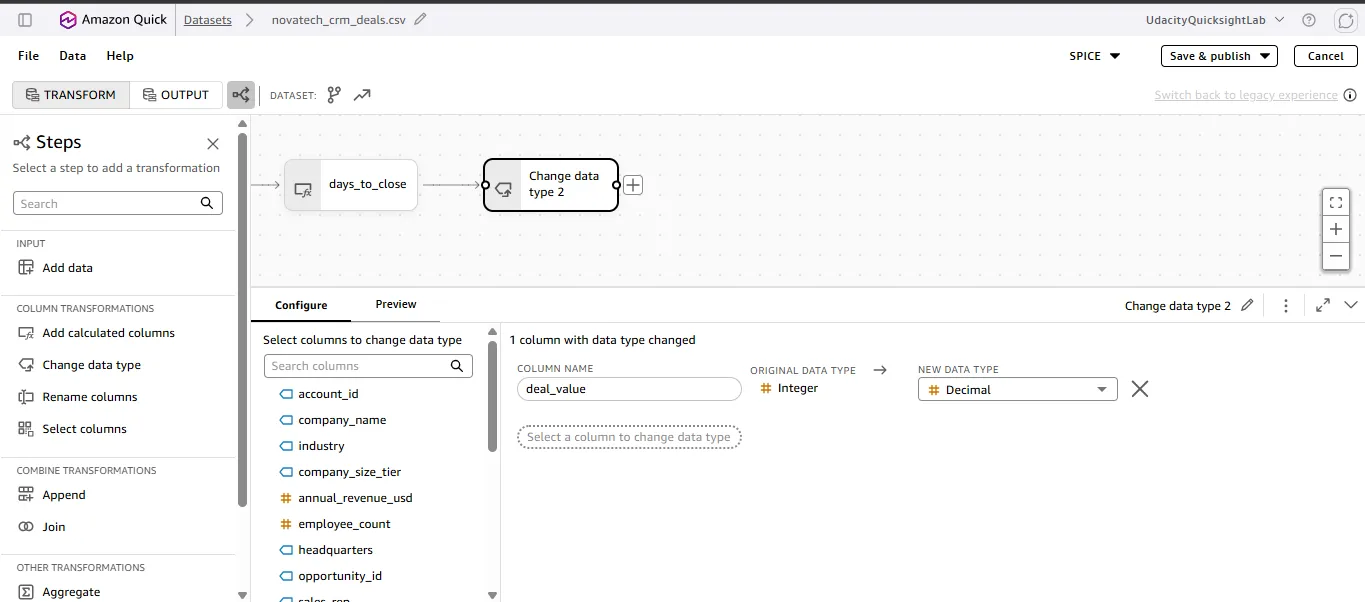
I also created calculated fields, including
days_to_close and campaign_roi. Getting days_to_close to work required troubleshooting how the date fields were handled.These might seem like small details, but they matter. A dashboard can look polished and still produce inaccurate results if the underlying data types or calculations are wrong.
The unexpected lesson: more rows don't always mean more data
One of the most valuable lessons came when I joined the CRM, marketing, and support datasets using
account_id.I used CRM as the anchor, then left-joined marketing interactions and support tickets. The unified dataset grew to 63,420 rows, even though the original CRM dataset contained only 499 deals.
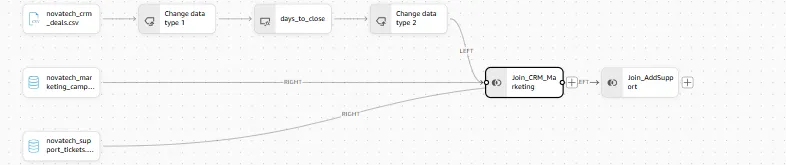
Why?
An account could have multiple marketing interactions and multiple support tickets. Combining those relationships created multiple rows for the same underlying deal.
This is known as join fan-out. It is an expected consequence of joining one-to-many relationships, but it can lead to serious analytical errors if the resulting dataset is used without considering its grain.
For example, summing deal values across the joined dataset could count the same deal multiple times. Similarly, counting tickets or campaign interactions from the joined data could produce inflated totals.
I also had to correct a join-direction mistake during the process.
My solution was to use the appropriate source datasets for straightforward campaign and ticket counts rather than calculating those metrics from the fan-out dataset. I checked row counts and validated the results instead of assuming that a successful join meant the data was ready to use.
My biggest takeaway from this part of the project was that data preparation isn't just a preliminary step. It directly determines whether the insights built on top of that data are trustworthy.
Making Quick Chat understand the business
With the data prepared and the dashboard taking shape, I moved on to configuring a Topic for Quick Chat.
A Topic helps define how natural-language questions should be interpreted against business data. I configured field descriptions, synonyms, relationships, and custom instructions, and disabled internal IDs that weren't useful for business-facing questions.
I also scoped the Topic to the clean source datasets instead of relying on the joined dataset that had introduced aggregation problems.
The difference was measurable.
When I asked about total marketing revenue, the initial answer was $1,047,749.94, while the verified figure was $1,127,223.09. After configuring the Topic, Quick Chat returned the correct total.
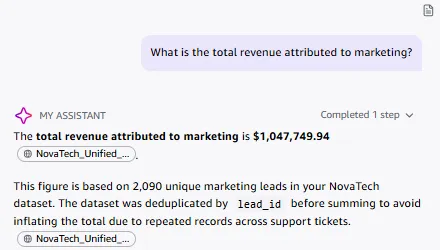
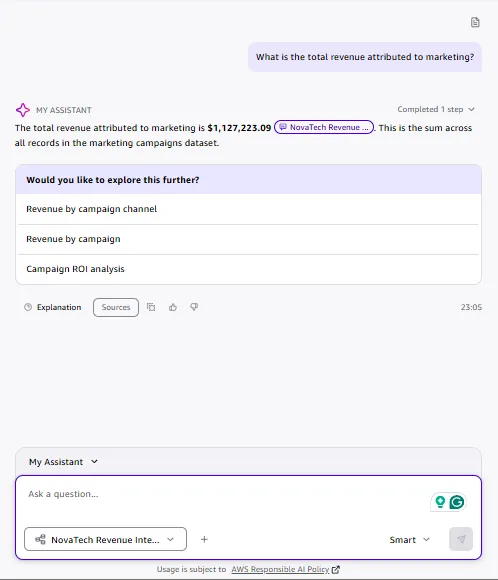
I then tested its answers against the dashboard and known values. Seven out of eight post-Topic answers agreed with the dashboard.
One discrepancy remained: Quick Chat returned 496 deals instead of the expected 499. I documented this as a residual edge case rather than assuming the configuration had solved every problem.
That was an important distinction. Improving AI accuracy doesn't mean eliminating the need for verification.
Turning the data into an interactive dashboard
I organized the dashboard into three sheets, each designed around a different business question.
Marketing Funnel explored where leads dropped off and which channels performed better, with channel and segment filters.
Sales Pipeline examined deal outcomes across products, regions, and industries, along with time to close. I added region and product filters and enabled cross-visual interactions so users could click a chart element to filter a related visual.
Customer Health focused on ticket volume, priority, and the relationship between account value and support demand. I also added navigation to the Sales Pipeline sheet to make it easier to investigate individual accounts in context.

The dashboard surfaced several findings worth investigating:
- A 45% drop between 848 qualified leads and 465 leads.
- Negative calculated marketing ROI across every channel, with Direct Mail performing best at -63.7% and Organic Search worst at -96.3%.
- A win rate of approximately 63.1%, with the Central region leading in total revenue and the West leading in average deal size.
- An account, ACCT-041, with $13.6 million in deal value and 334 support tickets.
- A total of 601 tickets associated with Notifications and 50 critical tickets overall.
The account with substantial deal value and high support volume caught my attention because it connected revenue with customer health. A high-value account isn't necessarily a healthy account.
Of course, these findings were signals for further investigation rather than automatic explanations of business performance. The dashboard helped identify where a team might need to look more closely.
That was the value of the project for me: bringing different perspectives together so that the business could ask better questions and make more informed decisions.
Project 2: Building a Market Intelligence Agent with Amazon QuickSuite
My second project moved from structured business intelligence to agentic research.
The scenario involved a publisher deciding which platform and genre to prioritize for its next video game title, and how to position the release against competitors.
The objective was to build a no-code agent that could analyze internal data, conduct external research, synthesize evidence into a leadership-ready brief, and assess the reliability of its own findings.
Bringing internal data and external research together
I started with the Kaggle Video Game Sales dataset, containing 16,598 rows. Before uploading it, I checked for nulls and duplicates in Python.
I then created a Space called Market Intelligence - Video Game Industry and uploaded the dataset. The Space provided an organized location for the data, research documents, and other supporting materials.
Next, I created a custom chat agent, connected the Space as its knowledge source, and configured instructions to analyze the dataset, combine findings with external research, quantify insights, and avoid unsupported claims.
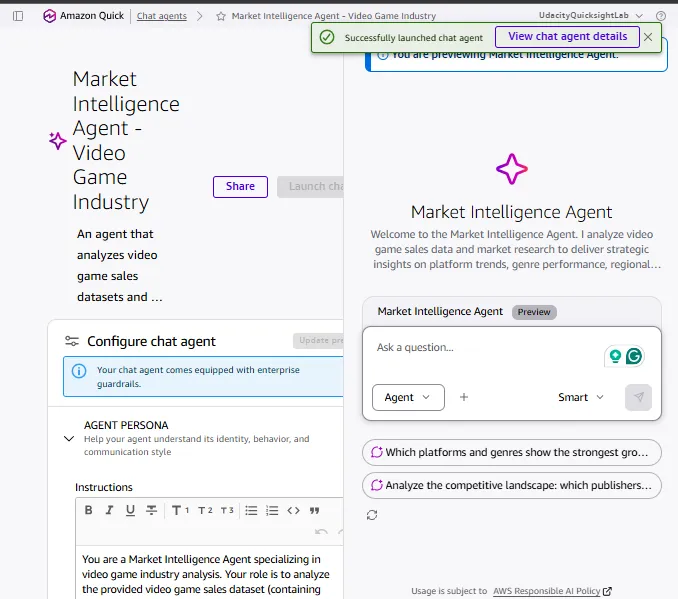
I used Quick Research to investigate three focused areas:
- Market trends: platform, genre, and year.
- Competitive landscape: publisher activity and positioning.
- Regional dynamics: North America, Europe, Japan, and other markets.

Mapping the research questions to specific dataset dimensions made it easier to cross-reference external findings with internal data.
I then prompted the agent to produce a structured analysis covering the competitive landscape, trends, opportunities, risks, an evidence table, and recommendations.
I also asked it to assess source quality, cross-source consistency, timeliness, and confidence for each insight.
Finally, I experimented with agent-generated visualizations and created a bar chart comparing PC's share by year in the historical dataset with a 2025 external figure. I also uploaded the three research PDFs into the Space so the supporting evidence remained organized alongside the dataset.

The workflow brought together data analysis, research, synthesis, and reliability evaluation in a single process.
But the most interesting part wasn't the report the agent produced. It was what the analysis revealed about the data itself.
When the data tells only part of the story
At first glance, a dataset covering video game sales across several decades seems like a useful foundation for understanding long-term industry trends.
However, the agent's analysis highlighted several limitations that affected how confidently I could interpret the results.
1. Historical coverage wasn't consistent
The dataset became much thinner after 2015. It contained only 348 titles from 2016–2020, compared with 1,259 titles in 2010 alone. This made it risky to treat the dataset as a consistent representation of the market throughout the entire period. A change in the recorded data might reflect gaps in coverage rather than an actual change in the industry.
2. The dataset had a platform bias
PC represented approximately 2.9% of the dataset, while the external research I used cited a figure of around 21.5% in its market context. Mobile, which the research described as accounting for 56.2% of the market, was absent from the dataset. These figures came from different sources and contexts, so they weren't directly interchangeable. However, the gap highlighted an important measurement problem: the historical dataset did not adequately represent the broader market described by the external research. It would therefore be misleading to interpret every difference as market growth alone.
3. The genre categories didn't reflect the modern market
The dataset lacked dedicated categories for sandbox/creative games, battle royale, and gacha. Even Minecraft was classified under Misc. This meant that opportunities in emerging or differently categorized genres couldn't be evaluated reliably through straightforward category-level comparisons.
4. Some apparent trends could be driven by individual franchises
For example, Call of Duty accounted for eight of the top ten entries in the dataset for 2011–2015 under the analysis I conducted. This raised an important question: was the apparent dominance of shooters representative of the wider genre, or was it heavily influenced by one successful franchise? These limitations changed how I approached the final recommendations.
From AI-generated insights to evidence-based recommendations
The agent identified several potential strategic directions, including PC as an opportunity to investigate, Europe as a possible growth market for PC, and competitive timing around the expected Q4 2026 release window for GTA VI.
It also identified sandbox and creative games as a potential momentum play, although that conclusion required reasoning beyond the available dataset.
I assigned confidence levels to the findings rather than treating every recommendation equally. The sandbox/creative opportunity, for example, received medium confidence because the historical genre taxonomy did not adequately capture that category.
The overall assessment was medium-high, but that didn't mean every insight was equally reliable or ready to act on.
The analysis could help inform platform prioritization, genre exploration, regional go-to-market planning, and competitive timing. However, the available evidence was not sufficient to support decisions such as entering the mobile market or producing precise revenue forecasts for a new title.
That distinction was important to me.
A leadership-ready report should not simply present recommendations. It should make clear which conclusions are supported by evidence, which depend on assumptions, and which questions remain unanswered.
I also learned that asking an agent to evaluate its own evidence can be useful, but it doesn't independently guarantee accuracy. The evaluation itself still needs to be checked against the underlying sources.
Five lessons I'm taking forward
Completing both projects gave me a more practical understanding of working with AI-powered business tools. A few lessons stood out across both experiences.
1. Verify before you trust
AI-generated answers can be convincing even when they are wrong. Whether I was checking revenue totals in Quick Chat or reviewing an agent's market research, I learned to compare outputs against a source of truth. Row counts, dashboard values, source documents, and explicit validation checks all played a role.
2. Data quality affects everything built on top of it
Incorrect data types, one-to-many joins, inconsistent coverage, and missing categories can undermine an otherwise well-designed solution. The quality of the final insight depends not only on the AI system but also on the data model and assumptions behind it.
3. Context makes a difference
Configuring a Topic with appropriate descriptions, synonyms, relationships, and instructions improved the way Quick Chat interpreted business questions. Similarly, giving the market intelligence agent a clearly defined research objective and a well-organized knowledge source helped structure its analysis. AI tools need context to be useful, and that context needs to be designed deliberately.
4. Confidence should reflect the evidence
Not all findings deserve the same level of certainty. A calculation verified against a reliable source is different from a strategic prediction that depends on incomplete historical data and external assumptions. Making those differences visible helps people interpret recommendations more responsibly.
5. Knowing what you cannot conclude is just as important
The market intelligence project taught me to pay attention to what was missing from the data, not only what was present. Recognizing that a dataset could not adequately represent mobile gaming or modern genre categories was just as valuable as identifying a potential opportunity. Sometimes, the most useful result of an analysis is recognizing that the available evidence isn't sufficient to make a particular decision.
Beyond completing the nanodegree
Looking back, what I appreciated most about this experience was how the two projects connected different parts of the technology landscape.
The first project helped me explore data preparation, data modeling, business intelligence, and natural-language interaction. The second introduced me to a workflow combining internal data, external research, agent instructions, visualizations, and evidence evaluation.
Together, they helped me see how AI-powered tools can support business workflows, while also showing why human judgment remains essential.
I encountered unexpected results, corrected mistakes, tested assumptions, and learned to treat limitations as part of the analysis rather than something to hide.
Completing the AWS AI & ML Scholars 2026 Nanodegree was a valuable milestone in my learning journey. More importantly, it gave me practical experience to build on as I continue exploring cloud technologies, AI, and the ways they can solve real-world problems.
I'm still learning, and I see these projects as a starting point rather than the final word on building reliable AI systems.
If there's one question I'm taking forward, it's this:
It's easy to ask AI for an answer. How do we know when that answer is worth acting on?
That's something I want to keep exploring as I continue building, experimenting, and learning across the cloud and AI ecosystem.
Enjoyed reading this content? Let the author know!
Your likes, comments, shares, and saves help creators reach more builders.

Loading recommendations
Loading article