
Security Testing Keeps Pace with AI-Assisted Development
When developers ship with AI assistance, a small security team can test only a fraction of releases. This article shows how AWS Continuum reviews code on every pull request and runs penetration tests before production, so every release gets tested before it ships.

Disclosure: written by Purnaresa Y, Security Solutions Architect at AWS, assisted by Claude Opus 5.5.
Overview
When developers ship code with AI assistance, releases grow faster than a small security team can test them, and most releases reach production untested. AWS Continuum closes that gap with two capabilities: code review on every pull request before the build, and agentic penetration testing of the running application in pre-production. With both in place, testing coverage keeps pace with AI-assisted development.
The challenge: security testing falls behind AI-assisted releases
Some medium to large organizations share a common pattern these days. They hold sensitive records, such as financial or health data, and employ more than 50 developers, while their small security teams have few members with deep application security testing skills.
At a company like this, a developer writes code, someone reviews it with self-managed open-source scanning tools if the security team has bandwidth, and then the release ships. Because bandwidth decides whether a review happens, critical and regulated workloads get an external penetration test once a year, while lower-priority workloads get no testing at all. AWS describes the same pattern: traditional penetration testing is time-consuming and expensive, which limits customers to testing only their most critical applications, annually or quarterly [1].
This routine breaks when developers start using AI coding assistants. Releases grow about ten times while security testing stays manual, so only about one release in ten gets tested before it ships. The other nine reach production with vulnerabilities nobody on the security team has looked at.
The goal: security testing that scales with development
The team cannot add reviewers as fast as releases grow, so it needs testing that runs at the speed of AI-assisted development. AWS Continuum, formerly AWS Security Agent, offers on-demand penetration testing of web applications and APIs [2] and code security review. AWS describes it as a way to scale security reviews to match development velocity [3].
Three metrics show whether testing keeps pace, and the team sets its own target for each:
- Coverage: releases tested before production, as a count and a percentage of all releases.
- Time to first finding: hours from a pull request or build to its first finding, which must arrive before the release.
- Remediation: confirmed findings fixed before production, as a count and a percentage of all confirmed findings.

Penetration testing: agents attack the application and prove each finding
A penetration test starts with what the security team gives the service: target URLs, credentials, and optionally source code, threat models, design documents, and API documentation [3]. Credentials can be, for example, a username and password stored in AWS Secrets Manager or a credential vendor that runs as an AWS Lambda function. The team limits scope by choosing vulnerability categories and listing out-of-scope URLs.
The service tests applications on AWS, on other clouds, and on premises [9]. A public application needs no network setup, because the agents reach it over the internet. For a private application, the team gives the service a VPC, subnets, and security groups [8]. The service then creates a network interface with no public IP address in the chosen subnet and tests the application from there. The security group must allow outbound traffic to the target, which must resolve to a private IP range.
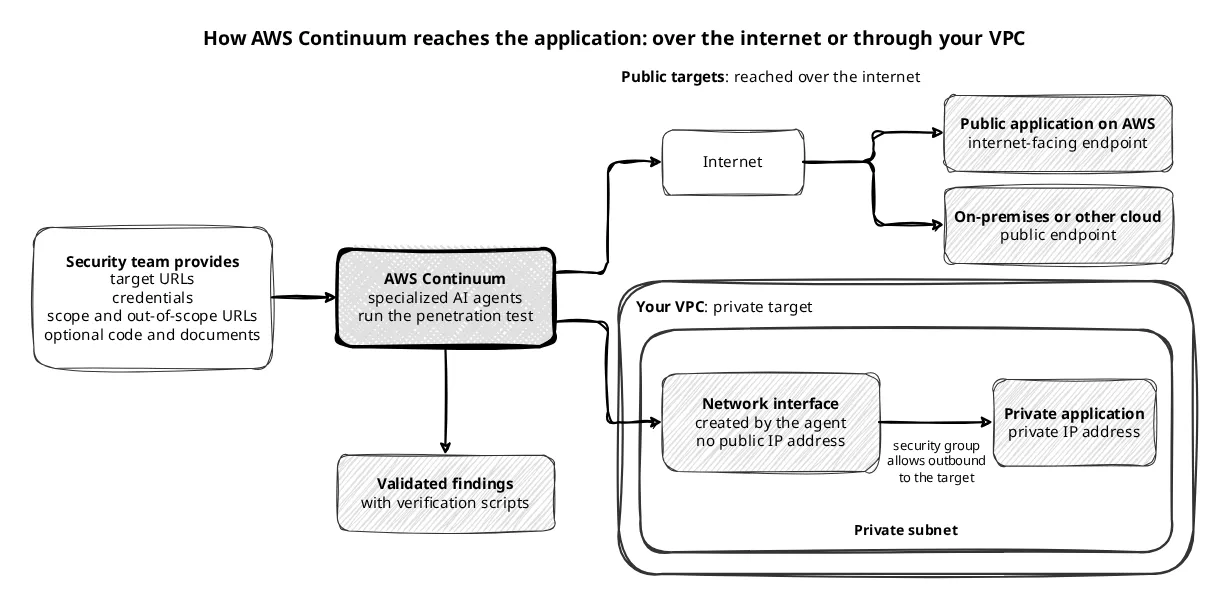
During the test, specialized AI agents build context about the application and run multi-step attack chains against it. They use minimal-impact payloads, such as reading the SQL version instead of dropping a table, and deterministic guardrails keep them from creating excessive load. AWS still recommends testing only in pre-production, because business logic can react in ways the guardrails do not foresee. The team cannot preview the plan, which changes as the agents explore, so it watches the test logs in real time and can stop a run. Most runs complete within 16 hours.
Before reporting a finding, the service validates it with deterministic validators or by replaying the attack steps, and it shows only high or medium confidence findings by default. Each finding has a description, a CVSS-based severity, and steps to reproduce it [4]. Confirmed findings also come with a verification script that the team configures with its own environment variables and runs against the target [5]. The script is generated with AI, so the team reviews it first and runs it only against systems it is authorized to test.
When the company trials a test on one development application, it returns validated findings that the team reproduces with the scripts. A test that needs a running application still cannot check every change developers make each day, so the team needs a check earlier in the path.
Code review: findings arrive in the pull request
Code review checks the code where it changes, against the organization's own security requirements and for common issues such as missing input validation and SQL injection risks [3]. Security teams define the requirements once in the AWS console, for example approved authorization libraries, logging standards, and data access policies. Code review is in preview and not billed, with up to 1,000 reviews per account per month [1].
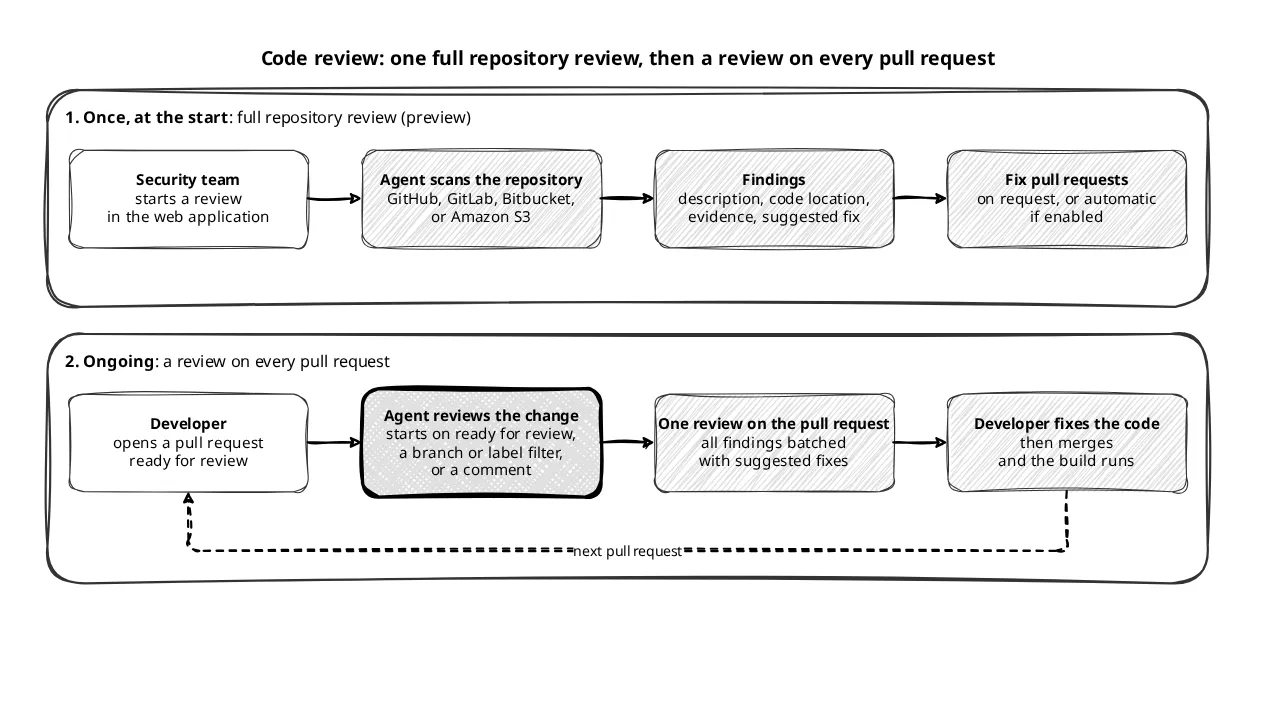
A team can use code review in two ways. The first is a full review of a repository from GitHub, GitLab, Bitbucket, or Amazon S3, started in the web application [6]. After a preflight check confirms the service can pull the code, the scan typically takes 30 to 60 minutes depending on codebase size. Each finding shows a description, code locations, evidence, and a suggested fix, and a user can request a fix pull request or turn on automatic remediation. Full repository code review is also in preview [7].
The second way runs on every pull request. Once code review comments are turned on for a repository, the service starts a review when a pull request is ready for review [10]. Administrators can limit reviews by target branch or label, and a user can start one at any time with a comment. The service posts all findings as a single review on the pull request, so the developer fixes them while the change is still open.
The company connects the repositories of all its applications, including the lower-priority ones that had no testing before. It runs one full review of each repository to find existing flaws, and from then on every pull request gets its own review.
Both checks together: code review before the build, penetration test before production
Code review and penetration testing cover two different moments in a release. Code review finds flaws in each pull request before they become part of a build. The penetration test attacks the built application in pre-production, where AWS places it for applications that are ready for deployment [1], and it is the only capability that authenticates to the application at runtime [3]. The company runs code review on every repository and adds a penetration test before each release of its sensitive workloads. The team can start a test by hand, on a schedule [11], or from the CI/CD pipeline after each deployment [12]. The pipeline option is in preview and can block a release when a finding is too severe. One older docs page still says scheduling is not available [3].
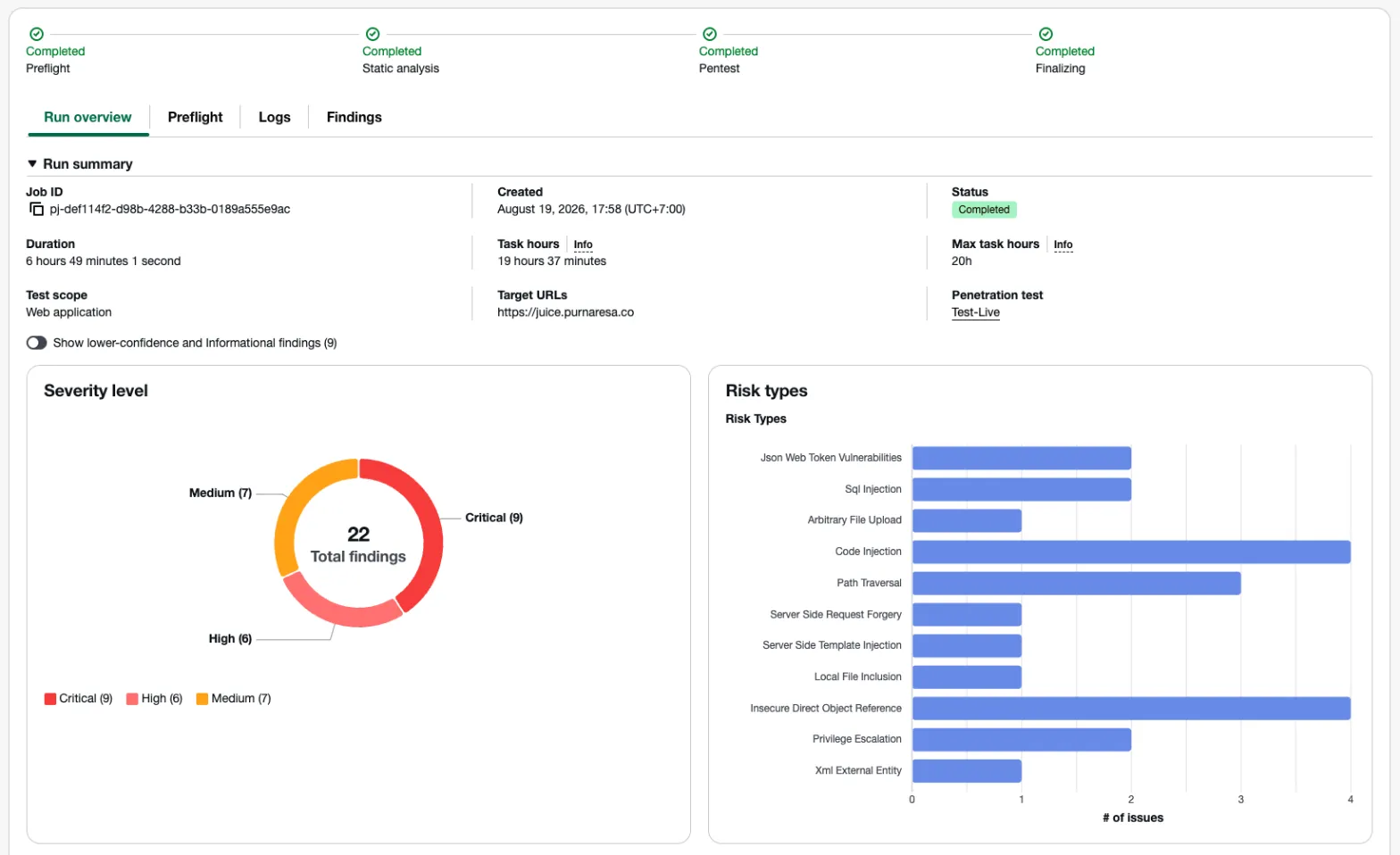
The screenshot below shows the result of an example penetration test against a test web application. The run overview gives the duration, the number of findings by severity, and the risk type of each finding. Lower-confidence and informational findings stay hidden unless the team turns them on.
The result: every release gets tested before production
Every release now passes through at least one check. Developers fix code review findings before the build, and sensitive workloads also pass a penetration test in pre-production before they ship. Code review replaces the open-source scanning tools, and lower-priority workloads, which had no testing before, now get it on every pull request. The annual external penetration test stays for regulated workloads, because AWS states that the service is not a professional penetration testing service and encourages customers to integrate it into their security review workflow [3].
For a team in the same position, three points carry over:
- Measure how many releases get tested today, because that ratio shows the coverage gap.
- Turn on code review across all repositories first: one full review of each repository, then a review on every pull request.
- Add penetration testing in pre-production for workloads that hold sensitive data, and keep a professional penetration test where regulation requires one.
Testing coverage at the company now keeps pace with AI-assisted development.
References
- [1] AWS Continuum, FAQs: https://aws.amazon.com/continuum/faqs/
- [2] AWS What's New, AWS Continuum for Penetration Testing: https://aws.amazon.com/about-aws/whats-new/2026/09/aws-continuum-penetration/
- [3,4,6,8,10,11,12] AWS Security Agent, User Guide: https://docs.aws.amazon.com/securityagent/latest/userguide/
- [5] AWS What's New, verification scripts for pentest findings: https://aws.amazon.com/about-aws/whats-new/2026/05/aws-security-agent/
- [7] AWS What's New, full repository code review: https://aws.amazon.com/about-aws/whats-new/2026/05/aws-security-agent-full-repository-code-review/
- [9] AWS Security Blog, AWS Security Agent penetration testing GA: https://aws.amazon.com/blogs/security/aws-security-agent-on-demand-penetration-testing-now-generally-available/
Enjoyed reading this content? Let the author know!
Your likes, comments, shares, and saves help creators reach more builders.

Loading recommendations
Loading article