
Moving Lambda Logs to a Centralized Location [S3]
Learn how to route AWS Lambda logs to CloudWatch, S3(in this case), or Firehose, and choose the right option for centralized storage, analysis, and retention.
Series: Lambda Logging [and available options] (3 articles)
- 2Moving Lambda Logs to a Centralized Location [S3] This article

Moving Lambda Logs to a Centralized Location[S3]
AWS Lambda gives you logs out of the box, but once an application starts growing, the real question becomes: where should those logs go?
If you are only testing a function, CloudWatch Logs is usually enough. But if you want long-term storage, centralized analysis, or integration with downstream systems, AWS gives you a few different ways to send Lambda logs somewhere else.
The available options
Inside the Lambda console, you can go to:
Configuration -> Monitoring and operational tools -> Logging configuration -> Edit -> Log Destination
From there, you get three choices:
- Amazon CloudWatch Logs: the default option
- Amazon S3: a simple choice for long-term archiving
- Amazon Data Firehose: useful when you want to stream logs in near real time to other destinations
Each option solves a different problem, so the right one depends on what you want to do with the logs after Lambda writes them.
Function
The function remains the same which we discussed in the first article.
1
2
3
4
5
6
7
8
9
10
def lambda_handler(event, context):

    print("Dummy Lambda output")

    return {

        "statusCode": 200,

        "body": "Dummy Lambda output",

    }


if __name__ == "__main__":

    print(lambda_handler({}, None))
A quick note about delivery log classes
- If you send logs to Amazon S3 or Amazon Data Firehose, Lambda requires a log group with the delivery log class.
- That is an important detail because this log class is designed for delivery, not for the full CloudWatch Logs experience. In other words, you trade some CloudWatch features for simpler forwarding.
- For example, delivery log class does not support standard CloudWatch Logs features such as Logs Insights and Live Tail.
- It is also worth remembering that log events are only kept in CloudWatch Logs for two days when this class is used. That retention period is fixed and cannot be changed.
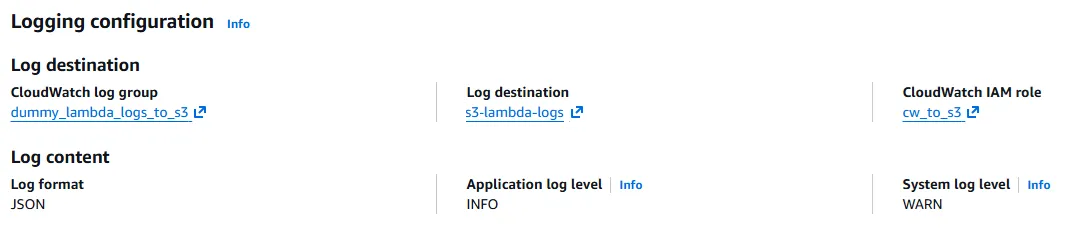
In this example, I used Amazon S3
For this setup, I created a new log group using the delivery class and named it
dummy_lambda_logs_to_s3.Then I selected this bucket:
arn:aws:s3:::s3-lambda-logsI also created an IAM role for the Lambda function. The trust relationship and permissions are defined in:
- 02_iam_role_trust_relationships.json
1
2
3
4
5
6
7
8
9
10
11
12
13
14
15
16
17
{

    "Version": "2008-10-17",

    "Statement": [

        {

            "Effect": "Allow",

            "Principal": {

                "Service": "logs.amazonaws.com"

            },

            "Action": "sts:AssumeRole",

            "Condition": {

                "StringLike": {

                    "aws:SourceArn": "arn:aws:logs:eu-central-1:ACCOUNT_ID:*"

                }

            }

        }

    ]

}- 02_iam_role_permissions.json
1
2
3
4
5
6
7
8
9
10
11
12
13
14
{

    "Statement": [

        {

            "Effect": "Allow",

            "Action": [

                "s3:PutObject"

            ],

            "Resource": [

                "arn:aws:s3:::s3-lambda-logs/*",

                "arn:aws:s3:::s3-lambda-logs"

            ]

        }

    ]

}
After saving the configuration, Lambda starts delivering logs to the S3 bucket.
What the S3 path looks like
When you invoke the function again, the logs show up in the bucket under a path like this:
Amazon S3 -> Buckets -> s3-lambda-logs -> AWSLogs/ -> ACCOUNT_ID/ -> eu-central-1/ -> dummy_lambda_logs_to_s3/ -> 2026/ -> 10/ -> 11/ -> 12/That layout is useful because it keeps the logs organized by account, region, log group, and time.
Why this matters
- This is the part that often gets overlooked. CloudWatch Logs is great for day-to-day debugging, but not every team wants to keep everything there forever. Sometimes you want a cheaper archive. Sometimes you want to move logs into a data lake. Sometimes you want to push them to another analytics pipeline.
- That is where S3 and Firehose start making sense.
- Use CloudWatch Logs when you want convenience and fast troubleshooting
- Use S3 when you want simple long-term storage and archiving
- Use Firehose when you want logs flowing into another system in near real time
Notes:
Log delivery to Amazon S3 requires using a log group with the delivery log class. This enables efficient routing, but it does not support standard CloudWatch Logs features such as Logs Insights and Live Tail.
Final thought
There is no single best destination for Lambda logs. The best option depends on what you are trying to do with them.
- If you need quick operational visibility, keep them in CloudWatch Logs.
- If you need long-term retention, move them to S3.
- If you need streaming delivery to another platform, Firehose is the better fit.
For this example, S3 is a clean middle ground because it keeps the setup simple while still giving you centralized storage.
Feel free to share your thoughts, happy learning!
Series: Lambda Logging [and available options] (3 articles)
- 2Moving Lambda Logs to a Centralized Location [S3] This article
Enjoyed reading this content? Let the author know!
Your likes, comments, shares, and saves help creators reach more builders.

Loading recommendations
Loading article