
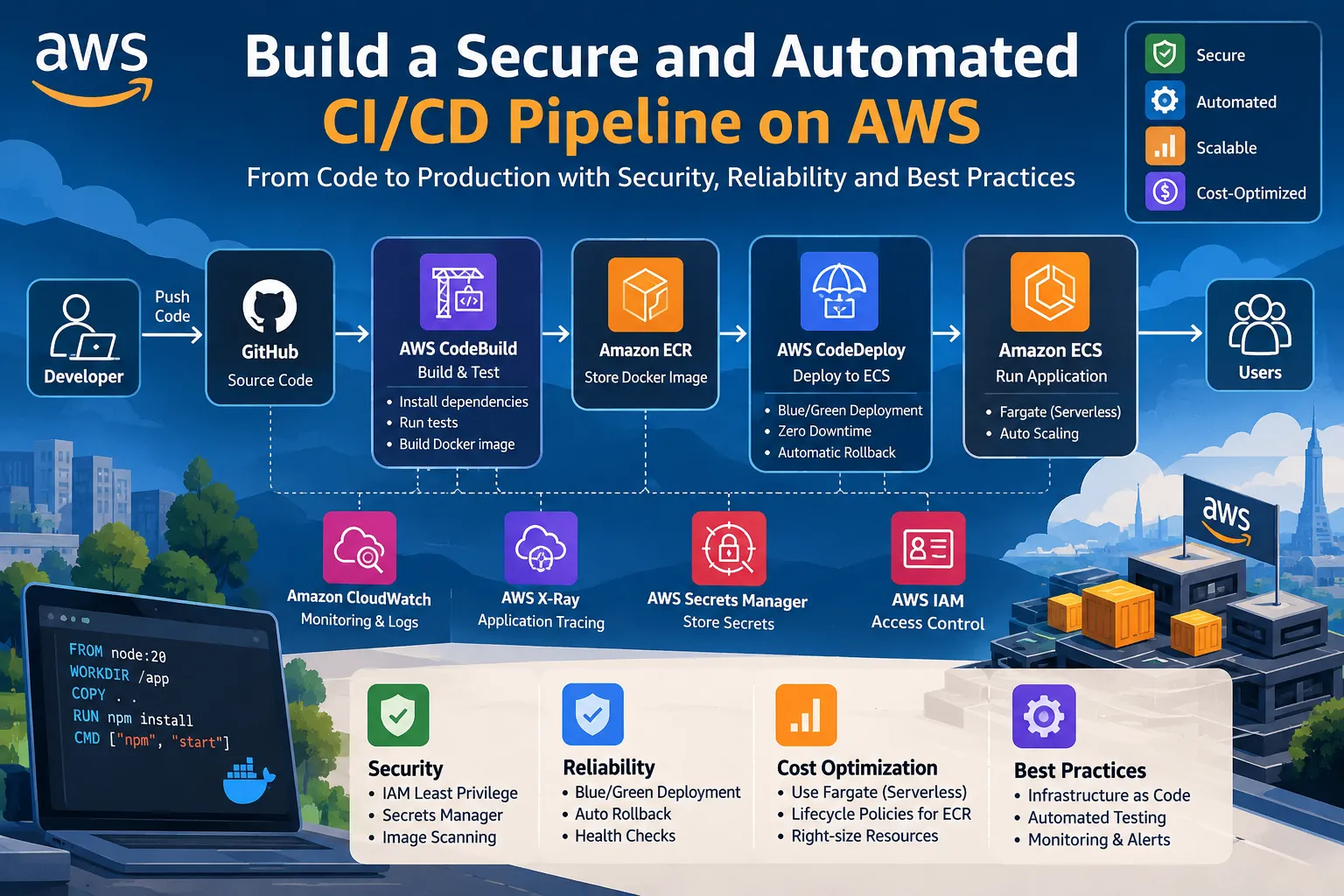
Build a Secure and Automated CI/CD Pipeline on AWS with CodeBuild, ECR, CodeDeploy and ECS
Learn how to build a production-ready CI/CD pipeline on AWS that automatically builds, tests, containerizes, and deploys applications to Amazon ECS. This guide covers CodeBuild, Amazon ECR, CodeDeploy, IAM, Secrets Manager, monitoring, rollback strategies, and security best practices

1
2
3
4
5
6
7
8
9
10
11
12
13
14
15
16
17
18
19
20
21
22
23
24
25
26
27
28
29
30
31
32
33
34
35
36
37
38
39
40
41
42
43
44
45
46
47
48
49
50
51
52
53
54
55
56
57
58
59
60
61
62
63
64
65
66
67
68
69
70
71
72
73
74
75
76
77
78
79
80
81
82
83
84
85
86
87
88
89
90
91
92
93
94
95
96
97
98
99
100
101
102
103
104
105
106
107
108
109
110
111
112
113
114
115
116
117
118
119
120
121
122
123
124
125
126
127
128
129
130
131
132
133
134
135
136
137
138
139
140
141
142
143
144
145
146
147
148
149
150
151
152
153
154
155
156
157
158
159
160
161
162
# Build a Secure and Automated CI/CD Pipeline on AWS with CodeBuild, ECR, CodeDeploy and ECS
Modern applications need to be delivered quickly, reliably, and securely. Manually building Docker images and deploying applications can be time-consuming and can introduce human errors.
A CI/CD pipeline automates the software delivery process from source code to production.
In this article, we will build a practical AWS-based CI/CD architecture using GitHub, AWS CodeBuild, Amazon ECR, AWS CodeDeploy, Amazon ECS, Application Load Balancer, AWS IAM, AWS Secrets Manager, and Amazon CloudWatch.
The goal is to create a pipeline that can automatically build, test, containerize, deploy, monitor, and safely roll back an application.
## 1. What Is CI/CD?
CI/CD stands for Continuous Integration and Continuous Delivery or Continuous Deployment.
### Continuous Integration
Continuous Integration means automatically building and testing application code whenever developers push changes to a source-code repository.
For example:
Developer → Git Push → Build → Test
This helps identify problems early.
### Continuous Delivery
Continuous Delivery means keeping the application in a deployable state and automatically preparing successful builds for deployment.
### Continuous Deployment
Continuous Deployment takes automation one step further by automatically deploying successful changes to the target environment.
A typical workflow looks like this:
Developer
|
| git push
↓
GitHub
|
↓
AWS CodeBuild
|
+---- Run Tests
|
+---- Build Docker Image
|
↓
Amazon ECR
|
↓
AWS CodeDeploy
|
↓
Amazon ECS
|
↓
Application Load Balancer
|
↓
Users
|
↓
Amazon CloudWatch
## 2. AWS Services Used in This Architecture
The pipeline uses several AWS services.
| AWS Service | Purpose |
|---|---|
| GitHub | Source code repository |
| AWS CodeBuild | Build and test application |
| Amazon ECR | Store Docker images |
| AWS CodeDeploy | Automate deployment |
| Amazon ECS | Run containers |
| Application Load Balancer | Distribute application traffic |
| AWS IAM | Control permissions |
| AWS Secrets Manager | Store sensitive information |
| Amazon CloudWatch | Logs, metrics and monitoring |
Each service performs a specific responsibility.
This separation makes the architecture easier to maintain and troubleshoot.
## 3. Overall Architecture
The complete architecture can be represented as:
Developer
|
| git push
↓
GitHub
|
↓
AWS CodeBuild
|
+---- Install Dependencies
|
+---- Run Tests
|
+---- Build Docker Image
|
↓
Amazon ECR
|
↓
AWS CodeDeploy
|
↓
Amazon ECS
|
+---- ECS Task
|
+---- ECS Task
|
↓
Application Load Balancer
|
↓
Users
Additional services:
AWS IAM
|
+---- CodeBuild Permissions
+---- ECS Permissions
+---- CodeDeploy Permissions
AWS Secrets Manager
|
+---- Database Credentials
+---- API Keys
+---- Application Secrets
Amazon CloudWatch
|
+---- Application Logs
+---- ECS Metrics
+---- Alarms
+---- Deployment Monitoring
## 4. Step 1: Create an Amazon ECR Repository
Amazon Elastic Container Registry (ECR) is used to store Docker container images.
Create an ECR repository using the AWS CLI:
```bash
aws ecr create-repository \
--repository-name my-application \
--region us-east-1Verify the repository:
1
2
3
aws ecr describe-repositories \
  --repository-names my-application \
  --region us-east-1
The repository will have a URI similar to:
1
123456789012.dkr.ecr.us-east-1.amazonaws.com/my-application
This URI will be used when pushing Docker images.
5. Step 2: Create the Dockerfile
Suppose we have a Node.js application.
Create a file named:
1
Dockerfile
Example:
1
2
3
4
5
6
7
8
9
10
11
12
13
FROM node:20-alpine

WORKDIR /app

COPY package*.json ./

RUN npm ci

COPY . .

EXPOSE 3000

CMD ["npm", "start"]
This Dockerfile performs the following operations:
- Uses a lightweight Node.js image.
- Creates the
/appworking directory. - Copies dependency files.
- Installs dependencies.
- Copies application source code.
- Exposes port 3000.
- Starts the application.
6. Step 3: Build the Docker Image
Build the image locally:
1
docker build -t my-application:latest .
Verify the image:
1
docker images
Run the container:
1
docker run -p 3000:3000 my-application:latest
Test the application:
1
http://localhost:3000
Once the application works locally, the same image-building process can be automated through AWS CodeBuild.
7. Step 4: Authenticate Docker with Amazon ECR
Authenticate Docker with ECR:
1
2
3
4
5
6
aws ecr get-login-password \
  --region us-east-1 | \
docker login \
  --username AWS \
  --password-stdin \
  123456789012.dkr.ecr.us-east-1.amazonaws.com
Tag the image:
1
2
docker tag my-application:latest \
123456789012.dkr.ecr.us-east-1.amazonaws.com/my-application:latest
Push the image:
1
2
docker push \
123456789012.dkr.ecr.us-east-1.amazonaws.com/my-application:latest
Now the Docker image is stored in Amazon ECR.
8. Step 5: Configure AWS CodeBuild
AWS CodeBuild provides a managed build environment.
CodeBuild can execute commands such as:
- Installing dependencies
- Running tests
- Building applications
- Building Docker images
- Pushing images to ECR
Create a file named:
1
buildspec.yml
Example:
1
2
3
4
5
6
7
8
9
10
11
12
13
14
15
16
17
18
19
20
21
22
23
24
25
26
27
28
29
30
31
32
33
34
35
36
version: 0.2

phases:

  install:
    commands:
      - echo Installing dependencies
      - npm ci

  pre_build:
    commands:
      - echo Running tests
      - npm test

      - echo Logging into Amazon ECR
      - aws ecr get-login-password --region $AWS_DEFAULT_REGION | docker login --username AWS --password-stdin $ECR_URI

  build:
    commands:
      - echo Building Docker image
      - docker build -t $IMAGE_REPO_NAME:$IMAGE_TAG .

      - echo Tagging Docker image
      - docker tag $IMAGE_REPO_NAME:$IMAGE_TAG $ECR_URI:$IMAGE_TAG

  post_build:
    commands:
      - echo Pushing Docker image
      - docker push $ECR_URI:$IMAGE_TAG

      - echo Creating image definition
      - printf '[{"name":"my-application","imageUri":"%s"}]' $ECR_URI:$IMAGE_TAG > imagedefinitions.json

artifacts:
  files:
    - imagedefinitions.json
The
buildspec.yml defines what CodeBuild should execute during the build.9. Step 6: Use Environment Variables
Avoid hard-coding AWS account IDs and repository names.
For example:
1
2
3
4
AWS_DEFAULT_REGION=us-east-1
ECR_URI=123456789012.dkr.ecr.us-east-1.amazonaws.com/my-application
IMAGE_REPO_NAME=my-application
IMAGE_TAG=latest
Environment variables make the pipeline easier to reuse across environments.
For production systems, sensitive values should not be stored directly in the build configuration.
10. Step 7: Configure IAM Permissions
The CodeBuild service role requires permissions to perform its tasks.
For example, CodeBuild may need permission to:
- Authenticate with ECR
- Push images to ECR
- Write logs to CloudWatch
- Access required artifacts
Avoid giving the role:
1
AdministratorAccess
Instead, use the principle of least privilege.
The goal is:
1
2
3
4
5
6
7
8
9
CodeBuild
    |
    +---- Only required AWS permissions
    |
    +---- ECR Push
    |
    +---- CloudWatch Logs
    |
    +---- Required S3 access
This reduces the impact of compromised credentials.
11. Step 8: Create an Amazon ECS Cluster
Amazon ECS is used to run the containerized application.
You can use AWS Fargate when you want AWS to manage the underlying container infrastructure.
A simplified architecture is:
Amazon ECS Cluster
|
+----------------+
| |
ECS Task ECS Task
| |
Container Container
| |
+-------+--------+
|
Application Load
Balancer
|
Users
|
+----------------+
| |
ECS Task ECS Task
| |
Container Container
| |
+-------+--------+
|
Application Load
Balancer
|
Users
Running multiple tasks improves availability.
12. Step 9: Create an ECS Task Definition
A task definition describes how ECS should run the container.
Example:
1
2
3
4
5
6
7
8
9
10
11
12
13
14
15
16
17
18
19
20
21
22
23
{
  "family": "my-application",
  "networkMode": "awsvpc",
  "requiresCompatibilities": [
    "FARGATE"
  ],
  "cpu": "256",
  "memory": "512",
  "executionRoleArn": "arn:aws:iam::123456789012:role/ecsTaskExecutionRole",
  "containerDefinitions": [
    {
      "name": "my-application",
      "image": "123456789012.dkr.ecr.us-east-1.amazonaws.com/my-application:latest",
      "essential": true,
      "portMappings": [
        {
          "containerPort": 3000,
          "protocol": "tcp"
        }
      ]
    }
  ]
}
The ECS task execution role allows ECS to perform required actions such as pulling the image from ECR and sending logs to CloudWatch.
13. Step 10: Configure Application Load Balancer
The Application Load Balancer receives requests from users and sends them to healthy ECS tasks.
The architecture becomes:
Internet
|
↓
Application Load Balancer
|
+--------+--------+
| |
Target Group Target Group
| |
ECS Task ECS Task
|
↓
Application Load Balancer
|
+--------+--------+
| |
Target Group Target Group
| |
ECS Task ECS Task
Health checks help ensure that traffic is sent only to healthy targets.
For example:
1
2
3
Health Check Path:

/health
The application can return:
1
HTTP 200 OK
when it is healthy.
14. Step 11: Configure AWS CodeDeploy
AWS CodeDeploy can automate deployments to ECS.
For ECS deployments, CodeDeploy can create a replacement task set and shift traffic from the existing task set to the new version.
A simplified blue/green deployment looks like:
Production Traffic
|
↓
Application Load Balancer
|
+---+---+
| |
Blue Green
v1 v2
| |
Old New
Version Version
|
↓
Application Load Balancer
|
+---+---+
| |
Blue Green
v1 v2
| |
Old New
Version Version
Initially:
100% → Blue
After successful validation:
100% → Green
If the new version fails:
100% → Blue
This provides a safer deployment strategy.
15. Step 12: Create an AppSpec File
For ECS CodeDeploy deployments, an AppSpec file defines deployment information.
Example:
1
2
3
4
5
6
7
8
9
10
version: 0.0

Resources:
  - TargetService:
      Type: AWS::ECS::Service
      Properties:
        TaskDefinition: <TASK_DEFINITION>
        LoadBalancerInfo:
          ContainerName: my-application
          ContainerPort: 3000
The task definition and AppSpec configuration are used by CodeDeploy during deployment.
16. Step 13: Configure Secrets Manager
Never store sensitive information directly inside:
1
2
3
4
Dockerfile
GitHub repository
buildspec.yml
source code
Examples of sensitive information include:
1
2
3
4
DATABASE_PASSWORD
JWT_SECRET
API_KEY
DATABASE_USERNAME
AWS Secrets Manager can be used to store these values securely.
Example concept:
1
2
3
4
5
6
7
8
9
10
11
12
13
AWS Secrets Manager
        |
        +---- DATABASE_PASSWORD
        |
        +---- JWT_SECRET
        |
        +---- API_KEY
        |
        ↓
Amazon ECS
        |
        ↓
Application
The application can retrieve secrets at runtime.
17. Step 14: Configure CloudWatch Monitoring
Amazon CloudWatch can monitor the application and infrastructure.
Monitor:
- ECS CPU utilization
- ECS memory utilization
- Application logs
- Container failures
- Load balancer metrics
- Deployment health
- Application errors
Example:
1
2
3
4
5
6
7
8
9
10
ECS CPU > 80%
       |
       ↓
CloudWatch Alarm
       |
       ↓
Notification
       |
       ↓
DevOps Team
Monitoring is essential because deployment automation alone does not tell you whether the application is actually healthy.
18. Complete CI/CD Flow
The final pipeline can look like this:
Developer
|
| git push
↓
GitHub
|
↓
AWS CodeBuild
|
+---- Install Dependencies
|
+---- Run Tests
|
+---- Security Checks
|
+---- Build Docker Image
|
↓
Amazon ECR
|
↓
AWS CodeDeploy
|
+---- Create New ECS Task Set
|
+---- Health Check
|
+---- Shift Traffic
|
↓
Amazon ECS
|
↓
Application Load Balancer
|
↓
Users
|
↓
Amazon CloudWatch
|
| git push
↓
GitHub
|
↓
AWS CodeBuild
|
+---- Install Dependencies
|
+---- Run Tests
|
+---- Security Checks
|
+---- Build Docker Image
|
↓
Amazon ECR
|
↓
AWS CodeDeploy
|
+---- Create New ECS Task Set
|
+---- Health Check
|
+---- Shift Traffic
|
↓
Amazon ECS
|
↓
Application Load Balancer
|
↓
Users
|
↓
Amazon CloudWatch
19. Production CI/CD Flow
A production pipeline should contain multiple validation stages.
1
2
3
4
5
6
7
8
9
10
11
12
13
14
15
16
17
18
19
20
21
22
23
24
25
26
27
28
29
30
31
32
33
34
35
36
37
Developer
    |
    ↓
Git Push
    |
    ↓
Build
    |
    ↓
Unit Tests
    |
    ↓
Security Scan
    |
    ↓
Docker Build
    |
    ↓
Push Image to ECR
    |
    ↓
Deploy to Staging
    |
    ↓
Integration Tests
    |
    ↓
Production Deployment
    |
    ↓
Health Checks
    |
    ↓
Traffic Shift
    |
    ↓
CloudWatch Monitoring
This approach reduces the risk of deploying broken software.
20. Security Best Practices
Follow these security practices:
1. Use IAM Least Privilege
Give each AWS service only the permissions it needs.
2. Protect Secrets
Use AWS Secrets Manager instead of hard-coded credentials.
3. Scan Container Images
Identify vulnerabilities before deploying images.
4. Use HTTPS
Secure communication between users and the Application Load Balancer.
5. Restrict Security Groups
Allow only the required ports and traffic sources.
6. Avoid Running Containers as Root
Use a non-root user when possible.
7. Keep Dependencies Updated
Regularly update application dependencies and base Docker images.
21. Cost Optimization
A good CI/CD architecture should also control AWS costs.
Use Fargate Carefully
Choose CPU and memory values according to actual application requirements.
Remove Old ECR Images
Configure ECR lifecycle policies to automatically remove unnecessary old images.
Example:
1
2
Keep latest 10 images
Delete older images
Optimize CodeBuild
Avoid unnecessary builds and use appropriate compute resources.
Monitor CloudWatch Costs
Logs can accumulate over time.
Configure appropriate log retention periods.
Delete Unused Resources
Regularly review:
1
2
3
4
5
6
Load Balancers
ECS Services
ECR Images
CloudWatch Logs
NAT Gateways
Unused Test Environments
22. Reliability Best Practices
For production applications:
1
2
3
4
5
6
7
8
9
☑ Run multiple ECS tasks
☑ Use an Application Load Balancer
☑ Configure health checks
☑ Use multiple Availability Zones
☑ Enable CloudWatch monitoring
☑ Configure deployment rollback
☑ Keep previous container images
☑ Test deployments before production
☑ Use automated alerts
A deployment should not be considered successful simply because the deployment command completed.
The application itself must be healthy.
23. Common CI/CD Mistakes
Mistake 1: Hard-Coding Credentials
Never put passwords or API keys inside source code.
Mistake 2: Using AdministratorAccess Everywhere
Use service-specific IAM permissions.
Mistake 3: Deploying Without Tests
Always test the application before production deployment.
Mistake 4: No Rollback Strategy
Production deployments should have a recovery mechanism.
Mistake 5: No Monitoring
Always monitor application and infrastructure health after deployment.
Mistake 6: Using Only the Latest Docker Tag
Prefer immutable or unique image tags such as:
1
my-application:8f31a21
where the value can represent a Git commit.
This makes rollback and version tracking easier.
24. Example Immutable Image Tagging
Instead of always using:
1
latest
use a Git commit ID:
1
my-application:a81f93c
Pipeline flow:
1
2
3
4
5
6
7
8
9
10
11
12
13
Git Commit
    |
    ↓
a81f93c
    |
    ↓
Docker Image
    |
    ↓
ECR
    |
    ↓
ECS
Now every deployment can be linked to a specific source-code version.
25. CI/CD Troubleshooting Checklist
If the pipeline fails, check the following.
CodeBuild Failure
Check:
1
2
3
4
5
CodeBuild Logs
buildspec.yml
IAM Permissions
Docker Configuration
Environment Variables
ECR Push Failure
Check:
1
2
3
4
5
ECR Repository
AWS Region
IAM Permissions
Docker Login
Image Tag
ECS Deployment Failure
Check:
1
2
3
4
5
6
7
Task Definition
Container Image
CPU/Memory
Security Groups
Subnets
IAM Execution Role
Container Health Check
Application Load Balancer Failure
Check:
1
2
3
4
5
Target Group
Listener
Health Check
Security Group
Container Port
CodeDeploy Failure
Check:
1
2
3
4
5
6
7
Deployment Group
AppSpec File
Target Groups
Listeners
IAM Role
ECS Service
Deployment Configuration
26. Example Final Architecture
1
2
3
4
5
6
7
8
9
10
11
12
13
14
15
16
17
18
19
20
21
22
23
24
25
26
27
28
29
30
31
32
33
34
35
36
37
38
39
40
                         USERS
                           |
                           ↓
                Application Load Balancer
                           |
                    +------+------+
                    |             |
                    ↓             ↓
                ECS Task       ECS Task
                    |             |
                    +------+------+
                           |
                        Amazon ECS
                           |
                     AWS CodeDeploy
                           |
                      Amazon ECR
                           |
                    AWS CodeBuild
                           |
                         GitHub
                           |
                       Developer

Additional Services:

AWS IAM
   |
   +---- Access Control

AWS Secrets Manager
   |
   +---- Application Secrets

Amazon CloudWatch
   |
   +---- Logs
   +---- Metrics
   +---- Alarms
   +---- Monitoring
27. Key Takeaways
The main responsibilities of the AWS services are:
1
2
3
4
5
6
7
8
9
10
11
12
13
14
15
16
17
18
19
20
21
22
23
24
25
26
27
28
29
30
31
32
33
34
35
GitHub
   ↓
Source Code

CodeBuild
   ↓
Build + Test

ECR
   ↓
Docker Image Storage

CodeDeploy
   ↓
Deployment Automation

ECS
   ↓
Run Containers

Application Load Balancer
   ↓
Distribute Traffic

Secrets Manager
   ↓
Secure Secrets

IAM
   ↓
Permissions

CloudWatch
   ↓
Monitoring + Logs
This separation makes the CI/CD architecture easier to understand, automate, secure, and maintain.
Conclusion
A secure and automated CI/CD pipeline can significantly improve the speed and reliability of application delivery.
By combining GitHub, AWS CodeBuild, Amazon ECR, AWS CodeDeploy, Amazon ECS, Application Load Balancer, IAM, Secrets Manager, and CloudWatch, teams can create a complete path from source code to production.
The key is not simply to automate deployment.
A production-ready pipeline should also include:
- Automated testing
- Secure secret management
- IAM least privilege
- Container security
- Health checks
- Monitoring
- Deployment validation
- Rollback capability
- Cost optimization
With these practices, AWS can provide a powerful foundation for building reliable and secure DevOps workflows.
Enjoyed reading this content? Let the author know!
Your likes, comments, shares, and saves help creators reach more builders.

Loading recommendations
Loading article