
Automate bulk cleanup of AWS Step Functions state machines by using AWS Batch
Step Functions has no built-in way to expire state machines that your code creates at runtime. Learn how to run a dry-run-first cleanup job on AWS Batch and Fargate, inside private subnets, to find and delete stale state machines safely.


Automate bulk cleanup of AWS Step Functions state machines by using AWS Batch
Summary
Customers who create AWS Step Functions state machines from application code at runtime often know, at the moment of creation, that many of them are short-lived. A common example is a dynamic orchestration pattern. An orchestrator Lambda function reads the input metadata for a job, generates a state machine definition that matches the shape of that job, runs it, and never needs it again. The state machine is effectively dead as soon as the run finishes. Development teams also create state machines for testing that outlive their purpose, and applications generate state machines per user request without any cleanup logic.
The
CreateStateMachine API has no way to record that intent. The knowledge that a state machine is single-use exists only in the code that created it, and it is discarded when the call returns. Other AWS services handle this natively: DynamoDB has item-level TTL, Amazon S3 has lifecycle expiration rules, and Amazon ECR has lifecycle policies. Step Functions has no equivalent. Any later cleanup has to reconstruct the intent by guessing from a tag, a naming convention, or a creation timestamp, and guessing is risky because a state machine that looks abandoned may only be idle.Left alone, these orphaned state machines might cause the following problems:
- Scale: large numbers of inactive state machines make listing and reviewing very slow.
- Operations: finding and removing them by hand across accounts and Regions takes DevOps time on every cleanup cycle.
- Security: they might reference IAM roles that may no longer be needed, and their definitions can contain hard-coded values. Both complicate access reviews and audits.
Existing approaches don't close the gap:
- Manual deletion in the AWS Management Console becomes impractical beyond a few dozen state machines.
- Ad hoc scripts typically lack error handling, audit logging, and security controls.
- Third-party tools add configuration, maintenance, and licensing overhead.
- No AWS service provides native bulk cleanup of state machines.
This pattern provides an automated, auditable cleanup job for DevOps teams and cloud architects. A Python script runs as an AWS Batch job on AWS Fargate, in private subnets that reach AWS services only through VPC endpoints. The script lists state machines, filters them by creation date and name, stops any running executions, and deletes the matches. It defaults to dry-run mode, runs under an IAM role scoped to specific state machine ARN patterns, and writes an audit trail to an encrypted Amazon CloudWatch Logs log group.
Warning: deleting a state machine can't be undone. Before you run this against any account that matters:
- Test the full flow in a non-production account against dummy state machines.
- Always run a dry run first, and read every line of the output (the matched count, each state machine name, and the oldest and newest creation dates).
- Scope the IAM role to the narrowest ARN pattern that works. Never leave a bare
*.- Always pass
--max-per-runexplicitly. Don't rely on the defaults.- Verify the results after execution, and keep the logs as your audit trail.
- Don't put this on a schedule until you have completed several reviewed manual runs.
Prerequisites and limitations
Prerequisites
- An active AWS account. Use a non-production account for your first tests.
- The infrastructure shown in the architecture diagram is already deployed, by using any infrastructure as code (IaC) tool: private subnets with the VPC endpoints shown in the diagram, an Amazon ECR repository, an AWS Batch Fargate compute environment with a job queue and job definition, the IAM roles, and the encrypted CloudWatch Logs log group. The person who deploys this infrastructure is assumed to have all the permissions needed to create these resources.
- AWS Command Line Interface (AWS CLI), configured with credentials that can push images to the ECR repository, submit AWS Batch jobs, read the CloudWatch Logs log group, and list state machines.
- Docker, to build and push the container image.
- (Optional) Python with
boto3on your workstation, to develop and test the cleanup script locally.
Limitations
- Deletion is irreversible. Step Functions has no recycle bin. Export any definition you might need before you delete it.
- Selection is by creation date and name. This approach selects state machines created before a cutoff date, optionally narrowed by a name filter. Selecting by tag is possible but isn't covered here.
- Choose the cutoff time zone deliberately. Compare creation times and the cutoff date in the same time zone, and decide whether a date-only cutoff includes the whole day. Leave a margin around the cutoff.
- One Region per run. Each job targets a single Region and account. Run it once for each.
- Running executions are stopped. The script stops running executions before it deletes a state machine, so a long-running workflow that only looks idle will lose its in-flight work.
- Throttling applies. Step Functions API limits can slow large runs. The script retries with exponential backoff.
- Cleanup runs on demand. This pattern has no scheduler. Add one only after several reviewed manual runs.
Notes
- Container Python version: use the same Python version for the container base image as you use to test locally.
- Wildcard ARNs: in a single-account setup, ARN patterns can use
*for the account and Region. In multi-account or regulated environments, pin the account ID and Region. - Testing: create dummy state machines in a non-production account to test the job. See Test with dummy state machines.
Architecture
Target technology stack
- AWS Batch (on AWS Fargate)
- Amazon Elastic Container Registry (Amazon ECR)
- Amazon Virtual Private Cloud (Amazon VPC) with private subnets
- VPC endpoints
- Interface endpoints for Amazon ECR, AWS Step Functions, and Amazon CloudWatch Logs
- Gateway endpoint for Amazon Simple Storage Service (Amazon S3)
- AWS Identity and Access Management (IAM)
- AWS Key Management Service (AWS KMS)
- Amazon CloudWatch Logs
- Python (
boto3) and Docker
Target architecture
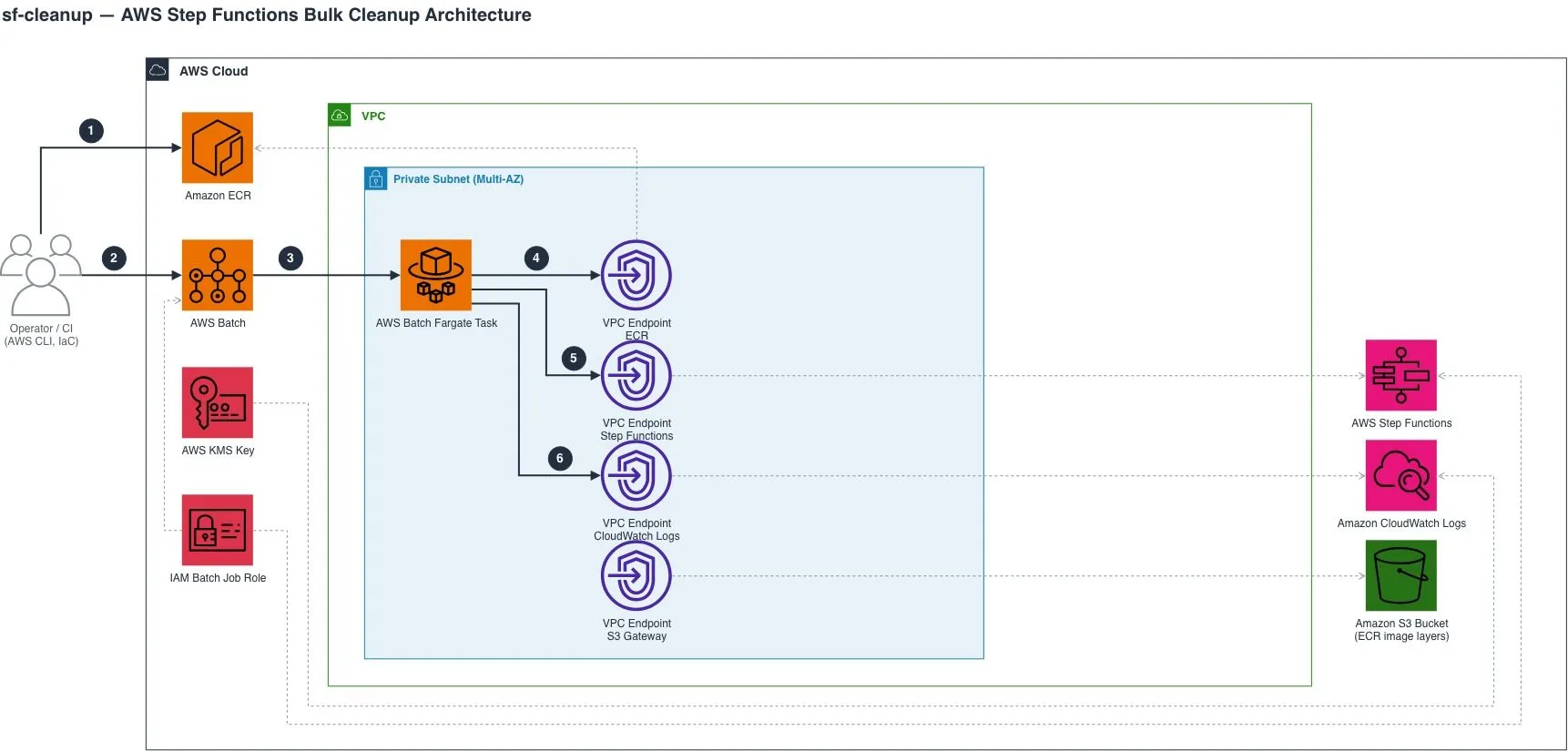
The diagram shows the following workflow:
- An operator or a CI/CD pipeline builds the container image and pushes it to an Amazon ECR repository.
- The operator submits the cleanup job to the AWS Batch job queue, passing the parameters for the run: the cutoff date, an optional name filter, the maximum number of deletions per run, and whether to execute or only do a dry run.
- AWS Batch schedules a Fargate task in a private subnet.
- The Fargate task pulls the container image through the Amazon ECR VPC endpoints. ECR stores image layers in Amazon S3, so the S3 gateway endpoint lets the private subnet download them.
- The script lists the state machines through the Step Functions VPC endpoint and filters them by creation date and name. In dry-run mode it deletes nothing and logs each state machine that would be deleted, with its creation date. In execute mode it stops any running executions and deletes the matching state machines.
- The task writes its execution log through the CloudWatch Logs VPC endpoint to a log group that is encrypted with an AWS KMS key. This log is your audit trail.
Design notes
- Private by design. The task runs in private subnets with no direct route to the internet, so the VPC endpoints are its only path to the AWS APIs. This is true even though the task and the state machines are in the same account, because being in the same account doesn't give the subnet a network path. No internet gateway is required.
- Least-privilege IAM. The job role can list and describe state machines across the account, because the script has to see them to filter them. It can delete state machines and stop executions only on the ARN patterns you allow.
- Dry run first. The script does nothing destructive unless you explicitly pass
--execute. - Encrypted, retained logs. The log group uses a customer managed KMS key and keeps logs for a defined retention period, so you have a record of every run.
- No servers to manage. AWS Batch queues the jobs and Fargate runs them to completion, so there is no instance to patch.
Tools
- AWS Batch runs the cleanup job on Fargate and queues each submitted run.
- Amazon ECR stores the private container image.
- AWS Step Functions is the service whose state machines the job lists, stops, and deletes.
- Amazon CloudWatch Logs collects the job output, which serves as your audit trail.
- AWS KMS encrypts the log group.
- AWS IAM controls what the job is allowed to delete.
- Docker builds the container image.
- AWS CLI submits jobs and reads logs.
- Python and boto3 provide the runtime and SDK for the cleanup script.
Additional details for creating your cleanup job
This section gives you the details you need to create your own cleanup job. You create three things: a cleanup script, a Dockerfile, and a container image in Amazon ECR. Build the image once and rebuild it only when the script changes.
Write the cleanup script
Write the script in any language that has an AWS SDK. The examples in this article assume Python with
boto3. You can write it yourself or generate it with an AI coding assistant. Either way, review the result and test it against dummy state machines in a non-production account before you use it. The script must meet the following requirements.Inputs
- A required cutoff date. Choose one time zone and use it both for the comparison and for the timestamps you log, so the dates in your logs match the dates you filtered on. Accept a date-only form (state whether the whole day is included) and a date-and-time form.
- An optional name filter, for example a prefix or substring.
- A maximum number of state machines to process in one run, with a modest default.
- An explicit flag to delete. Without it, the script runs as a dry run.
- The AWS Region. Each run targets one Region.
Behavior
- Dry run is the default. In a dry run the script calls no API that changes anything. It logs one line for each state machine it would delete, with its name and creation time, followed by the total count and the oldest and newest creation times.
- Select predictably. List all state machines with pagination. Keep those created before the cutoff whose names match the filter. Sort them oldest first, and apply the per-run cap.
- Stop executions, then delete. For each selected state machine, list its
RUNNINGexecutions (with pagination), stop each one, and then delete the state machine. Stopping an execution needs theStopExecutionpermission on execution ARNs, not state machine ARNs. If a stop fails, log the error and still attempt the delete.DeleteStateMachineis asynchronous. The state machine moves toDELETING, and Step Functions terminates any remaining executions on their next state transition. - Retry throttling only. Retry throttling errors with exponential backoff and jitter, and cap the delay. Fail immediately on any other error, such as
AccessDenied. - Isolate failures. One failed delete must not stop the others. Log each failure, and exit with a non-zero code if any state machine failed.
- Bound the parallelism. Use a small, configurable number of workers. Raise it only if throttling allows.
- Run unattended. No interactive prompts, and unbuffered output to standard output so AWS Batch can send it to CloudWatch Logs.
Create the Dockerfile
Create a Dockerfile that follows these guidelines:
- Start from a slim, currently supported Python base image.
- Install dependencies from a requirements file with pinned versions. Never bake credentials into the image.
- Copy in only the cleanup script.
- Run as a non-root user.
- Set the script as the
ENTRYPOINTand--helpas the defaultCMD. The image then does nothing destructive by default, and the AWS Batch job command supplies the real arguments. - Set unbuffered Python output.
- Skip
HEALTHCHECK, because this is a run-to-completion job and not a service.
Publish the image to Amazon ECR
To push the image to your ECR repository, see Pushing a Docker image to an Amazon ECR private repository . Tag the image with a unique version, such as a timestamp or a commit ID.
If your repository has tag immutability turned on, push only the unique version tag and point the job definition at the tag you want to run. Fargate pulls the image each time a job starts, so every job started after a push uses the new image.
Test with dummy state machines
Before you run the job against real state machines, create a set of dummy ones in a non-production account.
- Create 20 to 200 state machines with a minimal definition (for example, a single
Passstate) and a shared name prefix such astest-cleanup-. You need an IAM execution role for them. - Start an execution of one or two of them that keeps running, for example with a
Waitstate, to confirm that the job stops running executions. - Run the dry run with the prefix as the filter, and check that every dummy state machine is listed and nothing else is.
- Run the deletion, and confirm that only the dummy state machines are removed. Repeat with a small per-run cap to confirm that the oldest ones go first.
Run the cleanup
After the image is in ECR and the infrastructure is in place, a cleanup run has four stages: dry run, review, deletion, and verification.
Reminder: Deletion can't be undone. Follow the warning at the start of this article, and never skip the dry run.
Before you start
- You tested the script and the job against dummy state machines in a non-production account.
- Your filter and cutoff date are narrow, and
--max-per-runis small, for example 10. Raise it only after you review the results. - You know the name of the CloudWatch Logs log group that holds the job output.
Submit a dry run
Submit the job with the same arguments you plan to use for the real run. Don't pass the delete flag.
Note: The following commands are examples. Replace the placeholders with your own values. The argument names in the job command (--region,--date,--filter,--max-per-run, and--execute) are also examples. Use the argument names that your script defines.
1
2
3
4
5
6
aws batch submit-job \
  --job-name sf-cleanup-dryrun-$(date +%Y%m%d-%H%M%S) \
  --job-queue <job-queue-name> \
  --job-definition <job-definition-name> \
  --container-overrides '{"command":["--region","<region>","--date","<YYYY-MM-DD>","--filter","<name-prefix>","--max-per-run","10"]}' \
  --region <region>
The command prints a job ID. If your job queue uses a fair-share scheduling policy, also pass
--share-identifier.Check the job status
1
2
aws batch describe-jobs --jobs <job-id> --region <region> \
  --query "jobs[0].[status, statusReason]"
The job ends as
SUCCEEDED or FAILED. With a script that exits non-zero on any failure, SUCCEEDED means no deletion failed.Review the dry-run output
Read the job output in CloudWatch Logs.
1
aws logs tail <log-group-name> --follow --region <region>
Confirm that the number of matches, every name in the list, and the oldest and newest creation dates are what you expect. For an independent check, list the matching state machines directly from the API (for example with
aws stepfunctions list-state-machines) and compare them with the dry-run output.Run the deletion
When the dry run shows exactly what you want removed, submit the same job again with the same arguments and add the delete flag (for example,
--execute). Change nothing else. If much time has passed since the dry run, run a new dry run first, because state machines may have been created or finished since then.Watch the status and logs the same way. When the job finishes, check the summary the script logged at the end, and confirm that the job status is
SUCCEEDED.Verify the result
List the state machines again. Because
DeleteStateMachine is asynchronous, a deleted state machine can remain visible for a short time while Step Functions drains its executions. Check again after a few minutes. To see a specific state machine's state, run describe-state-machine, which reports a status of ACTIVE or DELETING.Repeat as needed
- More matches than the cap: the script processes the oldest first, so run the same dry run and execute sequence again until no matches remain. Review each pass.
- Other Regions or accounts: repeat the whole sequence for each one. A run targets a single Region and account.
Best practices
Narrow the scope
- Combine the date and the name filter. A date alone can match far more than you intended, especially around time zone edges.
- Use a naming prefix convention. Have the code that creates state machines add a consistent prefix, such as
tmp-orjob-. Your filter and your IAM patterns can then stay narrow and safe. - Scope the job role tightly. Allow
DeleteStateMachineonly on the state machine ARN patterns you want cleaned up.StopExecutionacts on executions, so grant it on execution ARNs that carry the same name prefix, not on state machine ARNs. Never use a bare*. In multi-account or regulated environments, also pin the account ID and Region in the ARNs.
Protect against mistakes
- Export definitions you might need. Deletion can't be undone, and it also removes the state machine's versions and aliases. If a definition has any value, retrieve it with
DescribeStateMachineand keep it in version control or Amazon S3 first. - Check for in-flight work. The job stops running executions before it deletes a state machine. Confirm that the matched state machines are truly abandoned, and not long-running workflows that only look idle.
Operate it safely
- Test every script change. The image changes only when you rebuild it. Test each change against dummy state machines in a non-production account before you update the image that production jobs use.
- Reference an exact image version. Point the job definition at a unique version tag instead of
latest, so you always know which script version a run used. - Keep the logs. The CloudWatch Logs output is your only record of what a run deleted. Set the retention period to meet your own audit needs, and don't delete the log group while you still need that record.
Troubleshooting
| Issue | Solution |
|---|---|
The job fails with CannotPullContainerError. | Check that the ECR interface endpoints (ecr.api and ecr.dkr) and the S3 gateway endpoint exist, that the private subnet route tables include the S3 gateway endpoint, that the endpoint security groups allow HTTPS from the task, that the image tag exists, and that the task execution role can pull from ECR. |
| The job runs but writes no logs. | Check the log group name in the job definition, the execution role's permission to write logs, the CloudWatch Logs VPC endpoint, and that the KMS key policy allows CloudWatch Logs to use the key for that log group. |
| Calls to Step Functions time out or can't connect. | Check that the Step Functions interface endpoint exists with private DNS enabled, that its security group allows HTTPS from the task, and that the job's Region matches the endpoint's. |
AccessDenied when listing, stopping, or deleting. | Check the job role policy and compare the state machine names with the ARN patterns you allowed. StopExecution needs permission on execution ARNs, not state machine ARNs. |
Related resources
Enjoyed reading this content? Let the author know!
Your likes, comments, shares, and saves help creators reach more builders.

Loading recommendations
Loading article