
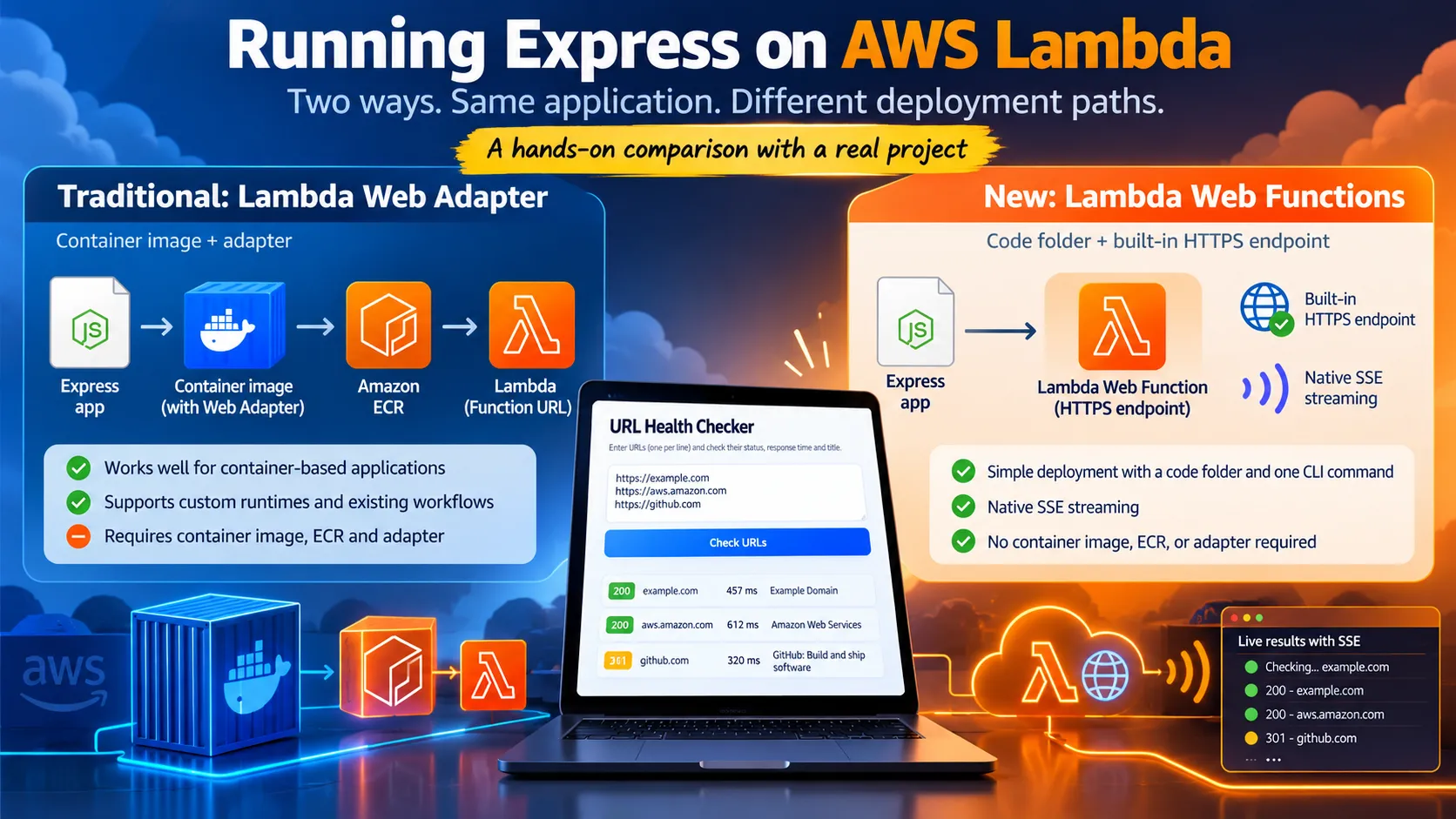
Two Ways to Run Express on AWS Lambda: The Adapter vs. Web Functions
A hands-on comparison of the traditional AWS Lambda Web Adapter approach and the new AWS Lambda Web Functions model, built and deployed using the same URL Health Checker application.

Introduction
AWS Lambda has traditionally been associated with event-driven execution: a function receives an event, processes it, and returns a result. Running a conventional web application on Lambda required an additional layer to translate HTTP requests into Lambda invocation events.
The AWS Lambda Web Adapter made that possible by allowing existing web frameworks, such as Express, to run on Lambda. Developers could package their applications as container images, deploy them to Lambda, and expose them through a Function URL or another HTTP front door.
Lambda Web Functions introduce a different approach. Instead of adapting an HTTP server to the traditional event-handler model, developers can deploy a web application directly as a web function, with a built-in HTTPS endpoint.
I wanted to explore this difference through a working application rather than a theoretical architecture comparison. I built the same URL Health Checker twice, deployed both versions to AWS, tested their endpoints, investigated authentication failures, and compared their response behavior.
This article documents the implementation, the measurements, the problems I encountered, and the lessons that emerged from the experiment.
The objective is not to prove that one approach is universally better. It is to understand where each model fits, what changes when the adapter disappears, and what developers should verify before adopting the newer approach.
Live demo
Both apps are deployed live in
us-east-1, each using its own canonical front door - and both open directly in a browser:| App | Live URL | Notes |
|---|---|---|
| NEW WAY - Lambda Web Function | https://flchy4zbxtbz4b66.076.lambda-web.us-east-1.on.aws | Public built-in endpoint; results stream live via SSE |
| OLD WAY - Lambda Web Adapter + Function URL | https://tcjfm2nrvsot7khjek3ai2du5q0blhjy.lambda-url.us-east-1.on.aws/ | Public Function URL (AuthType: NONE); results arrive as one JSON array |
The application: URL Health Checker
The application is intentionally small so that the infrastructure, rather than the business logic, remains the main variable.
A user enters multiple URLs, one per line, and clicks Check. The application checks each URL and displays:
- HTTP status code.
- Response time.
- Final URL after redirects.
- Page title extracted from the HTML response.
- Error information when a request fails.
Results are displayed as a color-coded list: green for successful 2xx responses, yellow for redirects in the 3xx range, and red for 4xx, 5xx, or request errors.
The URL-checking logic is identical in both implementations. Both use parallel
fetch requests, a 10-second timeout, and HTML title extraction.The experiment therefore focuses on the differences in deployment and execution: packaging, HTTP request handling, endpoint configuration, streaming behavior, authentication, and billing.
The contrast at a glance
| OLD WAY (Prompt A) | NEW WAY (Prompt B) | |
|---|---|---|
| Adapter / wrapper | Required (aws-lambda-web-adapter) | None |
| Packaging | Container image + Dockerfile | Plain code folder |
| Fronting infra | Function URL / API Gateway | Built-in HTTPS endpoint |
| Port source | process.env.PORT (8080) | process.env.AWS_LAMBDA_HTTP_ENDPOINT |
| Deploy | plain Docker + AWS APIs | aws lambda-web deploy |
| Streaming / SSE | Extra config, buffering caveats | Native |
| Response style | One JSON array (all at once) | One SSE event per URL (live rows) |
Architecture
Traditional approach: Lambda Web Adapter
The application runs inside a container image. The Lambda Web Adapter receives invocation events and translates them into ordinary HTTP requests for Express. The adapter also handles the response path.

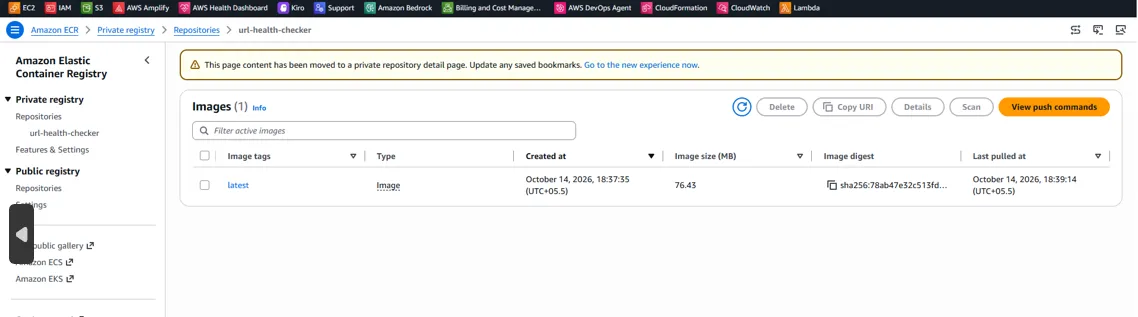
The container image is stored in Amazon Elastic Container Registry (Amazon ECR), and the Function URL provides the HTTP entry point used in this comparison.
New approach: Lambda Web Functions
The Web Function runs the web server directly. The deployment starts with a code folder rather than a Docker image, and the service provides its own HTTPS endpoint.
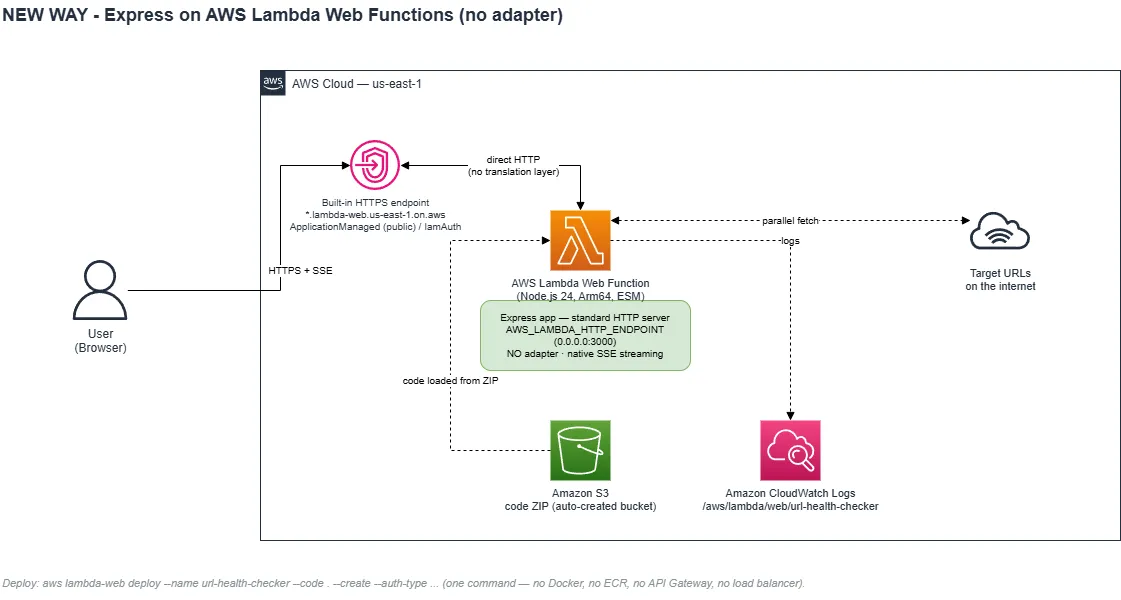
For this implementation, the deployment command created the Web Function, its execution role, the code bucket, and the endpoint. The key architectural difference is the removal of the adapter layer and container packaging from this deployment path.
The traditional implementation: Express behind Lambda Web Adapter
The Lambda Web Adapter makes it possible to run an existing web framework on Lambda without rewriting the application as a Lambda handler. Express listens on
process.env.PORT, using port 8080 as the default in this implementation. The adapter is a Lambda extension that translates invocation events into HTTP requests and forwards the application's response.Packaging the application
The adapter binary must be included in the deployment artifact at the appropriate extension path. The Dockerfile uses the published adapter image to copy the binary into
/opt/extensions/:1
2
COPY --from=public.ecr.aws/awsguru/aws-lambda-adapter:0.9.1 \
/lambda-adapter /opt/extensions/lambda-adapterThe resulting container image contains the application and the adapter extension.
This is useful when a team already builds and distributes containerized applications. However, it introduces additional packaging and deployment steps compared with uploading a plain code folder.
ZIP deployment + Lambda Web Adapter - Package your Express application and the adapter extension in a ZIP file, then deploy it to Lambda. This avoids Docker and Amazon ECR, but still uses the adapter.
Deploying the traditional version
I used Docker and AWS APIs directly. The deployment followed the same essential sequence that the template-based workflow automates:
- Build the Docker image.
- Push the image to Amazon ECR.
- Create the Lambda function using the container image.
- Configure the Function URL and its permissions.
The deployed function successfully returned actual health-check data. A signed request returned a result similar to this:
1
2
3
4
5
6
7
8
9
10
[
  {
    "url": "https://example.com",
    "status": 200,
    "responseTimeMs": 457,
    "finalUrl": "https://example.com/",
    "title": "Example Domain",
    "error": null
  }
]
This confirmed that the application was running and returning the expected JSON response.
Function URL and public access
The original test used the Function URL as the front door:
The important lesson from this deployment was that setting a Function URL to
AuthType: NONE does not, by itself, guarantee that anonymous requests will succeed.A public Function URL requires two resource-based permissions:
lambda:InvokeFunctionUrl, with the Function URL authentication condition set toNONE.lambda:InvokeFunction, allowing the public principal to invoke the function.
During the investigation, the first permission was present but the second was missing. As a result, anonymous requests returned
403 AccessDeniedException.The relevant configuration commands were:
1
2
3
4
5
6
7
8
9
10
11
12
13
14
15
16
17
18
19
20
aws lambda update-function-url-config \
  --function-name url-health-checker \
  --auth-type NONE \
  --region us-east-1

aws lambda add-permission \
  --function-name url-health-checker \
  --statement-id PublicFunctionUrlAccess \
  --action lambda:InvokeFunctionUrl \
  --principal "*" \
  --function-url-auth-type NONE \
  --region us-east-1

# The second permission was the missing piece.
aws lambda add-permission \
  --function-name url-health-checker \
  --statement-id PublicFunctionUrlInvoke \
  --action lambda:InvokeFunction \
  --principal "*" \
  --region us-east-1
After the missing permission was added, the public Function URL returned HTTP 200.
Investigating the Function URL 403
The 403 error was caused by a missing
lambda:InvokeFunction permission, not an account-level restriction. API Gateway worked because it used that permission, but I removed it from the comparison to focus on the traditional Lambda Web Adapter with Function URL versus Lambda Web Functions.Streaming limitations in the traditional approach
The adapter buffers responses by default. For this URL Health Checker, the result is a single JSON array containing all completed checks. Server-sent events (SSE) require additional configuration, including response-stream mode and a response-stream Function URL. The adapter's buffering behavior is an important distinction when the application needs to send incremental updates.
The adapter approach remains useful, but streaming needs to be considered explicitly rather than assumed to work in the same way as a conventional long-running HTTP server.
The new implementation: Lambda Web Functions
Lambda Web Functions take a different approach to running a web application. Instead of adding an adapter to translate between Lambda events and HTTP, the service runs a supported web server directly. For this implementation, the application was deployed as a plain code folder with
index.js at the root. The server reads its host and port from process.env.AWS_LAMBDA_HTTP_ENDPOINT, with a local fallback of 0.0.0.0:3000.The deployment did not require a Dockerfile, an ECR repository, or API Gateway.
Updating the AWS CLI
The first practical obstacle was the AWS CLI version.
The
aws lambda-web command was available in AWS CLI 2.37.9, while an older 2.36.40 installation reported an error similar to: invalid choice: 'lambda-web'That error could easily be interpreted as evidence that the feature was unavailable. In this case, the CLI needed to be updated. The generic AWS CLI MSI installer also needed attention because the version being installed could lag behind the required release. The installer used in this experiment was:
https://awscli.amazonaws.com/AWSCLIV2-2.37.9.msiThe upgrade required administrator privileges; attempting a silent upgrade over an existing installation without elevation resulted in Windows Installer error
1603. The broader lesson is to check the installed CLI version before concluding that a newly announced AWS feature is unavailable.Deploying the Web Function
After installing a compatible CLI, the application dependencies were installed and the Web Function was deployed:
1
2
3
4
5
6
7
8
npm ci --omit=dev

aws lambda-web deploy \
  --name url-health-checker \
  --code . \
  --create \
  --auth-type IamAuth \
  --region us-east-1
This was the initial deployment command. The endpoint was later changed to
ApplicationManaged during the authentication investigation described below.The deployment created the following resources:
| Resource | Value recorded during the experiment |
|---|---|
| Web Function ARN | arn:aws:lambda:us-east-1:4xxxxx6:web-function/url-health-checker |
| Execution role | awscli-lambdaweb-url-health-checker |
| Code bucket | awscli-lambdaweb-4xxxx6-us-east-1-an |
| Runtime | Node.js 24, ESM |
| Endpoint state | Active |
The deployment completed without the container-image workflow used by the traditional implementation.
Native server-sent events
One of the main goals was to compare response streaming.
With the adapter-based implementation, the application returns the completed JSON array. With the Web Function, the same health-check results can be sent incrementally using SSE.
A local test timestamped the events:
1
2
3
4
5
[+442 ms] event: total  → {"total":3}
[+464 ms] event: result → {...responseTimeMs:113...}
[+466 ms] event: result → {...}
[+470 ms] event: result → {...}
[+476 ms] event: done   → {"done":true}
Each result event was delivered as its URL check completed, rather than waiting for every check to finish. This is a user-visible difference, not merely an architectural one. The interface can display results while other requests are still running.
The Web Function 403 investigation
The first Web Function deployment used
IamAuth. Every signed request returned an HTML response containing:1
2
3
403 Forbidden
You are not authorized to access this endpoint.This was a separate problem from the earlier Function URL 403.
The IAM policy simulator returned
allowed for lambda:InvokeWebFunctionEndpoint, and a resource-based policy granting account-root invocation was attached and verified.The organizational checks also found no attached service control policies.
CloudWatch provided another important clue: the Web Function log group had not been created, and there were zero recorded invocations. The response also contained a
lambda-web-request-id header, indicating that the rejection occurred in the Lambda Web service's endpoint authorization path rather than inside the Express application.These observations established that the request was being rejected before the application ran. They did not, on their own, prove that the rejection was an unchangeable account-level restriction.
The endpoint authentication type was then changed:
1
2
3
4
5
aws lambda-web update-web-function-endpoint \
  --function-name url-health-checker \
  --endpoint-name dev \
  --auth-type ApplicationManaged \
  --region us-east-1
After the change, an unsigned request returned HTTP 200 and the HTML application loaded in a browser.
The live SSE test also worked:
1
2
3
4
5
[+1448 ms] event: total  → {"total":3}
[+1477 ms] event: result → example.com, status 200, "Example Domain"
[+1488 ms] event: result → httpstat.us/404, error captured
[+1503 ms] event: result → aws.amazon.com, status 200, real title
[+1506 ms] event: done
The result events streamed as their corresponding checks completed. No adapter, Docker image, or API Gateway was needed for the Web Function endpoint.
There is an important security trade-off:
ApplicationManaged does not provide AWS-layer IAM authentication for the public endpoint. A production application must implement appropriate application-level authentication and authorization, validate input, and apply rate limiting. Depending on the design, CloudFront and AWS WAF may also be appropriate.The two 403 incidents therefore had different observed causes:
- Traditional Function URL: the resource policy was missing
lambda:InvokeFunction. - Web Function endpoint: the
IamAuthendpoint rejected requests despite the successful signature and IAM simulation; changing toApplicationManagedallowed the public demo to serve traffic. They should not be presented as the same issue.
Real deployed endpoints
New way Lambda Web Functions, live with streaming results
The public Web Function endpoint, after checking five URLs. Results are color-coded (green = 2xx with the page title extracted, red = error), and each row streamed in live over SSE as its fetch resolved.

The landing page before running a check:

Old way - Lambda Web Adapter
The container Lambda (Express behind the Web Adapter), returning results as one JSON array rendered as a color-coded list. (This capture was taken while a temporary public front door was in place; the app output is identical however the function is reached.)

The landing page:

In the AWS Console - the deployed resources
- New way - the Web Function. The brand-new Web Functions section of the Lambda console shows the function Active, its
devendpoint and public endpoint URL, revision routing at "Latest revision (100)", and a Metrics panel whose request spikes line up with the live traffic from these tests.

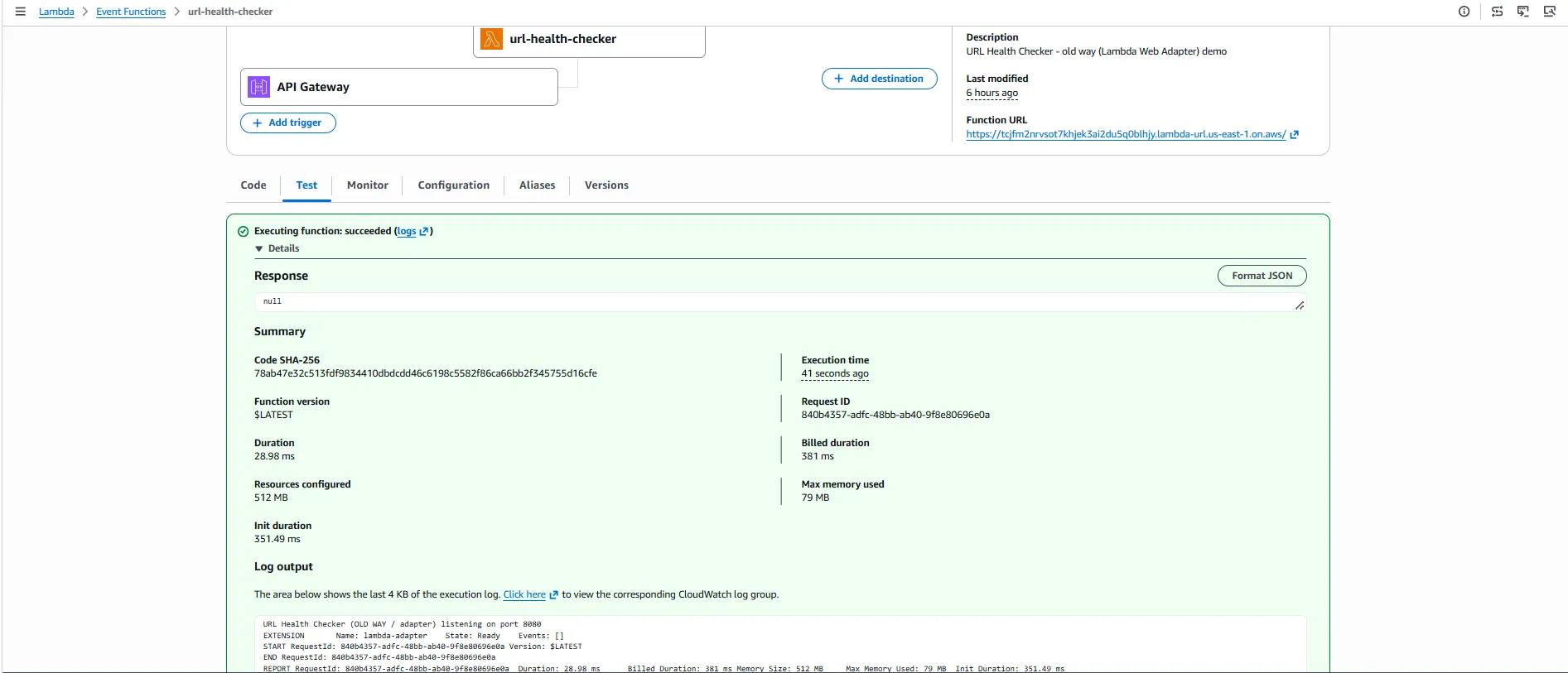
- Old way - the container-image function. The traditional Lambda, packaged as a container image, in the (Event) Functions console.

The Lambda functions list - both deployments side by side:
- Event Functions

- Test :
Amazon ECR - the container image the old-way Lambda runs from:
- Web Functions

Side-by-side comparison
| Area | Traditional Lambda Web Adapter | Lambda Web Functions |
|---|---|---|
| Application model | Express behind an adapter | Express running directly |
| Packaging | Container image | Plain code folder |
| Docker required for this deployment? | Yes | No |
| Registry | Amazon ECR | No ECR image required |
| HTTP entry point | Lambda Function URL | Built-in Web Function endpoint |
| Additional gateway required? | No; a Function URL is sufficient | No |
| Server port | process.env.PORT, default 8080 | AWS_LAMBDA_HTTP_ENDPOINT |
| Deployment used here | Docker and AWS APIs; SAM is another route | aws lambda-web deploy |
| Response behavior | Buffered JSON array | Native SSE events |
| Streaming configuration | Additional configuration required | Verified with SSE in this experiment |
| Operational components | Image, registry, adapter, Lambda and URL | Code, Web Function and endpoint |
| Strong fit | Existing container workflows and supported traditional Lambda use cases | Supported HTTP applications seeking a simpler deployment path |
This table describes the implementations tested here. It should not be interpreted as saying that every traditional Lambda deployment requires API Gateway or that every Web Function is automatically secure for production.
Execution time: measurements from the live deployments
Both endpoints were tested from the same client using the same three URLs:
example.com, aws.amazon.com, and github.com.The total duration was measured using
curl -w "%{time_total}". The first request was treated as a cold-start observation; subsequent requests were treated as warm observations.| Request | Traditional Function URL | Web Function |
|---|---|---|
| Run 1, cold-start observation | ~2.57 s | ~1.61 s |
| Run 2, warm | ~1.20 s | ~0.96 s |
| Run 3, warm | ~1.21 s | ~0.95 s |
| Run 4, warm | ~1.13 s | ~0.88 s |
| Typical warm observation | ~1.1–1.2 s | ~0.9 s |
In these runs, the Web Function returned more quickly. However, this was a small, practical experiment, not a controlled performance benchmark. Network conditions, target-site responsiveness, AWS Region, configuration, and cold-start conditions can all affect the results.
The application performs its URL checks in parallel. Its total completion time is therefore heavily influenced by the slowest target response. Both implementations were in a similar overall range because the workload is primarily I/O-bound.
Time to first byte and streaming
A separate warm test used two URLs:
| Measurement | Traditional approach | Web Function |
|---|---|---|
| Connect time | 0.27 s | 0.30 s |
| Time to first byte | 1.16 s | 0.90 s |
| Total time | 1.16 s | 0.93 s |
For the traditional approach, the time to first byte was almost the same as the total duration. That is consistent with the adapter buffering the response until the JSON array was ready.
For the Web Function, the first byte arrived before the overall response finished. This is consistent with the application streaming the first SSE event while later checks were still resolving.

The timing difference is useful evidence of the response behavior, but it should not be presented as a universal speed guarantee for Lambda Web Functions.
What the billing model changes
Both approaches are serverless, but the billing models described in the source material differ.
| Billing aspect | Traditional Lambda Event Function | Lambda Web Functions |
|---|---|---|
| Compute measurement | Request count and duration, measured in wall-clock time and memory | Request count, active CPU time, memory lifetime and data transfer |
| Network waiting | Waiting contributes to billed function duration | CPU is not charged while the application is waiting on I/O, although memory and other applicable charges remain |
| Request concurrency | One request per execution environment for the traditional model | Multiple concurrent requests per environment, subject to configured limits |
The URL Health Checker spends much of its time waiting for external websites to respond. It uses relatively little CPU compared with its total wall-clock execution time. That makes it a useful example for understanding why active-CPU billing and concurrent request handling can matter for I/O-heavy web workloads. It would be misleading, however, to claim a specific percentage of savings based only on the response-time table. Response duration and billable compute are different measurements.
What it costs (the pricing difference that matters)
Both are "serverless" - nothing to pay when no one is using the app, and no servers to rent by the hour. The difference is in how the running time is billed, and it genuinely matters for an app like this one.
| Old way (standard Lambda) | New way (Web Functions) | |
|---|---|---|
| You pay for | Requests + duration (wall-clock time) × memory | Requests + active CPU time + memory |
| Waiting on the network (e.g. our app waiting for a URL to respond) | You pay for that waiting time | You don't pay for CPU while waiting on I/O |
| Concurrent requests per environment | One at a time | Many at once compute cost is shared |
Why this matters here: the URL Health Checker spends most of its time waiting for other websites to respond - it barely uses the CPU. Under the old way, you're billed for all that waiting (wall-clock duration). Under the new way, you're billed for active CPU time, so the waiting is largely free, and one running environment can check many URLs for many users at once, sharing the cost. For I/O-heavy web apps, that's often cheaper.
Numbers change over time and depend on Region, memory, and traffic, so this guide sticks to the billing model rather than quoting dollar figures. For current rates, see the AWS Lambda pricing page . Both models also stay in the AWS Free Tier range for light/demo usage.
Lambda now has three "flavors"
The thing people miss: "Lambda" is no longer one model. There are three, all on the same Firecracker microVM isolation, with different programming models on top. (Your existing functions are now called Event Functions - a console rename only, zero code changes.)
| Event Functions (classic) | Web Functions (new) | MicroVMs | |
|---|---|---|---|
| How your code runs | handler(event, context) | A port-listening HTTP server | Firecracker sandbox for untrusted code |
| Concurrency | 1 request per sandbox | 1–128 per environment (default 64) | — |
| Billing | Wall-clock GB-seconds (CPU + memory together) | Active CPU + memory (no idle-CPU cost) | — |
| Best for | Queues, streams, schedules, events | Web apps, APIs, SSR, streaming | Running untrusted user code |
| Runtimes | Python, Node.js, .NET, Rust, Go, OCI | Node.js 24 (Python planned Q4 2026) | — |
A real system often uses all three: Event Functions for SQS/stream processing, Web Functions for the API and server-rendered pages, MicroVMs for sandboxed user code - one account, one operational model.
Concurrency and the cost example
Consider one health check that spends approximately 308 milliseconds in total:
| Operation | Approximate time | Type |
|---|---|---|
| Express parses the request | 3 ms | CPU |
| Prepare the outbound fetch | 2 ms | CPU |
| Wait for the target URL | 300 ms | I/O wait |
| Parse the response and build JSON | 3 ms | CPU |
| Total | ~308 ms | ~8 ms of active CPU |
This is an illustrative breakdown from the source material, not a billing statement.
For a batch of five URLs, the original comparison illustrates the difference between separate traditional invocations and a concurrent Web Function environment. If five independent Event Function invocations each run for about 308 milliseconds, their combined billed execution duration can approach 1,540 milliseconds before accounting for differences in cold starts and parallel execution details.
A Web Function may handle multiple requests concurrently in one environment, and its active-CPU billing model can reduce the impact of time spent waiting for external services.
Actual costs still depend on the application's implementation, memory usage, request patterns, concurrency, and service pricing. The simplified arithmetic explains the concept; it is not a substitute for a measured cost analysis.
Additional capabilities to consider
Multi-Region deployment
The source material documents a multi-Region deployment option using a command-line argument such as:
1
--regions us-east-1,eu-west-1,ap-northeast-1
The intended outcome is a single endpoint that can route users to a nearby Region. The deployment settings and endpoint requirements should be verified against the current service documentation before use.
Canary deployments and traffic splitting
The source material also describes weighted traffic between revisions, using a
revisionWeights mechanism. For example, a deployment could send 90% of traffic to a stable revision and 10% to a candidate revision, then increase the candidate's weight after evaluating results.This can support canary and blue/green release strategies. Teams should still define appropriate health checks, monitoring, rollback conditions, and release procedures.
Practical Gotchas
- Runtime: Verify Node.js version and Arm64 compatibility for native dependencies such as
sharp,canvas, andbcrypt. - HTTP server: Start the server and bind to the host and port provided by
process.env.AWS_LAMBDA_HTTP_ENDPOINT. - Concurrency: Avoid shared mutable state that could cause cross-request data leaks or race conditions.
- Persistence: Don’t rely on
/tmpfor persistent data; use services like DynamoDB or S3. - Security:
ApplicationManagedrequires application-level authentication and authorization for protected routes. - Testing: A successful deployment doesn’t guarantee a working endpoint. Test requests and check authentication settings and logs when errors occur.
Service limits and deployment tooling
The source file recorded the following launch-era limits. These are historical reference values from the experiment and should be checked against current AWS documentation before being used for a production design.
| Resource or setting | Value recorded in the source |
|---|---|
| Deployment package | 512 MB |
| vCPU per environment | 2 |
| Memory per environment | 2 GB |
| Concurrent requests per environment | 1–128, default 64 |
| Request timeout | 3–900 seconds, default 30 seconds |
| Endpoints per function | 10 |
| Revisions retained | 50 |
/tmp storage | 512 MB |
| Initialization timeout | 10 seconds |
| Per-endpoint rate limit | 10,000 requests/second |
| Account rate limit | 100,000 requests/second |
| Account vCPU quota | 2,000 vCPUs |
The launch-era notes also recorded Node.js 24 support, with Python support planned for Q4 2026. These details can change, so consult the current service documentation rather than treating the table as a permanent contract.
For repeatable infrastructure, the source identifies CloudFormation (
AWS::Lambda::WebFunction), AWS CDK, AWS SAM, and Terraform as infrastructure-as-code options to consider. A CLI deployment is convenient for exploration, while production environments benefit from version-controlled infrastructure, repeatable deployments, and documented rollback procedures.The source also records initial Region availability as of October 12, 2026:
- US East (N. Virginia) —
us-east-1 - US East (Ohio) —
us-east-2 - US West (Oregon) —
us-west-2 - Asia Pacific (Tokyo) —
ap-northeast-1 - Europe (Ireland) —
eu-west-1
Confirm current Region availability and networking capabilities before deploying. The source notes that private resources such as RDS and ElastiCache may be reached using supported VPC connectivity options.
Cleanup: removing the AWS resources
The resources created for this experiment can incur charges, even when they are no longer being used. The following commands reproduce the cleanup procedure recorded in the source. They are destructive: run them only after verifying the account, Region, function names, and resource identifiers.
The original deployment used account 4xxxxxxxxx6 and Region
us-east-1.1
2
export ACCT=4xxxxxxxxx6
export AWS_REGION=us-east-1Remove the Web Function
1
2
3
aws lambda-web delete-web-function \
  --function-name url-health-checker \
  --region us-east-1
The source states that deleting the Web Function removes its endpoint and revisions.
Empty and delete the code bucket:
1
2
3
4
5
6
7
aws s3 rm \
  s3://awscli-lambdaweb-$ACCT-us-east-1-an \
  --recursive

aws s3api delete-bucket \
  --bucket awscli-lambdaweb-$ACCT-us-east-1-an \
  --region us-east-1
Detach policies from the auto-created execution role and delete it:
1
2
3
4
5
6
7
8
9
10
11
12
13
aws iam list-attached-role-policies \
  --role-name awscli-lambdaweb-url-health-checker \
  --query 'AttachedPolicies[].PolicyArn' \
  --output text |
  tr '\t' '\n' |
  while read P; do
    aws iam detach-role-policy \
      --role-name awscli-lambdaweb-url-health-checker \
      --policy-arn "$P"
  done

aws iam delete-role \
  --role-name awscli-lambdaweb-url-health-checker
Review any inline policies or other dependencies before deleting a role in a shared environment.
Remove the traditional Lambda deployment
Delete the Function URL configuration and Lambda function:
1
2
3
4
5
6
7
aws lambda delete-function-url-config \
  --function-name url-health-checker \
  --region us-east-1

aws lambda delete-function \
  --function-name url-health-checker \
  --region us-east-1
Delete the ECR repository and its images:
1
2
3
4
aws ecr delete-repository \
  --repository-name url-health-checker \
  --force \
  --region us-east-1
Detach the execution role's basic logging policy and delete the role:
1
2
3
4
5
6
aws iam detach-role-policy \
  --role-name url-health-checker-exec-role \
  --policy-arn arn:aws:iam::aws:policy/service-role/AWSLambdaBasicExecutionRole

aws iam delete-role \
  --role-name url-health-checker-exec-role
Delete the CloudWatch log groups if no longer needed
Lambda log groups may remain after the functions have been deleted.
1
2
3
4
5
6
7
aws logs delete-log-group \
  --log-group-name /aws/lambda/url-health-checker \
  --region us-east-1

aws logs delete-log-group \
  --log-group-name /aws/lambda/web/url-health-checker \
  --region us-east-1
Only delete logs if you no longer need them for debugging, auditing, or recordkeeping.
Verify the resources are gone
The original verification procedure used these commands:
1
2
3
4
5
6
7
8
9
10
11
aws lambda get-function \
  --function-name url-health-checker \
  --region us-east-1

aws lambda-web get-web-function \
  --function-name url-health-checker \
  --region us-east-1

aws ecr describe-repositories \
  --repository-names url-health-checker \
  --region us-east-1
After cleanup, the expected result is that the deleted resources can no longer be found. Check the relevant S3 buckets, IAM roles, API Gateway resources, CloudFront resources, and CloudWatch log groups separately if they were created. The live demo endpoints will stop working when their underlying resources are deleted.
Conclusion
This experiment compared two approaches to running Express on AWS Lambda. The traditional Lambda Web Adapter uses a container image and an adapter layer, while Lambda Web Functions simplify deployment with a code folder and a built-in HTTPS endpoint.
In my tests, Web Functions delivered faster responses and supported native SSE streaming, allowing results to appear as they arrived. These measurements are specific to this experiment, not universal performance guarantees.
The troubleshooting process also highlighted the importance of correct IAM permissions and endpoint authentication. Ultimately, Lambda Web Functions are worth exploring for supported HTTP applications, while the Web Adapter remains valuable for existing container-based workflows. The best choice depends on your application's requirements, security needs, and infrastructure.
Thank you for taking the time to read my article! If you found it helpful, feel free to like, share, and drop your thoughts in the comments; I’d love to hear from you.
If you want to connect or dive deeper into cloud, AI and DevOps, feel free to follow me on my socials:
💼 LinkedIn
🛡️Medium
🐙 GitHub
Enjoyed reading this content? Let the author know!
Your likes, comments, shares, and saves help creators reach more builders.

Loading recommendations
Loading article