
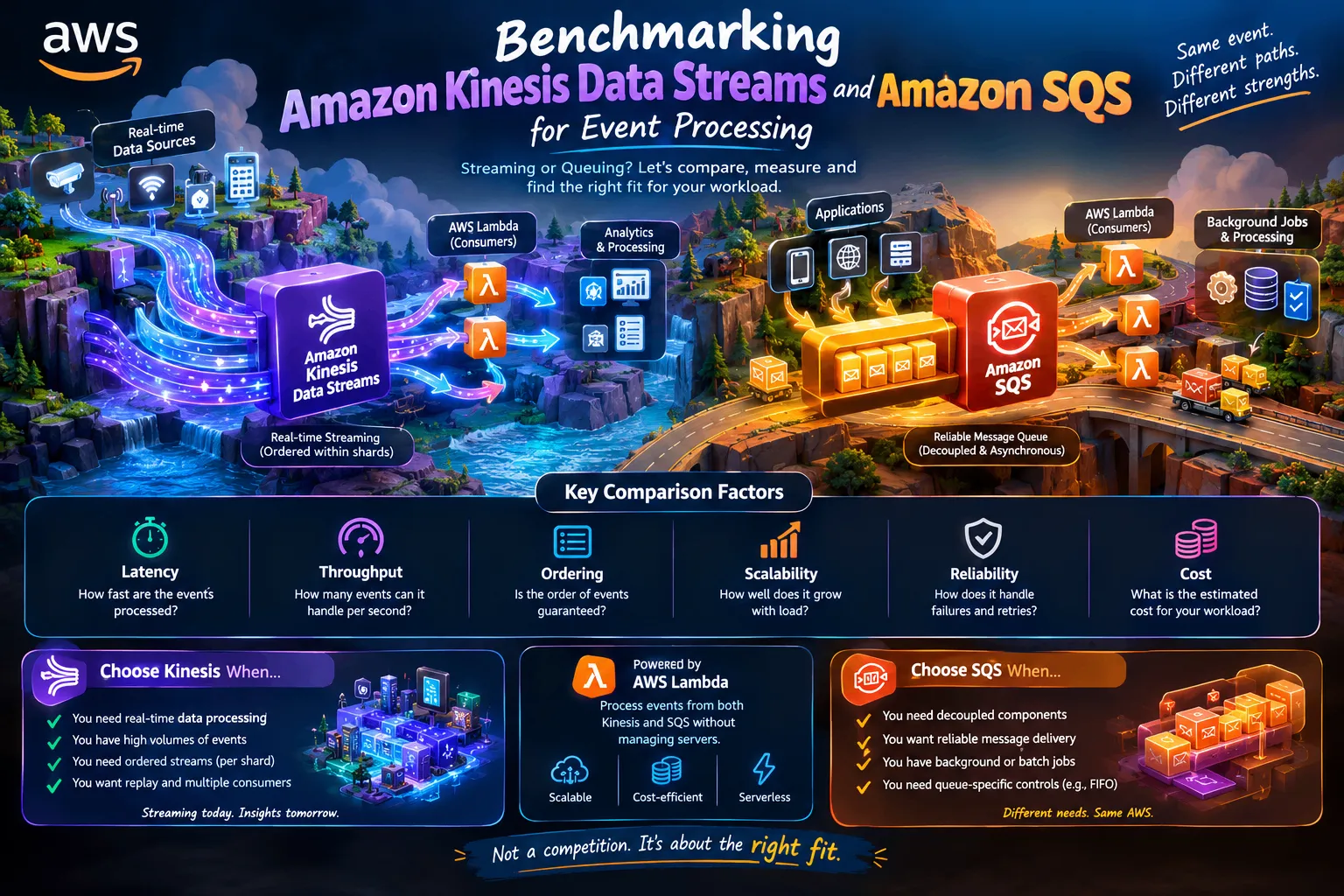
Benchmarking Amazon Kinesis Data Streams vs. Amazon SQS: Choosing the Right Architecture for Event Processing
Streaming or queue-based processing—which architecture fits your workload? Explore Amazon Kinesis Data Streams, Amazon SQS, and AWS Lambda through a practical benchmarking framework covering latency, throughput, ordering, scalability, reliability, and cost.

Benchmarking Amazon Kinesis Data Streams vs. Amazon SQS: Choosing the Right Architecture for Event Processing
1. Introduction: Two services, different purposes
Modern applications generate events continuously.
An online store creates order events. Smart devices send sensor readings. Banking applications record transactions. Websites generate clicks, searches, and user activity.
Processing these events efficiently is an important part of building scalable cloud applications.
AWS provides two services that can help: Amazon Kinesis Data Streams and Amazon Simple Queue Service (Amazon SQS).
Although both handle messages or events, they are designed for different processing patterns.
Kinesis Data Streams focuses on streaming data that consumers can process continuously. Amazon SQS provides managed message queues that help applications communicate asynchronously and process messages independently.
So, which service should developers choose?
Instead of assuming that one is always better, let's examine how to compare them using a practical benchmarking approach.
2. Understanding the architectures
Amazon Kinesis Data Streams: Continuous event streaming
Kinesis Data Streams is designed to collect and process continuous streams of records.
Imagine a smart city receiving traffic sensor readings from hundreds of roads. These readings can flow into a Kinesis data stream, where consumers process them to update traffic dashboards or support analytics.
A simplified architecture looks like this:
Traffic Sensors → Kinesis Data Streams → AWS Lambda → Analytics Application
Important characteristics include:
- Continuous ingestion of streaming records.
- Multiple consumers can process the same stream independently.
- Records are retained for a configurable period, allowing consumers to read them again while they remain available.
- Ordering is maintained within a shard, subject to the stream's partitioning and record-processing design.
Kinesis is useful when applications need continuous data processing, stream analytics, or the ability to replay retained events.
Amazon SQS: Reliable message queuing
Amazon SQS is a managed message-queuing service that allows applications to send messages for processing without requiring the sender and receiver to operate simultaneously.
Imagine an online shopping application receiving thousands of orders during a sale. Instead of processing every order synchronously, the application can place messages into an SQS queue for downstream workers to process.
A simplified architecture looks like this:
Shopping Application → Amazon SQS → AWS Lambda → Order Processing System
Important characteristics include:
- Producers and consumers are decoupled.
- Messages remain available until they are processed and deleted, subject to retention settings.
- Queues can buffer bursts of incoming work.
- Standard queues provide at-least-once delivery and best-effort ordering; FIFO queues support ordering guarantees within their message groups.
SQS is useful for background jobs, asynchronous workflows, and reliable message delivery between application components.
3. What should we benchmark?
A useful benchmark needs measurable criteria rather than assumptions.
Latency
How long does it take for an event to travel from production to successful processing?
Measure end-to-end latency and examine percentiles such as p50, p95, and p99. Separate ingestion latency from processing time when possible.
Throughput
How many events can the architecture process per second while meeting the required latency and error-rate targets?
Test several message sizes and input rates rather than relying on one workload.
Scalability
What happens when the event rate increases from hundreds to thousands of messages per second?
Observe throttling, consumer lag, queue depth, concurrency, and processing failures.
Ordering
Does the application require events to be processed in a specific order?
Kinesis preserves record ordering within a shard. SQS FIFO provides ordering within message groups, while SQS Standard provides best-effort ordering.
Reliability
How does each architecture behave when a consumer fails, processing takes longer than expected, or duplicate deliveries occur?
Measure successful processing, retry behavior, duplicate handling, and recovery time.
Cost
What is the total estimated cost for the same useful workload?
Include ingestion or request charges, stream capacity, Lambda execution, data transfer where applicable, monitoring, and other supporting resources.
4. Designing a fair benchmark
To compare the services properly, use the same logical event-processing workload.
For example, create synthetic order events with a timestamp, event ID, order ID, and payload.
Then build two independent pipelines:
Pipeline A — Streaming
Producer → Kinesis Data Streams → Lambda event source mapping → Processing function
Pipeline B — Queue-based
Producer → Amazon SQS → Lambda event source mapping → Processing function
Use equivalent processing logic and the same payloads. Configure each service according to its documented requirements and the intended workload.
Run the experiment at multiple input rates, such as 100, 500, and 1,000 events per second, provided the test account and configurations can safely support those rates.
For each test, record:
- Average and percentile end-to-end latency.
- Successfully processed events per second.
- Failed and duplicated processing attempts.
- Consumer lag or queue depth.
- Throttling and retry counts.
- Total resource usage and estimated cost.
Repeat the tests under the same conditions. Record service configurations, region, payload size, concurrency, batching, and test duration so another developer can reproduce the experiment.
Important: These rates are proposed test settings, not claims about the performance limits of either service.
5. Understanding the results
A meaningful benchmark should report measured results, not declare a winner in advance.
For example, the final results table could look like this:
| Metric | Kinesis Data Streams | Amazon SQS |
|---|---|---|
| p95 end-to-end latency | Measure experimentally | Measure experimentally |
| Successful events per second | Measure experimentally | Measure experimentally |
| Processing failures | Measure experimentally | Measure experimentally |
| Duplicate handling | Evaluate consumer design | Evaluate delivery and consumer design |
| Recovery after consumer interruption | Test replay and checkpoint behavior | Test retries and redrive behavior |
| Estimated cost | Calculate from actual usage | Calculate from actual usage |
Interpret the results against the needs of the application.
A streaming workload may benefit from retained records and independent consumers. A queue-based workload may benefit from message buffering, straightforward asynchronous processing, and queue-specific delivery controls.
Neither service is universally faster or cheaper. The outcome depends on workload characteristics, configuration, traffic patterns, and the performance requirements.
6. Where AWS Lambda fits
AWS Lambda can process events from both services without requiring developers to maintain their own fleet of consumer servers.
However, the integrations work differently.
With Kinesis, Lambda polls the stream through an event source mapping and processes records in batches. Shard structure, checkpointing, retries, and batch settings affect processing behavior.
With SQS, Lambda polls the queue and invokes the function with message batches. Visibility timeouts, batch size, concurrency, retry behavior, and dead-letter queues influence reliability and throughput.
In both cases, the processing function should handle duplicate attempts safely when the application requires effectively-once business outcomes.
Using Lambda does not automatically guarantee exactly-once processing.
7. Choosing the right service
Choose Amazon Kinesis Data Streams when you need continuous event ingestion, stream-processing workflows, retained-record replay, or multiple independent consumers working from a stream.
Choose Amazon SQS when you need to decouple application components, buffer work, process background jobs, or manage asynchronous messages with queue-specific delivery controls.
For example:
- Live traffic analytics: Kinesis Data Streams may fit a continuous stream-processing architecture.
- Order confirmation jobs: SQS may fit a queue-based background-processing architecture.
- IoT telemetry: Kinesis may fit continuous ingestion and analytics.
- Document-processing jobs: SQS may fit independent tasks that workers process asynchronously.
Some systems benefit from both services. An architecture could use Kinesis for event ingestion and streaming analysis while using SQS to distribute independent downstream tasks.
The choice should follow the event-processing requirements, not simply the popularity of a service.
8. Conclusion
Amazon Kinesis Data Streams and Amazon SQS solve related but different problems.
Kinesis is designed around streaming records and stream consumers. SQS is designed around managed message queues and asynchronous processing.
A fair comparison considers latency, throughput, ordering, reliability, scalability, and total cost under a defined workload.
For AWS developers, the important skill is not memorizing which service is best. It is learning how to measure system behavior and select an architecture that fits the real requirements.
The best architecture is the one that meets your application's needs reliably, efficiently, and at an acceptable cost.
Let's discuss!
If you were designing a high-volume application, which would you investigate first: Amazon Kinesis Data Streams, Amazon SQS, or a combination of both?
What benchmark metric would matter most to you: latency, throughput, reliability, or cost?
Share your reasoning and let's learn from each other's architecture choices.
Enjoyed reading this content? Let the author know!
Your likes, comments, shares, and saves help creators reach more builders.

Loading recommendations
Loading article