
Architecting a Secure, Private VPC-Enabled Serverless Image Processing Pipeline on AWS
Handling media uploads efficiently without risking security or hitting network timeouts is a common hurdle in backend and DevOps engineering. To solve this, I built an automated, event-driven pipeline that securely processes images using Amazon S3, AWS Lambda, and an isolated private VPC backed by an S3 Gateway Endpoint.

Architecting a Secure, Private VPC-Enabled Serverless Image Processing Pipeline on AWS
As cloud architects and serverless developers, we frequently design asynchronous, event-driven media processing pipelines. A classic pattern involves triggering an AWS Lambda function via an Amazon S3 event notification whenever a user uploads an image, processing or compressing the file, and storing the result in a destination bucket.
However, a common security and networking challenge arises when enterprise policies or best practices dictate that Lambda functions must reside inside a private VPC. Moving a Lambda function into a VPC removes its default direct access to public AWS service endpoints, often leading to mysterious timeouts unless proper routing is established.
In this article, we’ll explore how to build a robust, secure image compression and thumbnail generation pipeline inside a private VPC using an S3 Gateway VPC Endpoint.
The Challenge: Lambda in a VPC and S3 Connectivity
By default, when you attach an AWS Lambda function to a private VPC subnet without a NAT Gateway or a public IP, it loses direct outbound access to the public internet.
When your code attempts to call
s3_client.download_file() or s3_client.upload_file(), the request hits the VPC boundary and hangs until the function hits its execution timeout limit (resulting in a Sandbox.Timeout error).The Solution: Gateway VPC Endpoints
Instead of paying for and managing an expensive NAT Gateway just for S3 traffic, AWS provides Gateway VPC Endpoints. A Gateway Endpoint is free, highly available, scales effortlessly, and allows your VPC-attached Lambda functions to communicate with Amazon S3 privately via the AWS internal backbone network.
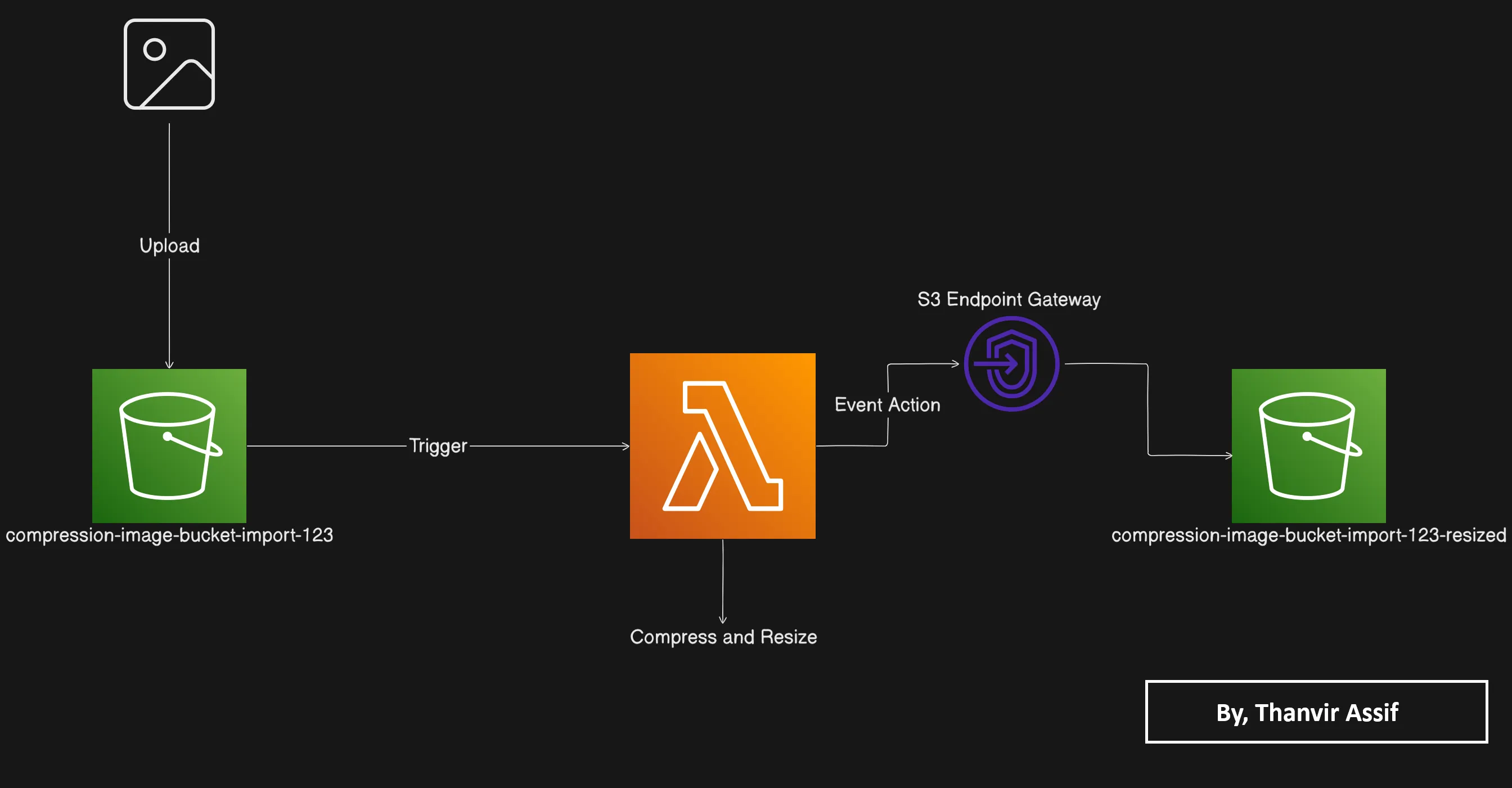
Architecture Flow
1
2
3
4
5
6
7
8
9
10
11
12
13
14
15
16
[ S3 Source Bucket (originals/) ]
       │ (Object Created Event)
       ▼
┌──────────────────────────────┐
│ AWS Lambda (Python 3.12)     │
│ • Runs inside Private Subnet │
└──────────────────────────────┘
       │
       │ (Routes internally via VPC)
       ▼
┌──────────────────────────────┐
│ S3 Gateway VPC Endpoint      │
└──────────────────────────────┘
       │
       ▼
[ S3 Destination Bucket (compressed/) ]

Step-by-Step Implementation Guide
1. Provisioning the S3 Buckets
Create two S3 buckets in your target region:
- Source Bucket:
compression-image-bucket-import-123(configured with anoriginals/folder prefix) - Destination Bucket:
compression-image-bucket-import-123-resized(configured with acompressed/folder prefix)
2. Configuring Private Networking & S3 Gateway Endpoint
- Create your custom VPC: Set up a VPC named
LabVPCwith a CIDR block of10.0.0.0/16. - Create a Private Subnet: Create a subnet (e.g.,
Subnet 1) with CIDR10.0.1.0/24. - Create the S3 Gateway Endpoint:
- Navigate to the VPC console, choose Endpoints -> Create endpoint.
- Select AWS services and search for the S3 gateway service (
com.amazonaws.<region>.s3). - Associate it with
LabVPC. - Crucial Step: Select your VPC's route table so that the endpoint automatically injects the necessary route entries for S3 internal traffic.
- Create a Security Group: Create
LambdaSecurityGroupattached toLabVPCwith default outbound rules permitting internal network traffic.
3. Deploying the Lambda Function
- Create a Lambda function named
Create-Thumbnailusing the Python 3.12 runtime (matching the compiled binary requirements of the Pillow image processing package). - Under Advanced settings:
- Enable the VPC toggle, select
LabVPC, your private subnet, andLambdaSecurityGroup. - Attach an IAM execution role with permissions for
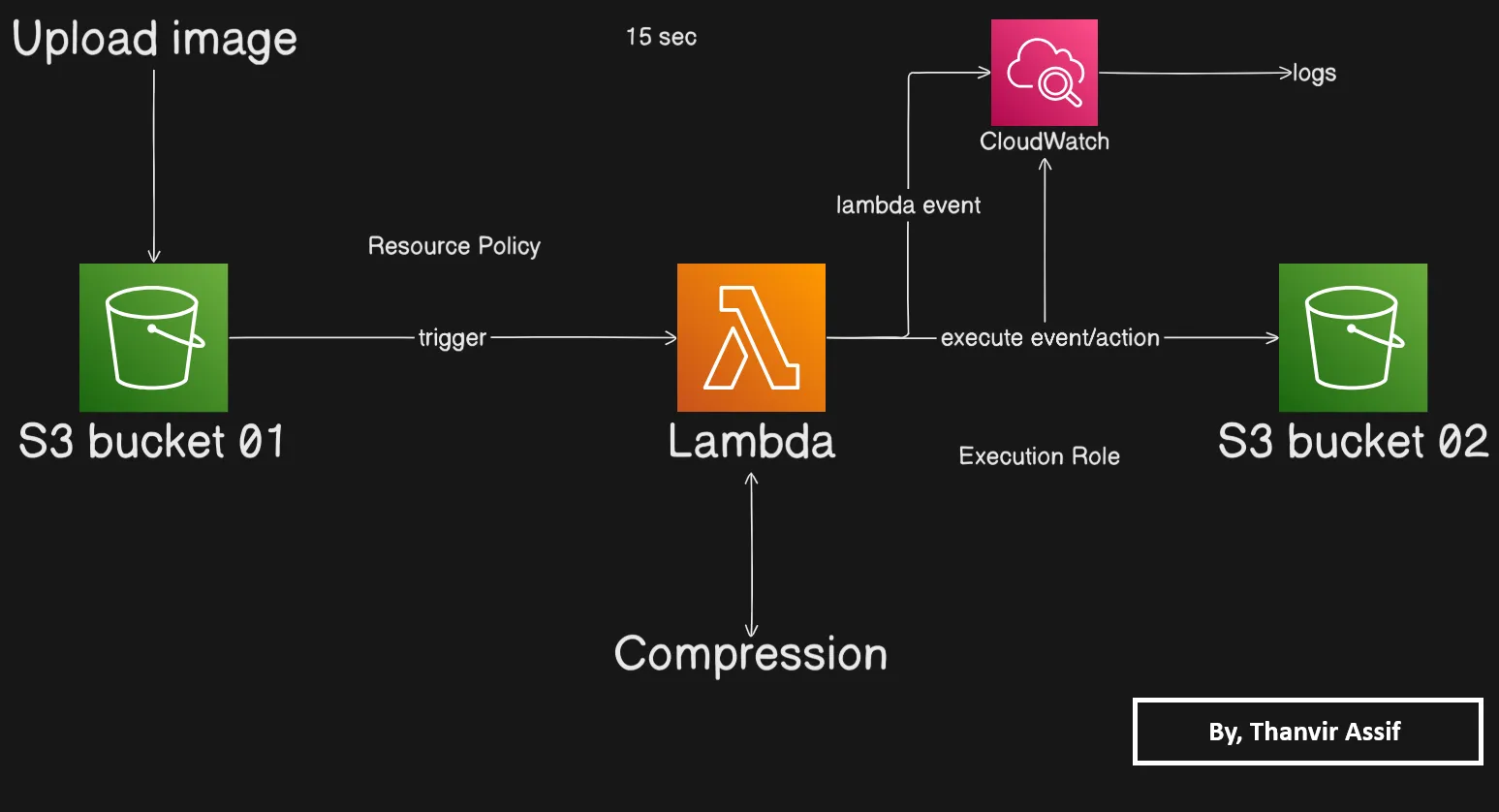
s3:GetObject,s3:PutObject, and CloudWatch logging.
- Import your code deployment package (either via a direct S3 deployment URL or
.zipupload) and set the handler to:
1
CreateThumbnail.handler
- Set the function memory to at least
256 MBand timeout to30–60 seconds.
4. Setting up the S3 Event Trigger
- In the Lambda console, click Add trigger and select Amazon S3.
- Point it to your source bucket, select All object create events (
s3:ObjectCreated:*), and set the prefix tooriginals/to prevent infinite recursive invocation loops.
Key Takeaways & Best Practices
- Zero Internet Exposure: By using an S3 Gateway Endpoint, your data never traverses the public internet, satisfying strict compliance and security baselines.
- Cost Optimization: Gateway endpoints do not incur hourly charges or data processing fees, making them significantly cheaper than NAT Gateways for storage-heavy architectures.
- Runtime Compatibility: Ensure your Lambda runtime matches your deployment package's compiled dependencies (such as Python 3.12 for pre-compiled binary modules like Pillow).
For a complete walkthrough with visual diagrams and exact policy JSON templates, check out the full technical documentation on my website:
🔗 Read the Full Documentation & Implementation Guide
🔗 Read the Full Documentation & Implementation Guide
I’d love to hear how other builders are securing their serverless VPC topologies in the comments below!
Enjoyed reading this content? Let the author know!
Your likes, comments, shares, and saves help creators reach more builders.

Loading recommendations
Loading article