
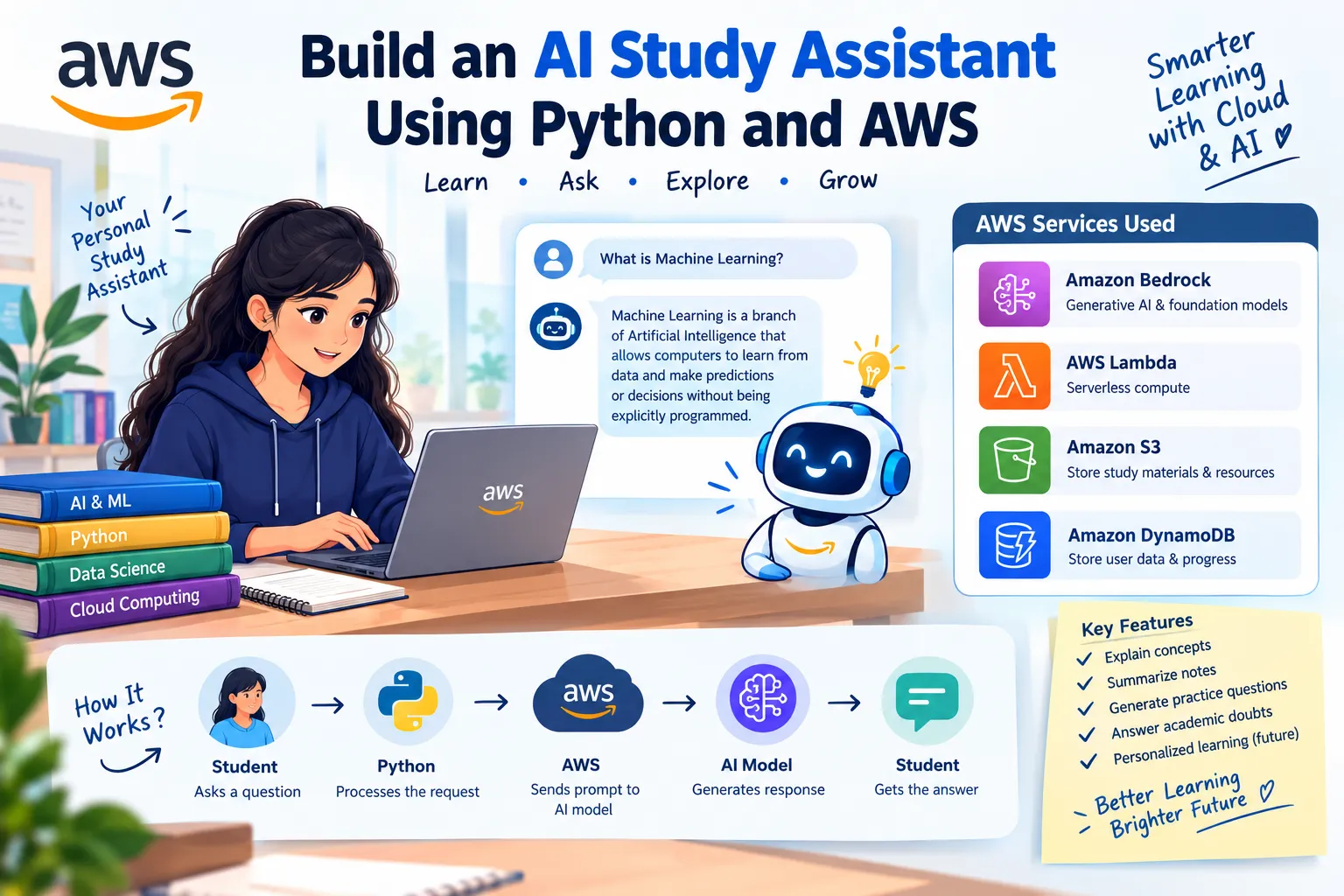
🎓 Build an AI Study Assistant with Python & AWS: Smarter Learning with Generative AI
Discover how Python and AWS can power an AI Study Assistant! 🤖📚 This beginner-friendly article explores how AWS services like Amazon Bedrock, AWS Lambda, Amazon S3, and DynamoDB can support intelligent learning applications. Learn the basics through a simple Python program and explore future possibilities such as AI-generated summaries, practice questions, and personalized learning. 🚀 Explore the exciting connection between Artificial Intelligence, Cloud Computing, and education!

🎓 Build an AI Study Assistant Using Python and AWS
Introduction 🚀
Imagine having a personal study assistant available whenever you need help understanding a difficult topic!
Artificial Intelligence is transforming education by making learning more interactive, personalized, and accessible. With Python and AWS, developers can explore ways to build intelligent applications that help students learn more effectively.
In this article, I'll explore how an AI-powered study assistant can work and how AWS services can help us develop one.
💡 What Is an AI Study Assistant?
An AI study assistant is an application that helps students understand concepts, summarize notes, generate practice questions, and answer academic questions.
For example, a student could enter a topic such as Machine Learning, and the assistant could explain it in simple language.
☁️ AWS Services We Can Use
1. Amazon Bedrock 🤖
Provides access to foundation models that can generate explanations, summaries, and answers.
2. AWS Lambda ⚡
Runs application code without requiring developers to manage servers.
3. Amazon S3 📂
Stores study materials, documents, and learning resources.
4. Amazon DynamoDB 🗄️
Can store user preferences, saved questions, and study progress.
These services can be combined to create a scalable AI-powered learning application.
🏗️ How Does It Work?
The basic workflow is:
👩🎓 Student enters a question
⬇️
🐍 Python processes the request
⬇️
☁️ AWS sends the prompt to an AI model
⬇️
🤖 The model generates an explanation
⬇️
📚 The student receives the answer
⬇️
🐍 Python processes the request
⬇️
☁️ AWS sends the prompt to an AI model
⬇️
🤖 The model generates an explanation
⬇️
📚 The student receives the answer
💻 Python Program: A Simple Study Assistant
Before connecting to AWS, we can create a basic study assistant using Python.
def study_assistant():
print("Welcome to AI Study Assistant!")
print("Ask me about AI, Python, or Machine Learning.")
print("Welcome to AI Study Assistant!")
print("Ask me about AI, Python, or Machine Learning.")
while True:
question = input("\nEnter your question: ")
question = input("\nEnter your question: ")
if question.lower() == "exit":
print("Happy learning!")
break
print("Happy learning!")
break
if "artificial intelligence" in question.lower():
print("AI enables machines to perform tasks")
print("that normally require human intelligence.")
print("AI enables machines to perform tasks")
print("that normally require human intelligence.")
elif "machine learning" in question.lower():
print("Machine Learning allows computers")
print("to learn patterns from data.")
print("Machine Learning allows computers")
print("to learn patterns from data.")
elif "python" in question.lower():
print("Python is a programming language")
print("widely used in AI and Data Science.")
print("Python is a programming language")
print("widely used in AI and Data Science.")
else:
print("I don't know that topic yet.")
print("Try AI, Machine Learning, or Python.")
print("I don't know that topic yet.")
print("Try AI, Machine Learning, or Python.")
study_assistant()
📌 Sample Output
Welcome to AI Study Assistant!
Ask me about AI, Python, or Machine Learning.
Ask me about AI, Python, or Machine Learning.
Enter your question: What is machine learning?
Machine Learning allows computers
to learn patterns from data.
to learn patterns from data.
Enter your question: exit
Happy learning!
How does this program work?
- "def" defines the study assistant function.
- "input()" accepts a question from the user.
- "if" and "elif" identify the topic.
- "print()" displays the explanation.
- "while True" allows multiple questions until the user enters "exit".
- "input()" accepts a question from the user.
- "if" and "elif" identify the topic.
- "print()" displays the explanation.
- "while True" allows multiple questions until the user enters "exit".
This is a basic rule-based prototype, not a Generative AI application yet. We can extend it by connecting Python to Amazon Bedrock.
🌟 Features We Could Add
Future versions of the application could include:
- 📄 Summarizing uploaded PDF notes.
- 📝 Generating multiple-choice questions.
- 💬 Answering questions using Generative AI.
- 🎯 Creating personalized study plans.
- 📊 Tracking learning progress.
- 🌐 Supporting multiple languages.
- 📝 Generating multiple-choice questions.
- 💬 Answering questions using Generative AI.
- 🎯 Creating personalized study plans.
- 📊 Tracking learning progress.
- 🌐 Supporting multiple languages.
🔐 Security Considerations
When building applications on AWS, we should protect user data, use appropriate IAM permissions, and avoid storing AWS credentials directly in source code.
Students should also verify AI-generated answers against reliable learning materials because AI systems can sometimes produce incorrect information.
🎯 Conclusion
Building an AI study assistant is an exciting way to explore the connection between Python, Artificial Intelligence, and Cloud Computing.
A simple Python prototype is a useful starting point. By integrating AWS services such as Amazon Bedrock, we can explore how to transform it into a more intelligent learning application.
As an AI & Data Science student, I look forward to exploring more practical AI projects and learning how cloud technologies can solve real-world problems.
Learn continuously. Build creatively. Innovate with AI! 🚀
#AWS #ArtificialIntelligence #GenerativeAI #Python #AmazonBedrock #MachineLearning #CloudComputing #AWSBuilderCenter
Enjoyed reading this content? Let the author know!
Your likes, comments, shares, and saves help creators reach more builders.

Loading recommendations
Loading article