
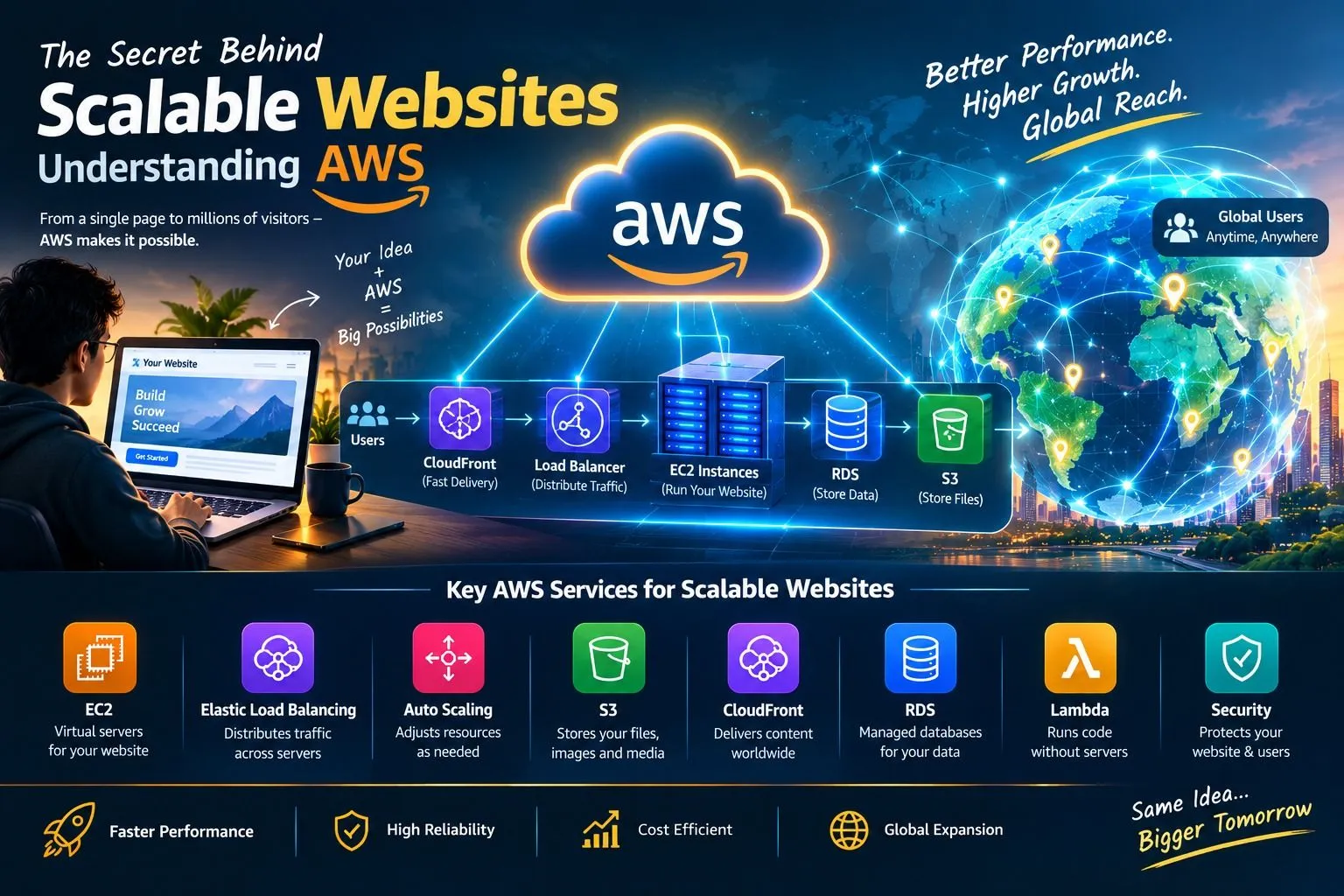
The Secret Behind Scalable Websites: Understanding AWS
Discover the secret behind websites that can handle thousands or even millions of visitors without slowing down. Learn how Amazon Web Services (AWS) helps websites grow through cloud computing, virtual servers, cloud storage, databases, load balancing, automatic scaling, and content delivery networks. This article explains how AWS supports website performance, reliability, security, and business growth, making it a powerful platform for startups, developers, and modern businesses.

Introduction: What Makes a Website Powerful?
Have you ever visited a website during a major online sale and wondered how it handles thousands of people shopping at the same time? Or have you noticed that popular websites can serve users from different countries while continuing to operate smoothly? Behind many modern websites is a carefully designed technology infrastructure that helps them manage increasing numbers of visitors. One important technology that makes this possible is cloud computing. Amazon Web Services (AWS) provides cloud computing services that help developers build websites capable of growing as traffic increases. Instead of depending entirely on a single physical server, website owners can use cloud resources to support changing workloads, store information, and deliver content efficiently. Understanding AWS reveals how websites can begin with a small number of users and expand to serve a much larger audience.
What Is AWS?
Amazon Web Services, commonly known as AWS, is a cloud computing platform provided by Amazon. It offers services for computing, storage, databases, networking, security, analytics, and artificial intelligence. Traditionally, businesses needed to purchase physical servers and maintain their own infrastructure to operate websites. This required money, space, electricity, technical staff, and regular maintenance. AWS provides an alternative by allowing businesses to access computing resources through the internet. Developers can launch virtual servers, create databases, store files, and configure networks according to their needs. As website traffic changes, businesses can adjust their cloud resources instead of relying only on fixed hardware. This flexibility makes AWS useful for personal projects, startup websites, online shopping platforms, educational portals, and large digital services.
What Is a Scalable Website?
A scalable website is a website that can handle changes in user traffic and workload by adjusting its available resources or architecture. For example, a new blog might receive only 100 visitors per day when it first launches. After publishing a popular article, it may suddenly receive thousands of visitors. If the website is not designed to handle the increase, pages may load slowly, errors may occur, or the website may become unavailable. A scalable website is designed to manage such changes more effectively. It can increase computing capacity, distribute requests across multiple servers, cache frequently requested content, and use databases that support its workload. Scalability is not only about adding more servers; it also involves designing software efficiently and identifying performance bottlenecks. AWS provides services that can help developers build and maintain scalable website architectures.
- Amazon EC2: The Computing Power Behind Websites
Amazon Elastic Compute Cloud, known as Amazon EC2, provides virtual servers that can run website applications, web servers, and other software. Developers can select computing resources according to their requirements, including processing capacity, memory, and operating system options. For a small website, a single EC2 instance may be sufficient. As the website becomes more popular, additional instances can be introduced to handle the growing workload. For example, an online store can run its application on EC2 instances to process customer requests, display products, and communicate with databases. EC2 gives developers control over the computing environment while avoiding the need to purchase physical servers. However, reliable performance also depends on correct configuration, efficient application code, and suitable resource planning.
- Elastic Load Balancing: Distributing Website Traffic
Imagine thousands of visitors arriving at a website at the same time. Sending every request to one server could overload it and cause delays. AWS Elastic Load Balancing helps distribute incoming traffic across multiple registered targets, such as EC2 instances, according to the selected load balancer type and configuration. This distribution can help prevent a single server from becoming a bottleneck. For example, an online shopping website running several application servers can use a load balancer to direct incoming customer requests across those servers. If one target becomes unhealthy, the load balancer can stop routing traffic to it when configured health checks identify the problem. Load balancing can improve application availability and help a website serve more visitors, although the entire system must also be designed to avoid bottlenecks in databases and other components.
- AWS Auto Scaling: Growing When Traffic Increases
One of the most useful features for scalable websites is automatic resource adjustment. AWS Auto Scaling can help add or remove computing resources based on defined policies, schedules, or observed demand. For example, an online store may receive moderate traffic during normal days but experience a large increase during a festival sale. With a properly configured Amazon EC2 Auto Scaling group, additional instances can be launched when scaling conditions are met and removed when demand decreases. This helps the website adapt to changing workloads without requiring administrators to add every server manually. Automatic scaling can also help control costs by reducing unnecessary capacity when demand falls. However, scaling policies, application startup time, service quotas, and database capacity must be planned carefully. Auto Scaling is most effective when combined with monitoring and performance testing.
- Amazon S3: Storing Website Files in the Cloud
Websites need storage for images, videos, documents, downloadable files, and other content. Amazon Simple Storage Service (Amazon S3) provides object storage that can support these requirements. Instead of storing every image or file directly on an application server, developers can keep suitable static content in S3 and deliver it to users through a website or content delivery network. For example, an online learning platform may store course materials and lesson images in S3, while a shopping website may store product photographs. Separating file storage from application servers can simplify architecture and reduce the amount of storage work performed by those servers. Access controls, encryption options, backup strategies, and cost settings should be configured according to the needs of the website.
- Amazon CloudFront: Delivering Content Faster
Website speed is important because visitors expect pages and images to load quickly. Amazon CloudFront is a content delivery network (CDN) that distributes content through a network of edge locations. It can cache eligible content closer to users, reducing the distance some requests need to travel and improving delivery performance. For example, if a website hosted in one region has visitors from several countries, CloudFront may serve cached images, stylesheets, scripts, and other content from suitable edge locations. This can reduce the workload on the origin server and improve the user experience. CloudFront can also be configured with security features and access controls. The actual performance improvement depends on factors such as content caching, geographic distribution, cache settings, and application design.
- Amazon RDS: Managing Website Databases
Many websites rely on databases to store customer accounts, product details, orders, comments, bookings, and other important information. Amazon Relational Database Service (Amazon RDS) helps users set up and manage supported relational databases. It automates several administrative tasks, depending on the selected configuration, and offers options for backups, monitoring, and availability. For example, an online shopping website can use a relational database to store product information and customer orders. As the number of users grows, developers must monitor database connections, query performance, storage, and processing capacity. A website can have powerful application servers and still become slow if its database cannot handle the workload. Therefore, database design and optimization are essential parts of a scalable AWS architecture.
- AWS Lambda: Running Code Without Managing Servers
AWS Lambda allows developers to run code in response to events without managing the underlying servers directly. It can be useful for tasks such as processing uploaded files, handling certain API requests, sending notifications, and performing background jobs. For example, when a user uploads an image to a website, a Lambda function can automatically resize the image or generate a thumbnail. Lambda can automatically manage execution capacity within applicable service limits and configuration settings. This allows developers to build event-driven applications without maintaining a dedicated server for every background task. However, developers still need to consider execution time, concurrency limits, permissions, service integrations, and cost. Lambda is particularly useful when its event-driven approach matches the requirements of the application.
- AWS Security: Keeping Websites Safe
As a website grows, protecting its information and users becomes increasingly important. A scalable website must not only handle large amounts of traffic but also protect customer data, accounts, and transactions. AWS provides security services and features that help developers control access, monitor activity, protect information, and identify potential threats. AWS Identity and Access Management (IAM) helps control which users and applications can access resources. AWS WAF can help protect web applications against common web exploits by using configured rules, while AWS Certificate Manager can help provision and manage supported SSL/TLS certificates. Developers should also use secure coding practices, strong authentication, suitable encryption, regular updates, and appropriate backups. AWS security tools support a wider security strategy, but correct configuration and ongoing monitoring remain essential.
- How AWS Services Work Together
The real strength of AWS becomes clear when multiple services work together to support a complete website. Consider an online shopping website that is becoming popular.
A customer visits the website through a browser.
Amazon CloudFront can deliver cached images and other eligible content.
A load balancer distributes application requests across available servers.
Amazon EC2 instances run the website application.
Amazon RDS stores product, customer, and order information.
Amazon S3 stores product images and other files.
Amazon EC2 Auto Scaling adjusts the number of application instances according to defined conditions.
Monitoring and security tools help administrators understand system performance and protect resources.
This architecture can help a website handle changing traffic more effectively than a basic single-server design. The exact arrangement depends on the application's needs, and not every website requires every service. Developers should choose services that provide meaningful benefits without introducing unnecessary complexity.
- Real-World Example: A Small Website Becomes Popular
Imagine a student creates a website that shares programming tutorials and study materials. At first, the website receives only a few hundred visitors each week, so a simple setup may be enough. After one tutorial becomes popular on social media, thousands of students begin visiting the website. The original server may struggle to process all the requests. The website owner can improve the architecture by moving suitable files to Amazon S3, using CloudFront to deliver cached content, and running the application on appropriately configured EC2 instances. A load balancer can distribute requests across multiple application servers, while Auto Scaling can add capacity when traffic rises. If the website includes user accounts or saved learning progress, a properly designed database can manage that information. Through monitoring and performance testing, the owner can identify problems and improve the system gradually. This example demonstrates how cloud technology can help a small project grow into a service used by a much larger audience.
Advantages of Using AWS for Scalable Websites
AWS offers several advantages for website developers and businesses. First, scalable infrastructure can help applications respond to changing demand. Second, services such as CloudFront can improve content delivery for users in different locations. Third, managed services can reduce the amount of routine infrastructure administration required. Fourth, AWS offers a broad range of tools for storage, computing, networking, databases, monitoring, and security. Fifth, businesses can start with an appropriate configuration and expand as their requirements change. These benefits can help developers focus on improving website features and user experience. However, results depend on proper architecture, service selection, security, and cost management.
Challenges of Building Scalable Websites
Building a scalable website also presents challenges. AWS includes many services, and beginners may find it difficult to choose the correct combination. Cloud costs can increase when resources are overprovisioned, data transfers are expensive, or unnecessary services remain active. Poor application code and inefficient database queries can create performance problems even when additional servers are available. Security mistakes can expose sensitive information, and poorly designed systems may still experience downtime. To address these challenges, developers should begin with a clear architecture, test applications under different workloads, monitor resource usage, configure security carefully, and review costs regularly. Learning cloud fundamentals and improving the design step by step can make scalable website development more manageable.
The Future of Website Scalability
As more businesses move their operations online, scalable website infrastructure will continue to play an important role in the digital economy. Online shopping, education, entertainment, healthcare platforms, and business applications all need systems that can respond to changing user demand. Cloud platforms such as AWS provide tools that help developers build applications with flexible computing resources, managed databases, content delivery, automation, and AI capabilities. Future websites may increasingly combine cloud infrastructure with intelligent features, real-time analytics, and personalized experiences. However, successful website development will still depend on efficient programming, good design, security, accessibility, and understanding users' needs. Cloud technology provides the foundation, but developers must use it thoughtfully to create reliable digital experiences.
Conclusion: The Secret Is Smart Technology
The secret behind scalable websites is not simply having more servers. It is designing a system that can distribute traffic, store information efficiently, deliver content quickly, monitor performance, and adjust resources as demand changes. AWS provides services such as Amazon EC2, Elastic Load Balancing, Auto Scaling, Amazon S3, CloudFront, Amazon RDS, and AWS Lambda that can help developers achieve these goals. By combining suitable services with secure configurations and efficient application design, businesses can build websites that are prepared for growth. Whether you are a student creating your first project, a developer building an application, or an entrepreneur launching an online business, understanding AWS can help you learn how modern websites operate. Start small, understand your users, monitor your performance, and improve your architecture as your website grows.
Enjoyed reading this content? Let the author know!
Your likes, comments, shares, and saves help creators reach more builders.

Loading recommendations
Loading article