
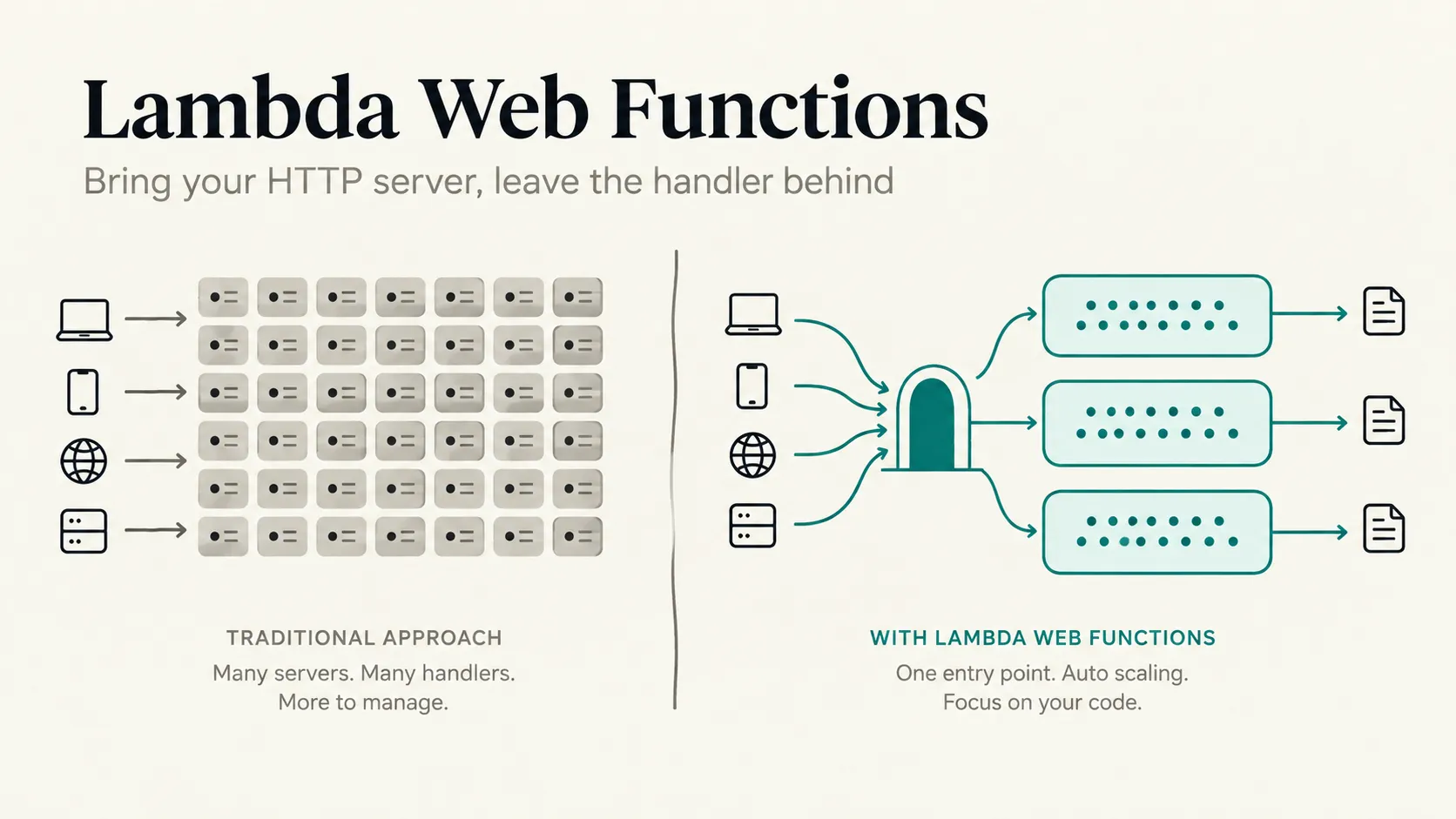
AWS Lambda Web Functions: Bring Your HTTP Server, Leave the Handler Behind
AWS launched Lambda Web Functions by giving Lambda a normal Node.js HTTP server that listens on a port, and Lambda gives you an HTTPS endpoint, scales the server out and back to zero, and bills you for the CPU your code actually uses rather than the time it spends waiting.
Series: Serverless (2 articles)
- 1AWS Lambda Web Functions: Bring Your HTTP Server, Leave the Handler Behind This article
This is Part 1, covering the what and the why. If you’d rather get straight to code, Part 2 covers deploying your first Web Function, SAM, streaming, canary releases and locking down your endpoints.
AWS launched Lambda Web Functions on 12 October 2026 where you give Lambda a normal Node.js HTTP server that listens on a port. Lambda gives you an HTTPS endpoint, scales it out and back to zero, and bills you for active CPU time plus the memory each environment holds, not for every millisecond spent waiting.
That matters more than it sounds. Most Lambda APIs I’ve seen spend the bulk of each request waiting on DynamoDB, a downstream service or, more and more often, an LLM. Classic Lambda bills every millisecond of that wait and gives every concurrent request its own execution environment. Web Functions drop both assumptions.
AWS also renamed classic Lambda to Lambda Event Functions. It’s a name change only, and existing functions keep working exactly as they are.
I spend most of my week in Lambda and Step Functions, so that’s the lens here: how we’ve been running HTTP on Lambda until now, what a Web Function actually is, and how it differs from an Event Function. Part 2 covers the code and getting one deployed.
The fine print no one ever reads: this is a day-one service. At launch it’s Node.js 24 and Arm64 only, in five Regions (N. Virginia, Ohio, Oregon, Tokyo and Ireland). Quotas and limits will move, so check the developer guide before you build on any number quoted here.
How we've been running HTTP on Lambda
Until now, Lambda has only understood events. Something in front of the function had to turn an HTTP request into a JSON event, and something had to turn the function's return value back into an HTTP response. Over the years most of us settled on one of three ways to live with that.
The native option is a handler behind API Gateway, an Application Load Balancer or a Function URL:
1
2
3
4
5
6
7
8
9
// Classic Event Function behind an API Gateway proxy integration
export const handler = async (event) => {
  const name = event.queryStringParameters?.name ?? 'world';
  return {
    statusCode: 200,
    headers: { 'Content-Type': 'application/json' },
    body: JSON.stringify({ message: `Hello, ${name}` }),
  };
};
It's simple and it works. The downside is that your routing and middleware end up shaped around the front door's event format instead of a framework you could run anywhere else.
The second option is a language-specific adapter such as Serverless Express , Serverless Java Container or Bref . (a PHP runtime for Lambda). You keep your framework's routes, but something still has to translate each Lambda event into a request object and back.
The third option, and the closest we got to "just run my server", is the AWS Lambda Web Adapter . It runs as a Lambda extension, starts your actual web server, waits for a readiness check, and then proxies each invocation to the server over HTTP. For a zip package on Arm64, the README's setup is a layer, an exec wrapper and a startup script:
1
2
3
4
Layer:        arn:aws:lambda:${AWS::Region}:753240598075:layer:LambdaAdapterLayerArm64:30
Env var:      AWS_LAMBDA_EXEC_WRAPPER=/opt/bootstrap
Handler:      run.sh   (your startup script)
Traffic port: AWS_LWA_PORT (default 8080)
All three have the same constraints underneath. The scaling docs put it plainly: "For each concurrent request, Lambda provisions a separate instance of your execution environment." So 500 slow requests in flight means 500 environments, and potentially 500 cold starts. You're billed for wall-clock duration, waiting included. Synchronous payloads are capped at 6 MB each way, or 200 MB for a streamed response (quotas ). Function URLs and weighted aliases cover the basics, but custom domains, rate limiting and multi-Region routing are yours to assemble.
To be fair, multi-concurrency on Lambda isn't brand new. Lambda Managed Instances already let one environment handle several invocations at once, and the Web Adapter supports it. That model runs on EC2 instances in your account, with EC2 pricing plus a management fee, and it scales to a configured minimum rather than zero. Web Functions bring the same idea to the shared Lambda fleet, with nothing to provision.
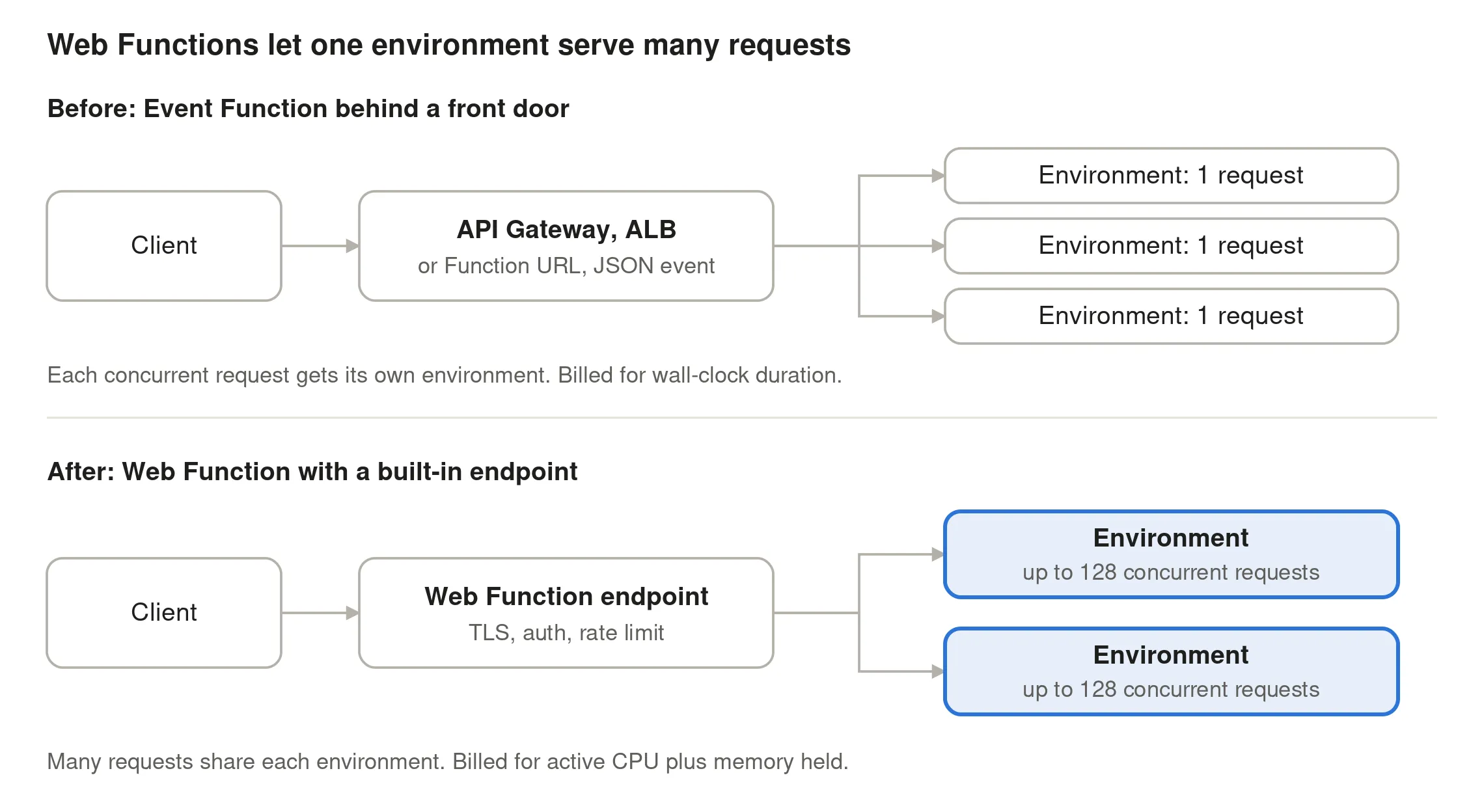
In the new model, the front door is part of the function, and each environment takes many requests at once (64 by default, up to 128).
What a Web Function actually is
Lambda now has three form factors , all running on Firecracker.
Event Functions are classic Lambda: an event comes in, a response goes out, one request per environment, billed on duration.
MicroVMs are isolated, stateful sandboxes with a lifecycle you control, built for running untrusted or user-generated code.
Web Functions sit in the middle. Your code is a long-running HTTP server, each environment handles many requests, and you’re billed for active CPU plus the memory the environment holds.
The resource model has three pieces. The Web Function is the top-level resource. Under it sit revisions, which are immutable snapshots of your code and configuration. Change the code, timeout, concurrency settings or environment variables and you get a new revision. Alongside revisions sit endpoints, each with its own Lambda-managed TLS domain, auth type, scaling limits and revision weights. A function can have up to 10 endpoints, and each one routes to one or two revisions.
If you know versions and aliases, the model carries over. A revision is roughly a published version, and an endpoint is roughly an alias that also owns the URL, the auth, the rate limit and the Regions it runs in.
On each request, Lambda terminates TLS, then checks the signature (for IAM auth endpoints) and enforces the rate limit before anything reaches your code. It then picks a revision by weight and hands the request to an environment with spare capacity. Your server sees plain HTTP/1.1 on the address in
AWS_LAMBDA_HTTP_ENDPOINT. Lambda adds a lambda-web-request-id header to each request and echoes it on the response, which makes log correlation easy.Scaling works in two directions (scaling docs ). Each environment takes more requests up to a dynamic limit that Lambda manages, which you can cap with
maxConcurrencyPerEnvironment (default 64, maximum 128). As environments near that limit, Lambda adds more, up to maxEnvironments and your account’s vCPU quota. It also keeps warm headroom ahead of demand, so small traffic bumps rarely land on a cold start.Event Functions vs Web Functions
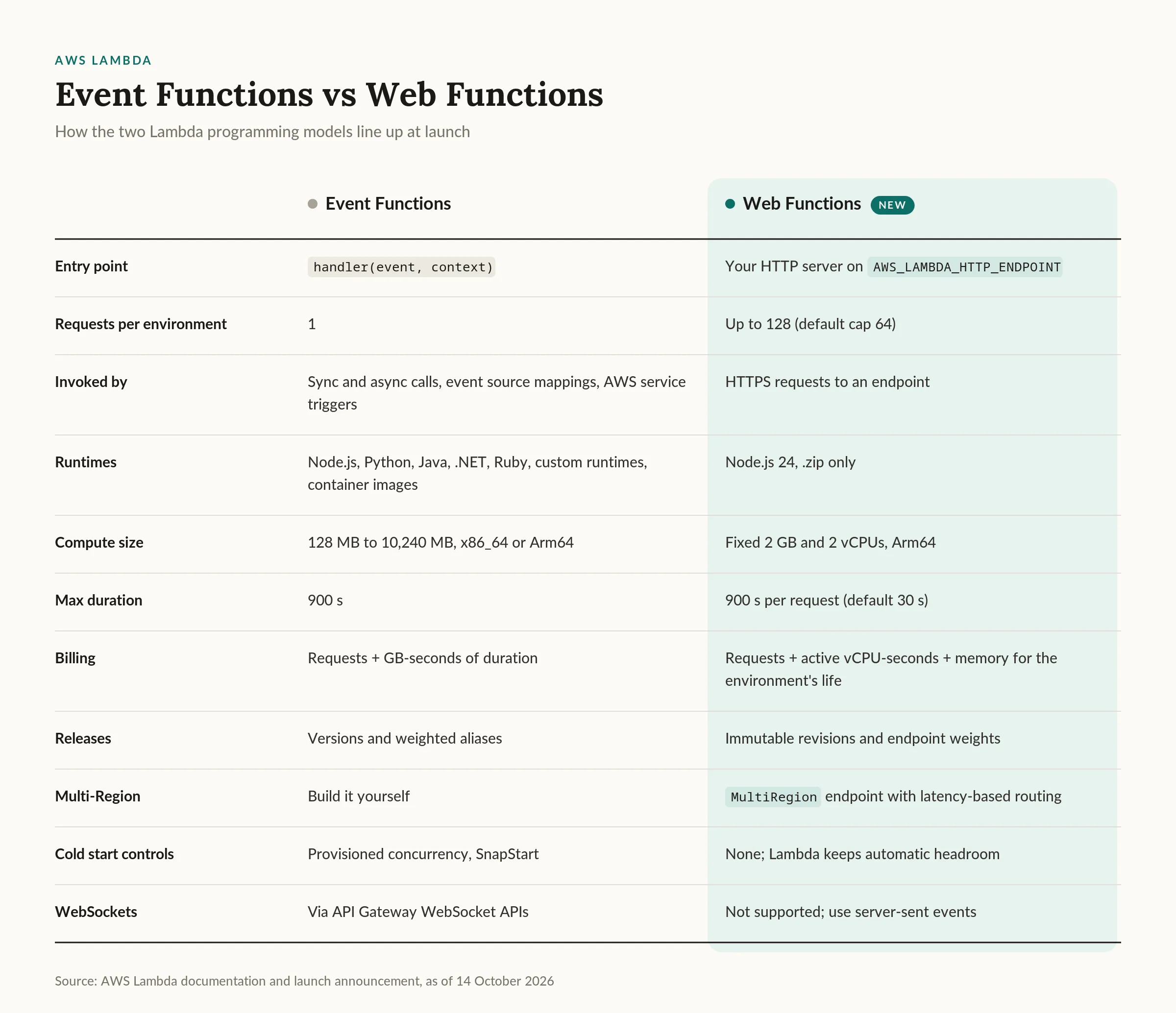
The table doesn't really capture how differently you end up building. With a Web Function you write a server, not a handler. Routing, middleware, error handling and auth live in your framework, and the same
index.js runs on your laptop without changes. Your code has to be safe for concurrent requests, and I think that's the adjustment most Lambda developers will find hardest (more on it below). Waiting on I/O costs you very little CPU, but memory sitting idle between requests does cost you. Protecting a downstream database moves from reserved concurrency to rateLimit and maxEnvironments on the endpoint. And shipping a new version comes down to changing weights on an endpoint.What it costs
Web Functions bill four things: requests, active vCPU time, the memory each environment consumes for as long as it exists, and data transfer, all at 1 ms granularity (Lambda pricing ). Event Functions bill requests plus configured memory multiplied by wall-clock duration. Here are the published US East (N. Virginia) Arm rates side by side:

The pricing page includes an I/O-heavy API example: 10 million requests a month, each taking 200 ms end to end with 50 ms of active CPU, and one environment running all month using about 0.29 GB.
1
2
3
4
Active vCPU:  10,000,000 x 0.050 s = 500,000 vCPU-s x $0.0000276944 = $13.85
Memory:       0.29 GB x 2,592,000 s = 751,680 GB-s  x $0.0000036667 = $2.76
Requests:     10,000,000 x $0.30 / 1M                                = $3.00
Total                                                                = $19.61
I ran the same traffic through the Event Function rates (Arm, before the free tier) to see how it compares. At 512 MB, it's 1,000,000 GB-seconds, or $13.33 of compute plus $2.00 of requests, for $15.33 in total. At 1,024 MB, it doubles to 2,000,000 GB-seconds, or $26.67 plus $2.00, for $28.67.
So Web Functions aren't automatically cheaper, and I'd be wary of anyone who tells you they are. They come out ahead when requests spend most of their time waiting and you'd otherwise be sizing up Event Function memory to get more CPU. They can lose on quiet or memory-light endpoints, because the request price is 50% higher and you're paying for memory while an environment sits idle between requests.
The pricing page's examples also assume exactly one environment runs all month, which your traffic almost certainly won't match. Model your real traffic shape and load test before you commit. The published examples exclude the free tier and data transfer, so check the pricing page for your Region too.
What I'd watch out for
This is a day-one service with the rough edges you’d expect. Unless noted, everything below comes from the AWS docs (quotas , HTTP , networking , runtimes , scaling , core concepts ).
The runtime story is narrow: Node.js 24, Arm64 and .zip packages only. For Python, Java, .NET or container images, the Lambda Web Adapter on Event Functions is still the answer, and its README says as much.
Environments are fixed at 2 GB and 2 vCPUs. With no memory knob, you tune memory-heavy or CPU-heavy apps with
maxConcurrencyPerEnvironment and worker_threads instead.There’s no provisioned concurrency or minimum environment count either. Scale to zero is always on, so the first request after a quiet period hits a cold start. Keep startup fast.
The endpoint speaks HTTP/1.1 only (HTTP/1.0 gets a 505), has no WebSockets, and can’t take a custom domain, AWS WAF or PrivateLink directly. CloudFront covers most of that, including HTTP/2 and HTTP/3 to viewers.
Operationally,
Active doesn’t mean healthy, because Lambda doesn’t check at deploy time that your server starts. Revisions don’t inherit configuration, and Lambda keeps roughly 50 before it cleans up old ones that no endpoint routes to. Delete the S3 object version behind a revision and that revision fails. Metrics have no revision dimension, and you can’t pin a runtime patch version.On networking, VPC egress connectors only work with
HomeRegion endpoints. Public egress IPs aren’t stable, so if a partner wants to allowlist you, you’ll need a connector and a NAT gateway. New accounts also start with reduced vCPU and request-rate quotas, so check GetWebAccountSettings and request increases well before launch.Where this leaves Event Functions and Step Functions
Web Functions don’t replace Event Functions. They take over the synchronous HTTP edge, and that’s it. The developer guide is direct about it: “For event-driven processing, such as handling queue messages or file uploads, use Lambda Event Functions instead.”
The deployment docs add that “you can only invoke a revision through an endpoint”. So a Web Function can’t be an SQS consumer, an S3 trigger or a Step Functions
Lambda:Invoke task. A Step Functions HTTP Task can still call an ApplicationManaged endpoint, though, like any other HTTPS API.The launch blog sketches the split AWS has in mind: Event Functions for asynchronous backend processing, Web Functions for the user-facing API and server-side rendering, and MicroVMs for interactive code execution, all in one account.
That’s how I’d use it too. The Web Function serves the API: it validates input, writes what it needs to, and returns quickly or streams progress back. Anything long-running or multi-step gets handed off through the AWS SDK with
StartExecution, SendMessage or PutEvents. Step Functions then owns the retries, waits, approvals and fan-out, while Event Functions do the task work inside the workflow. The SDK permissions come from the execution role on the revision, just as they would for an Event Function.The HTTP layer stays cheap and concurrency-friendly, and the durable, retryable work stays where it already belongs.
Wrapping up
If you have a Node.js API on Lambda that spends most of its time waiting on I/O, try this now. Deploy the starter in a sandbox account (the launch blog quotes under a minute), then port one real service. Part 2 walks through both. First, audit the code for module-level state that assumes one request at a time.
Then load test against your real downstream dependencies, and watch
EndpointActiveEnvironments, EnvironmentConcurrentRequests and the throttle metrics. Compare the bill with what you pay today, using your actual traffic shape. And before anything public sees production traffic, put CloudFront with OAC and an IamAuth endpoint in front of it.If your HTTP services are in another language, or rely on provisioned concurrency to keep latency flat, I’d wait. The constraints are real, and Event Functions with the Web Adapter aren’t going anywhere.
What I like most is that Lambda finally meets web developers where they are: a server on a port, a framework they know, and a laptop that runs exactly the same code. The price is that those of us who’ve built on Lambda for years have to unlearn “one request, one environment”. For HTTP workloads, that’s a trade I’ll take, and my queues, streams and Step Functions tasks will stay right where they are.
Series: Serverless (2 articles)
- 1AWS Lambda Web Functions: Bring Your HTTP Server, Leave the Handler Behind This article
Enjoyed reading this content? Let the author know!
Your likes, comments, shares, and saves help creators reach more builders.

Loading recommendations
Loading article