
Amazon SNS Explained: The Cloud's Own Messaging Hub 🚀
Ever wondered how AWS services communicate without being tightly connected? Let's explore Amazon SNS, the pub/sub messaging service that makes event-driven architectures a lot easier to build.

Amazon SNS Explained: The Cloud's Own Messaging Hub 🚀
Imagine you're building a cloud application, and every time something happens, three or four different services need to know about it.
A new order comes in? Update the inventory, notify the shipping team, and send a confirmation to the customer.
You could make your application call each service individually. Sounds simple enough, right?
Well, at first, maybe. But as your application grows, things can get messy pretty quickly. More services mean more connections to maintain, more dependencies, and more headaches when something changes.
Wouldn't it be nice to have a central place where you could publish a message and let everyone interested in that event know about it?
That's where Amazon SNS comes in!
In this article, we'll break down how Amazon Simple Notification Service works, explore some practical use cases, and see why it's such a useful tool when building applications on AWS.
No need to overcomplicate things. Let's get into it!
1. So, What Exactly Is Amazon SNS?
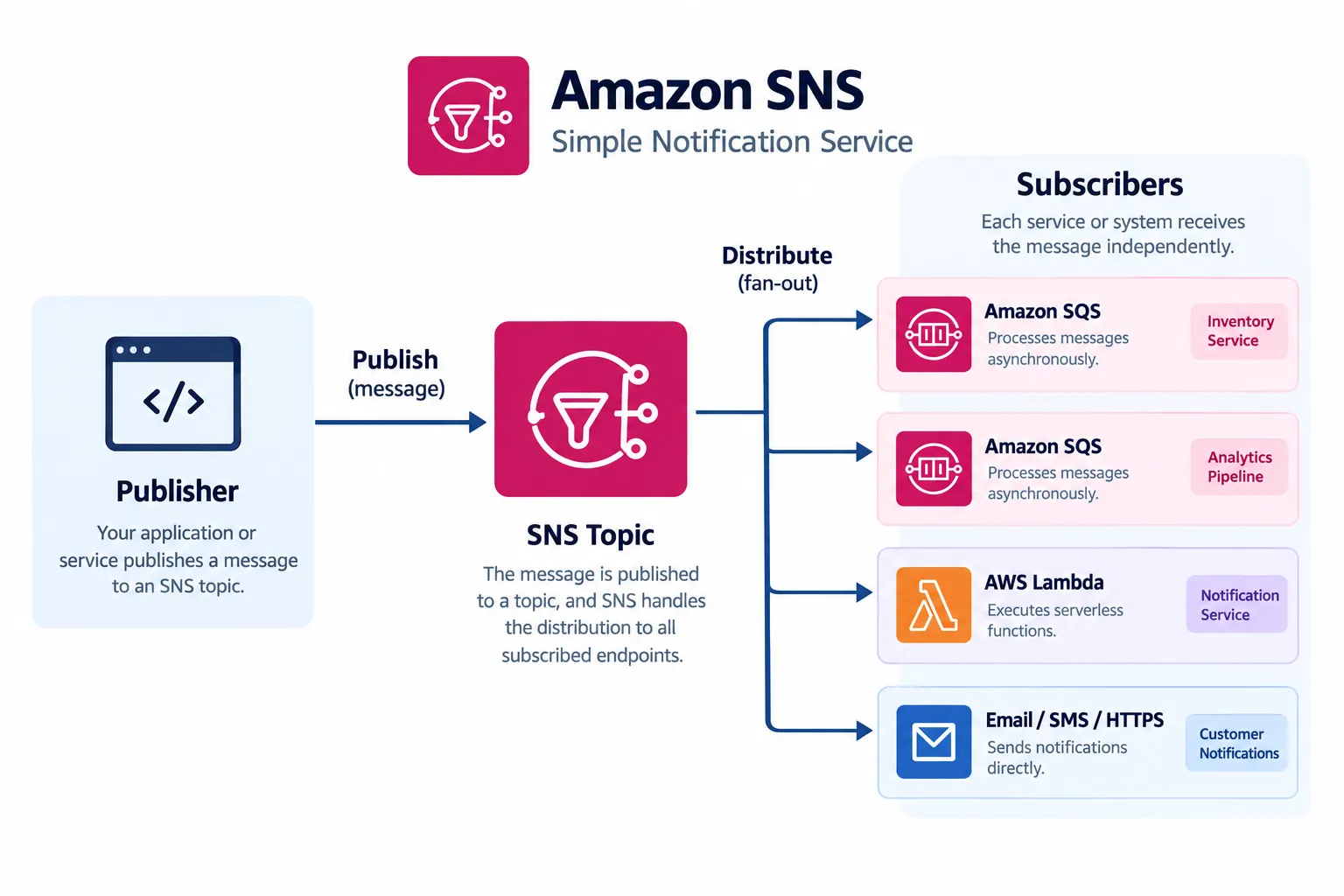
Amazon SNS (Simple Notification Service) is a fully managed messaging service based on the publish-subscribe (pub/sub) model.
Okay, that sounds like another cloud buzzword. Let's make it simpler.
Think of SNS as a post office for your applications.
You have someone sending a message, a place where that message is published, and several people or systems interested in receiving it.
In AWS terminology, these are:
- Publisher: The application or service sending the message.
- Topic: The communication channel where the message is published.
- Subscriber: The endpoint that receives messages from the topic.
The cool part? The publisher doesn't need to know every subscriber. It simply publishes a message to the topic, and SNS takes care of distributing it to the subscribed endpoints.
This makes it easier to connect different parts of your architecture without forcing them to depend directly on one another.
2. How Does It Work in Practice?
Let's use an example that most of us can relate to: an online store.
A customer places an order. That's our event!
Now, several things need to happen:
- The inventory system needs to know about the order.
- The analytics pipeline needs the information for reporting.
- A notification service needs to inform the customer.
Without SNS, the application might need to manage separate calls to each component.
With SNS, the application can publish an
OrderPlaced message to an SNS topic called OrderEvents.From there, SNS distributes the message to the topic's subscribers.
Here's the basic flow:
Application → SNS Topic → Multiple Subscribers
One message published, multiple destinations notified. Pretty neat, right?
And if you need to add another subscriber later, you can usually do that without changing the publisher's communication logic.
That's one of the main benefits of this approach: your architecture can grow without every new component turning into another dependency you have to manage.
3. Fan-Out: One Message, Multiple Destinations
Let's talk about one of the most common SNS patterns: fan-out.
The name might sound complicated, but the idea is straightforward. A single message is distributed to multiple subscribers.
Going back to our online store, imagine this setup:
- SNS → SQS Inventory Queue: Stores order events for the inventory worker to process.
- SNS → SQS Analytics Queue: Buffers events for the analytics pipeline.
- SNS → Lambda: Triggers additional serverless processing.
Here's a visual representation:
1
2
3
4
5
6
7
8
                 Application
                      |
                      v
                 SNS Topic
                /    |     \
               v     v      v
             SQS    SQS   Lambda
          Inventory Analytics Processing
Each destination can handle its own responsibility independently.
For example, the analytics consumer might take a little longer to process an event, while the inventory consumer is already working on the next one. When SQS is used as the destination, each queue can buffer messages for its own consumers.
That separation is useful because one workload doesn't have to run at exactly the same speed as another.
One important detail: SNS distributes messages, but it doesn't guarantee that every downstream application will successfully finish processing them. That's something we need to consider when designing the whole workflow.
4. SNS vs. SQS: Aren't They Basically the Same Thing?
This is a common question when you're starting to explore AWS messaging services.
Both SNS and SQS deal with messages, but they play different roles.
Think about it this way:
SNS is the broadcaster. SQS is the queue where work waits to be processed.
Here's a quick comparison:
| Feature | Amazon SNS | Amazon SQS |
|---|---|---|
| Main purpose | Distribute messages | Queue messages for processing |
| Communication model | Publish-subscribe | Message queue |
| How consumers receive messages | SNS pushes to subscribers | Consumers poll the queue |
| Typical use case | Notify multiple systems | Buffer work for workers |
So, which one should you use?
It depends on what you're trying to accomplish.
If you want to distribute an event to multiple destinations, SNS is a great fit.
If you need to hold messages until workers are ready to process them, SQS is usually the better fit.
And here's the interesting part: you don't always have to choose between them. You can use both!
With an SNS-to-SQS setup, SNS distributes the event, and each SQS queue buffers its own copy for downstream processing.
Just remember that message delivery, queue retention, retries, and successful processing are separate concerns. For important workloads, it's worth planning for failures and duplicate messages too.
5. Where Does SNS Fit into Data Engineering?
Now let's move beyond the online store and look at something closer to a data pipeline.
Imagine you have an S3 bucket receiving files from different sources throughout the day.
Whenever a new file arrives, different parts of your system may need to react:
- One process validates the incoming file.
- Another registers information about the file.
- A third workflow starts additional processing.
Instead of making the component that receives the file coordinate every downstream task directly, you can use an event-driven design to distribute notifications.
For example, an S3 event notification can publish an event to an SNS topic, which then fans out to multiple subscribers.
1
2
3
4
5
6
7
8
9
10
11
               Amazon S3
                   |
                   v
                SNS Topic
               /         \
              v           v
        SQS Queue A   SQS Queue B
              |           |
              v           v
        File Validation  Metadata
                          Processing
Each queue can feed its own processing workflow.
This pattern can be useful when you want to separate responsibilities, support multiple consumers, or allow different parts of a pipeline to process events at their own pace.
Of course, SNS doesn't replace your processing engine or orchestration tool. Services such as AWS Lambda, AWS Glue, and Apache Airflow can still play their respective roles.
SNS is simply one of the building blocks that helps connect everything.
One thing to keep in mind: if you use S3 event notifications, configure the event destination and permissions correctly, and consider duplicate events and failure handling in your design.
6. A Few Best Practices Worth Remembering
Before you start adding SNS topics to every corner of your architecture, here are a few things worth keeping in mind.
1. Keep your services loosely coupled
Let publishers focus on publishing meaningful events. Avoid making them responsible for knowing every downstream consumer.
2. Combine SNS with SQS when buffering matters
If consumers need to process messages independently or handle bursts of incoming traffic, SQS can help absorb that workload.
3. Don't forget permissions
Use IAM policies and SNS topic policies to control who can publish messages, manage topics, and subscribe endpoints. Give each component only the permissions it needs.
4. Plan for failures
Messages can fail to reach certain endpoints, and downstream processing can fail even after delivery. Understand the delivery guarantees of your chosen subscription type, configure appropriate retries and failure handling, and make consumers resilient to duplicate messages.
5. Use filtering to avoid unnecessary work
Not every subscriber needs every event. SNS subscription filter policies can help route only messages matching specific attributes or message-body conditions to the relevant subscribers.
6. Monitor what's happening
Amazon CloudWatch provides SNS metrics that can help you monitor message delivery and spot potential problems before they become bigger headaches.
You don't need to build an overly complicated architecture from day one. Start with the requirements, understand how the services behave, and add complexity when there's a real reason for it.
7. Wrapping Things Up
Amazon SNS is one of those AWS services that becomes much easier to understand once you stop thinking about it as just another cloud acronym.
At its core, it's about letting applications publish messages and allowing multiple subscribers to react without requiring direct connections between every component.
We've seen how SNS topics work, how fan-out messaging distributes events, why SNS and SQS complement each other, and how this pattern can fit into a data engineering pipeline.
If you're exploring serverless applications or event-driven architectures, SNS is definitely worth adding to your toolkit.
And the best part? You don't need a huge distributed system to start learning these concepts. Even a small hands-on experiment with an SNS topic, an SQS queue, and a Lambda function can teach you a lot.
Let's talk! 💬
Have you used Amazon SNS in a project? Maybe you've combined it with SQS, Lambda, or S3?
I'd love to hear about your experience. Share your use cases, lessons learned, or questions in the comments!
Happy building! 🚀
Enjoyed reading this content? Let the author know!
Your likes, comments, shares, and saves help creators reach more builders.

Loading recommendations
Loading article