
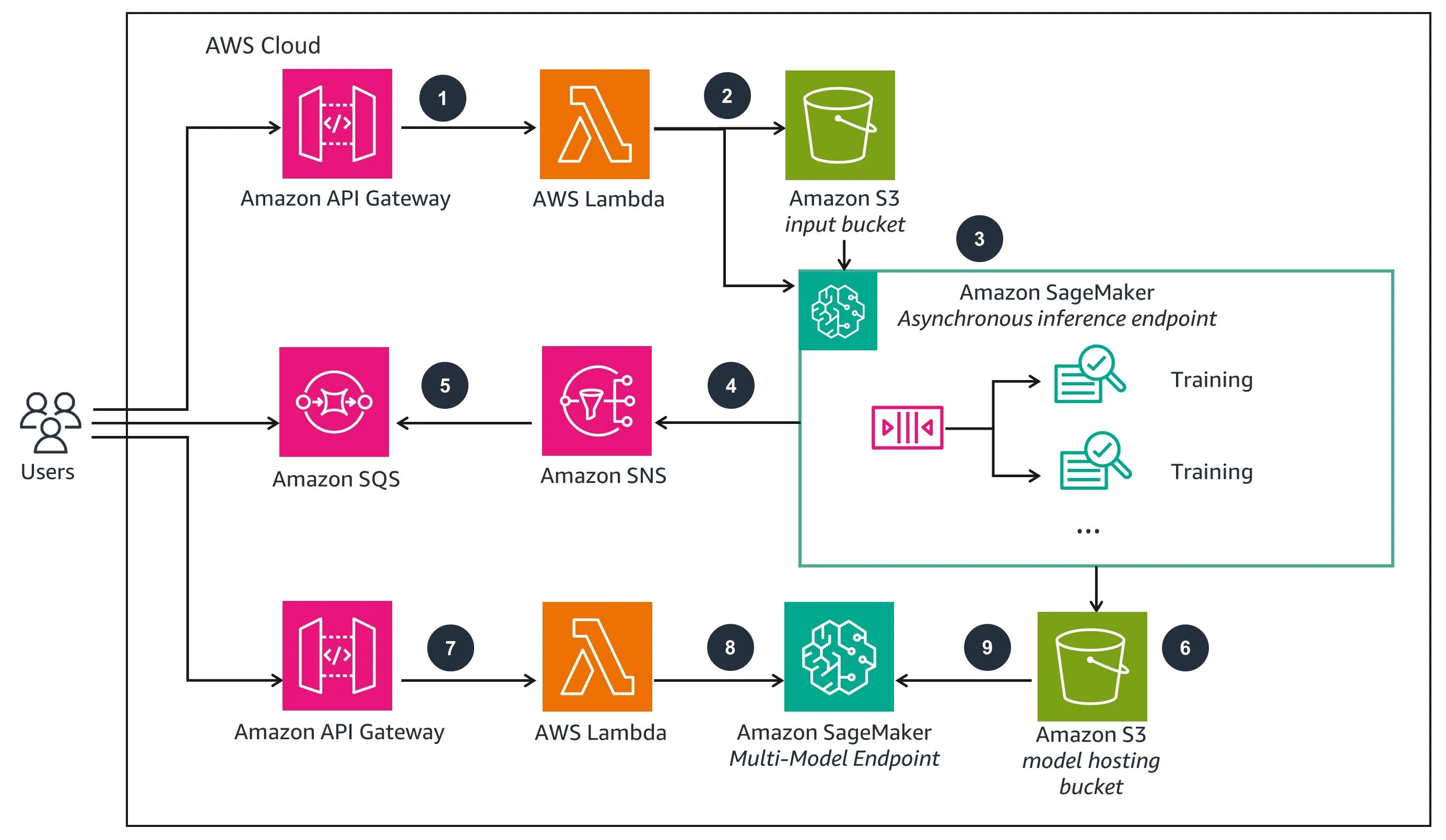
Deploying Machine Learning Models on AWS: A Beginner’s Guide
Learn how to take a machine learning model from a local development environment to the cloud using AWS. This guide covers deployment options, model serving, scalability, and cost considerations for developers getting started with cloud-based machine learning.

Introduction
Building a machine learning model is only one part of an AI project. To make it useful, we need to deploy it so that other applications and users can access its predictions.
For beginners, moving from a local Python environment to a cloud-based deployment can seem challenging. AWS provides several services that make this process easier, whether you are building a simple prediction API or deploying a production-scale machine learning application.
In this article, we’ll explore the basic workflow for deploying machine learning models on AWS.
1. Train Your Model Locally
Start by developing and evaluating your model using Python libraries such as Scikit-learn, TensorFlow, or PyTorch.
For example, a basic classification model can be trained using Scikit-learn:
1
2
3
4
5
6
7
8
9
10
from sklearn.datasets import load_iris
from sklearn.ensemble import RandomForestClassifier

data = load_iris()
X, y = data.data, data.target

model = RandomForestClassifier(random_state=42)
model.fit(X, y)

print("Model training completed!")
This example trains a simple classification model. In a real project, you would also split your dataset into training and validation sets and evaluate the model before deployment.
2. Choose the Right AWS Service
AWS offers multiple ways to deploy machine learning applications.
Amazon SageMaker AI: A managed service for building, training, and deploying machine learning models.
AWS Lambda: Useful for lightweight inference workloads that can run within Lambda’s execution limits.
Amazon EC2: Provides virtual machines where you can configure your own model-serving environment.
Amazon API Gateway: Can expose an inference service through an HTTP API when integrated with an appropriate backend.
The best option depends on your model size, traffic, latency requirements, operational complexity, and budget.
3. Prepare Your Model for Deployment
Before deploying, save your trained model and prepare an inference function that accepts input data and returns predictions.
For example, you can save a Scikit-learn model using Joblib:
1
2
3
import joblib

joblib.dump(model, "model.joblib")
For a real deployment, you should also preserve the preprocessing steps, validate incoming requests, and ensure that the production environment uses compatible library versions.
4. Deploy and Test Your Model
With Amazon SageMaker AI, you can package your model and deploy it to a managed inference endpoint.
Once deployed, send test requests and verify that the endpoint returns valid predictions.
Check the following before making your application available to users:
- Prediction accuracy on representative inputs.
- Response latency and throughput.
- Authentication and access permissions.
- Error handling and input validation.
- Logging, monitoring, and resource utilization.
A successful deployment is not just about getting predictions. It also requires reliability, security, and observability.
5. Monitor Performance and Control Costs
Cloud deployments introduce ongoing operational costs. The cost depends on the service, instance type, resource usage, and how long your application runs.
To manage these costs effectively:
- Select resources based on actual workload requirements.
- Configure monitoring and billing alerts.
- Remove unused resources.
- Evaluate serverless inference when appropriate.
- Review latency and throughput before increasing capacity.
For learning projects, start with small experiments and understand the pricing before provisioning resources. Some AWS services can incur charges even when you are not actively testing your model.
Conclusion
Deploying a machine learning model on AWS helps bridge the gap between experimentation and real-world applications.
Start with a small model, choose an appropriate deployment service, test the inference workflow, and monitor both performance and cost.
For students and aspiring machine learning engineers, understanding deployment is a valuable step toward building complete AI applications rather than models that only run locally.
The next step is to deploy a small classification model, expose its predictions through an API, and document the process in a GitHub repository.
Enjoyed reading this content? Let the author know!
Your likes, comments, shares, and saves help creators reach more builders.

Loading recommendations
Loading article