
🌐 Amazon VPC Explained: Build Your First Secure Network in AWS ☁️🔐
Amazon VPC

🚀 Introduction
When we think about Cloud Computing, we often imagine virtual servers, databases, and applications running in the cloud.
But have you ever wondered how these resources communicate securely with each other?
That's where Amazon Virtual Private Cloud (Amazon VPC) comes in!
Amazon VPC is one of the fundamental networking services in AWS. It allows you to create your own logically isolated virtual network where you can deploy resources, control network traffic, and design secure cloud architectures.
In this article, we'll explore Amazon VPC, understand its main components, and build a simple network architecture step by step.
Let's get started! 🚀
☁️ 1. What Is Amazon VPC?
Amazon Virtual Private Cloud (Amazon VPC) is an AWS service that allows you to create a logically isolated network within the AWS Cloud.
Think of it as your own virtual data center, where you control how resources communicate.
With Amazon VPC, you can:
- Define your own IP address ranges.
- Create public and private subnets.
- Configure network routing.
- Control inbound and outbound traffic.
- Connect cloud resources securely.
- Design scalable and highly available architectures.
Why is it important?
Because networking is the foundation of almost every cloud application!
🧩 2. Understanding the Main VPC Components
Before creating our architecture, let's understand six essential components.
🌐 VPC: Your virtual network in AWS. You define its IP address range using CIDR notation, such as
10.0.0.0/16.🟢 Public Subnet: A subnet with a route to an Internet Gateway. Resources can communicate with the internet when they also have the necessary public addressing and security configuration.
🔒 Private Subnet: A subnet without a direct route to an Internet Gateway. It is commonly used for application servers and databases that should not be directly exposed to the internet.
🚪 Internet Gateway: Connects a VPC to the internet when properly configured with route tables and public IP addressing.
🛣️ Route Tables: Determine where network traffic is directed. Each subnet uses a route table to control its network paths.
🛡️ Security Groups: Act as stateful virtual firewalls, controlling allowed inbound and outbound traffic for resources such as EC2 instances.
Another useful component is a NAT Gateway, which can provide outbound internet connectivity to private resources without allowing unsolicited inbound internet connections.
🏗️ 3. Our VPC Architecture
Let's imagine we're building a small web application.
We want a web server accessible from the internet while keeping our database isolated in a private subnet.
Our architecture will use:
| Component | Configuration |
|---|---|
| VPC | 10.0.0.0/16 |
| Public Subnet | 10.0.1.0/24 |
| Private Subnet | 10.0.2.0/24 |
| Internet Gateway | Attached to the VPC |
| Public EC2 Instance | Web server |
| Private Database | RDS example |
| Route Tables | Public and private routing |
| Security Groups | Restricted access |
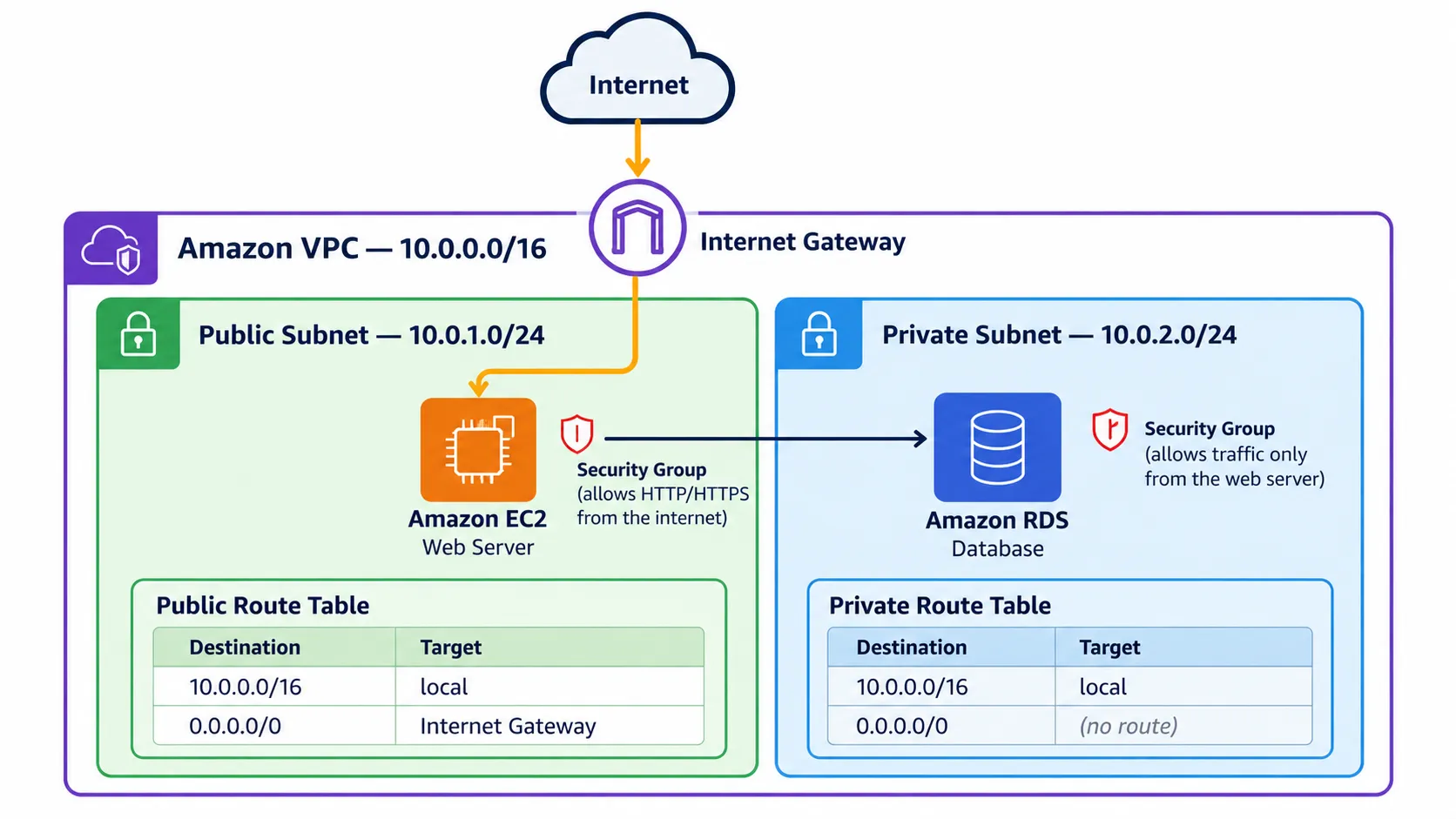
The diagram below illustrates how these components connect.
Architecture Diagram: Amazon VPC with Public and Private Subnets
Insert the architecture image here.
The main idea is simple: public-facing resources can handle incoming requests, while sensitive resources remain in private network segments.
🛠️ 4. Hands-On Lab: Create Your First VPC
Now let's create the networking foundation using the AWS Management Console.
Step 1: Create a VPC
- Open the AWS Management Console.
- Search for VPC.
- Select Create VPC.
- Choose VPC only.
- Enter the following values:
- Name:
My-First-VPC - IPv4 CIDR:
10.0.0.0/16 - IPv6 CIDR: No IPv6 CIDR block
- Tenancy: Default
- Click Create VPC.
Congratulations! 🎉 You now have your own virtual network.
Step 2: Create Two Subnets
Navigate to VPC → Subnets → Create subnet.
Create the following:
Public Subnet
- Name:
Public-Subnet - VPC:
My-First-VPC - IPv4 CIDR:
10.0.1.0/24
Private Subnet
- Name:
Private-Subnet - VPC:
My-First-VPC - IPv4 CIDR:
10.0.2.0/24
For this beginner lab, you can place both subnets in the same Availability Zone. In production, use multiple Availability Zones for higher availability.
Step 3: Create an Internet Gateway
Navigate to Internet Gateways.
- Click Create internet gateway.
- Name it
My-Internet-Gateway. - Create the gateway.
- Select Actions → Attach to VPC.
- Choose
My-First-VPC.
The gateway is now attached, but we still need to configure routing.
Step 4: Configure Route Tables
Create a route table named
Public-Route-Table.Associate it with
Public-Subnet and add the following route:| Destination | Target |
|---|---|
| 10.0.0.0/16 | local |
| 0.0.0.0/0 | Internet Gateway |
For the private subnet, create
Private-Route-Table with only the local route:| Destination | Target |
|---|---|
| 10.0.0.0/16 | local |
Associate it with
Private-Subnet.This means our public subnet has a path to the internet, while our private subnet remains isolated from direct internet connectivity.
Step 5: Configure Security Groups
Create a security group for a demonstration web server.
For inbound traffic:
| Type | Port | Source |
|---|---|---|
| HTTP | 80 | 0.0.0.0/0 |
| HTTPS | 443 | 0.0.0.0/0 |
Only enable the ports actually needed. Use HTTPS for real applications and avoid exposing administrative ports to the entire internet.
For a database security group, allow only the required database port from the application server's security group.
💻 5. Create Your VPC Using AWS CLI
You can also create the same basic network using the AWS Command Line Interface.
First, make sure the AWS CLI is installed and configured with appropriate credentials and permissions.
Create the VPC:
1
2
aws ec2 create-vpc \
  --cidr-block 10.0.0.0/16
Save the returned VPC ID.
Create the public subnet:
1
2
3
aws ec2 create-subnet \
  --vpc-id vpc-xxxxxxxx \
  --cidr-block 10.0.1.0/24
Create the private subnet:
1
2
3
aws ec2 create-subnet \
  --vpc-id vpc-xxxxxxxx \
  --cidr-block 10.0.2.0/24
Create an Internet Gateway:
1
aws ec2 create-internet-gateway
Attach the Internet Gateway:
1
2
3
aws ec2 attach-internet-gateway \
  --vpc-id vpc-xxxxxxxx \
  --internet-gateway-id igw-xxxxxxxx
Replace the placeholder IDs with the actual resource IDs returned by AWS.
These commands create the initial networking resources. To complete the public subnet configuration, you must also create and associate a public route table, add its default route to the Internet Gateway, and configure public IP addressing for resources requiring internet access.
🔐 6. AWS VPC Security Best Practices
Security should always be part of cloud architecture design.
Here are some important recommendations:
✅ Use private subnets for databases and internal services.
✅ Apply the principle of least privilege to security groups.
✅ Avoid exposing SSH and RDP access to the entire internet.
✅ Use VPC Flow Logs to help analyze network traffic.
✅ Consider VPC endpoints for private connectivity to supported AWS services.
✅ Design applications across multiple Availability Zones when high availability is required.
✅ Regularly review route tables and security group rules.
Remember: A private subnet is an important security boundary, but it does not replace application-level security, authentication, or encryption.
📈 7. Real-World Use Cases
Amazon VPC is widely used in cloud architectures, including:
- Web applications: Public load balancers with private application servers.
- Database environments: Amazon RDS databases deployed in private subnets.
- Enterprise networks: Hybrid connectivity between on-premises environments and AWS.
- Microservices: Internal communication between distributed cloud services.
- Development environments: Isolated networks for testing applications.
💡 8. What I Learned
Exploring Amazon VPC helped me better understand how cloud networking works.
Some of my key takeaways are:
- A VPC provides the network foundation for AWS resources.
- Public and private subnets serve different purposes.
- Route tables determine the paths network traffic can take.
- Security groups are essential for controlling resource access.
- Good network design improves security, scalability, and maintainability.
Learning these concepts is an important step toward building real-world AWS architectures.
🎯 Conclusion
Amazon VPC is much more than a networking service. It is a fundamental building block for designing secure, reliable, and scalable cloud applications.
Understanding how VPCs, subnets, Internet Gateways, route tables, and security groups work together gives us a strong foundation for more advanced AWS architectures.
This is another step in my Cloud Computing learning journey, and I'm excited to keep exploring AWS technologies! ☁️💜
💬 Have you already created your first Amazon VPC? What was the most interesting part of learning AWS networking?
Let's keep learning and building in the cloud! 🚀
📚 References
🏷️ Hashtags
#AWS #AmazonVPC #CloudComputing #AWSNetworking #CloudSecurity #AWSCommunity #AWSBuilderCenter #LearnAWS #CloudArchitecture #WomenInCloud
Enjoyed reading this content? Let the author know!
Your likes, comments, shares, and saves help creators reach more builders.

Loading recommendations
Loading article