
Building My First Data Lake on AWS with Amazon S3
Learn how to build a simple data lake on AWS using Amazon S3. In this hands-on beginner guide, we will create a private S3 bucket, upload a sample dataset, organize raw data, and explore best practices for secure and scalable data storage.

Building My First Data Lake on AWS with Amazon S3
Welcome to the second article in my Data Engineering on AWS series!
In my previous article, Introduction to Data Engineering on AWS: Building the Foundations, I introduced the role of a Data Engineer and explored three essential AWS services: Amazon S3, AWS Glue, and Amazon Athena.
Now, it is time to move from theory to practice.
In this tutorial, we will build the foundation of a simple data lake using Amazon S3. We will create a bucket, upload a sample dataset, organize our data, and review important security considerations.
The goal is to understand how data is stored and organized before introducing data transformation and analytics services.
1. What Is a Data Lake?
A data lake is a centralized storage environment that can hold large amounts of data in different formats, including CSV, JSON, Parquet, images, and log files.
Unlike a traditional relational database, a data lake can store data in its original format without requiring us to define a complete relational schema before ingestion.
In AWS, Amazon S3 is commonly used as the storage foundation for a data lake.
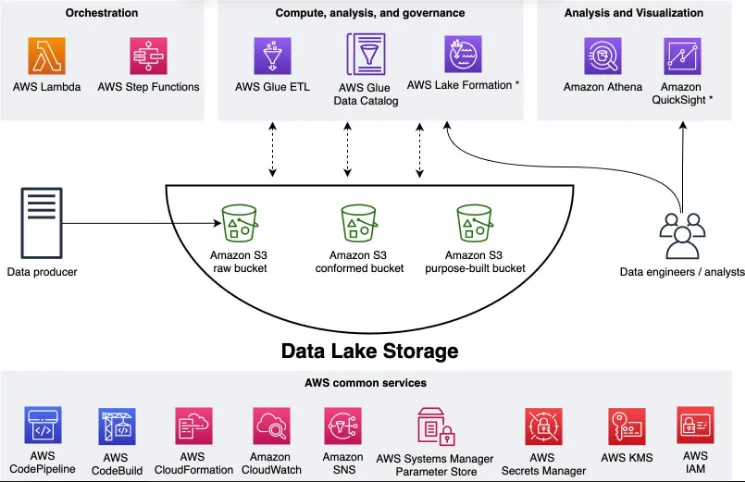
A simplified architecture looks like this:
Data Sources → Amazon S3 → AWS Glue → Amazon Athena → Insights
- Data sources: Applications, databases, APIs, and log files.
- Amazon S3: Stores raw and processed data.
- AWS Glue: Helps discover, catalog, and transform data.
- Amazon Athena: Allows us to query supported data stored in S3 using SQL.
In this article, we will focus on Amazon S3.
2. Creating Our First S3 Bucket
An S3 bucket is a container for storing objects in Amazon S3. Objects can include datasets, application logs, JSON files, and other types of data.
Let's create our first bucket.
Step 1: Open the Amazon S3 Console
- Sign in to the AWS Management Console.
- Search for Amazon S3.
- Open the S3 service.
- Select Create bucket.
Step 2: Configure the Bucket
For this tutorial, use the following configuration as a guide:
- Bucket type: General purpose.
- Bucket name: Choose a globally unique name, such as
my-first-data-lake-demo-12345. - AWS Region: Select a region appropriate for your project.
- Object Ownership: Keep the recommended default setting.
- Block Public Access: Keep all public access blocked.
- Bucket Versioning: Optional for this introductory exercise.
Replace the example bucket name with a unique name of your own. S3 bucket names must follow AWS naming rules.
For a beginner project, a private bucket is the appropriate starting point. There is no need to make our data publicly accessible.
Review the configuration and select Create bucket.

Step 3: Verify the Bucket
After creating the bucket, return to the S3 bucket list and confirm that your new bucket appears.
At this point, we have created the storage foundation for our data lake.
3. Uploading Our First Dataset
A data lake becomes useful when we start storing data that can later be processed and analyzed.
For this example, imagine that we have a CSV file containing sales transactions.
Our dataset could contain the following columns:
| order_id | order_date | product | quantity | unit_price |
|---|---|---|---|---|
| 1001 | 2026-10-01 | Laptop | 1 | 850 |
| 1002 | 2026-10-02 | Keyboard | 2 | 35 |
| 1003 | 2026-10-03 | Monitor | 1 | 220 |
These are illustrative records for our tutorial.
Save the sample data as
sales.csv.Next, open your bucket, select Create folder if you want to organize the data first, and create a prefix named
raw/sales/. Upload the CSV file into that location.Amazon S3 uses object keys rather than traditional filesystem directories. The folder-like structure shown in the console is based on object key prefixes.
Our uploaded object will have a key similar to:
s3://my-first-data-lake-demo-12345/raw/sales/sales.csvReplace the example bucket name with your actual bucket name.
We now have a dataset stored in Amazon S3 and ready for a future data processing workflow.
4. Organizing Data in a Data Lake
As data engineering projects grow, keeping files organized becomes increasingly important.
A simple structure for our project could be:
1
2
3
4
5
6
7
8
my-first-data-lake/
├── raw/
│   └── sales/
│       └── sales.csv
├── processed/
│   └── sales/
└── curated/
    └── sales/
Each prefix represents a logical stage in our data workflow.
- Raw: Original data as received from the source.
- Processed: Data that has undergone initial cleaning or transformation.
- Curated: Data prepared for specific analytical use cases.
This is an organizational convention, not a mandatory AWS folder structure. You can adapt it to your project requirements.
For this exercise, we have only populated the raw layer. We will explore how to transform data and populate the other layers in future articles.
5. Security Best Practices
Security is a fundamental part of data engineering. A poorly configured storage environment can expose sensitive business information.
Here are a few important practices to follow:
1. Keep public access blocked.
Do not enable public access unless there is a specific, reviewed requirement for it.
2. Apply least-privilege permissions.
Use IAM policies and other appropriate access controls to grant users and applications only the permissions they need.
3. Protect sensitive information.
Avoid uploading personal, financial, or confidential production data into a learning environment.
4. Understand encryption.
Amazon S3 automatically encrypts new object uploads with server-side encryption using Amazon S3 managed keys by default in supported standard configurations. Additional encryption options are available when required.
5. Monitor costs.
Although this tutorial can be inexpensive, AWS services may incur charges depending on storage, requests, data transfer, and other resources. Review current pricing and clean up resources you no longer need.
6. What Have We Learned?
In this hands-on introduction, we explored the first steps toward building a data lake on AWS.
We learned how to:
- Create an Amazon S3 bucket.
- Store a sample CSV dataset.
- Organize objects using prefixes.
- Understand the raw, processed, and curated data layers.
- Apply basic storage security practices.
These concepts provide a foundation for building more complete data engineering pipelines.
7. What's Next?
In the next article, we will explore Amazon Athena, a serverless interactive query service that allows us to analyze data stored in Amazon S3 using SQL.
We will learn how to configure a query result location, create a table over our sales dataset, and execute our first SQL queries.
This will take us one step closer to building an end-to-end data engineering workflow on AWS.
Thank you for reading!
I'm documenting my journey into Data Engineering on AWS, one practical step at a time.
Have you built a data lake on AWS before? What storage organization strategies do you use in your projects? Feel free to share your experience in the comments.
Enjoyed reading this content? Let the author know!
Your likes, comments, shares, and saves help creators reach more builders.

Loading recommendations
Loading article