
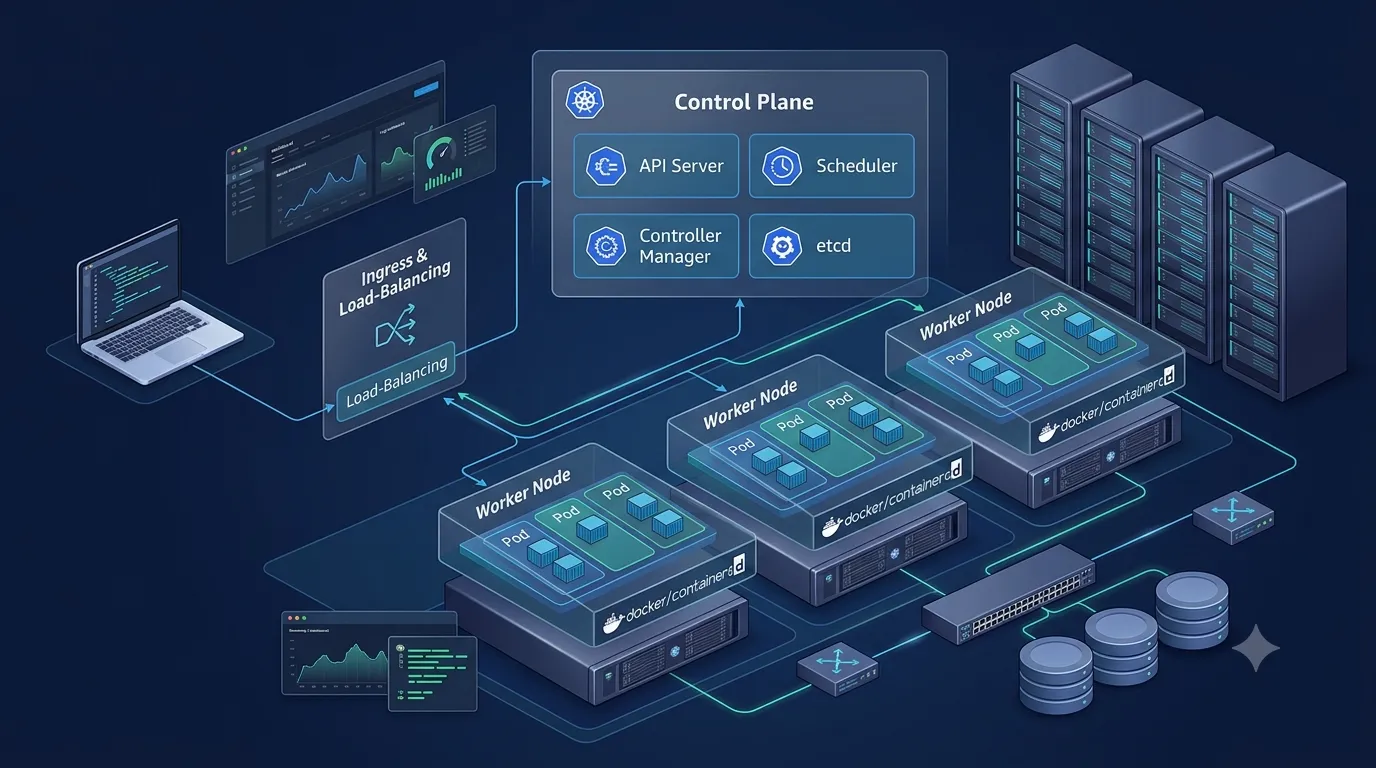
Deploying Kubernetes On-Premises: Building a Self-Managed Cluster with kubeadm
Explore how to deploy a self-managed Kubernetes cluster on on-premises servers using kubeadm, containerd, and Linux. This hands-on guide covers cluster initialization, worker-node joining, application deployment, networking, troubleshooting, and production considerations for running Kubernetes outside managed cloud services.

Introduction
Kubernetes has become a popular platform for deploying, managing, and scaling containerized applications. While many organizations use managed Kubernetes services, some prefer to run Kubernetes on their own infrastructure.
This approach is known as on-premises Kubernetes deployment.
Organizations may choose on-premises Kubernetes to maintain control over their infrastructure, meet data residency requirements, integrate with existing data centers, or run applications in environments where cloud connectivity is limited.
However, managing Kubernetes on-premises introduces additional responsibilities. Teams must configure the control plane, prepare worker nodes, manage networking, secure the cluster, monitor workloads, and plan for failures and upgrades.
In this article, we will explore how to build a self-managed Kubernetes cluster using
kubeadm, Linux servers, containerd, and a Container Network Interface (CNI) plugin. We will then deploy a sample web application and examine the operational considerations involved in running Kubernetes outside a managed cloud environment.1. Understanding on-premises Kubernetes
In a traditional deployment, an application might run directly on a physical server or virtual machine. Administrators must manually manage application processes, dependencies, resource allocation, and recovery.
Kubernetes changes this model by providing a platform for orchestrating containers across multiple machines.
With an on-premises Kubernetes cluster, the organization supplies and maintains the underlying infrastructure, while Kubernetes manages containerized workloads.
Key components
Control plane: Manages the cluster and makes decisions about application placement and desired state.
Worker nodes: Run application pods and the services required to support them.
Container runtime: Runs containers on each node. In this tutorial, we use containerd.
kubelet: Communicates with the control plane and ensures that containers assigned to a node are running.
kubeadm: Helps initialize the control plane and join additional nodes to the cluster.
kubectl: Provides the command-line interface for interacting with Kubernetes.
CNI plugin: Provides pod networking so that workloads can communicate across nodes.
Persistent storage: Provides durable storage for applications that need to retain data beyond the lifetime of a pod.
These components work together to provide a consistent deployment platform across physical servers and virtual machines.
2. Architecture of the on-premises cluster
For this tutorial, consider a small development environment with three Linux virtual machines hosted on a local hypervisor or on-premises virtualization platform.
The example uses one control-plane node and two worker nodes.
1
2
3
4
5
6
7
8
9
10
11
12
13
14
15
16
17
18
19
20
21
22
23
24
25
26
27
28
29
                  Developer / Administrator
                            |
                          kubectl
                            |
                    Private Network
                            |
                 +----------------------+
                 |   Control Plane      |
                 |----------------------|
                 | Kubernetes API       |
                 | Scheduler            |
                 | Controller Manager   |
                 | etcd                 |
                 +----------------------+
                            |
                   Cluster Networking
                            |
              +-------------+-------------+
              |                           |
      +---------------+           +---------------+
      | Worker Node 1 |           | Worker Node 2 |
      |---------------|           |---------------|
      | Application   |           | Application   |
      | Pods          |           | Pods          |
      +---------------+           +---------------+
                            |
                   Internal Service
                            |
                    Web Application
The control plane maintains the cluster's desired state. Worker nodes run the application containers, and Kubernetes Services provide stable access to workloads.
This is a simplified development architecture. A single control-plane node is a single point of failure for cluster management. A production deployment should use a properly designed highly available control plane, redundant networking, and resilient storage.
3. Preparing the infrastructure
Before installing Kubernetes, prepare the Linux machines that will form the cluster.
Each machine should have:
- A supported Linux distribution, such as Ubuntu Server.
- A unique hostname and IP address.
- Compatible CPU architecture and sufficient memory.
- Network connectivity between all cluster nodes.
- Administrative access for installation and configuration.
- A supported container runtime.
- The required Kubernetes network ports permitted by the host firewall and network security controls.
For a basic learning environment, the Kubernetes documentation specifies at least 2 GiB of RAM per machine and at least 2 CPUs for a control-plane machine. Real workloads generally require more resources.
Example hostnames:
| Role | Hostname | Example private IP |
|---|---|---|
| Control plane | k8s-control | 192.168.10.10 |
| Worker 1 | k8s-worker-1 | 192.168.10.11 |
| Worker 2 | k8s-worker-2 | 192.168.10.12 |
These addresses are examples. Replace them with addresses from your own network.
Verify connectivity between nodes before continuing. DNS or host resolution should also be configured consistently.
Check the machine's hostname and network configuration:
1
2
3
hostname
ip addr
ip route
Kubernetes components need reliable communication with the API server, and the pod network must not overlap with existing host or LAN networks.
4. Installing the container runtime and Kubernetes tools
Kubernetes needs a container runtime to execute containers. We will use containerd, which implements the Container Runtime Interface (CRI).
Install and configure containerd on all three machines. Ensure that the runtime is running and configured appropriately for Kubernetes.
Next, install these Kubernetes components on every node:
kubeadm— initializes and configures the cluster.kubelet— manages pods on the node.kubectl— manages Kubernetes resources from a client machine.
Use the official Kubernetes installation instructions for your Linux distribution and the Kubernetes minor version you intend to deploy.
Keep
kubeadm, kubelet, and the control-plane version compatible. Do not mix arbitrary package versions.Official installation guide: https://kubernetes.io/docs/setup/production-environment/tools/kubeadm/install-kubeadm/
At this stage, verify that containerd is running and that the required Kubernetes tools are installed on every machine.
5. Initializing the control plane
Once the machines and runtime are ready, initialize the cluster on the control-plane node.
For a basic development cluster, the command has this general form:
1
2
3
sudo kubeadm init \
  --apiserver-advertise-address=192.168.10.10 \
  --pod-network-cidr=<CNI-compatible-pod-CIDR>
Replace the example IP address with the control-plane address. Replace the pod CIDR placeholder with the network range required by your chosen CNI plugin.
Do not copy the command until you have selected a CNI plugin and confirmed its networking requirements.
The initialization process configures the control-plane components and creates the initial cluster configuration.
After initialization, configure
kubectl for your normal administrative user using the commands printed by kubeadm init:1
2
3
4
5
6
7
mkdir -p "$HOME/.kube"
sudo cp /etc/kubernetes/admin.conf \
"$HOME/.kube/config"
sudo chown "$(id -u):$(id -g)" \
"$HOME/.kube/config"The generated
admin.conf file grants powerful cluster-admin access. Keep it secure, and never commit it to GitHub or share it publicly.Verify that the control-plane node is registered:
1
kubectl get nodes
The node may initially show
NotReady. This is expected before the pod networking plugin has been installed.6. Configuring pod networking
Kubernetes requires a pod networking solution to allow containers to communicate across nodes.
A CNI plugin implements the networking configuration required by the cluster. Common choices include Calico, Cilium, and Flannel, each with different features and requirements.
Select a plugin that supports your Kubernetes version and intended network design.
Install the plugin using its official installation instructions.
After installation, verify the system pods:
1
kubectl get pods -n kube-system
Check the nodes again:
1
kubectl get nodes -o wide
The nodes should become
Ready when the required components and networking are functioning correctly.If CoreDNS remains pending or the nodes do not become ready, inspect the CNI pods, node conditions, and kubelet logs before proceeding.
Important: use only one pod network implementation per cluster, and ensure its pod CIDR does not conflict with the existing network.
7. Joining worker nodes
The worker nodes are where the application workloads will run.
After successful initialization,
kubeadm init prints a kubeadm join command containing the API server address, bootstrap token, and CA certificate hash.Run that command with the required privileges on each worker node.
The command follows this general structure:
1
2
3
sudo kubeadm join <control-plane-address>:6443 \
  --token <bootstrap-token> \
  --discovery-token-ca-cert-hash sha256:<ca-hash>
Use the actual command generated by your cluster. Do not use the placeholders literally.
The bootstrap token is sensitive. Share it only through a secure channel and only with the machines authorized to join the cluster.
Once both worker nodes have joined, return to the control-plane node and run:
1
kubectl get nodes -o wide
You should see the control-plane node and both worker nodes registered.
At this point, Kubernetes can schedule workloads across the available worker nodes.
8. Deploying a web application
Now that the cluster is ready, we can deploy a simple Nginx web application.
Create a file named
deployment.yaml:1
2
3
4
5
6
7
8
9
10
11
12
13
14
15
16
17
18
19
20
21
22
23
24
25
apiVersion: apps/v1
kind: Deployment
metadata:
name: web-app
spec:
replicas: 2
selector:
matchLabels:
app: web-app
template:
metadata:
labels:
app: web-app
spec:
containers:
- name: nginx
image: nginx:stable
ports:
- containerPort: 80
readinessProbe:
httpGet:
path: /
port: 80
initialDelaySeconds: 5
periodSeconds: 10This manifest defines a Deployment named
web-app with two replicas.Kubernetes attempts to maintain two pod instances matching the specified configuration. The readiness probe helps determine when a container is ready to receive traffic.
Apply the manifest:
1
kubectl apply -f deployment.yaml
Verify the Deployment and pods:
1
2
kubectl get deployments
kubectl get pods -o wide
The
-o wide option helps identify the worker node on which each pod is running.This demonstrates one of Kubernetes' main advantages: administrators declare the desired application state, and Kubernetes works to maintain that state.
9. Exposing the application with a Kubernetes Service
Pods are temporary resources, and their IP addresses can change when they are recreated.
A Kubernetes Service provides a stable endpoint for accessing matching pods.
Create
service.yaml:1
2
3
4
5
6
7
8
9
10
11
12
apiVersion: v1
kind: Service
metadata:
name: web-app-service
spec:
type: NodePort
selector:
app: web-app
ports:
- port: 80
targetPort: 80
nodePort: 30080Apply the Service:
1
kubectl apply -f service.yaml
Verify the Service:
1
kubectl get service web-app-service
The application can now be reached through the NodePort on a node IP, provided the host firewall and network allow the connection.
For example, a client on the permitted network could access:
1
http://192.168.10.11:30080
This is only an example URL. Use an actual reachable node IP.
NodePort is useful for a basic demonstration, but it is not a complete production ingress strategy. A production on-premises environment may use an external load balancer, an ingress controller, or a solution such as MetalLB to provide reachable service addresses, depending on its network design.
10. Testing self-healing and scaling
One of Kubernetes' important capabilities is its ability to reconcile the actual state of the application with the desired state.
For example, if a pod is deleted, the Deployment controller should create a replacement pod to maintain the configured replica count.
List the pods:
1
kubectl get pods
Delete one of the application pods:
1
kubectl delete pod <pod-name>
Replace
<pod-name> with the actual name of a pod belonging to the web-app Deployment.Then inspect the pods again:
1
kubectl get pods -w
You should observe Kubernetes creating a replacement pod.
You can also scale the application:
1
kubectl scale deployment web-app --replicas=3
Verify the new replica count:
1
2
kubectl get deployment web-app
kubectl get pods -o wide
This demonstrates how Kubernetes manages application replicas without requiring an administrator to manually start each container.
However, self-healing has limits. Kubernetes cannot compensate for every infrastructure failure. If a physical server, network switch, or shared storage system fails, the cluster's ability to recover depends on the available capacity and the design of those systems.
11. Monitoring and troubleshooting
Running Kubernetes on-premises means the team is responsible for observing both the application and the infrastructure beneath it.
Useful initial commands include:
1
2
3
4
5
kubectl get nodes
kubectl get pods -A
kubectl get events --sort-by=.metadata.creationTimestamp
kubectl describe pod <pod-name>
kubectl logs <pod-name>
These commands help identify scheduling failures, image-pull errors, container crashes, networking issues, and readiness probe failures.
Common problems include:
Node remains NotReady: Check the kubelet, container runtime, and CNI plugin.
Pod remains Pending: Inspect scheduling events, resource requests, node capacity, and taints.
ImagePullBackOff: Verify the image name, tag, registry access, and image-pull credentials.
Service is unreachable: Check Service selectors, pod readiness, endpoints, firewall rules, and the selected exposure mechanism.
DNS resolution fails: Inspect CoreDNS and verify pod networking and DNS configuration.
For more advanced monitoring, integrate a metrics collection and visualization solution such as Prometheus and Grafana. Centralized logging and alerts can also help operators identify problems before they affect users.
12. Security considerations for on-premises Kubernetes
A self-managed Kubernetes cluster requires careful security planning.
Important practices include:
- Keep the Kubernetes control plane and nodes updated with supported security patches.
- Restrict access to the Kubernetes API server to authorized networks and administrators.
- Use Kubernetes RBAC to assign users and service accounts only the permissions they require.
- Protect cluster certificates, kubeconfig files, and bootstrap tokens.
- Configure network policies where supported by the chosen CNI plugin.
- Use trusted container images and scan them for known vulnerabilities.
- Store application secrets securely rather than committing them to source control.
- Apply host firewall rules and protect node management interfaces.
- Back up etcd and test restoration procedures.
- Monitor audit logs and application activity.
- Document certificate renewal, cluster upgrades, and incident recovery procedures.
Security should be built into the deployment from the beginning rather than added after applications are running.
13. High availability and production readiness
The three-node example in this article is a learning environment, not a fully highly available Kubernetes control plane.
With only one control-plane node, failure of that machine can make the Kubernetes API unavailable and prevent normal cluster management.
A production design should evaluate:
- Multiple control-plane nodes and a stable API endpoint.
- Appropriate etcd quorum and backup procedures.
- Redundant network paths and power supplies.
- Reliable persistent storage and recovery mechanisms.
- Sufficient worker capacity to handle node failures.
- Load balancing for externally accessible applications.
- Disaster recovery, monitoring, and tested upgrade procedures.
The exact architecture depends on the application's availability requirements, existing data-center resources, and operational capabilities.
Kubernetes provides orchestration, but the organization remains responsible for making the underlying infrastructure resilient.
14. On-premises Kubernetes versus managed Kubernetes
Both deployment models use Kubernetes concepts such as pods, Deployments, Services, and controllers. The primary difference is who operates the infrastructure and control plane.
| Area | On-premises Kubernetes | Managed Kubernetes |
|---|---|---|
| Infrastructure | Organization manages servers or VMs | Uses a cloud provider's infrastructure |
| Control plane | Organization operates and maintains it | Provider manages key control-plane components |
| Customization | High control over infrastructure | Depends on provider capabilities |
| Operations | More direct responsibility | Some operational tasks are simplified |
| Hardware and networking | Organization provisions and maintains them | Cloud infrastructure services provide them |
| Cost model | Hardware, power, licensing, and operations | Service, compute, networking, and storage charges |
Neither approach is automatically better for every workload. The choice depends on compliance, latency, control, cost, existing infrastructure, and team expertise.
Conclusion
Deploying Kubernetes on-premises gives organizations control over the infrastructure running their containerized applications. It also introduces responsibilities that managed Kubernetes services handle differently, including control-plane maintenance, networking, storage, security, monitoring, and recovery.
By preparing Linux nodes, configuring containerd, initializing a cluster with kubeadm, installing a CNI plugin, and deploying an application through Kubernetes manifests, teams can build a foundation for self-managed container orchestration.
The next step is to extend this environment with automated deployments, centralized monitoring, persistent storage, network policies, and high-availability control-plane architecture.
The key takeaway is that successful on-premises Kubernetes is not just about getting pods to run. It is about designing, securing, monitoring, and maintaining a reliable platform throughout the application's lifecycle.
References
- Kubernetes documentation — Creating a cluster with kubeadm: https://kubernetes.io/docs/setup/production-environment/tools/kubeadm/create-cluster-kubeadm/
- Kubernetes documentation — Installing kubeadm: https://kubernetes.io/docs/setup/production-environment/tools/kubeadm/install-kubeadm/
- Kubernetes documentation — Highly available clusters: https://kubernetes.io/docs/setup/production-environment/tools/kubeadm/high-availability/
This article describes a reference implementation for learning and experimentation. Validate version compatibility, networking, security, and recovery requirements before using a similar configuration in production.
Enjoyed reading this content? Let the author know!
Your likes, comments, shares, and saves help creators reach more builders.

Loading recommendations
Loading article