
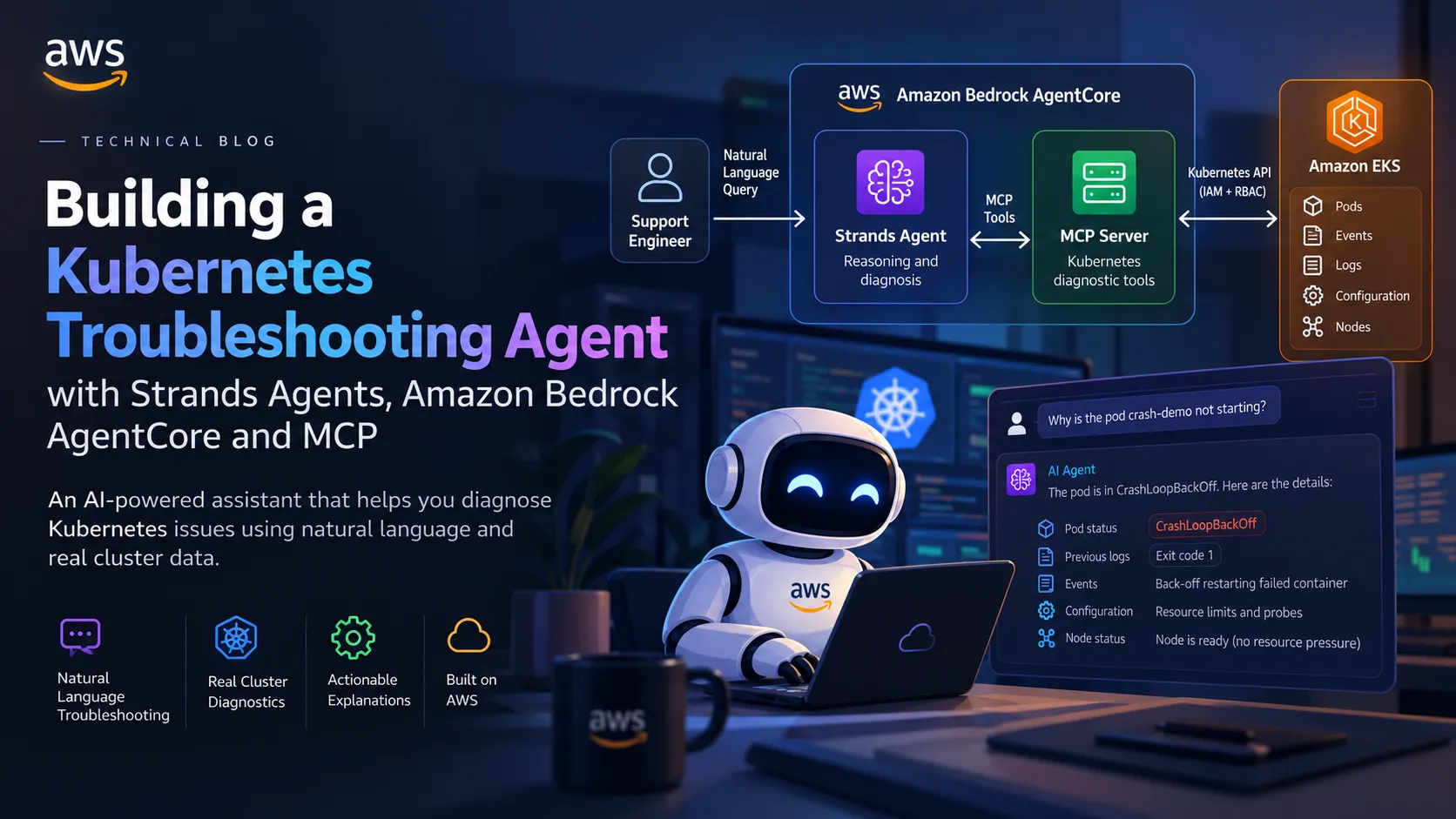
Building a Kubernetes Troubleshooting Agent with Strands Agents and Amazon Bedrock AgentCore
Kubernetes incidents often begin with a simple question from a support engineer: Why is this pod not running? The answer may be hidden across pod status, container logs, Kubernetes events, workload configuration, and node conditions. Checking each signal manually takes time, and the evidence is easy to interpret in isolation. In this project, we are building a small troubleshooting agent with Python, Strands Agents, and Amazon Bedrock

Introduction
When a Kubernetes workload fails, diagnosing the problem often means correlating several sources of information: pod status, container termination details, logs, Kubernetes events, workload configuration, and node conditions. A single signal rarely tells the whole story, and manually gathering that evidence can slow down support engineers.
In this project, I built a Kubernetes troubleshooting agent using Python, Strands Agents, Amazon Bedrock, and Amazon Bedrock AgentCore Runtime. The agent accepts a natural-language troubleshooting request, gathers relevant cluster evidence through diagnostic tools, and produces an explanation grounded in the results.
The architecture separates reasoning from Kubernetes access. Strands is responsible for deciding which diagnostic tools to call and interpreting their output. A dedicated Model Context Protocol (MCP) server exposes the Kubernetes tools and handles cluster queries. AgentCore Runtime hosts the agent and the MCP server as independent components.
Why Strands Agents?
Strands Agents is a Python SDK for building model-driven agents. It connects a model with instructions and tools, then orchestrates the interaction: the model can request a tool call, inspect the returned result, and continue until it can provide a final response.
This is a natural fit for troubleshooting because different incidents require different evidence. An
ImagePullBackOff problem calls for image and event information, while an OOMKilled termination calls for container termination details and resource configuration. Rather than encode every diagnosis in one large decision tree, the agent can select from focused tools and correlate their results.Strands does not inherently know the state of a Kubernetes cluster. It only has access to information supplied by its tools. The system instructions therefore emphasize evidence-based responses: do not invent cluster state, logs, events, or tool results; distinguish observed facts from possible explanations; and recommend next diagnostic checks when the evidence is incomplete.
Creating the Strands agent
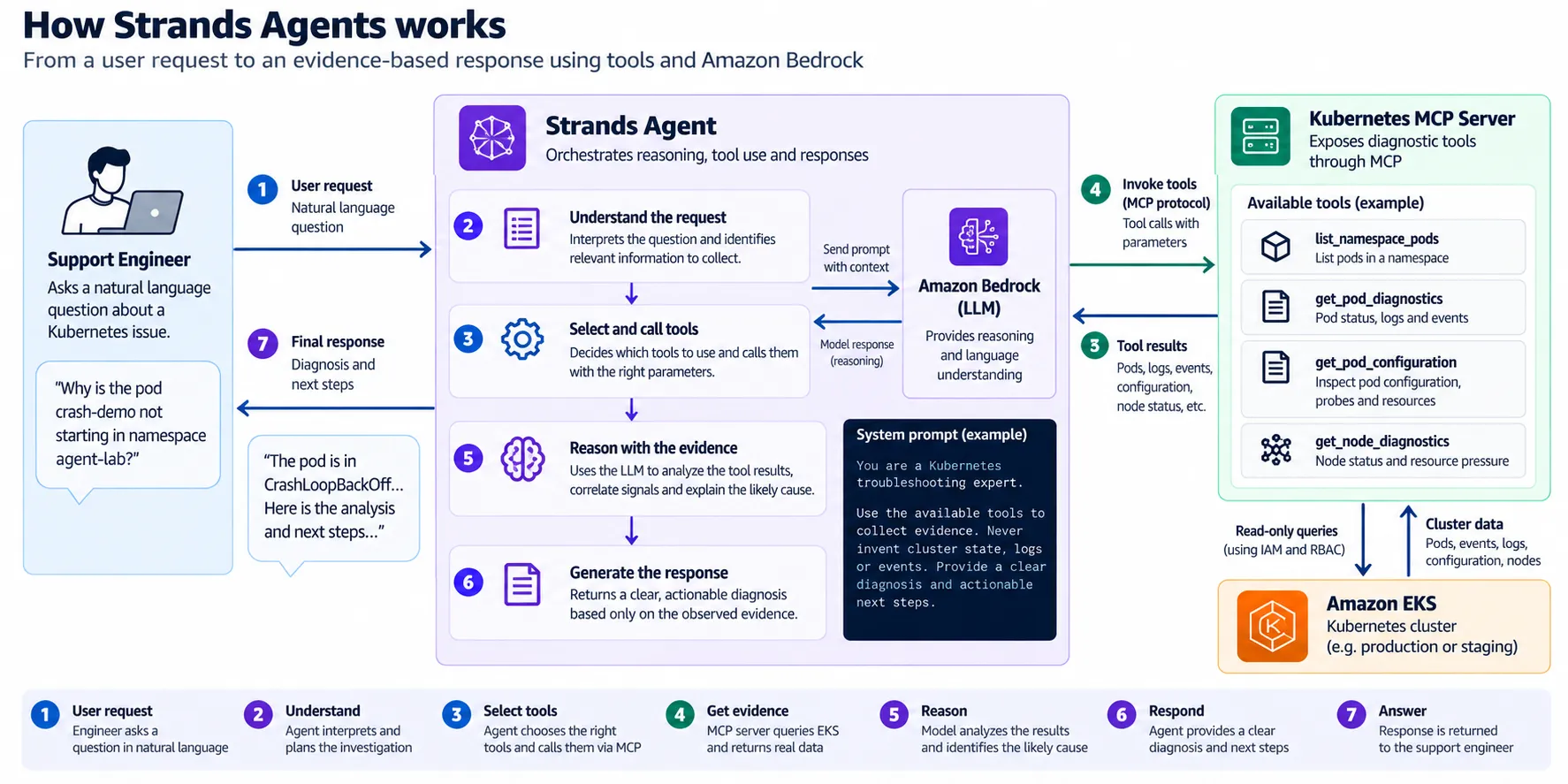
The agent brings together three core elements:
- A model: configured through Strands to use a model available in Amazon Bedrock.
- Tools: functions that retrieve bounded sets of Kubernetes diagnostic information.
- System instructions: guidance for collecting evidence, interpreting results, and returning concise, actionable explanations.
At runtime, a request is passed to the Strands agent. The model decides which tools are relevant, Strands orchestrates their execution, and the results are fed back into the model so it can formulate a diagnosis. This lets the agent adapt its investigation to the incident instead of following one fixed sequence of commands.
The implementation keeps the agent's reasoning separate from the mechanics of querying Kubernetes. That boundary becomes especially important when the same agent is hosted in AgentCore and its tools are supplied by a remote MCP server.
Designing tools around Kubernetes troubleshooting cases
The diagnostic capabilities are deliberately focused. Instead of giving the model unrestricted access to Kubernetes, the agent uses tools that collect specific facts from the cluster.
Namespace inventory
list_namespace_pods lists pods in a namespace and helps identify which workload needs investigation. It gives the agent an initial view of the resources involved in a support request.Pod diagnostics
get_pod_diagnostics retrieves runtime status, previous container logs when available, and relevant Kubernetes events. These signals help explain restart loops, image-pull failures, and container terminations.Pod configuration
get_pod_configuration inspects workload details such as container commands, probes, and resource requests or limits. Configuration adds context to runtime symptoms, but it does not by itself prove a root cause.Node diagnostics
get_node_diagnostics gathers node readiness and resource-pressure information relevant to scheduling and runtime problems. This tool can also reveal when the agent's current permissions do not allow it to inspect a node.These tools complement each other. Kubernetes remains the source of truth; the agent's responsibility is to choose relevant queries, correlate the returned facts, explain what the evidence supports, and identify what remains unknown.
Troubleshooting scenarios
The implementation focuses on four common failure patterns.
CrashLoopBackOff
A container repeatedly exits and Kubernetes restarts it. Pod diagnostics can reveal restart counts, current and previous container states, logs when available, and related events. The agent can summarize the observed failure and suggest checks involving application behavior, commands, probes, or resource settings without assuming a cause that has not been established.
ImagePullBackOff
A pod cannot start because Kubernetes cannot pull its container image. Pod status and events can identify the reported image-pull failure. Based on the actual error, the agent can recommend checking the repository and tag, registry access, or image-pull credentials.
OOMKilled
A container has been terminated after memory exhaustion. The termination reason and exit code are useful evidence, and the pod configuration provides the configured memory requests and limits. However, configured limits are not historical usage metrics. Without monitoring data, the agent must not claim to know the container's actual memory consumption before termination.
Pending due to scheduling constraints
A pod remains Pending because the scheduler cannot place it on a node. Scheduling events may report insufficient CPU, untolerated taints, or other placement constraints. Node diagnostics provide additional context when the runtime identity is authorized to read the relevant node information.
These cases exercise different diagnostic signals while keeping the tool surface limited to read-only operations.
Deploying the agent with Amazon Bedrock AgentCore Runtime
Amazon Bedrock AgentCore Runtime provides the managed runtime in which the Strands agent can be invoked by an external client. The caller sends a request to the runtime, the agent processes it using its configured model and tools, and the response is returned to the caller.
This separates the client from the agent implementation. A local Python client can invoke the deployed runtime through the AWS SDK, and other clients can be added without rewriting the diagnostic reasoning. Each caller still needs an appropriate authentication method and permission to invoke the runtime.
For the Kubernetes troubleshooting flow, the agent runtime is the reasoning layer. Kubernetes connectivity and cluster permissions belong in the dedicated tool layer rather than being mixed into the agent's application logic.
Connecting Kubernetes tools through MCP
The Model Context Protocol provides a standard way to expose tools to an AI application. In this architecture, the Kubernetes MCP server publishes the diagnostic capabilities as MCP tools. The Strands agent connects to the remote MCP endpoint, discovers the available tools through an MCP client—for example, using
mcp_client.list_tools_sync() —and supplies those tools to Strands.The request flow is:
- A support engineer submits a natural-language question to the Strands agent hosted on AgentCore.
- Strands selects the diagnostic tools needed to investigate the issue.
- The agent calls the MCP server using the configured endpoint and authentication.
- The MCP server validates the requested cluster context and executes the permitted Kubernetes queries.
- The tool results return to the agent, which correlates the evidence and responds to the caller.
This design keeps responsibilities explicit: Strands reasons about the incident, MCP exposes diagnostic capabilities, and Kubernetes supplies the actual cluster state.
Making the MCP server reusable across clusters
A useful troubleshooting service should not be permanently tied to one EKS cluster. The MCP layer can instead use administrator-configured cluster profiles, allowing a caller to request diagnostics against a named, authorized context such as a development or staging cluster.
Cluster selection must be validated by the MCP server. A model or caller should not be allowed to provide arbitrary API endpoints, kubeconfig contents, or credentials. The server should only connect to explicitly configured clusters for which the runtime has valid authentication, network access, and authorization.
For EKS, this includes the appropriate AWS identity, EKS authentication, Kubernetes authorization, and network path to the cluster API. Access should be limited to the read-only operations required by the diagnostic tools. Supporting multiple clusters does not mean granting access to every cluster in an AWS account; each configured context must have a defined security boundary.
This abstraction also keeps the Strands agent independent of the specific cluster implementation. The agent asks for diagnostic information through tools, while the MCP layer resolves the authorized Kubernetes context and retrieves the data.
Validating the agent against a real EKS cluster
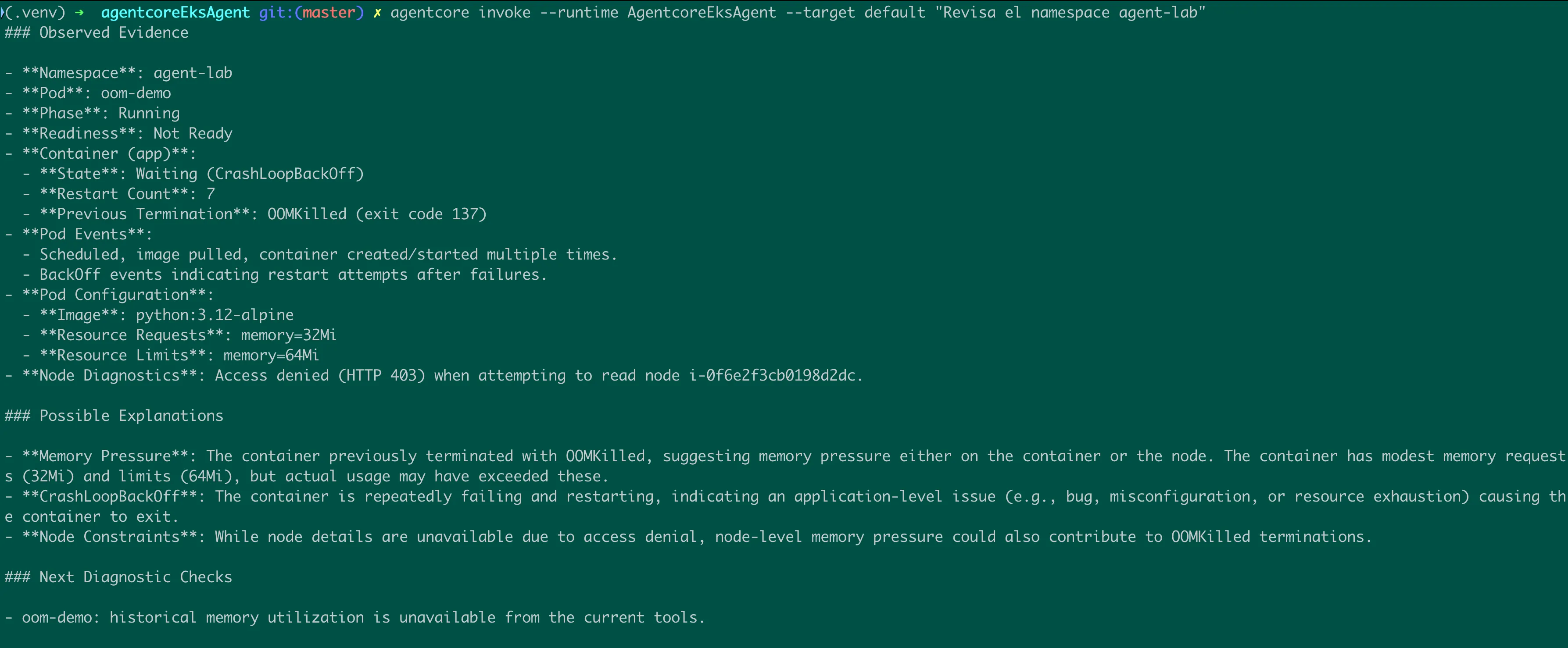
After deploying the Strands agent to AgentCore Runtime, I invoked it against a real Amazon EKS cluster and asked it to diagnose the
oom-demo pod in the agent-lab namespace.The response reported the following observed evidence:
- Pod phase: Running, but not Ready.
- Container state: Waiting in CrashLoopBackOff.
- Restart count: 7.
- Previous termination: OOMKilled, with exit code 137.
- Resource configuration: 32 MiB memory request and 64 MiB memory limit.
- Pod events: The image was pulled and the container was created and started multiple times, followed by restart backoff events.
The agent identified memory pressure as a plausible explanation and recommended further investigation. It did not claim to know the pod's historical memory usage because that information was not available through the diagnostic tools.
The run also surfaced a permissions boundary: node diagnostics received HTTP 403 when attempting to read a node. The agent reported the access denial rather than presenting node conditions as known facts. This is an important part of trustworthy troubleshooting: a missing observation must remain missing, not become an invented diagnosis.
This invocation demonstrates the agent's ability to gather and correlate real EKS evidence. The remote MCP integration is the next architectural step for separating the Kubernetes access layer from the agent and making the tools reusable across explicitly authorized clusters.
Security and operational boundaries
The architecture depends on more than deploying two runtimes. The agent and MCP server require appropriately scoped execution identities, the MCP endpoint needs an explicit authentication configuration, and the MCP runtime needs network connectivity and authorization to query its target cluster.
The diagnostic tools should remain read-only. Credentials should not be embedded in prompts, source code, or container images. Cluster selection must be allowlisted and authorized by the server, and any unavailable information—whether due to missing telemetry or insufficient permissions—must be reported transparently.
Conclusion
This project combines Strands Agents, Amazon Bedrock, AgentCore Runtime, MCP, and Kubernetes diagnostic tools into a support-oriented troubleshooting architecture. Strands provides the reasoning and tool orchestration, AgentCore hosts the agent runtime, and MCP separates the agent from the Kubernetes access layer.
The real EKS invocation validates the agent's ability to reason over cluster evidence and communicate uncertainty. The next step is to complete the remote MCP integration and make cluster selection reusable and secure, so the same troubleshooting agent can work with multiple explicitly authorized Kubernetes contexts.
References
Enjoyed reading this content? Let the author know!
Your likes, comments, shares, and saves help creators reach more builders.

Loading recommendations
Loading article