
Building a Serverless Python Chatbot with AWS Lambda: From HTTP Requests to AI-Powered Responses
Learn how to build a simple Python chatbot using AWS Lambda and API Gateway, and discover how serverless architecture can help you scale from predefined responses to AI-powered conversations without managing servers.

1. The Idea: A Chatbot Without a Server
Imagine you're building a customer support chatbot for an e-commerce website. Customers can ask questions about return policies, order status, or business hours.
Traditionally, you might deploy your Python application on an EC2 instance and keep the server running to handle incoming requests.
But what if your chatbot receives only 10 messages in the morning and hundreds in the evening?
This is where AWS Lambda becomes useful. Instead of managing a server that stays available, you can run your Python chatbot logic whenever a request triggers it.
2. How Does It Work?
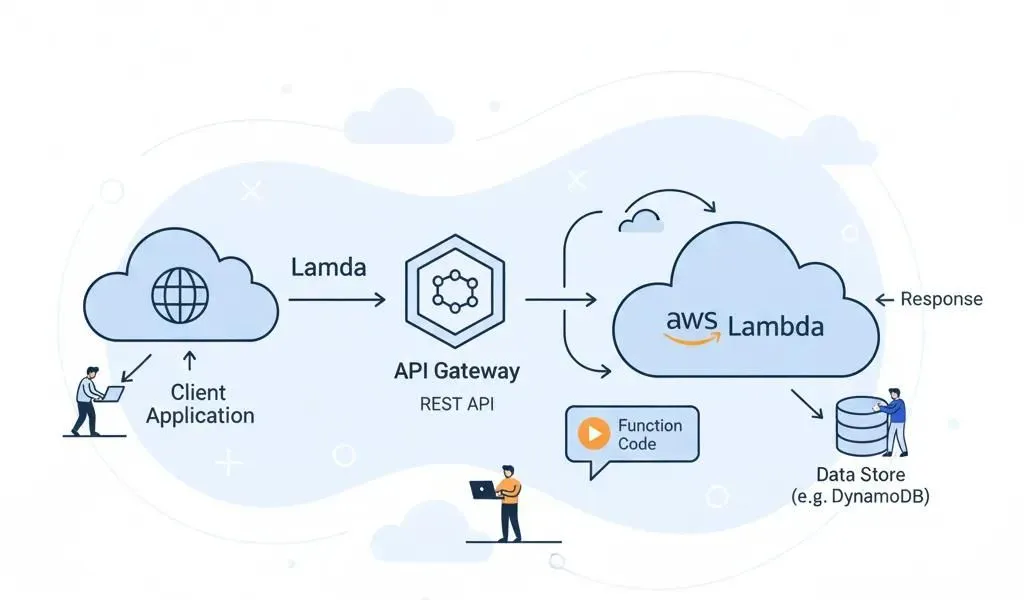
The architecture is simple:
Customer → API Gateway → AWS Lambda (Python) → Response
- API Gateway: Receives the HTTP request containing the customer's message.
- AWS Lambda: Executes your Python code to process the message and determine the response.
- Response: Lambda returns the result through API Gateway to the chatbot interface.
For example, when a customer asks, "What is your return policy?", Lambda can check predefined rules or retrieve the relevant information and return an answer.
The function runs when triggered, without requiring you to manage the underlying server.
3. From Rules to AI-Powered Conversations
Initially, your chatbot might use simple conditions to respond to specific keywords.
However, customers don't always ask questions in the same way. For example:
- "What is your return policy?"
- "Can I return my order?"
- "How many days do I have to send an item back?"
These questions may have the same intent, even though the wording differs.
To make the chatbot smarter, you can integrate Amazon Bedrock to access supported foundation models and generate more natural responses. For company-specific answers, you can also connect a knowledge base so the chatbot can retrieve relevant information.
AWS Lambda handles the request and coordinates the logic, while the AI model generates the response.
4. Why Use AWS Lambda?
- No server management: Focus on application logic instead of maintaining an EC2 instance.
- Automatic scaling: Handle changing request volumes, subject to concurrency limits and quotas.
- Pay-per-use: Lambda charges are based on requests and execution duration, helping reduce compute costs during idle periods.
- Easy integration: Connect your chatbot to API Gateway, databases, and AI services.
Keep in mind that AI model usage, database operations, and other AWS services can incur additional costs.
Final Thoughts
Building a chatbot isn't just about writing Python code. It's also about choosing an architecture that fits the application's needs.
AWS Lambda provides a simple way to run chatbot logic on demand, API Gateway exposes it through HTTP, and Amazon Bedrock can extend it with AI-powered responses.
Enjoyed reading this content? Let the author know!
Your likes, comments, shares, and saves help creators reach more builders.

Loading recommendations
Loading article