
Data Platforms, Decoded: Five Jobs, Two Real AWS Builds, and 500+ Builders in Sahiwal
A data platform is just five jobs: ingest, store, transform, orchestrate, visualize. I shared this with 500+ students and professionals at AWS Student Community Day in Sahiwal, with two real AWS builds: a batch and streaming platform, and an AI-native matching system on Amazon Bedrock.

Opinions are my own and do not reflect those of AWS.
A full hall in Sahiwal
I organized AWS Student Community Day in Sahiwal, Pakistan, and I also took the stage. In the hall were 500+ builders, students sitting next to working professionals, all there to learn how real systems are built on AWS. My talk had one message: a data platform is five jobs, and you can start learning them this week.
This article is the written version of that talk, with more detail than the slides allowed.
Start with a problem, not a tool
I opened with a story. A marketing team asked an ordinary question: how are the customers from our new campaign, both newly acquired and reactivated, performing over the next 30 days?
Answering it needed three kinds of data:
- Ad attribution: who we acquired and from which campaign
- In-app behavior: what those customers did after arriving
- Transactions: what they actually paid, sent, and spent
Each lived in a separate system, and none of them could be joined. You cannot judge customer quality, find the true relationships between campaigns and behavior, or predict future usage from three disconnected islands. The fix was not another dashboard. It was one place where all three could be queried together, and that is what a data platform is.
What a data platform is
I explained it with a city water system. It pulls water from many sources, cleans it, stores it in reservoirs, and delivers it exactly where it’s needed, on demand. A data platform does the same with data, and the decisions it feeds are made by people or by AI.
Every platform, on every cloud, does five jobs:
Job | What it means | AWS services |
|---|---|---|
Ingest | Bring data in from many sources | Kinesis, MSK, Lambda |
Store | Keep it safe, organized, cheap | S3, Redshift, DynamoDB |
Transform | Clean and shape it | Glue, EMR |
Orchestrate | Automate the flow | MWAA, Step Functions |
Visualize | Put insight in front of people | QuickSight |
Tools change every year, and these jobs don’t. If you can place a service into one of the five jobs, you can understand almost any architecture diagram you will ever see.
Build 1: a batch and streaming platform on AWS
The first platform ingests four live source systems: MySQL, PostgreSQL and SQL Server on Amazon RDS, plus Amazon DynamoDB. The goal was near real-time data, reliable batch processing, and self-service analytics.
Here is how the pieces fit:
- Capture changes, not snapshots. Change data capture streams every row change from the relational sources, and a Lambda function handles DynamoDB Streams. You get changes as they happen instead of re-reading whole tables.
- Decouple with Kafka. A Kafka cluster on EC2 sits between producers and consumers. Sources don’t need to know who reads their data, and slow consumers don’t slow down fast producers.
- Process in two lanes. Airflow orchestrates batch jobs, and streaming jobs run alongside them, both as Spark on EMR. One platform serves both needs.
- Store as Parquet on S3. A columnar format on cheap object storage, with a Hive metastore giving it a table-like structure.
- Query and visualize. Presto runs distributed SQL over the lake, and Redash turns results into dashboards.
- Operate with discipline. CloudWatch handles monitoring and alerts, IAM handles access, and the Glue Data Catalog keeps metadata discoverable.
The takeaway is the shape: capture, decouple, process, store, serve, with governance around all of it. Swap Kafka for MSK or Kinesis, or Presto for Athena, and the shape stays the same.
Build 2: AI-native entity matching on Amazon Bedrock
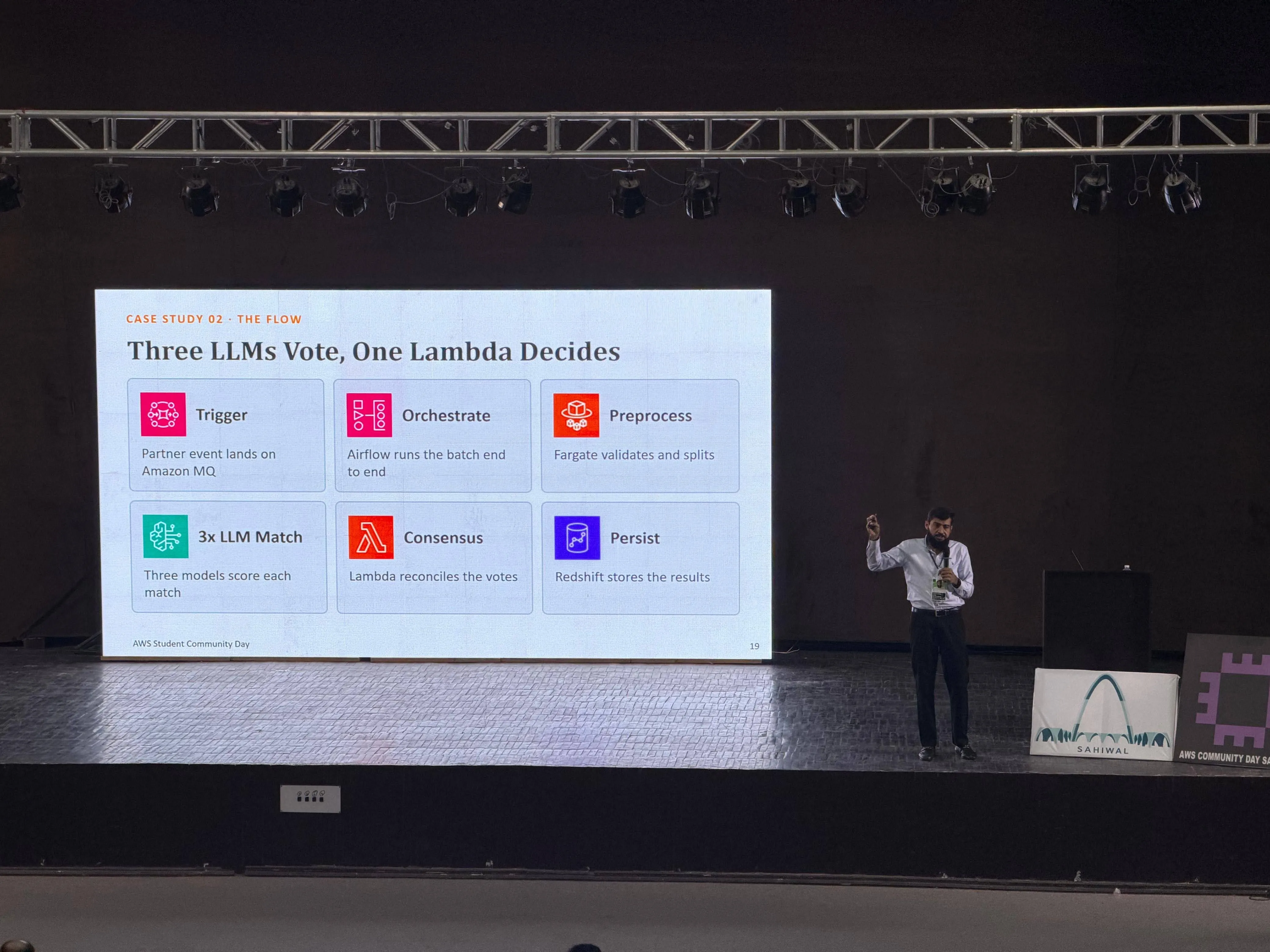
The second platform resolves entity identities across partner systems, deciding whether two records describe the same real-world company. It uses multiple language models in consensus.
The flow:
- A partner event lands on Amazon MQ.
- A Lambda trigger deduplicates the event by batch ID and starts the run.
- Amazon MWAA (managed Airflow) orchestrates the batch end to end.
- ECS Fargate tasks validate, enrich, and split the data.
- Three Amazon Bedrock models (Titan, Claude, and Llama) each score every match independently, in parallel.
- A Lambda consensus step reconciles the three votes into one decision.
- Amazon Redshift stores checkpoints and results, and a final Lambda notifies the partner system.
Three design ideas are worth stealing:
- Consensus beats a single model. One model can be confidently wrong. Three independent opinions turn a disagreement into a signal you can send for review.
- Make every step safe to repeat. Deduplicating by batch ID and checkpointing to Redshift mean a retried run doesn’t create duplicate work.
- Wrap AI in normal engineering. The models sit inside an orchestrated, observable pipeline, with CodePipeline and ECR for delivery, Secrets Manager for credentials, and CloudWatch and X-Ray for visibility. The AI is one component, and the rest is regular platform work.
What the two builds have in common
They look different, one a streaming lakehouse and one an AI pipeline, but four patterns appear in both:
- Decouple. A stream or a queue (Kafka in one, Amazon MQ in the other) separates the parts of the system.
- Orchestrate. Airflow, self-managed in one build and MWAA in the other, makes the flow explicit and restartable.
- Land results somewhere queryable. S3 with Presto in one, Redshift in the other.
- Observe and govern. Monitoring, access control, and metadata are built in from the start.

If you remember nothing else, remember these four patterns.
Your first week on AWS
You don’t need a job title to start. You need an account and one small idea. Build a platform in miniature:
- Create a free AWS account. New accounts can choose the free plan, which as of this writing includes $100 in credits at sign-up and up to $100 more for trying services like EC2 and Bedrock. It runs for six months or until the credits are gone, and the always-free services remain afterward. Check the current terms before you start.
- Upload a CSV to S3. One bucket is your first data lake.
- Query it with Athena. Define a table over the file and run plain SQL with no server to manage. A first query can be as simple as
SELECT campaign, COUNT(*) FROM my_table GROUP BY campaign;
- Automate with Lambda. Trigger a function whenever a new file lands in the bucket.
- Join a Cloud Club or community. Learning in public is faster than learning alone.
That sequence already covers ingest, store, transform, and orchestrate. Add QuickSight and you have all five jobs.
Why this event, and why Sahiwal
Sahiwal is not where tech headlines usually point. But a hall that full, with students and professionals asking real architecture questions, shows that talent was never the missing piece in smaller cities. Access was. That is why I started Sahiwal Tech Community, and why I organized this day: to bring real AWS knowledge, real architectures, and real mentors into the room.
Thank you to the volunteers, speakers, and the wider AWS community who made it happen. Their work rarely gets tagged, and it is the reason the day worked.
Your turn
If you were handed an AWS account today, which of the five jobs would you build first? Tell me in the comments, and if you’re in Pakistan and want to build with us, find Sahiwal Tech Community.
Enjoyed reading this content? Let the author know!
Your likes, comments, shares, and saves help creators reach more builders.

Loading recommendations
Loading article