
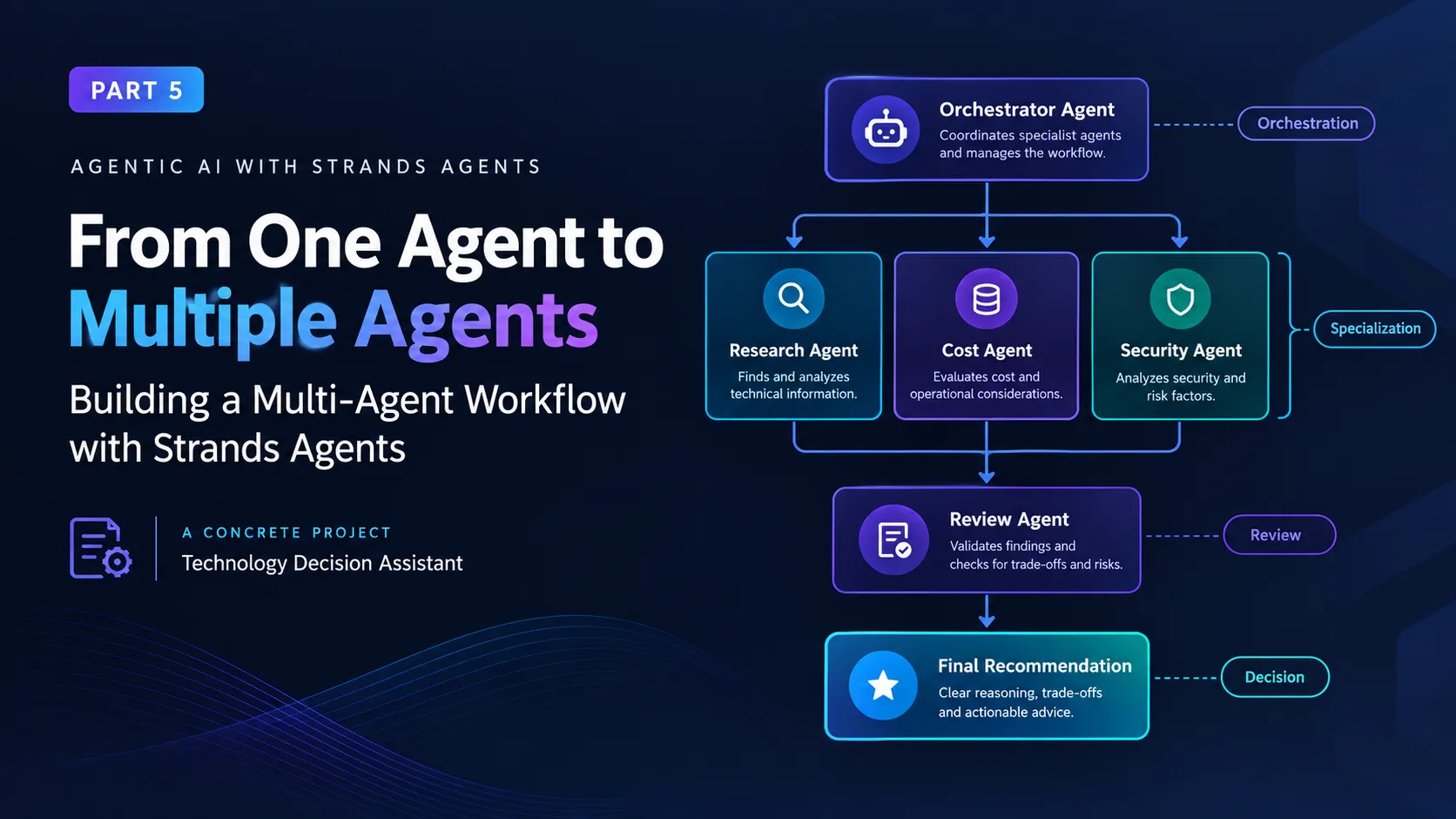
From One Agent to Multiple Agents: Building a Multi-Agent Workflow with Strands Agents
In Part 5 of my agentic AI journey, I move from a single Strands agent to a multi-agent architecture. I build specialized agents for planning, research, execution, and review, then explore how orchestration, shared context, tool boundaries, failure handling, and observability change when multiple agents work together.


Continuing My Agentic AI Journey
This is Part 5 of my journey into agentic AI with Strands Agents.
So far, I have been building the architecture one step at a time.
In Part 1, I started with the fundamentals of an AI agent and its tool-use loop.
In Part 2, I moved from a basic agent to a practical workflow where the agent could understand a request, select a tool, execute it, and use the result.
In Part 3, I connected agents to APIs, MCP, and external systems.
In Part 4, I focused on validation, permissions, human approval, and observability.
That progression led me to another question:
What happens when one agent is no longer enough?
A single capable agent can handle many tasks.
But some problems naturally contain different types of work.
One part may require research.
Another may require analysis.
Another may require security evaluation.
And before producing the final answer, someone should review the result.
Instead of asking one agent to do everything, we can divide those responsibilities across multiple specialized agents.
That is what I wanted to explore in this part.
Rather than only explaining multi-agent concepts, I decided to build a small working project.
The Project: A Multi-Agent Technology Decision Assistant
For this experiment, I built a Multi-Agent Technology Decision Assistant.
The idea is simple.
A user gives the system a technology decision such as:
"Compare three approaches for building an internal AI knowledge assistant. Consider cost, implementation complexity, and security, then recommend one."
Instead of sending the entire request to one agent, the system divides the work.
1
2
3
4
5
6
7
8
9
10
11
12
13
14
15
16
17
18
19
20
                         User Request
                              │
                              ▼
                    ┌──────────────────┐
                    │ Orchestrator     │
                    │ Agent            │
                    └────────┬─────────┘
                             │
              ┌──────────────┼──────────────┐
              ▼              ▼              ▼
        Research Agent   Cost Agent   Security Agent
              │              │              │
              └──────────────┼──────────────┘
                             ▼
                    ┌──────────────────┐
                    │ Review Agent     │
                    └────────┬─────────┘
                             │
                             ▼
                       Final Recommendation
Each agent has one job.
Research Agent
Finds and organizes technical information.
Cost Agent
Focuses on cost-related considerations.
Security Agent
Looks for security, permissions, and operational concerns.
Review Agent
Checks whether the final recommendation is actually supported by the collected information.
Orchestrator
Coordinates the specialists and produces the final response.
This is a small project, but it demonstrates several important multi-agent concepts without requiring a large infrastructure setup.
Why Build a Project Instead of Just Explaining Multi-Agent Systems?
I could have written an article explaining:
1
Agent A → Agent B → Agent C
But that doesn't really show what changes when the architecture becomes multi-agent.
Building the project exposed several practical questions:
- How should responsibilities be divided?
- How does one agent call another?
- What information should be passed between agents?
- What tools should each agent receive?
- What happens when one agent fails?
- How do we review the final result?
- How do permissions change?
- How do we observe the complete workflow?
Those questions are much more useful to me than simply knowing the terminology.
Project Structure
I kept the initial project intentionally small.
1
2
3
4
5
6
7
multi-agent-decision-assistant/
│
├── app.py
├── agents.py
├── tools.py
└── data/
    └── technologies.json
The first version does not need a database or external API.
I wanted to understand the multi-agent architecture first.
The data file contains a small technology catalog:
1
2
3
4
5
6
7
8
9
10
11
12
13
14
15
16
17
18
19
20
21
22
23
24
25
{
  "options": [
    {
      "name": "Managed RAG",
      "cost": "medium",
      "complexity": "medium",
      "security": "high",
      "description": "A managed retrieval-augmented generation architecture."
    },
    {
      "name": "Self-Hosted RAG",
      "cost": "high",
      "complexity": "high",
      "security": "high",
      "description": "A self-managed retrieval and generation architecture."
    },
    {
      "name": "External AI SaaS",
      "cost": "medium",
      "complexity": "low",
      "security": "medium",
      "description": "A third-party managed AI solution."
    }
  ]
}
The data is intentionally simple.
The interesting part is what the agents do with it.
Step 1: Create a Shared Research Tool
I started with a normal Strands custom tool.
1
2
3
4
5
6
7
8
9
10
11
from strands import tool
import json
def get_technology_options() -> str:
"""Return the available technology options."""
with open("data/technologies.json", "r") as file:
data = json.load(file)
return json.dumps(data, indent=2)
This is familiar from the earlier parts of my series.
The tool reads application data and exposes it to an agent.
The important difference now is that I don't necessarily want every agent to have access to every capability.
Step 2: Build the Research Agent
The research agent gets the research tool.
1
2
3
4
5
6
7
8
9
10
11
12
13
14
15
16
17
from strands import Agent

research_agent = Agent(
    name="researcher",
    system_prompt="""
    You are a technology research specialist.

    Your responsibility is to examine the available
    technology options and summarize the important
    technical differences.

    Do not make the final recommendation.

    Return factual findings that another agent can use.
    """,
    tools=[get_technology_options]
)
The research agent has a focused responsibility.
It isn't responsible for cost analysis.
It isn't responsible for security approval.
It isn't responsible for producing the final answer.
Its job is research.
That separation is intentional.
Step 3: Build a Cost Analysis Agent
Next, I created a specialist for cost analysis.
1
2
3
4
5
6
7
8
9
10
11
12
13
14
15
16
cost_agent = Agent(
    name="cost_analyst",
    system_prompt="""
    You are a technology cost analyst.

    Analyze the available options with a focus on:
    - relative cost
    - operational overhead
    - infrastructure requirements
    - likely maintenance effort

    Do not invent exact pricing.

    Use only the information provided to you.
    """
)
Notice something important here.
This agent doesn't need the same tools as the research agent.
It can receive information from the orchestrator rather than directly accessing the application data.
That is an early example of least privilege applied to agents.
Step 4: Build a Security Agent
Then I created a security specialist.
1
2
3
4
5
6
7
8
9
10
11
12
13
14
15
16
17
security_agent = Agent(
    name="security_analyst",
    system_prompt="""
    You are a security architecture specialist.

    Evaluate technology options using:
    - data control
    - access boundaries
    - operational security
    - deployment control
    - integration risks

    Identify risks and trade-offs.

    Do not make the final recommendation.
    """
)
Again, the responsibility is deliberately narrow.
The security agent is not there to perform actions.
It is there to evaluate.
This is consistent with one of the lessons from Part 4:
Different responsibilities can have different permissions.
Step 5: Build the Review Agent
The final specialist is the reviewer.
1
2
3
4
5
6
7
8
9
10
11
12
13
14
15
16
review_agent = Agent(
    name="reviewer",
    system_prompt="""
    You are a senior technical reviewer.

    Review the research, cost analysis, and security analysis.

    Look for:
    - unsupported conclusions
    - missing trade-offs
    - contradictions
    - overly confident recommendations

    Produce a final recommendation with clear reasoning.
    """
)
The reviewer is deliberately separated from the other agents.
I don't want the same agent that generated every conclusion to automatically approve its own conclusions.
That doesn't guarantee correctness, but it creates a useful separation of responsibility.
Step 6: Create the Orchestrator
Now we have four specialists.
The missing piece is coordination.
This is where the agents-as-tools pattern becomes useful.
Strands allows specialized agents to be exposed as callable tools to an orchestrator. The orchestrator can then delegate work to the specialist that fits the task.
A simple version looks like this:
1
2
3
4
5
6
7
8
9
10
11
12
13
14
15
16
17
18
19
20
21
22
23
24
25
26
27
28
29
30
31
32
33
34
35
36
37
38
from strands import Agent

orchestrator = Agent(
    name="orchestrator",
    system_prompt="""
    You are the lead technology decision assistant.

    Your job is to coordinate specialist agents.

    Use the research specialist to gather technical findings.
    Use the cost specialist to analyze cost implications.
    Use the security specialist to evaluate security concerns.
    Use the reviewer to evaluate the combined result.

    Do not invent information.

    Give the user a final recommendation that clearly
    explains the important trade-offs.
    """,
    tools=[
        research_agent.as_tool(
            name="research",
            description="Research available technology options."
        ),
        cost_agent.as_tool(
            name="cost_analysis",
            description="Analyze cost and operational considerations."
        ),
        security_agent.as_tool(
            name="security_analysis",
            description="Analyze security and control considerations."
        ),
        review_agent.as_tool(
            name="review",
            description="Review findings and produce a final recommendation."
        )
    ]
)
This is the point where the project becomes genuinely multi-agent.
The orchestrator doesn't need to perform every task itself.
It can delegate.
Step 7: Run the Project
The application itself can remain very small.
1
2
3
4
5
6
7
8
9
10
11
12
13
14
15
16
17
18
from agents import orchestrator

request = """
Compare the available technology options for building
an internal AI knowledge assistant.

Consider:
- implementation complexity
- cost
- security
- operational control

Recommend the most suitable option for a small engineering team.
"""

response = orchestrator(request)

print(response)
That is the entire entry point.
I can run:
1
python app.py
and give the system a natural-language request.
The interesting part is what happens behind that request.
What Happens During One Request?
The architecture now looks like this:
1
2
3
4
5
6
7
8
9
10
11
12
13
14
15
16
17
18
19
20
21
22
23
24
25
26
User
 │
 │ "Compare the available AI architectures..."
 │
 ▼
Orchestrator
 │
 ├──────► Research Agent
 │             │
 │             ▼
 │        Technology Data
 │
 ├──────► Cost Agent
 │             │
 │             ▼
 │        Cost Analysis
 │
 ├──────► Security Agent
 │             │
 │             ▼
 │        Security Analysis
 │
 └──────► Review Agent
               │
               ▼
        Final Recommendation
The orchestrator is responsible for deciding how to coordinate the specialists.
The specialists focus on their individual responsibilities.
That is a much better mental model for me than simply saying:
"I have four agents."
The interesting part is the relationship between them.
Making the Data Flow Explicit
One thing I learned while building this is that agent boundaries are also information boundaries.
For example, the cost agent doesn't necessarily need the entire conversation.
It can receive only the relevant research:
1
2
3
4
5
6
7
Research Agent
      │
      ▼
Research Findings
      │
      ▼
Cost Agent
Likewise, the reviewer might receive:
1
2
3
4
5
Research Findings
+
Cost Analysis
+
Security Analysis
rather than the entire raw interaction history.
That gives us:
1
2
3
4
5
6
7
8
9
                 Orchestrator
                      │
        ┌─────────────┼─────────────┐
        ▼             ▼             ▼
    Research        Cost         Security
        │             │             │
        └─────────────┼─────────────┘
                      ▼
                   Review
I found this much easier to reason about than passing the entire context to every agent.
Adding a Real Tool Boundary
The next thing I wanted to test was tool access.
Suppose I add a tool that can modify application data:
1
2
3
4
5
6
7
8
9
10
11
12
13
14
15
16
17
18
def update_recommendation_status(
recommendation_id: str,
status: str
) -> str:
"""Update the status of a recommendation."""
allowed_statuses = {
"draft",
"approved",
"rejected"
}
if status not in allowed_statuses:
return "Invalid status."
# Update application state here.
return f"Recommendation {recommendation_id} updated."
I would not automatically give this tool to every agent.
The research agent doesn't need it.
The cost agent doesn't need it.
The security agent doesn't need it.
If an action agent eventually needs it, I can give the capability only to that agent.
1
2
3
4
5
6
7
8
9
10
11
Research Agent
    └── Read-only research tools

Cost Agent
    └── Analysis tools

Security Agent
    └── Security data tools

Action Agent
    └── Controlled write tools
This is where the security lessons from Part 4 become useful again.
Multi-agent architecture doesn't replace least privilege.
It gives me another place to apply it.
What If the User Asks for an Action?
So far, our project is mostly analytical.
But imagine the user asks:
"Approve the recommended architecture and save it."
Now we have moved from analysis into an external side effect.
I would introduce another boundary.
1
2
3
4
5
6
7
8
9
10
11
Reviewer
    ↓
Recommendation
    ↓
Validation
    ↓
Authorization
    ↓
Human Approval
    ↓
Write Tool
The reviewer can propose the recommendation.
It should not automatically have unrestricted permission to modify production data.
This is exactly the distinction I explored in Part 4.
An agent can recommend an action.
The application decides whether the action is allowed.
Handling Agent Failure
A multi-agent application also introduces more failure points.
For example:
1
2
3
4
5
6
7
8
9
Research Agent
      ↓
     FAIL
      ↓
Cost Agent
      ↓
Security Agent
      ↓
Review Agent
What should happen?
For this project, I would start with a simple policy:
1
2
3
4
5
6
7
Research failure
      ↓
Retry once
      ↓
Still failing?
      ↓
Stop and explain the failure
For another application, I might allow partial results.
For example:
1
2
3
4
5
6
7
8
9
10
11
Research
   ↓
Success

Cost
   ↓
Failure

Security
   ↓
Success
The reviewer could still produce:
"I can provide a preliminary recommendation, but the cost analysis could not be completed."
That is much better than silently pretending the missing analysis happened.
Adding a Reviewer Is Not the Same as Adding Trust
This was another important lesson.
It is tempting to think:
1
2
3
4
5
Agent A says something
        ↓
Agent B reviews it
        ↓
Therefore it must be correct
That isn't true.
The reviewer is another model.
It can make mistakes too.
The value comes from separation of responsibility, not from assuming one model is automatically an authority over another.
That is why I would still keep:
- Input validation
- Tool permissions
- Deterministic policy checks
- Human approval where necessary
- Observability
outside the model's reasoning.
Making the Project More Realistic
The first version uses local JSON data.
That is intentional.
I wanted to prove the multi-agent design before adding external dependencies.
The next step could replace:
1
JSON file
with:
1
REST API
or:
1
Database
or:
1
MCP server
The architecture would remain largely the same:
1
2
3
4
5
6
7
8
9
User
 ↓
Orchestrator
 ↓
Specialist Agents
 ↓
Tools
 ↓
API / Database / MCP
This is also where the project connects naturally to Part 3.
The multi-agent layer doesn't replace APIs and MCP.
It sits above them.
Sequential vs Dynamic Collaboration
The project currently uses a model-driven orchestrator.
The orchestrator decides which specialist to call.
That is useful when the task can vary.
For example:
1
2
3
4
5
6
7
8
9
10
11
12
13
14
User asks about cost
       ↓
Cost Agent

User asks about security
       ↓
Security Agent

User asks for a complete comparison
       ↓
Research
 + Cost
 + Security
 + Review
But sometimes I want the sequence to be fixed.
For example:
1
2
3
4
5
Research
   ↓
Analysis
   ↓
Review
In that situation, a structured workflow can be more appropriate.
Strands supports several multi-agent patterns, including agents-as-tools, swarms, and graphs, allowing developers to choose between more dynamic delegation and more structured orchestration.
The lesson for me is:
Use dynamic orchestration when the path needs to adapt. Use structured orchestration when the path itself is part of the application's requirements.
Where Parallel Execution Fits
The project also contains an opportunity for parallelism.
Cost and security analysis are independent.
Instead of:
1
2
3
4
5
6
7
Research
   ↓
Cost
   ↓
Security
   ↓
Review
we can potentially use:
1
2
3
4
5
6
7
8
9
              Research
                 ↓
          ┌──────┴──────┐
          ▼             ▼
        Cost         Security
          │             │
          └──────┬──────┘
                 ▼
               Review
That can reduce unnecessary waiting when tasks don't depend on one another.
Strands 1.0 includes improved asynchronous support for concurrent agent workloads, making this kind of architecture practical to explore.
I would only introduce parallel execution after the sequential version works correctly.
Otherwise, debugging becomes much harder.
Observing the Whole Project
With one agent, I can inspect one agent execution.
With this project, I want to see:
1
2
3
4
5
6
7
8
9
10
11
12
Request ID
   │
   ├── Orchestrator
   │
   ├── Research Agent
   │     └── get_technology_options()
   │
   ├── Cost Agent
   │
   ├── Security Agent
   │
   └── Review Agent
For every step, I would eventually want to measure:
- Start time
- End time
- Agent involved
- Tool calls
- Failures
- Token usage
- Latency
- Final status
This becomes especially important when one agent delegates to another.
The final response alone doesn't tell me how the answer was produced.
Strands provides OpenTelemetry-based observability for agent executions, which is useful for tracing these increasingly complex workflows.
What I Would Change for Production
The project I built is intentionally small.
A production version would need much more.
I would add:
1
2
3
4
5
6
7
8
9
10
11
12
13
Frontend
   ↓
Backend API
   ↓
Authentication
   ↓
Orchestrator
   ↓
Specialist Agents
   ↓
Tools
   ↓
APIs / MCP / Databases
And around that:
1
2
3
4
5
6
Validation
Authorization
Rate Limits
Human Approval
Observability
Error Handling
I would also avoid allowing arbitrary agents to dynamically create powerful capabilities without additional controls.
The recent direction of AWS agent tooling reinforces the importance of controlling what agents can access and execute, rather than treating autonomy as unrestricted access.
The Complete Project Architecture
After putting everything together, the project looks like this:
1
2
3
4
5
6
7
8
9
10
11
12
13
14
15
16
17
18
19
20
21
22
23
24
25
26
27
                         User
                          │
                          ▼
                 ┌─────────────────┐
                 │  Orchestrator   │
                 │     Agent       │
                 └────────┬────────┘
                          │
          ┌───────────────┼────────────────┐
          │               │                │
          ▼               ▼                ▼
    ┌───────────┐   ┌───────────┐   ┌────────────┐
    │ Research  │   │    Cost   │   │  Security  │
    │   Agent   │   │   Agent   │   │   Agent    │
    └─────┬─────┘   └─────┬─────┘   └──────┬─────┘
          │               │                │
          ▼               ▼                ▼
      Data Tool      Analysis Logic    Security Logic
          │               │                │
          └───────────────┼────────────────┘
                          ▼
                  ┌───────────────┐
                  │ Review Agent  │
                  └───────┬───────┘
                          │
                          ▼
                    Final Result
And when the system needs to perform an actual action:
1
2
3
4
5
6
7
8
9
10
11
12
13
Final Recommendation
        ↓
   Validate
        ↓
  Authorize
        ↓
 Human Approval
        ↓
    Action Tool
        ↓
 External System
        ↓
    Audit Trace
This is the architecture that finally made multi-agent systems feel concrete to me.
What I Learned From the Project
Building the project changed my understanding of multi-agent systems more than reading about the patterns did.
1. Multiple agents should have a reason to exist
The research, cost, security, and review agents each have a different responsibility.
If two agents are doing exactly the same thing, I would question whether both are necessary.
2. Agents-as-tools are a natural starting point
Instead of immediately building a complicated orchestration graph, I can start with one orchestrator and a few specialist agents. Strands explicitly supports this hierarchical delegation pattern.
3. Agent boundaries can become security boundaries
Different agents don't need identical tools or permissions.
4. Context should be selective
Passing every piece of information to every agent is easy, but it isn't always the right design.
5. Failure handling becomes more important
Every additional agent creates another possible failure point.
6. Review does not equal authorization
A reviewer can identify problems, but deterministic application controls still need to enforce what can actually happen.
7. Observability becomes essential
Once several agents participate in one request, I need to understand the complete execution path.
8. More agents can mean more complexity
A multi-agent architecture is not automatically better.
Sometimes one agent and a few well-designed tools are still the better solution.
When Should I Actually Use Multiple Agents?
After building this project, I would consider a multi-agent architecture when at least one of these is true:
Specialized responsibilities
Different parts of the task require different expertise.
Different tools
Different agents need different capabilities.
Different permissions
Some operations should have more restricted access than others.
Parallel work
Independent tasks can be performed concurrently.
Independent review
A separate agent can evaluate or challenge another agent's work.
Different models
Some tasks may benefit from different models or model configurations.
If none of these apply, I would probably start with a single agent.
That keeps the system simpler.
Where I Am Going Next
My architecture has now evolved from:
1
Agent
to:
1
2
3
Agent
 ↓
Tools
then:
1
2
3
4
5
Agent
 ↓
Tools
 ↓
APIs / MCP
then:
1
2
3
4
5
6
7
Agent
 ↓
Tools
 ↓
Validation / Permissions / Approval
 ↓
External Systems
and now:
1
2
3
4
5
6
7
8
9
10
                Orchestrator
                     ↓
        ┌────────────┼────────────┐
        ↓            ↓            ↓
    Research       Cost       Security
        └────────────┼────────────┘
                     ↓
                  Review
                     ↓
               Final Answer
The next challenge is state.
If an agent runs for a long time, what happens to its context?
Where should session information be stored?
How can an agent resume after a failure?
How should memory be shared without exposing unnecessary information?
And how do I move this local experiment toward something that can operate as a real application?
That is where I want to take the next part of this journey.
Continue the Series
This article is Part 5 of my series:
My Journey into Agentic AI with Strands Agents
Part 1 — Building My First Agentic AI Application with Strands Agents: A Developer's Journey
I started by understanding the agent loop, built-in tools, custom tools, security considerations, and observability.
Part 2 — Building a Real-World AI Agent with Strands Agents: From User Request to Tool Execution
I moved from concepts into a practical workflow where an agent interpreted a request, selected tools, executed them, and processed the results.
Part 3 — Connecting AI Agents to Real Applications: APIs, MCP, and External Tools
I explored how agents can move beyond local Python functions and interact with APIs, MCP servers, and external systems.
Part 4 — Making My AI Agents Safer with Strands Agents: What I Learned About Validation, Permissions, and Human Approval
I focused on the controls needed when agents can interact with real systems.
Part 5 — From One Agent to Multiple Agents
I built a working technology decision assistant using specialized research, cost, security, and review agents, and explored delegation, orchestration, permissions, failures, and observability.
Next — State, Memory, and Production Readiness
The next step is understanding how these agents maintain context, recover from failures, and evolve from local experiments into production applications.
Conclusion
When I started learning about agentic AI, I thought the challenge was mainly about making an agent capable of doing more.
After building this project, I think the more interesting challenge is deciding how capabilities should be divided and controlled.
A single agent can be surprisingly capable.
But when a problem naturally contains different responsibilities, specialized agents can make the architecture easier to reason about.
The key is not to create a large network of agents just because we can.
It is to give each agent a clear responsibility, give it only the capabilities it needs, pass it the context it actually requires, and make the collaboration observable.
The project also reinforced something I learned in Part 4:
An agent can propose an action, but the application still needs to control what actually happens.
For me, the most useful mental model is now:
One agent can reason. Multiple specialized agents can collaborate. The application still controls the boundaries.
That balance between autonomy and control is what makes multi-agent systems interesting to me.
And, more importantly, actually building the project made the architecture much easier for me to understand than simply reading about it.
Enjoyed reading this content? Let the author know!
Your likes, comments, shares, and saves help creators reach more builders.

Loading recommendations
Loading article