
☁️ Building EcoLoop AI with AWS: Combining Serverless Architecture and AI for Waste Management
Category: AWS / Serverless / Generative AI Tags: AWS Lambda, Amazon API Gateway, Amazon DynamoDB, Groq AI, Python, React, Cloud Architecture

Introduction
Building an environmental application during a hackathon involves more than designing a useful idea. The application must also have a practical architecture, a working backend, and a clear path toward deployment.
For EcoLoop AI, I wanted to create a web-based environmental assistant that could accept user questions, generate AI-powered guidance, and support the recording of waste-management activities.
I chose an architecture that combines a React frontend, a Python backend running on AWS Lambda, Amazon API Gateway, Amazon DynamoDB, and Groq's AI service.
This article explains how the components fit together and why I chose this approach.
1. Project architecture
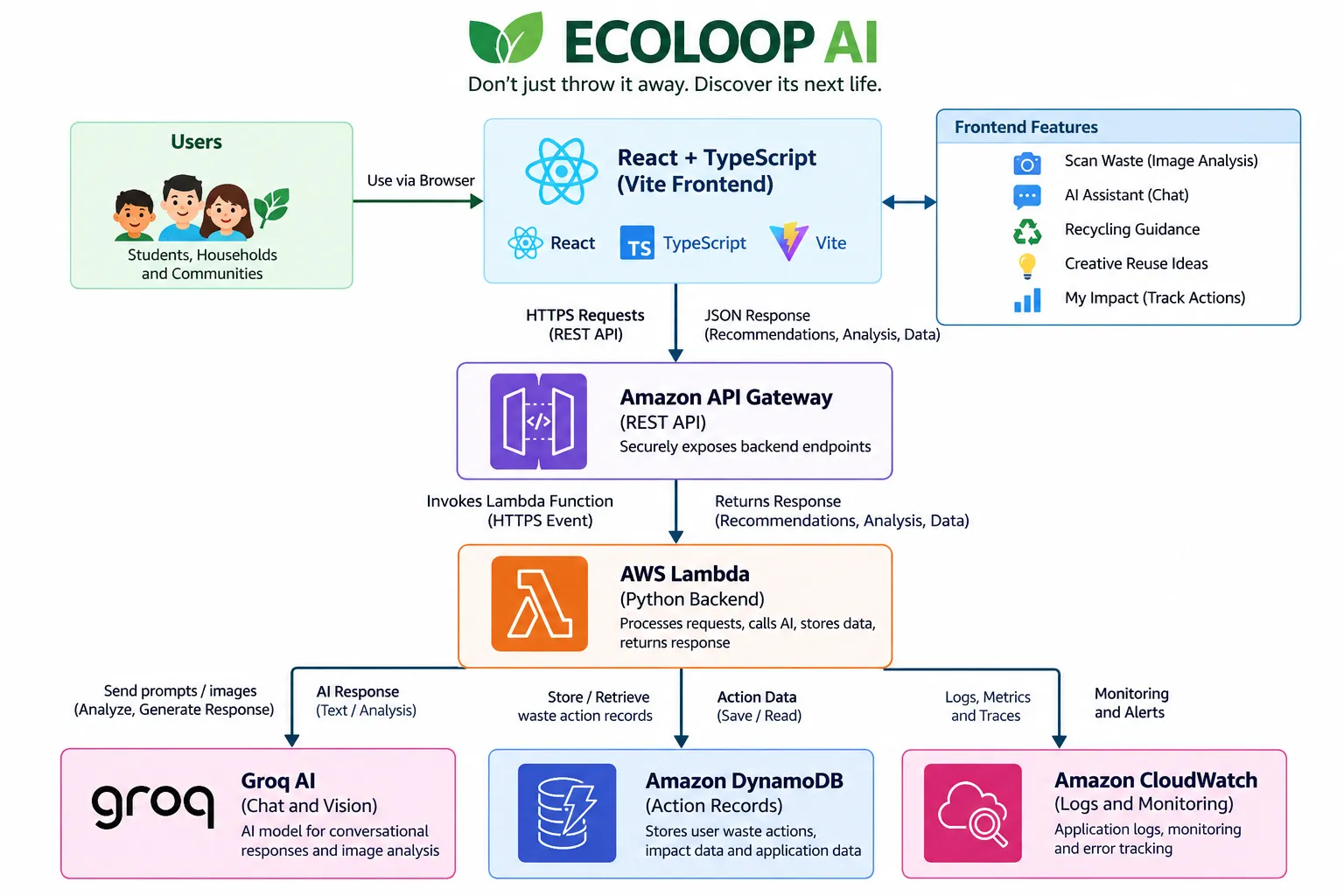
The architecture follows this general request flow:
The frontend communicates with the backend through HTTP API endpoints.
The backend processes incoming requests, invokes the AI service when needed, and returns structured responses to the frontend.
DynamoDB supports the storage of waste-action records, while CloudWatch provides application logging and monitoring.
2. Frontend: React, TypeScript, and Vite
The frontend provides the main interface for interacting with EcoLoop AI.
The technology stack includes:
- React: Builds the interactive user interface.
- TypeScript: Adds static typing and helps catch certain errors during development.
- Vite: Provides the development server and production build process.
The interface brings several environmental workflows together:
- AI-powered waste guidance.
- Conversational assistance.
- Recycling information.
- Creative reuse ideas.
- Waste-action tracking.
The frontend sends requests to the deployed AWS API rather than embedding the AI provider's credentials in the browser.
Keeping provider credentials on the backend is an important security decision because frontend code is visible to users.
3. Amazon API Gateway: The application entry point
Amazon API Gateway exposes the backend endpoints used by the frontend.
For example, the application includes endpoints for checking service health, asking the assistant questions, analyzing waste, and retrieving recycling guidance.
The general flow is:
- The user submits a question through the frontend.
- The frontend sends an HTTPS request.
- API Gateway routes the request to the Lambda function.
- Lambda processes the request.
- The backend returns a response through API Gateway.
- The frontend displays the result.
This separation allows the frontend and backend to evolve independently.
4. AWS Lambda: The Python backend
The backend runs in AWS Lambda using Python.
Lambda handles application logic such as request processing, input validation, AI integration, and response generation.
It also provides a place to implement fallback behavior when AI-generated results are unavailable or invalid.
For example, the waste-analysis workflow can use predefined recycling guidance when AI analysis fails, depending on the request and configured fallback logic.
This is useful because an environmental assistant should not become completely unusable whenever an external AI request fails.
Fallback guidance still needs to be appropriate to the material and should not replace specialized disposal instructions where those are required.
5. Groq AI: Conversational guidance and image analysis
EcoLoop AI uses Groq's API for AI-powered capabilities.
The assistant can answer questions about reuse, recycling, and creative waste transformation.
The image-analysis workflow is designed to help users identify likely materials and explore appropriate next steps.
For example, a user might ask:
How can I turn an old plastic water bottle into art?
The backend forwards the question to the AI service and returns the generated guidance to the frontend.
For image-based analysis, the application can send a supported image for processing and return the resulting identification and recommendations.
AI-generated material identification should be treated as an estimate. Users should verify material-specific and local disposal requirements before acting on the result.
6. Amazon DynamoDB: Recording environmental actions
EcoLoop AI is designed to support the recording of user actions, such as reusing, recycling, repairing, or donating an item.
Amazon DynamoDB provides the database layer for these records.
Recording actions creates opportunities for future features such as:
- Personal waste-management histories.
- Sustainability goals.
- Progress dashboards.
- Educational challenges.
- Community participation metrics.
An important distinction is that a recorded action is not automatically a verified environmental outcome. The application should distinguish self-reported activities from independently verified recycling or environmental benefits.
7. Amazon CloudWatch: Monitoring and troubleshooting
CloudWatch supports backend logging and monitoring.
During development, application logs help identify problems such as failed AI requests, invalid responses, and unexpected backend errors.
This is especially useful when an application depends on an external AI provider because failures may originate from either the AWS application or the external service.
Useful monitoring practices include tracking error rates, API latency, Lambda duration, and external service failures.
Logs should not expose API keys, credentials, or unnecessary personal information.
8. Deployment and testing
During development, I validated the AWS SAM template, built the backend, and ran unit tests.
I also tested the deployed health endpoint and chat endpoint through PowerShell.
The health endpoint returned a successful response, and the chat endpoint returned an AI-generated answer.
These tests helped verify that the core cloud request flow was functioning.
Testing individual endpoints does not establish that every feature is fully operational. Image analysis, action recording, and impact calculations should each be tested separately before being presented as fully working capabilities.
Lessons from the implementation
This project reinforced several practical engineering lessons:
- A clear separation between frontend and backend simplifies development.
- Serverless infrastructure reduces the need to manage application servers.
- External AI integrations require error handling and sensible fallbacks.
- API credentials must remain on the server side.
- Cloud deployment and local testing are separate stages of validation.
- Environmental impact claims require reliable data, not just an attractive dashboard.
What's next?
Future improvements could include more comprehensive automated tests, stronger monitoring, validated local recycling information, and educational experiences for children.
I also want to explore sustainability challenges that encourage users to take practical actions and learn from them.
Conclusion
EcoLoop AI combines a modern web interface, AWS serverless infrastructure, and an external AI service to explore a practical environmental problem.
The most important lesson is that successful AI applications need more than a model. They require thoughtful application design, reliable infrastructure, appropriate fallbacks, and a clear understanding of the problem they are intended to solve.
For me, EcoLoop AI is an opportunity to explore how AWS and AI can support more accessible environmental education and responsible waste management.
Enjoyed reading this content? Let the author know!
Your likes, comments, shares, and saves help creators reach more builders.

Loading recommendations
Loading article