
Ghar Guardian: a verified water-incident autopilot on AWS serverless
How I built, solo and during Environmental Hacks, a household water digital twin that detects abnormal water behaviour while the home is empty, acts, verifies the result and emails the owner, using API Gateway, Lambda, DynamoDB, SNS and CloudWatch, deployed with AWS SAM.

Student
Ghar Guardian is a household water digital twin I built solo for Environmental Hacks (WeMakeDevs x AWS, Heat & Water track). The home, sensors, pump and valves are simulated. The AWS backend is real. Demo video: [ https://youtu.be/4hRfUSVseFk ] · Code: https://github.com/Afrin26S/ghar-guardian
The problem
Many Indian homes depend on a storage tank, a pump and, in monsoon season, rainwater. When a family is away, the system keeps running and nobody is there to notice that water has been flowing for minutes while the tank level is not rising. Rainwater harvesting also needs a deliberate process: discard the dirty first runoff, check a sample against a stated policy, collect only when conditions pass, and stop when the tank is full.
Tank monitors and leak alarms already exist, so I did not try to invent a new sensor. I wanted to build something different: a loop that observes, decides, acts, verifies and escalates, and explains every step.
What it does
1. Away Mode incident autopilot. The policy engine looks at occupancy, flow, flow duration, pump state and tank trend together. The same flow is normal when someone is home and a probable anomaly when the house is empty. It picks an action from a fixed allowlist (
STOP_PUMP , CLOSE_INLET or MONITOR_AND_NOTIFY ), then takes a follow-up reading. If flow fell, the incident is CONTAINED . If not, it is ESCALATED and the owner is emailed.2. RainSafe. When rain starts, the collection gate stays closed during first flush. A sample is then checked against a configurable policy. The gate opens only if every precondition passes, the tank fills, and the gate closes automatically at 100%.
A "command issued" message is not treated as success. A fault-injection switch (valve failure, gate fault, missing sensor, poor sample) lets you watch the system handle failure on purpose.
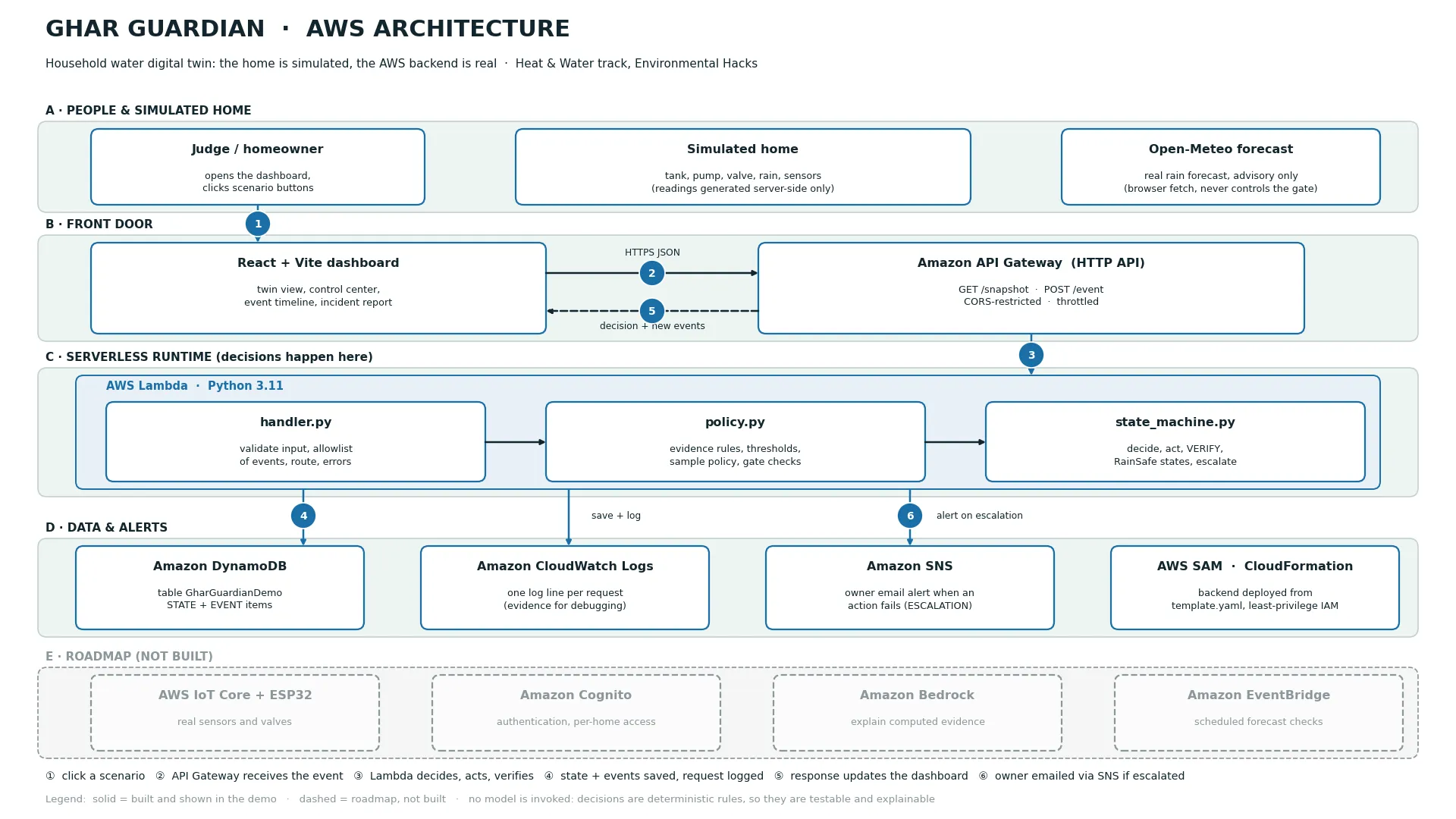
Architecture
Plain text
React dashboard -> API Gateway (HTTP API) -> Lambda (Python 3.11)|-> DynamoDB (state + event timeline)|-> SNS (owner email on escalation)|-> CloudWatch Logs
AWS service | What it does here |
|---|---|
Amazon API Gateway (HTTP API) | GET /snapshot and POST /event , CORS-restricted and throttled |
AWS Lambda | Validates input, runs the policy engine and state machine, saves, alerts |
Amazon DynamoDB | One table holding the home state and every timeline event |
Amazon SNS | Emails the owner when an action fails or the gate faults |
Amazon CloudWatch Logs | One log line per request |
AWS SAM / CloudFormation / IAM | The whole backend as one template with a least-privilege role |
Design rule: the browser is untrusted
The dashboard can only send a named event such as
SIMULATE_WATER_ANOMALY . It never sends sensor readings or action names. The Lambda function generates the simulated readings and chooses the action from an allowlist, so every decision comes from the policy engine, not from the UI. Anything outside the allowlist returns an error.The decision loop
The rules are plain, deterministic Python (simplified here):
Python
if flow > FLOW_THRESHOLD and duration >= DURATION_THRESHOLD:rise = tank_after - tank_beforeif pump_state == "ON" and rise < TANK_RISE_MIN:action = "STOP_PUMP" # pump runs but the tank is not risingelse:action = "CLOSE_INLET"
After the action, the state machine verifies it:
Python
after = before if valve_failure else 0.1status = "CONTAINED" if after <= VERIFY_MAX_FLOW else "ESCALATED"
I deliberately did not use an AI model for these decisions. Safety-style decisions should be predictable, testable and explainable. The policy and state machine are pure functions with 17 unit tests, run on every push with GitHub Actions, so they need no AWS to verify.
One DynamoDB table
I used a single table with a partition key
pk and sort key sk :-
pk = HOME#DEMO001,sk = STATE: the current home state
-
pk = HOME#DEMO001,sk = EVENT#<ISO timestamp>#<id>: one item per timeline event
Because the timestamp is in the sort key, one query with
begins_with("EVENT#") and ScanIndexForward=False returns the newest events first. That powers a timeline that survives a page reload. One gotcha: DynamoDB rejects Python floats, so I convert numbers to Decimal on write and back on read.Deploying with AWS SAM
The whole backend (table, HTTP API with CORS and throttling, function, log group, topic and IAM role) is one
template.yaml . The SAM policy templates gave least-privilege access in one line each:YAML
Policies:- DynamoDBCrudPolicy: {TableName: !Ref Table}- SNSPublishMessagePolicy: {TopicName: !GetAtt AlertTopic.TopicName}
sam build and sam deploy created the stack in a few minutes. Later updates only modified the Lambda function, and sam delete removes everything when I am done.Making "escalate" real with Amazon SNS
At first, an escalation was only a log line. I added an SNS topic with an email subscription. When an action fails or the collection gate faults, Lambda publishes an alert, and the attempt is logged as a timeline event either way:
Python
try:sns.publish(TopicArn=topic, Subject=subject, Message=body)# timeline event: OWNER_ALERT (published)except Exception:# timeline event: OWNER_ALERT_FAILED. The request never breaks.
Two details I learned: a new email subscription must be confirmed by clicking a link before alerts arrive, and a successful publish only means SNS accepted the message, not that it was delivered. So my timeline says "published to Amazon SNS" and never claims delivery.
What I learned
- Do not build on an unavailable service. I could not get Amazon Bedrock access during the event and opened a support case, so I made the core loop independent of it. The project works fully without any model, and I never imply one was used.
- Honest labels matter. The dashboard shows "AWS connected (DynamoDB)" only when the backend confirms it saved to DynamoDB, and "Local API, not AWS" otherwise.
- Verify, do not assume. The failure paths (valve failure, poor sample, gate fault) taught me more about the design than the happy path did.
- Separate logic from infrastructure. Keeping the state machine pure made it testable in milliseconds.
Limits
All sensors, pumps and valves are simulated. It does not locate leaks inside walls. The water-quality thresholds are configurable demo values, not a drinking-water standard, and passing means "suitable for storage under demo policy", never "safe to drink". The demo API has no authentication.
Next steps
Real sensors and valves through AWS IoT Core, authentication with Amazon Cognito, and a Bedrock explanation layer that only phrases evidence the policy engine has already computed.
Disclosure: I used Claude (Anthropic) as an AI coding assistant while building this project and drafting this article. I made the design decisions, deployed and tested the system on AWS, and reviewed and edited this write-up.
Enjoyed reading this content? Let the author know!
Your likes, comments, shares, and saves help creators reach more builders.

Loading recommendations
Loading article